Sponsored

gerrylum

Well-Known Member
First Name
Gerald
Joined
Apr 25, 2023
Threads
5
Messages
535
Reaction score
763
Location
Providence Village
Vehicles
R1T
Occupation
Director of Marketing
Clubs
 

chops

Well-Known Member
Joined
Aug 15, 2023
Threads
0
Messages
49
Reaction score
57
Location
SF Bay Area
Vehicles
R1S LE - 22"
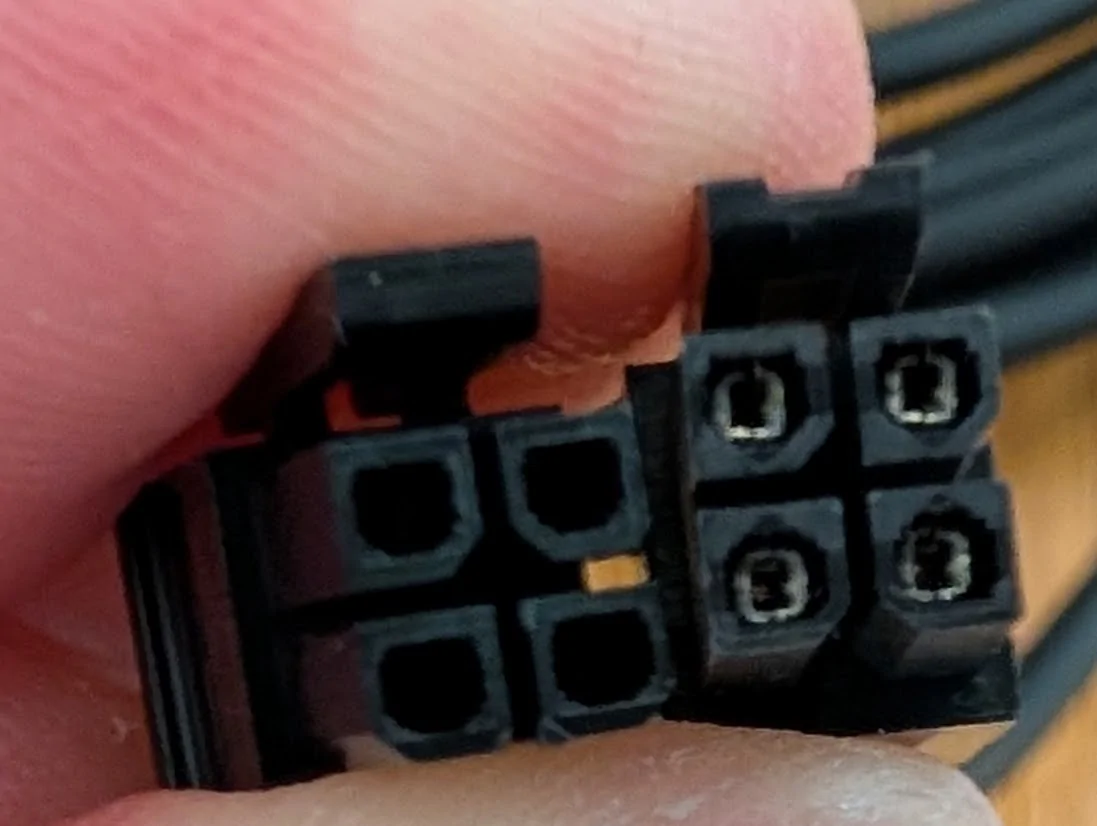
unfortunately, that's not the right connector either. at least not for the included comma adapter/power. the right male molex connector is from the included comma power/odb connector. the left side is the one from amazon. the pins on the amazon adapter are facing the wrong way. see how the center of the connector forms a triangle? the comma power/adapter do not.

Rivian R1T R1S Comma 4 Four released 1766181795414-kq


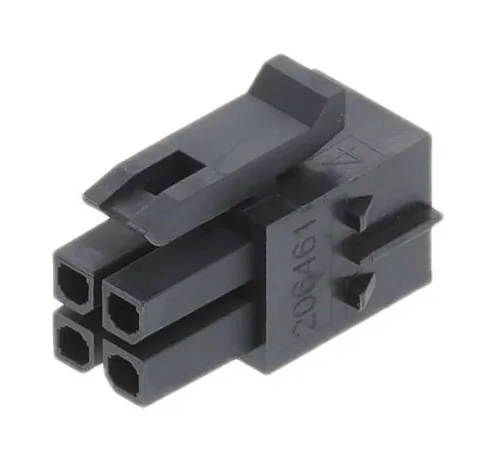
i found the exact molex here - https://www.mouser.com/ProductDetail/Molex/206461-0400?qs=EBDBlbfErPwP3QQD8I3cIw==

Rivian R1T R1S Comma 4 Four released 1766181987128-b2


but i dont want to wait 3-4 weeks for delivery
 

gerrylum

Well-Known Member
First Name
Gerald
Joined
Apr 25, 2023
Threads
5
Messages
535
Reaction score
763
Location
Providence Village
Vehicles
R1T
Occupation
Director of Marketing
Clubs
 
unfortunately, that's not the right connector either. at least not for the included comma adapter/power. the right male molex connector is from the included comma power/odb connector. the left side is the one from amazon. the pins on the amazon adapter are facing the wrong way. see how the center of the connector forms a triangle? the comma power/adapter do not.

1766181795414-kq.webp


i found the exact molex here - https://www.mouser.com/ProductDetail/Molex/206461-0400?qs=EBDBlbfErPwP3QQD8I3cIw==

but i dont want to wait 3-4 weeks for delivery

The one I posted works just fine. I've used it many times.
 

godfodder0901

Well-Known Member
First Name
Jared
Joined
Mar 12, 2019
Threads
27
Messages
5,748
Reaction score
10,138
Location
Washington
Vehicles
2022 Rivian R1T LE
unfortunately, that's not the right connector either. at least not for the included comma adapter/power. the right male molex connector is from the included comma power/odb connector. the left side is the one from amazon. the pins on the amazon adapter are facing the wrong way. see how the center of the connector forms a triangle? the comma power/adapter do not.

1766181795414-kq.webp


i found the exact molex here - https://www.mouser.com/ProductDetail/Molex/206461-0400?qs=EBDBlbfErPwP3QQD8I3cIw==

1766181987128-b2.webp


but i dont want to wait 3-4 weeks for delivery

The female end is more impactful. Compare the Amazon one to the female socket.
 

Sponsored

SwampNut

Well-Known Member
First Name
Carlos
Joined
Apr 22, 2024
Threads
50
Messages
3,378
Reaction score
3,579
Location
Peoria AZ
Vehicles
2022 R1T Launch Edition
Occupation
Geek
Clubs
 
It's a tight/unexpected fit in the Lukas harness too, but definitely works. Until this, I had no idea there could be two different "nearly the same" Molex-style connectors. WTF.

I am surprised that the stopping distance and how it stops behind another car is still insanely bad, to be kind of unusable. And that it's still impossible to feather the accelerator to fix it, because it's basically a light switch. For city usage, Tesla AP is still mostly better, sadly. There are a ton of other ways the Comma is better, but this problem makes it really hard to use on busy city streets. I'm running Nevada now and tried a few others in the past. Even with "aggressive" it leaves a ridiculous space in front of me when it stops.

I unlinked my C4 from Sunnylink and now I can't see a way to re-link it. Scanning the QR only takes me to my account and says I need to link a device, but no option to do so. Ideas?
 

gerrylum

Well-Known Member
First Name
Gerald
Joined
Apr 25, 2023
Threads
5
Messages
535
Reaction score
763
Location
Providence Village
Vehicles
R1T
Occupation
Director of Marketing
Clubs
 
I am surprised that the stopping distance and how it stops behind another car is still insanely bad, to be kind of unusable. And that it's still impossible to feather the accelerator to fix it, because it's basically a light switch. For city usage, Tesla AP is still mostly better, sadly. There are a ton of other ways the Comma is better, but this problem makes it really hard to use on busy city streets. I'm running Nevada now and tried a few others in the past. Even with "aggressive" it leaves a ridiculous space in front of me when it stops.

I unlinked my C4 from Sunnylink and now I can't see a way to re-link it. Scanning the QR only takes me to my account and says I need to link a device, but no option to do so. Ideas?
The stopping distance hasn't been so bad for me, but the stopping behavior is a bit weird. It generally will stop with about 10m of distance between me and the lead car which I'm comfortable with. Anywhere between 8-10m is fine with me so it's on the far end of that but it's ok.

The behavior that it does it is weird though - it will start slowing down way early, stop with about 18m between, and then slowly creep up and close the distance until it gets to 10.

I think this is a driving model issue and I may go back to Down to Ride v6 (currently using Cool GWM) since it seemed to work better.

For sunnylink, when you scan the QR it should take you to a page that lists your device as an option to pair.
 

SwampNut

Well-Known Member
First Name
Carlos
Joined
Apr 22, 2024
Threads
50
Messages
3,378
Reaction score
3,579
Location
Peoria AZ
Vehicles
2022 R1T Launch Edition
Occupation
Geek
Clubs
 
For sunnylink, when you scan the QR it should take you to a page that lists your device as an option to pair.
Unfortunately, no. It's like it remembers I once had it linked, and the unlink caused it to disappear, but not behave like an unlinked device.

I guess I should test drive other models. Nevada isn't giving me that odd behavior, which I used to have long ago. It just stops SO far back. It would be nice to be able to switch models from Sunnylink....
 

gerrylum

Well-Known Member
First Name
Gerald
Joined
Apr 25, 2023
Threads
5
Messages
535
Reaction score
763
Location
Providence Village
Vehicles
R1T
Occupation
Director of Marketing
Clubs
 
Unfortunately, no. It's like it remembers I once had it linked, and the unlink caused it to disappear, but not behave like an unlinked device.

I guess I should test drive other models. Nevada isn't giving me that odd behavior, which I used to have long ago. It just stops SO far back. It would be nice to be able to switch models from Sunnylink....
If you can, share a video of what you see when you scan the Sunnylink QR code.
 

SwampNut

Well-Known Member
First Name
Carlos
Joined
Apr 22, 2024
Threads
50
Messages
3,378
Reaction score
3,579
Location
Peoria AZ
Vehicles
2022 R1T Launch Edition
Occupation
Geek
Clubs
 
https://share.icloud.com/photos/00cto_SG7vAYW2JOLiOxkV8Eg

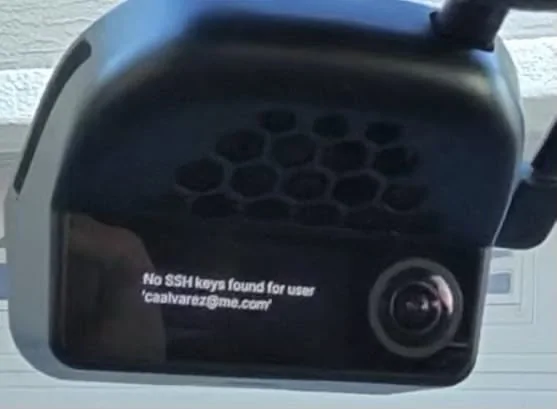
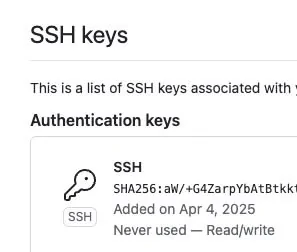
It just goes to my account, not an option to link. See below, I think I should try the SSH method. But that means entering my 15 character Github password on that screen, LOL.

Grok says:

It looks like you're running into a common issue with SunnyLink after unpairing a Comma device (likely a Comma 3 or 4 series). Based on SunnyPilot's community resources, unpairing the device from SunnyLink removes its association and generates a new device ID on their servers. This prevents simple re-pairing with the same QR code, as the system treats it like a new setup is required.

Steps to Relink:

  1. Factory Reset the Comma Device: This will re-register the device and assign a new ID, allowing you to start fresh.
    • Power on the device and go through the initial setup process.
    • If you have SSH access enabled on the device (via SunnyPilot settings), you can alternatively connect via SSH and manually delete the file /data/params/d/SunnylinkDongleId to achieve a similar reset without a full factory wipe.
  2. Re-Pair During Setup: Once reset, during the device's onboarding/setup screen, scan the SunnyLink QR code again as you would for a first-time pairing.
  3. Additional Tips:
    • If the issue persists immediately after trying, wait a day and retry—server-side caching or changes can sometimes cause temporary glitches.
    • Ensure your device is running a compatible SunnyPilot version (check for updates via the device's interface or their GitHub repo).
    • If this doesn't resolve it, post details (like device model, SunnyPilot version, and exact error) on the SunnyPilot community forum for dev input.

This should get you back online without much hassle. If you're dealing with a Comma FOUR specifically, there might be migration tools involved, but the reset approach applies broadly.
 

Sponsored

gerrylum

Well-Known Member
First Name
Gerald
Joined
Apr 25, 2023
Threads
5
Messages
535
Reaction score
763
Location
Providence Village
Vehicles
R1T
Occupation
Director of Marketing
Clubs
 

chops

Well-Known Member
Joined
Aug 15, 2023
Threads
0
Messages
49
Reaction score
57
Location
SF Bay Area
Vehicles
R1S LE - 22"
The female end on the comma harness isn't the same, but it still fits - its just a bit tighter.
thanks! I jammed the one I already bought in and it does fit, albeit very tightly. comma 4 installed and working now! also, not sure if it's a bad sign, but the USB-C when I touched it would trigger a hood open error. once I plugged it into the comma, that mostly stopped. couldn't shift out of P either, kept saying to press brake even though I was. did have to do a hard reset though and that seemed to have solve it
 

gerrylum

Well-Known Member
First Name
Gerald
Joined
Apr 25, 2023
Threads
5
Messages
535
Reaction score
763
Location
Providence Village
Vehicles
R1T
Occupation
Director of Marketing
Clubs
 
thanks! I jammed the one I already bought in and it does fit, albeit very tightly. comma 4 installed and working now! also, not sure if it's a bad sign, but the USB-C when I touched it would trigger a hood open error. once I plugged it into the comma, that mostly stopped. couldn't shift out of P either, kept saying to press brake even though I was. did have to do a hard reset though and that seemed to have solve it
Yeah, the brake thing is a common issue on first install - the hard reset usually clears that out. The hood open error is a new one, though - haven't seen that before.
 

SwampNut

Well-Known Member
First Name
Carlos
Joined
Apr 22, 2024
Threads
50
Messages
3,378
Reaction score
3,579
Location
Peoria AZ
Vehicles
2022 R1T Launch Edition
Occupation
Geek
Clubs
 
Did you record that video with your glasses??
Yeah, Meta Wayfarers that you can see in the mirror there. Love them. It's how I got the AXM plug video, no way to hold a camera and do that work.

I found a bug report on the Sunnylink site confirming this issue and the process to fix it. Grok was right.

thanks! I jammed the one I already bought in and it does fit, albeit very tightly. comma 4 installed and working now! also, not sure if it's a bad sign, but the USB-C when I touched it would trigger a hood open error. once I plugged it into the comma, that mostly stopped. couldn't shift out of P either, kept saying to press brake even though I was. did have to do a hard reset though and that seemed to have solve it
I had the brake sensor issue also.
 

SwampNut

Well-Known Member
First Name
Carlos
Joined
Apr 22, 2024
Threads
50
Messages
3,378
Reaction score
3,579
Location
Peoria AZ
Vehicles
2022 R1T Launch Edition
Occupation
Geek
Clubs
 
Ugh. Might need to factory reset.


Rivian R1T R1S Comma 4 Four released 1766251930277-j


Rivian R1T R1S Comma 4 Four released 1766251826415-ff


Also, as I was getting that video, I was thinking that the glasses could be a useful tool for the style of videos you do, particularly the driving stuff.
Sponsored


Top