Sponsored

Frustrated today with route planner and "send to vehicle"

apolish

New Member
First Name
Allison
Joined
Jun 18, 2023
Threads
0
Messages
4
Reaction score
1
Location
Chapel Hill, NC
Vehicles
Rivian R1S Quad Motor, Volvo XC40 Full Electric
Occupation
Interior Designer
I find that not only is the trip planning and routing bad but the estimate of range upon is grossly inaccurate. It does not adjust when you change your driving mode to conserve and seems to be completely inaccurate even if you were using all purpose. Our mileage estimates upon arrival can be off by over 50 miles which means the car has you routing to charging stops unnecessarily.
Sponsored

 

shrink

Well-Known Member
Joined
Feb 16, 2021
Threads
102
Messages
1,389
Reaction score
2,712
Location
Phoenix, AZ and Kailua-Kona, HI
Vehicles
'23 R1S Quad x 2; '26 Gen 2 R1T Quad Launch; '25 Ioniq 5; '24 Jeep Cherokee
Clubs
 
R1S occasionally shows the vehicle moving forward and overshooting the physical location after stopping at an intersection. Then it shows the vehicle backing up to correct the overshoot and displays the location properly.
Great description! That’s exactly what’s happening with my R1S.

I have a service appointment this Friday. Going to try to add to the service ticket.
 
Last edited:

Dark-Fx

Well-Known Member
First Name
Brian
Joined
Jul 15, 2020
Threads
148
Messages
13,598
Reaction score
27,476
Location
Michigan
Vehicles
R1T, R1S, Livewire One, Sierra EV, R1S
Occupation
Engineering
Clubs
 
I find that not only is the trip planning and routing bad but the estimate of range upon is grossly inaccurate. It does not adjust when you change your driving mode to conserve and seems to be completely inaccurate even if you were using all purpose. Our mileage estimates upon arrival can be off by over 50 miles which means the car has you routing to charging stops unnecessarily.
My estimations always adjust after a drive mode change but it isn't immediate.
 

apolish

New Member
First Name
Allison
Joined
Jun 18, 2023
Threads
0
Messages
4
Reaction score
1
Location
Chapel Hill, NC
Vehicles
Rivian R1S Quad Motor, Volvo XC40 Full Electric
Occupation
Interior Designer
My estimations always adjust after a drive mode change but it isn't immediate.
Interesting. Our total mileage estimate for the car does adjust after changing drive modes but the miles anticipated at arrival of destination using the route guidance does not adjust and they are grossly out of line with each other. Do you get your adjustment in the navigation pop up that shows arrival time and estimated range at arrival?
 

Dark-Fx

Well-Known Member
First Name
Brian
Joined
Jul 15, 2020
Threads
148
Messages
13,598
Reaction score
27,476
Location
Michigan
Vehicles
R1T, R1S, Livewire One, Sierra EV, R1S
Occupation
Engineering
Clubs
 
Interesting. Our total mileage estimate for the car does adjust after changing drive modes but the miles anticipated at arrival of destination using the route guidance does not adjust and they are grossly out of line with each other. Do you get your adjustment in the navigation pop up that shows arrival time and estimated range at arrival?
yeah, bottom left corner on the nav screen. Sometimes it seems like it takes a few minutes but I'm also not staring at it as I drive.
 

Sponsored

SoCal Rob

Well-Known Member
First Name
Rob
Joined
Apr 19, 2021
Threads
39
Messages
2,808
Reaction score
5,964
Location
Laguna Niguel / Palm Springs / Pioneertown
Vehicles
2025 Rivian R1S & 2021 VW ID.4 (2023 R1S sold)
Occupation
Information Technology
Clubs
 
Great description! That’s exactly what’s happening with my R1S.

I have a service appointment this Friday. Going to try to add to the service ticket.
I hope they can fix it for you! Please keep us posted here.
 

Slowduck93

Member
Joined
Jan 14, 2023
Threads
2
Messages
16
Reaction score
25
Location
California
Vehicles
R1T
Occupation
Software Exec
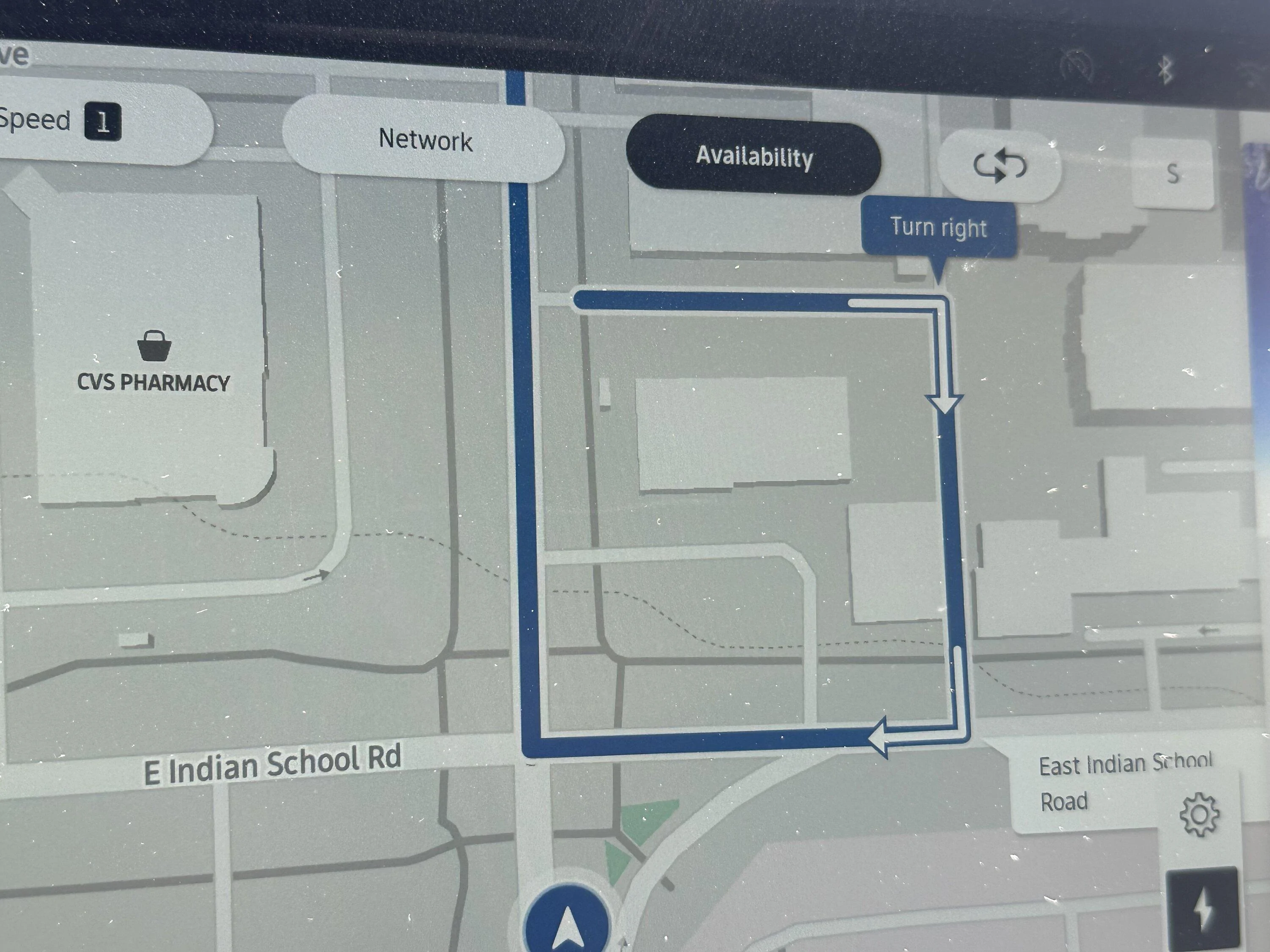
Rivian Nav on my new R1S is not tracking my location correctly - and it tried to direct me to the senseless route pictured below. I don't know if this is a new car thing, but my 10-month old R1T is no longer this wonky, although it was at first.

IMG_2815.jpeg
Yeh. Ever been in a parking lot with multiple exits and had the Nav tell you to go one way, so you drive to where the nav is telling you to exit the parking lot only to have the nav switch you to a new way out of the parking lot based on your new location? That happens all the time.
 

Greg Chick

Well-Known Member
First Name
Greg
Joined
Jan 27, 2023
Threads
12
Messages
914
Reaction score
652
Location
Tehachapi Ca. 93561
Website
diyplumbingadvice.com
Vehicles
R1T Quad, large battery, 21" Adventure
Occupation
Retired Plumbing Contractor
Clubs
 
My take away is my own, that is the details on how to charge at the many different stations. As well the different issues effecting those stations, like sun glare in the window, lower capacity than stated, ones not working, and very importantly the different prices involved.
I have a home charger, most all the time, thats it. However when I am on a trip the streets are unfamiliar as well there is no back up so to speak except a tow truck and/or motel room. I signed up for Plug share and have on my cell, and the monthyl Charge point card. But how that gets me charged is not the whole story. This thread covers ABMP, but my issues are integrated into the same end result.
 

RivAW

Well-Known Member
First Name
Alex
Joined
Mar 9, 2023
Threads
1
Messages
871
Reaction score
852
Location
MA
Vehicles
R1T, Glacier White, Black Mountain, Black AT 20s,
Clubs
 
I had a pretty frustrating and annoying trip today. I was making a 3-hour trip home from the beach with a couple of stops and knew I'd need one fast charging session. At my last stop, I used the phone app, entered my home address, and it generated a route that included 15 minutes of charging at a nearby EVGo station. I checked EVGo's app to verify availability and saw one 350kw station and one 100kw station were available. So I clicked "send to vehicle" and started following the navigation.

5 miles later I arrived at a totally different charging station, a Volta station with 28kw "fast" :rolleyes: chargers. I was annoyed but decided to give it a try, but after only getting 14 miles in 10 minutes, I gave up and navigated to the EVGo station I wanted in the first place where I connected to the 350kw station.
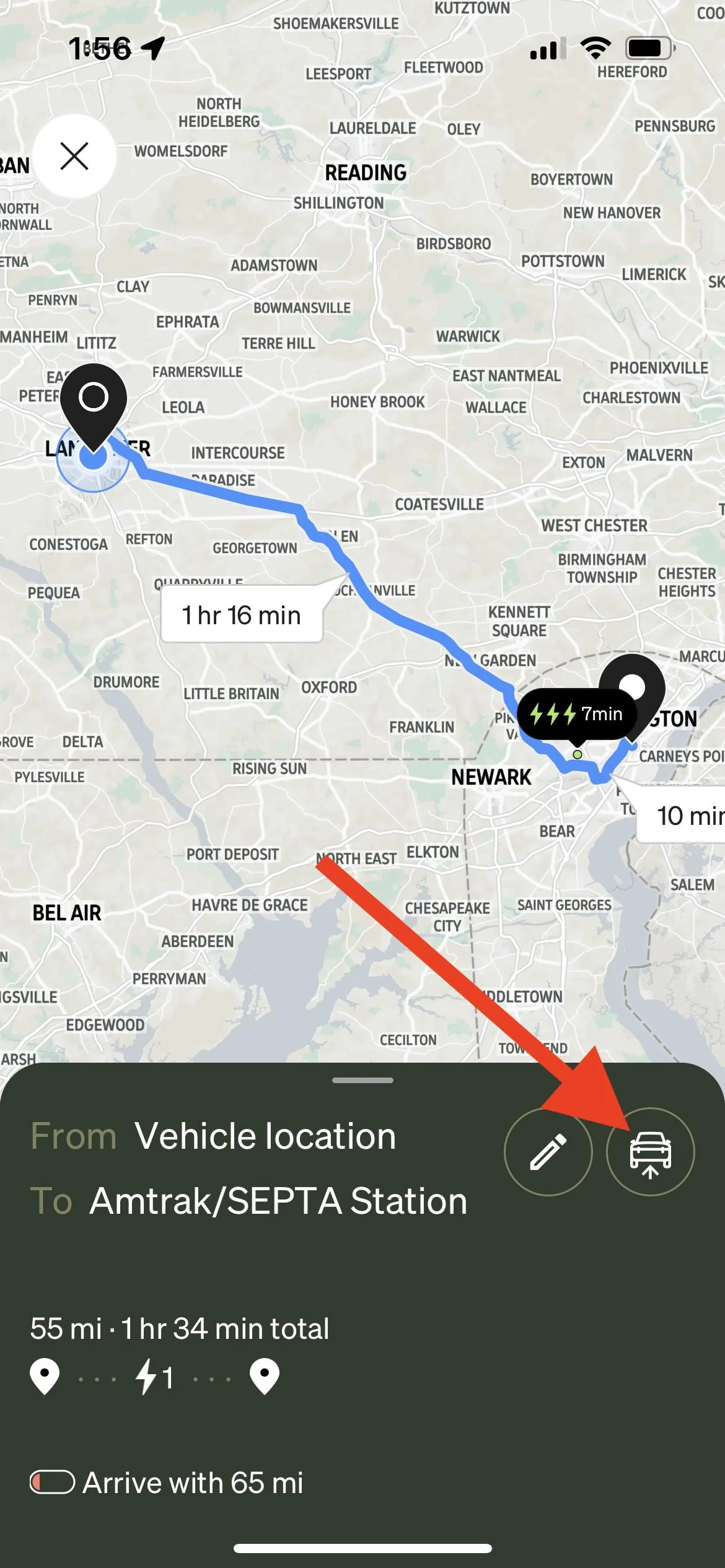


My trip home became at least 45 minutes longer because of all this. This was my first time in this city (Wilmington, DE) so I didn't really know my way around and just trusted the onboard navigation to take me where I wanted to go.

I guess I'm mostly just here to complain, but also maybe to ask if others have had a similar experience? If I design a route in the app and send it to the vehicle, am I crazy to expect that the route that I planned on my phone should be the one that comes up in the vehicle navigation?!?
You are misunderstanding your available options. Sending navigation from your phone to the Rivian still only sends the destination coordinates and not the actual route.....
 
OP
OP

johnmcgrann

Well-Known Member
First Name
John
Joined
Apr 23, 2022
Threads
25
Messages
125
Reaction score
229
Location
Lancaster, PA
Vehicles
Rivian R1T
You are misunderstanding your available options. Sending navigation from your phone to the Rivian still only sends the destination coordinates and not the actual route.....
Sure, but when I look at this mapped-out route on my phone screen with a charging destination designated along the way and a little button suggesting I can send this to the vehicle, it's reasonable to think that exactly this is what's being sent.

Also, Rivian says something different:

"When you make a trip plan from the Rivian mobile app, you can share it directly with your vehicle, and you’ll see it on the trip navigation screen when you get inside your R1T or R1S."

Rivian R1T R1S Frustrated today with route planner and "send to vehicle" IMG_A39F84F92655-1
 

Sponsored

azbill

Well-Known Member
First Name
Bill
Joined
Jun 8, 2020
Threads
17
Messages
1,696
Reaction score
1,978
Location
Arizona
Vehicles
Escalade IQ, Mach E, Hummer EV SUT
Occupation
Retired
You are misunderstanding your available options. Sending navigation from your phone to the Rivian still only sends the destination coordinates and not the actual route.....
Not true, I sent a trip plan and it included the two charging stops on the map in the truck. But, after hitting start on the nav screen, it completely ignored that planned route and created a new one with different charging stops.
 

Bruins06

Well-Known Member
First Name
Javier
Joined
Mar 1, 2022
Threads
3
Messages
125
Reaction score
195
Location
Bi0chem
Vehicles
Dodge Viper
This is somewhat related. I went on a long trip this weekend, on the way back, I was 60 miles away and had 90 miles worth of range on the battery. When I navigated back home on the Rivian, it kept directing me to chargers on the way home, even though I had enough juice to make it home. I could not find a way to unselect a charger. I had to rely on Google maps on my phone.
 

azbill

Well-Known Member
First Name
Bill
Joined
Jun 8, 2020
Threads
17
Messages
1,696
Reaction score
1,978
Location
Arizona
Vehicles
Escalade IQ, Mach E, Hummer EV SUT
Occupation
Retired
One other issue with the trip planner, versus the in truck nav, is that you can tell the trip planner your preferred charging networks. It honors that in the trip planner. But in the truck you can filter networks on the nav screen, but when it plans charging stops, it ignores the selected ones.

On my last trip it kept wanting to navigate me to an EVGO station, but that would have been double the price of EA.
 

WorldComposting

Well-Known Member
Joined
Oct 27, 2022
Threads
4
Messages
300
Reaction score
284
Location
Maryland
Website
www.worldcomposting.com
Vehicles
Rivian R1S, Subaru Ascent
Occupation
Project Manager
Clubs
 
This is somewhat related. I went on a long trip this weekend, on the way back, I was 60 miles away and had 90 miles worth of range on the battery. When I navigated back home on the Rivian, it kept directing me to chargers on the way home, even though I had enough juice to make it home. I could not find a way to unselect a charger. I had to rely on Google maps on my phone.
This is the same issue I've had and even telling it I want to arrive with 5% charge doesn't seem to work it would route me to a charger.

I've also been driving and had it reroute away from a charger that was originally in the plan to go directly to the location. Only issue is I wanted to actually stop and charge. I didn't even realize it changed directions until much later. Luckily I was able to charge at the destination which was my parents house for a couple hours or I would have had to drive way out of the way to a fast charger.
Sponsored


Top