Sponsored

Frustrated today with route planner and "send to vehicle"

johnmcgrann

Well-Known Member
First Name
John
Joined
Apr 23, 2022
Threads
25
Messages
125
Reaction score
229
Location
Lancaster, PA
Vehicles
Rivian R1T
I had a pretty frustrating and annoying trip today. I was making a 3-hour trip home from the beach with a couple of stops and knew I'd need one fast charging session. At my last stop, I used the phone app, entered my home address, and it generated a route that included 15 minutes of charging at a nearby EVGo station. I checked EVGo's app to verify availability and saw one 350kw station and one 100kw station were available. So I clicked "send to vehicle" and started following the navigation.

5 miles later I arrived at a totally different charging station, a Volta station with 28kw "fast" :rolleyes: chargers. I was annoyed but decided to give it a try, but after only getting 14 miles in 10 minutes, I gave up and navigated to the EVGo station I wanted in the first place where I connected to the 350kw station.

My trip home became at least 45 minutes longer because of all this. This was my first time in this city (Wilmington, DE) so I didn't really know my way around and just trusted the onboard navigation to take me where I wanted to go.

I guess I'm mostly just here to complain, but also maybe to ask if others have had a similar experience? If I design a route in the app and send it to the vehicle, am I crazy to expect that the route that I planned on my phone should be the one that comes up in the vehicle navigation?!?
Sponsored


 

Donald Stanfield

Well-Known Member
First Name
Donald
Joined
Jul 31, 2022
Threads
59
Messages
8,328
Reaction score
16,684
Location
USA
Vehicles
2025 R1S Tri Ascend, 2024 i4 M50
Occupation
Stuff and things
Yeah that navigation was wonky for sure but when you saw that it was the wrong place why didn't you double check with your phone? That would have only been a waste of a few minutes.
 

azbill

Well-Known Member
First Name
Bill
Joined
Jun 8, 2020
Threads
17
Messages
1,696
Reaction score
1,978
Location
Arizona
Vehicles
Escalade IQ, Mach E, Hummer EV SUT
Occupation
Retired
The trip planner and nav in the Rivian are garbage. I tried the trip planner two weeks go, sent the trip to the truck, then it completely ignored the plan and created a different route And charging stops.

Even the basic nav in the truck gives bad directions quite often.

My.Mach E has a great trip planner and a great nav system, and I always use it. It also offers CarPlay, but because the built in system is so good, I do not use CarPlay for nav.
 
OP
OP

johnmcgrann

Well-Known Member
First Name
John
Joined
Apr 23, 2022
Threads
25
Messages
125
Reaction score
229
Location
Lancaster, PA
Vehicles
Rivian R1T
Yeah that navigation was wonky for sure but when you saw that it was the wrong place why didn't you double check with your phone? That would have only been a waste of a few minutes.
The Volta charger wasn’t well-marked re: charging speed so my first reaction was to just plug in and see what I was getting before driving 10 minutes to the other station.

It was only when I was plugged in and charging so slowly that I looked up the station on PlugShare where I discovered that they were 28kw. So yeah, in hindsight I should have done what you suggest, but at the time it seemed to make sense to at least give this first one a try.
 

ElGuapo

Well-Known Member
Joined
Jul 10, 2023
Threads
3
Messages
249
Reaction score
291
Location
Maryland
Vehicles
R1S - April 2021 preorder
I have had no issue sending the exact trip from the Rivian app to my S. That’s not my personal issue.

However, the navigation and charging decisions the Rivian app makes (as well as the nav in the car), are terrible - regardless of what options I use. Rivian’s onboard navigation isn’t just worse than ABRP or Waze, it’s also insanely conservative no matter what options I change. It wants me to charge even if I will have well more than the 15% I’ve input as my target arrival percentage. And it monitors traffic about as well as all the dead deer by the side of the road…

I still use the ABRP stand-alone app and it’s markedly better. Which, of course, is why Rivian bought them. I just hope they get full integration asap.

My Tesla nav is equally horrendous. I an equal opportunity hater. So I’ve gotten used to using ABRP and Waze for years.

Having said all of that,this thread should not turn into a CarPlay/AndroidAuto thread. Please comment about those in the dedicated threads.
 

Sponsored

ycking

Active Member
Joined
Apr 17, 2023
Threads
1
Messages
29
Reaction score
8
Location
YC
Vehicles
22' Mach-E AWD Premium, 23 Rivian R1S
I recently had long trip with 4 stops. It was Northern California to Vancouver Canada. I used ABRP app to plan and also tired rivian trip planner (which sucked). Luckily I had 3 rivian chargers on my path. And I just needed 1 more session before going into Canada.

I used Google Maps to add all the stops and ones I was done i sent it to Rivian GPS. I used combination of both GPS to navigate. Both were very similar with their route. Didn’t have any issues. On my way back I switched it to Apple Maps on my phone, which worked great with my Apple Watch.

Rivian GPS is missing alot of features. For now I would just use it as secondary GPS to your primary phone.
 

azbill

Well-Known Member
First Name
Bill
Joined
Jun 8, 2020
Threads
17
Messages
1,696
Reaction score
1,978
Location
Arizona
Vehicles
Escalade IQ, Mach E, Hummer EV SUT
Occupation
Retired
The only way to do a long trip in thr Rivian is to plan the trip on the phone, then plug in the first charging stop into the truck. Then after each charge, plug in the next stop manually. Continue until the final destination.
 

cbrcanuck

Well-Known Member
First Name
Adam
Joined
Jun 29, 2022
Threads
16
Messages
650
Reaction score
775
Location
Vancouver
Vehicles
R1T
As others have said, Rivian nav is not good. I always use the phone to verify routes. ABRP for charging planning if a long enough trip, otherwise just Google Maps. Why any of these vehicle manufacturers think it's a good idea to try and compete with Google maps is beyond me.
 

Zoidz

Well-Known Member
First Name
Gil
Joined
Feb 28, 2021
Threads
226
Messages
5,203
Reaction score
11,705
Location
PA
Vehicles
23 R1S Adv, Avalanche, BMWs-X3,330cic,K1200RS bike
Occupation
Engineer
After experiencing similar issues (not charging routing; just routing in general), I’m pretty sure the SEND feature only sends the start and end coordinates, nothing else, and the vehicle’s nav does it’s own route. I don’t think the ABRP integration is complete. Hopefully when it is, it sends the detailed route that you build on the phone app to the vehicle.
 

shrink

Well-Known Member
Joined
Feb 16, 2021
Threads
102
Messages
1,391
Reaction score
2,715
Location
Phoenix, AZ and Kailua-Kona, HI
Vehicles
'23 R1S Quad x 2; '26 Gen 2 R1T Quad Launch; '25 Ioniq 5; '24 Jeep Cherokee
Clubs
 
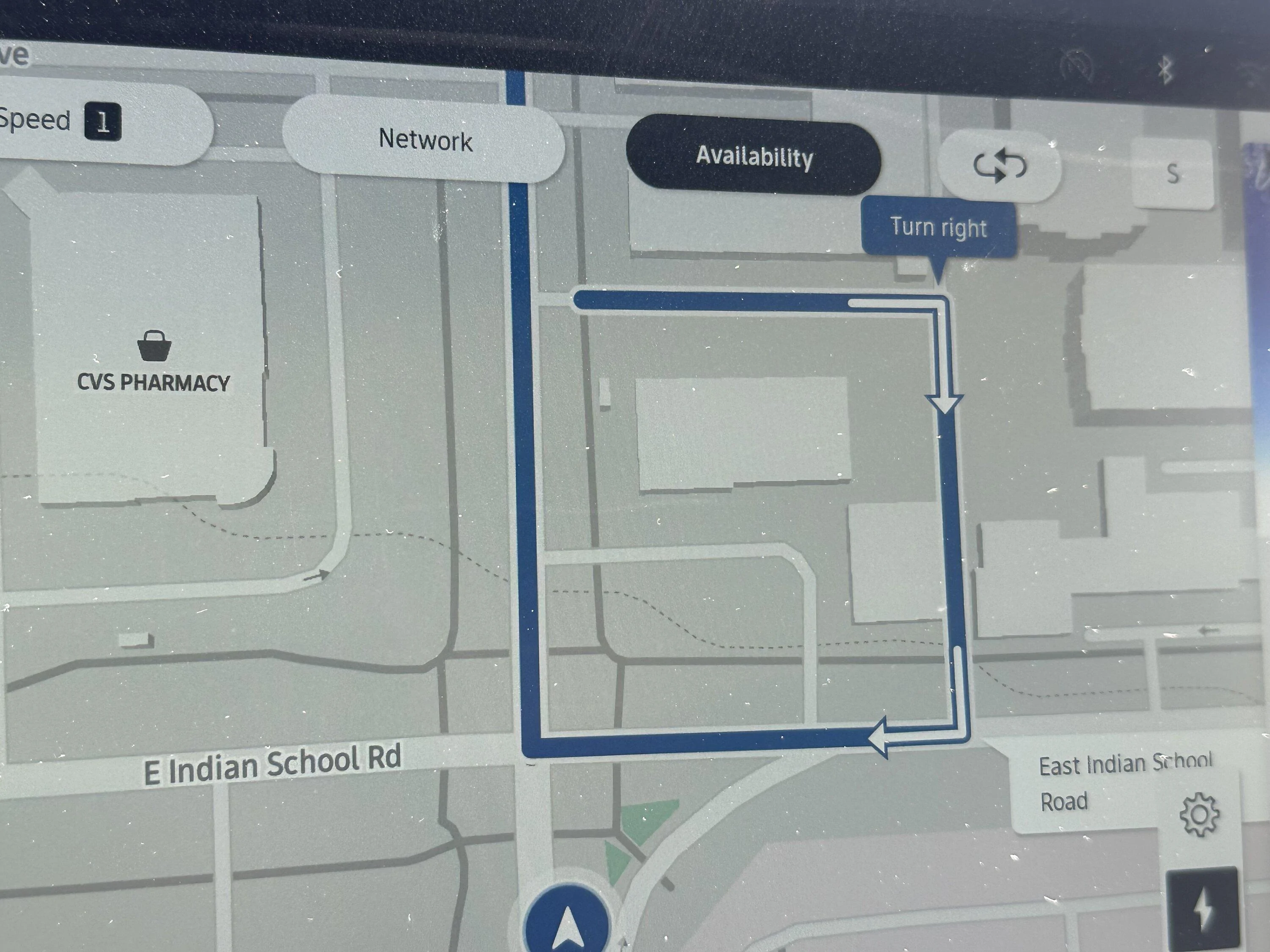
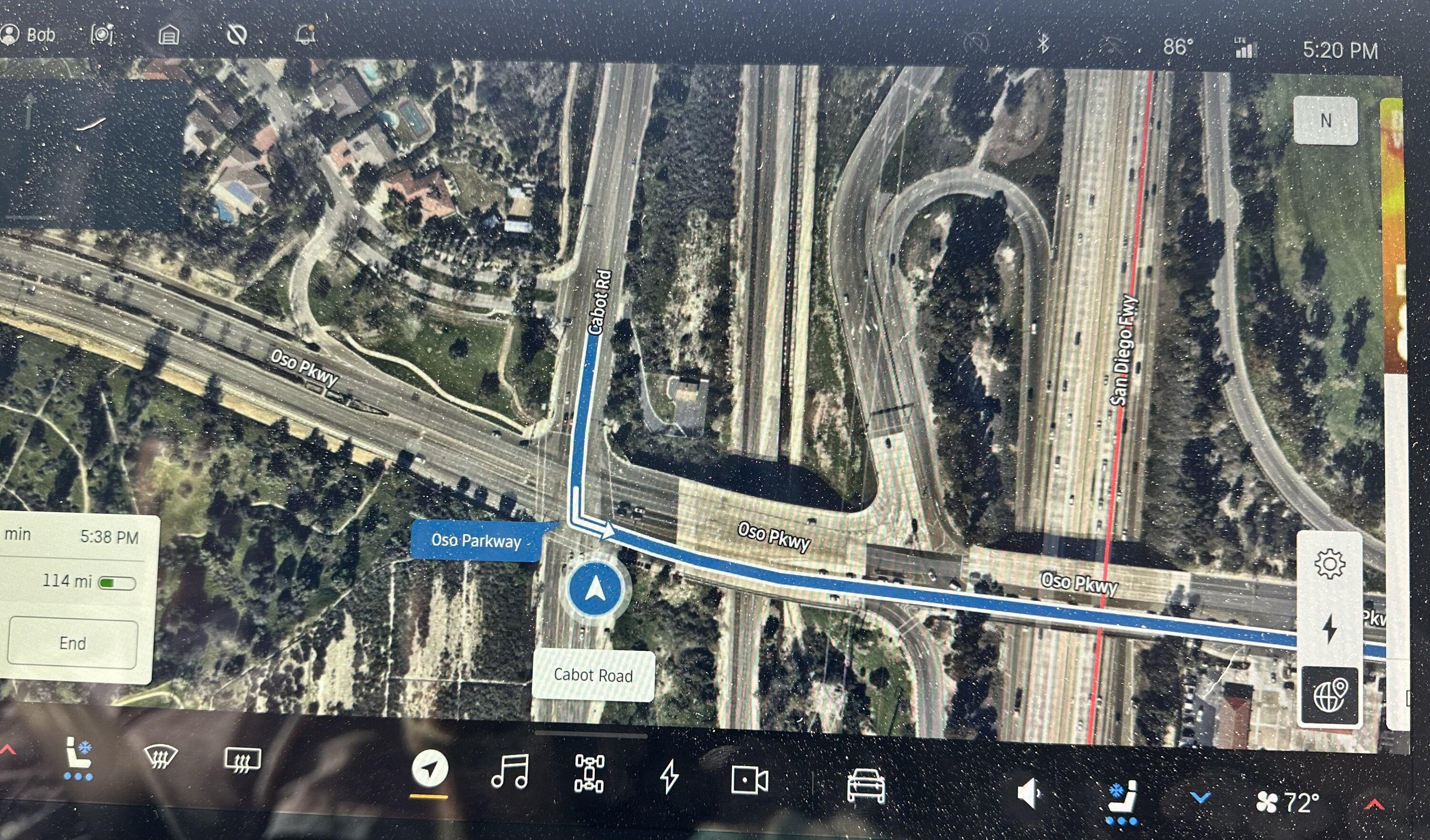
Rivian Nav on my new R1S is not tracking my location correctly - and it tried to direct me to the senseless route pictured below. I don't know if this is a new car thing, but my 10-month old R1T is no longer this wonky, although it was at first.

Rivian R1T R1S Frustrated today with route planner and "send to vehicle" IMG_2815
 

Sponsored

elektrode

Well-Known Member
First Name
Bran
Joined
Jul 11, 2022
Threads
42
Messages
988
Reaction score
1,621
Location
NC
Vehicles
Honda Ridgeline to R1T
Just got back from a trip where I watched the onboard nav calculate/re-calculate the trip I sent from my phone. Scratched my head - didn’t I just calculate that? Then got really confused because it appeared like the phone app and the onboard nav were displaying the address differently for the same charger. Visually I think the selected charging point should also have the 1/2/3 lightening bolts to help disambiguate what is selected.

Most alarmingly though was the on board nav’s proposal to save us 5 min on a new route. I blindly said yes. What wasn’t clear is the nav had decided to bail from a charger 11 miles down to road to one 70 miles down the road and arriving with 30miles (<10%) and the arrival charger was really slow.

That was a really bad suggestion it made and I was very glad I caught what it had done before it caused a serious problem for us.

Oh also my once dependable Electrify America charging station that’s 1/2 way between my house and favored destination now has only 1/2 the stalls working and one that works only reaches 40kW. How is this related to nav you ask? I have to manually open and search on the EA app to know what I’m getting ready to drive into. Lots of additional “math” and planning while driving.
 
OP
OP

johnmcgrann

Well-Known Member
First Name
John
Joined
Apr 23, 2022
Threads
25
Messages
125
Reaction score
229
Location
Lancaster, PA
Vehicles
Rivian R1T
After experiencing similar issues (not charging routing; just routing in general), I’m pretty sure the SEND feature only sends the start and end coordinates, nothing else, and the vehicle’s nav does it’s own route. I don’t think the ABRP integration is complete. Hopefully when it is, it sends the detailed route that you build on the phone app to the vehicle.
Yep, I think that's the takeaway from this trip - lesson learned, and hopefully a more complete integration comes soon.
 

Inhisname

Well-Known Member
First Name
Craig
Joined
Mar 2, 2023
Threads
3
Messages
57
Reaction score
49
Location
75071
Vehicles
R1T
Occupation
RSM
The trip planner and nav in the Rivian are garbage. I tried the trip planner two weeks go, sent the trip to the truck, then it completely ignored the plan and created a different route And charging stops.

Even the basic nav in the truck gives bad directions quite often.

My.Mach E has a great trip planner and a great nav system, and I always use it. It also offers CarPlay, but because the built in system is so good, I do not use CarPlay for nav.
1000% agree the Nav System is the WORST I've ever experienced. I shown this to the guys at service here in Dallas and I've sent pictures of how it takes me 17 minutes out of my way to get home. I am hopeful that they WILL get this fixed somehow someway as otherwise I love my R1T. But it is a waste of a large screen that's for sure!
 

SoCal Rob

Well-Known Member
First Name
Rob
Joined
Apr 19, 2021
Threads
39
Messages
2,808
Reaction score
5,965
Location
Laguna Niguel / Palm Springs / Pioneertown
Vehicles
2025 Rivian R1S & 2021 VW ID.4 (2023 R1S sold)
Occupation
Information Technology
Clubs
 
Rivian Nav on my new R1S is not tracking my location correctly - and it tried to direct me to the senseless route pictured below. I don't know if this is a new car thing, but my 10-month old R1T is no longer this wonky, although it was at first.

IMG_2815.jpeg
Your pic is the only other time I’ve seen someone else describing anything like what I see at times.

Our R1S occasionally shows the vehicle moving forward and overshooting the physical location after stopping at an intersection. Then it shows the vehicle backing up to correct the overshoot and displays the location properly. After that happens it shows nonsensical stuff like in the pic below if on a planned route.

It’s almost like the nav hardware is ignoring the wheel speed data from the vehicle and the GPS is making some bad assumptions. I don’t think this is typical for all R1 vehicles so I’m hoping I can get video of it when I’m a passenger one of these days. Then I’ll submit a service ticket.
Rivian R1T R1S Frustrated today with route planner and "send to vehicle" IMG_2560
 

defcon888

Well-Known Member
First Name
Keith
Joined
May 23, 2023
Threads
6
Messages
1,227
Reaction score
926
Location
Auburn, Ca
Vehicles
2023 R1T, 2021 Toyota RAV4 Prime
Occupation
Making money
Clubs
 
The one thing I do (drives my wife crazy) is to plan and plan and then plan more. I also familairize myself with the town/area we are traveling too (landmarks, stores, restaurants close to the chargers....more for navigation purposes).

We don't take long trips normally but in September we are going to Disneyland for a few days for our daughter's birthday. We live above Sacramento and according to ABRP, we will have to stop 2 times to top off the charge (1 time for 45 mins, and the second time for 15 mins.). I have checked out the stations leading up to where ABRP is telling us to charge to see the reliability of the stations and for the last 5 months I have checked, they are all doing good. I think some of the bad reviews are from people that don't fully understand charging.....just my guess.

I am also lucky that I have a coworker that lives in So. Cal drives up here in his F-150 Lightening every few weeks and he has told me where and what stations he has never had issues with in about a year of owning it.

Along with ABRP, my research, and a friend's advice....I am confident that we won't have any issues.

They are supposed to be opening to 2 RAN stations on Interstate 5 in California....1 in Santa Nella and the other in Buttonwillow. I check a few times a week to see if they are open yet and the map still shows the yellow diamond.
Sponsored


Top