Sponsored

Range prediction mismatch

KHopf

Member
First Name
Kurtis
Joined
Aug 5, 2024
Threads
5
Messages
8
Reaction score
11
Location
Merritt Island
Vehicles
R1S (2nd Gen)
Occupation
Chief Operating Officer
I must be missing something. The driver's display has an estimated range. The navigation has the total miles remaining as well as the estimated charge state at arrival. They don't match though. I even tried factoring in the desired minimum charge at arrival and couldn't get the numbers to match. Am I missing something? When they don't match, should I take the range estimate in the driver's display as the gospel? (The driver's display below says 258 miles @ 77%)

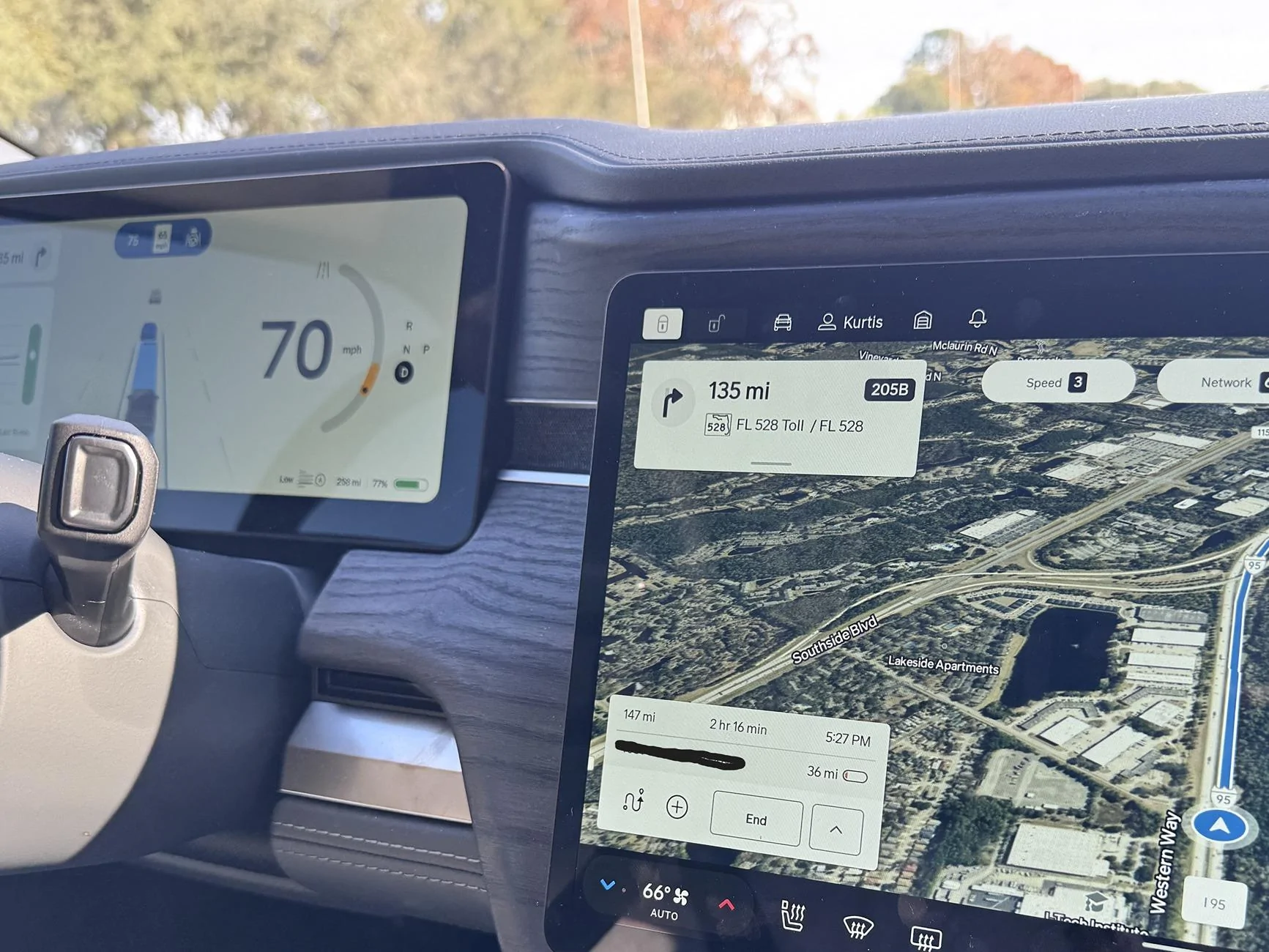
Rivian R1T R1S Range prediction mismatch IMG_6949
Sponsored


ElGuano

Well-Known Member
Joined
Oct 9, 2024
Threads
48
Messages
862
Reaction score
1,220
Location
Cali
Vehicles
R1T Trimax - Storm Blue, Driftwood, Sport Dark
Opposite, I think you take the nav planner as more accurate. The reason is the driver display is just an estimate based on your charge and recent driving characteristics, but it doesn't know what you'll do next.

The range estimate in the navigation accounts for the distance, speed, elevation, battery conditioning (if needed), eventually maybe weather/wind/etc.).
 

Donald Stanfield

Well-Known Member
First Name
Donald
Joined
Jul 31, 2022
Threads
59
Messages
8,309
Reaction score
16,656
Location
USA
Vehicles
2025 R1S Tri Ascend, 2024 i4 M50
Occupation
Stuff and things
Use the navs. The one on the driver's display is very optimistic, whereas the nav one uses your battery percentage and your current consumption rate to calculate it mathematically.
 

Dark-Fx

Well-Known Member
First Name
Brian
Joined
Jul 15, 2020
Threads
148
Messages
13,560
Reaction score
27,366
Location
Michigan
Vehicles
R1T, R1S, Livewire One, Sierra EV, R1S
Occupation
Engineering
Clubs
 
Navigation uses historical data, so it's closer to reality (but the range remaining at arrival is still the "false" number based on EPA that the driver's display shows).

The important part is to keep the number in the nav positive.
 

KBabione

Well-Known Member
First Name
Kevin
Joined
Sep 11, 2023
Threads
48
Messages
1,473
Reaction score
2,016
Location
Lititz, PA
Vehicles
2023 R1S Quad (8/23)
Occupation
Consultant
Logically I understand the difference, but I feel that when you have a destination set in the nav, then the estimated range on the driver's display should equal the distance to destination plus the estimated miles remaining once you get there.

Without a destination, the estimate on the driver's display can be calculated as it is.
 

Sponsored

VSG

Well-Known Member
Joined
Oct 3, 2022
Threads
4
Messages
3,219
Reaction score
6,012
Location
WA
Vehicles
R1T LE/RB/OC/20
The driver's display is not a "range estimate". It's a fuel gauge. I shows you how full your battery is. That's all.

You can change your settings to show % of battery instead of "miles" on the driver's display. IMO % should be the default because too many people jump to conclusions about what this number means.
 

AYAYRON

Well-Known Member
First Name
Aaron
Joined
Nov 17, 2022
Threads
6
Messages
466
Reaction score
434
Location
Dallas Tx
Vehicles
r1t
I must be missing something. The driver's display has an estimated range. The navigation has the total miles remaining as well as the estimated charge state at arrival. They don't match though. I even tried factoring in the desired minimum charge at arrival and couldn't get the numbers to match. Am I missing something? When they don't match, should I take the range estimate in the driver's display as the gospel? (The driver's display below says 258 miles @ 77%)

IMG_6949.JPG


The driver's display is useless and displays the EPA rated distance, I wish Rivian would make it match the navigation, but I"m thinking that may be a law or something

The navigation takes into account the temp of the motors, battery, wind speed, elevation gain and fleet feedback (other cars that have made similar drives and what their efficiency ended up being) which helps the navigation be extremely accurate (or at least a ton more accurate than the driver's display


I had made a post on facebook how my last trip Austin to Dallas that I've made 20 times, the estimated range was 60 miles less than usual, the feedback I got is what I used to make my comment above so that was helpful, and when I got near my destination I had less range than predicted by about 20 miles (was supposed to arrive with 30 would have arrived with 10 miles and that means 2022 quad motor from fully charged got 229 miles range. And the reason............crazy crazy wind, absolutely crushed my efficiency I was often sitting 1.3-1.4mi/kw on the 15 min range.
 

defcon888

Well-Known Member
First Name
Keith
Joined
May 23, 2023
Threads
6
Messages
1,222
Reaction score
923
Location
Auburn, Ca
Vehicles
2023 R1T, 2021 Toyota RAV4 Prime
Occupation
Making money
Clubs
 
I drive the same route to work (for the last 10 years). It is 146 miles one way (I stay locally 2 days a week). When I leave my house it says I will arrive at work with 95 miles. As I drive more, it increases and I usually arrive with about 125 miles left. I drive 70 to 73 mph and in All-purpose mode.
 

doit82

Well-Known Member
Joined
Jul 12, 2022
Threads
11
Messages
509
Reaction score
500
Location
Vermont
Vehicles
Model Y, R1T
Highly dependent on weather, elevation, etc. Usually the nav arrival number is extra conservative, but not this past sunday for me in 10 degree weather going uphill when i was eating 4 battery miles for every mile of distance. Least to say this was my first time running out of energy. Ended up pulling over before i fully bricked the truck and AAA towed me the last 10 miles to the rivian charger. It was a good lesson to buffer at least double the range in those conditions.
 

iamnid

Well-Known Member
Joined
Aug 10, 2023
Threads
7
Messages
619
Reaction score
767
Location
California
Vehicles
Mercedes EQE, Rivian R1S
As others have said, the one in the driver's display is simply a number based on the percentage and the EPA rating. The nav number takes into account speed limits, elevation changes etc. along the specific route you have chosen so it's more accurate (it knows what stretches you are likely to to better/worse than EPA for and adjusts the prediction accordingly).

The number in the driver's display is essentially useless -- use the number quoted by the nav.
 

Sponsored

ThumprMN

Well-Known Member
First Name
Simon
Joined
Dec 17, 2019
Threads
3
Messages
427
Reaction score
1,119
Location
Richfield, MN
Vehicles
Rivian R1T
Occupation
IT Professional
Clubs
 
I mostly agree with everyone…. But I find the Rivian NAV estimated range on arrival to be conservative. Iā€˜ve taken several long road trips and would set a route, and Nav would say i wouldn't make it or would be negative on arrival. I’d override and find that after driving to my next destination/charger, I would inevitably end up at my destination with plenty of range left over (often matching what the drivers display originally said as available).

I usually plot my route in 3 different ways (ABRP, Rivian NAV, and Apple Maps) to get a feel for what things might be like, especially since Rivian NAV tends to re-route me mid drive after I’ve started off with one plan. I’ll often have to stop the Rivian NAV and re-plot it back to the charger I originally intended so that it pre-conditions properly.
 

Nexus

Well-Known Member
Joined
May 19, 2022
Threads
1
Messages
64
Reaction score
36
Location
Baltimore
Vehicles
Toyota Tacoma, Tesla Model 3
I mostly agree with everyone…. But I find the Rivian NAV estimated range on arrival to be conservative. Iā€˜ve taken several long road trips and would set a route, and Nav would say i wouldn't make it or would be negative on arrival. I’d override and find that after driving to my next destination/charger, I would inevitably end up at my destination with plenty of range left over (often matching what the drivers display originally said as available).
Same here. I find that using the driver's display and doing math gets me a more accurate result than the nav's estimate. I routinely do a ~200 mile round trip (including 4 days sitting in the cold), and the nav often estimates that I'll get home with less than 10 miles. I generally return with ~30 miles which closely matches my calculations. I've also done 3 road trips of 1000-2000 miles and had the same result: I always got to my destination/chargers with a range similar to what I calculated using the driver display (i.e. more than what the nav predicted). The nav also tends to re-evaluate so that by the time I get to said destination, it matches my calculations.
Sponsored


Top