Sponsored

Got my R2 today, and walk away question

evilyn

Active Member
Joined
Aug 21, 2026
Threads
2
Messages
32
Reaction score
51
Location
California
Vehicles
Rivian R2
Got my Esker Silver today, very nice looking color. Interestingly there were two of them parked side by side and I noticed the color is very slightly different. Mine is more neutral dark silver, and the other one had more bluish tint to it.

Well, my immediate issue today is with using my phone as a key, in particular a walkaway lock. The problem is that my garage is on the first floor, and when I'm in my home office on the second floor the car senses the phone and I constantly receive messages "the doors locked", "the doors unlocked." Apart from being annoying it probably eats battery constantly waking up the vehicle. Is there a setting to disable it at home, or limit the range, or some other trick?
Sponsored

 

DeanB1452

Well-Known Member
First Name
Dean
Joined
Jun 12, 2023
Threads
14
Messages
421
Reaction score
711
Location
Milpitas, CA
Vehicles
'22 R1T LE/LG/BM
Occupation
IT Administrator
Clubs
 
You can set proximity settings to "lock only" at home. From the center screen, go to settings, access, proximity locking and look for "locking behavior at home." Set it to Lock Only.
 

godfodder0901

Well-Known Member
First Name
Jared
Joined
Mar 12, 2019
Threads
27
Messages
5,877
Reaction score
10,329
Location
Washington
Vehicles
2022 Rivian R1T LE
Got my Esker Silver today, very nice looking color. Interestingly there were two of them parked side by side and I noticed the color is very slightly different. Mine is more neutral dark silver, and the other one had more bluish tint to it.

Well, my immediate issue today is with using my phone as a key, in particular a walkaway lock. The problem is that my garage is on the first floor, and when I'm in my home office on the second floor the car senses the phone and I constantly receive messages "the doors locked", "the doors unlocked." Apart from being annoying it probably eats battery constantly waking up the vehicle. Is there a setting to disable it at home, or limit the range, or some other trick?
Yep. Search the manual, you can turn it off at home.
 

wesleyeff

Member
Joined
Apr 28, 2026
Threads
0
Messages
9
Reaction score
8
Location
USA
Vehicles
m3
New to rivian so sorry if this is a stupid question. If you disable “unlock at home” then what are the options to unlock? Can you tap the door handle? Or do you have to use the app to unlock?
 

DeanB1452

Well-Known Member
First Name
Dean
Joined
Jun 12, 2023
Threads
14
Messages
421
Reaction score
711
Location
Milpitas, CA
Vehicles
'22 R1T LE/LG/BM
Occupation
IT Administrator
Clubs
 
If you have it garaged, you can leave it unlocked. If it's outdoors, set it to lock only. To unlock, you can use the app on your phone, use your watch, use the key fob or key card, or create a shortcut to tell Siri to unlock the car.
 

Sponsored

OP
OP

evilyn

Active Member
Joined
Aug 21, 2026
Threads
2
Messages
32
Reaction score
51
Location
California
Vehicles
Rivian R2
Yep. Search the manual, you can turn it off at home.
Thanks for the reminder. No, I'm not going to read 400+ pages, but I fed pdf manual to ChatGPT and asked it to find the answer. It told me "go to your car, dummy, and check Settings → Access → Locking behavior at home"😁
My mistake was I didn't realize the Settings menu was scrollable.
 
OP
OP

evilyn

Active Member
Joined
Aug 21, 2026
Threads
2
Messages
32
Reaction score
51
Location
California
Vehicles
Rivian R2
New to rivian so sorry if this is a stupid question. If you disable “unlock at home” then what are the options to unlock? Can you tap the door handle? Or do you have to use the app to unlock?
My phone unlocks the car using NFC (you need to enable it on the phone) when I touch the door handle.
 

WoodChips

Well-Known Member
Joined
Apr 11, 2026
Threads
2
Messages
124
Reaction score
184
Location
Idaho
Vehicles
'04 Ram 1500, '06 XB, R2 waiting list
Occupation
Truck Driver
Thanks for the reminder. No, I'm not going to read 400+ pages, but I fed pdf manual to ChatGPT and asked it to find the answer. It told me "go to your car, dummy, and check Settings → Access → Locking behavior at home"😁
My mistake was I didn't realize the Settings menu was scrollable.
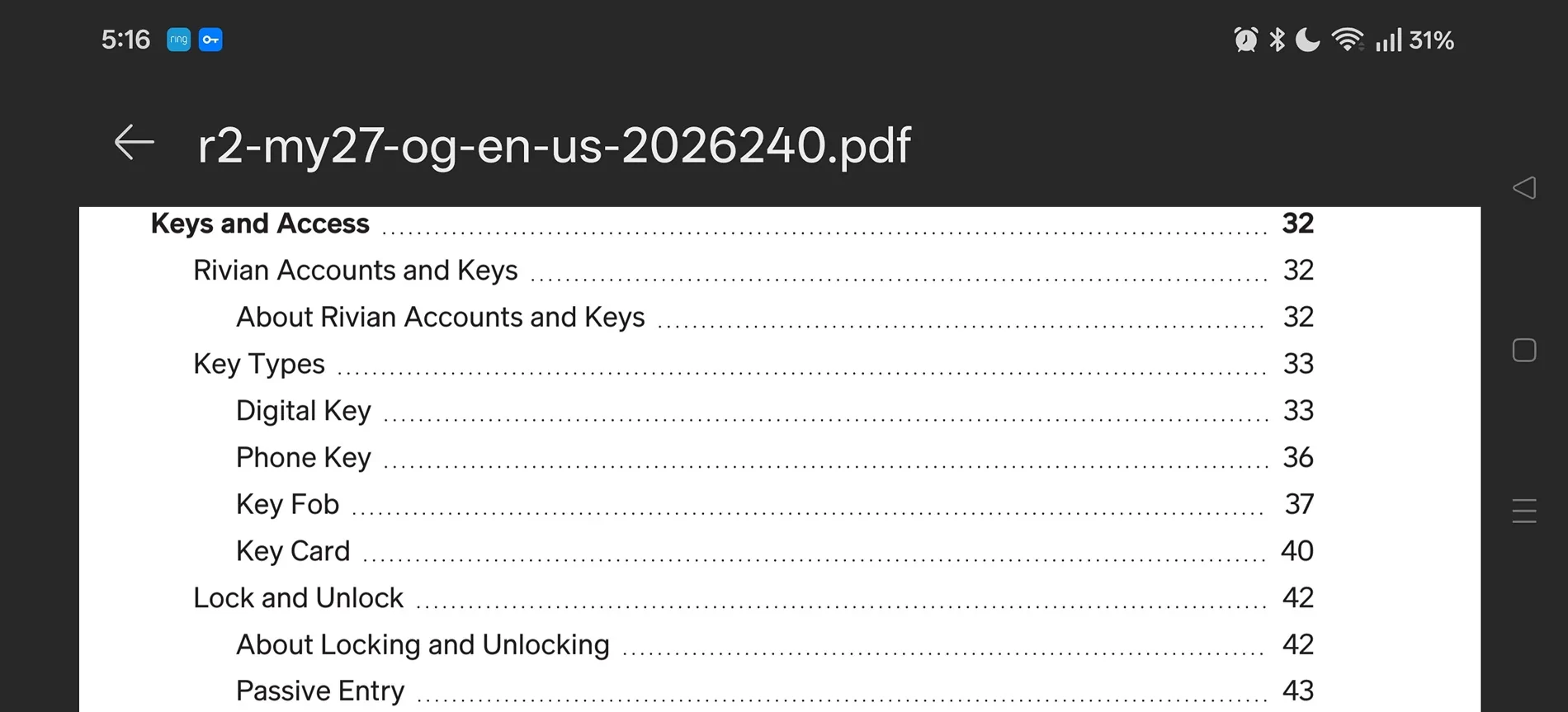
I opened a saved version of the manual on my phone.

It's interesting that there is this cool content section that you can click on and it takes you to the section that address your questions.

Under keys and access it shows lock and unlock page 42, passive entry page 43. I read them both and found the answer.

Probably much quicker and more reliable than AI, and less time than it took to write a response or question on a forum.

Rivian R1T R1S Got my R2 today, and walk away question Screenshot_2026-08-22-05-16-50-65_cbf47468f7ecfbd8ebcc46bf9cc626da
 

Dark-Fx

Well-Known Member
First Name
Brian
Joined
Jul 15, 2020
Threads
155
Messages
14,022
Reaction score
28,685
Location
Michigan
Vehicles
R1S, Livewire One, Sierra EV, R1S, R2
Occupation
Engineering, Dog Petting, Tesla Shill Spotter
Clubs
 
The manual in the car itself is pretty well organized.
 

Sponsored

DeafPug

Well-Known Member
Joined
Oct 20, 2021
Threads
7
Messages
594
Reaction score
899
Location
Kansas
Vehicles
'18 Model 3, '22 R1T
My mistake was I didn't realize the Settings menu was scrollable.
This is a common issue. Recent UI designers have gotten in this habit of hiding scrollbars that are not actively in use leading to this confusion. With touchscreen interfaces, you just have to assume that everything is scrollable, that is, unless it doesn’t scroll.
 

WoodChips

Well-Known Member
Joined
Apr 11, 2026
Threads
2
Messages
124
Reaction score
184
Location
Idaho
Vehicles
'04 Ram 1500, '06 XB, R2 waiting list
Occupation
Truck Driver
I’m a big fan of reading the owners manual on anything that cost me more than a few grand. Heck, I’ve already read the manual for the R2, and still not sure I’m getting it. :CWL:
As have I. My order window is Dec-Feb, I read the manual just to help me understand it better on a test drive. If I'm going to drop 60k on a vehicle I want to make sure it's what I want and in order to do that I need to understand it.

My second test drive is in a week. I will probably read the manual again so I can better test some of the features I didn't get to last time.
 

DuoRivian

Well-Known Member
Joined
Sep 3, 2023
Threads
3
Messages
1,804
Reaction score
2,027
Location
California
Vehicles
Rivian R1T and an R1S
Occupation
IT
Clubs
 
I opened a saved version of the manual on my phone.

It's interesting that there is this cool content section that you can click on and it takes you to the section that address your questions.

Under keys and access it shows lock and unlock page 42, passive entry page 43. I read them both and found the answer.

Probably much quicker and more reliable than AI, and less time than it took to write a response or question on a forum.

Screenshot_2026-08-22-05-16-50-65_cbf47468f7ecfbd8ebcc46bf9cc626da.webp
Not sure a snarky response to a valid question is warranted. Most people don’t have the manual saved on their phone.
 

bogeyfree69

Member
First Name
Eddie
Joined
Jul 18, 2026
Threads
0
Messages
21
Reaction score
28
Location
KY
Vehicles
Tesla Model Y, Audi Q5 TDI, R2 LE Reservation
Occupation
Retired
I've also downloaded and read most of the manual (August revision) and don't even have an order in yet but why read the manual when you have ChatGPT and people who have read the manual to answer all questions.
Sponsored

 
Last edited:


Top