Sponsored

Any tricks to improve arrival SOC prediction

KHopf

Member
First Name
Kurtis
Joined
Aug 5, 2024
Threads
5
Messages
8
Reaction score
11
Location
Merritt Island
Vehicles
R1S (2nd Gen)
Occupation
Chief Operating Officer
Most of my miles are highway (76 mile round trip daily commute). I drive the same way on my commute that I do on long road trips. I frequently make long drives from central FL to Northern GA. Without fail, the Nav will plan my charging stops, and will always overstate the remaining range upon arrival. I've learned that I have to bake in an extra 50 miles of range beyond what the system says or I'm rolling up to a charger with near zero range left and praying that everything works. Has anyone found any way to make these predictions more accurate?
Sponsored


 

COdogman

Well-Known Member
First Name
Brian
Joined
Jan 21, 2022
Threads
33
Messages
11,641
Reaction score
34,494
Location
CO
Vehicles
2023 R1T
Occupation
Cyber defender
Clubs
 
The estimated range is made using multiple factors, like drive mode, battery temp, starting charge, and mostly your driving behavior. What speed do you typically drive on these trips?

Also what do you have the SOC on arrival set for on these trips? If you find you are cutting it too close for comfort you can up that a little. It will add more charging stops but you will arrive at your destination with a higher percentage remaining.
 
OP
OP
KHopf

KHopf

Member
First Name
Kurtis
Joined
Aug 5, 2024
Threads
5
Messages
8
Reaction score
11
Location
Merritt Island
Vehicles
R1S (2nd Gen)
Occupation
Chief Operating Officer
I have it set at 50 miles, but it seems to only use that for the final arrival, not the charging stops. Those often are projected initially in the teens. I typically drive about 80-82 mph on the highway, which is the same as I use on my commute so it should have plenty of data. I'm still around 2.1-2.2 mi/kwh at that speed.
 

Dark-Fx

Well-Known Member
First Name
Brian
Joined
Jul 15, 2020
Threads
148
Messages
13,598
Reaction score
27,476
Location
Michigan
Vehicles
R1T, R1S, Livewire One, Sierra EV, R1S
Occupation
Engineering
Clubs
 
My guess is there is a reduction in traffic volume leading to reducing your efficiency on the non-commute trip. I generally don't use the Rivian system to plan my trips, since I know where I want to stop to charge, and it won't always agree with me.
 

mikehmb

Well-Known Member
First Name
Mike
Joined
Jan 12, 2022
Threads
154
Messages
2,303
Reaction score
5,224
Location
SF Bay Area
Vehicles
My name is Mike, and I have a (car) problem
Most of my miles are highway (76 mile round trip daily commute). I drive the same way on my commute that I do on long road trips. I frequently make long drives from central FL to Northern GA. Without fail, the Nav will plan my charging stops, and will always overstate the remaining range upon arrival. I've learned that I have to bake in an extra 50 miles of range beyond what the system says or I'm rolling up to a charger with near zero range left and praying that everything works. Has anyone found any way to make these predictions more accurate?
I find mine to be pretty accurate (Gen1 always left more buffer, Gen2 leaves less, but they''re close) - but only if I'm around the speed limit, plus/minus, and there aren't crazy winds.

Those are two variables to consider - I've found that it appears everyone in the US travels at 1/4 the speed of light and I drive like a 95 year old, apparently, so YMMV (literally).
 

Sponsored

Effopec

Well-Known Member
Joined
Jul 18, 2022
Threads
14
Messages
107
Reaction score
86
Location
Dallas
Vehicles
'23 R1T Gen 1 DM Large, Tesla 3
Occupation
Engineer
Clubs
 
This is one area where I far prefer the Tesla option for remaining % of capacity instead of miles. Everyone knows that the miles are not a real accurate gauge, but with the Tesla anyway it nails the % remaining within 1-2% every time unless you run into a massive rain storm or something like that. I'll leave a charger if it says I will have 5% remaining (which is only about 15 miles) while in the Riv I wouldn't leave if it says 40 miles.
 

VandalSibs

Well-Known Member
First Name
Andrew
Joined
Dec 27, 2023
Threads
15
Messages
1,412
Reaction score
2,449
Location
Eastern Washington State
Website
www.sibulskymusic.com
Vehicles
R1T Dual Motor Large Pack
Occupation
Composer, IT Service Desk Analyst
Clubs
 
This is one area where I far prefer the Tesla option for remaining % of capacity instead of miles. Everyone knows that the miles are not a real accurate gauge, but with the Tesla anyway it nails the % remaining within 1-2% every time unless you run into a massive rain storm or something like that. I'll leave a charger if it says I will have 5% remaining (which is only about 15 miles) while in the Riv I wouldn't leave if it says 40 miles.
Navigation can now display % remaining on arrival with the latest update. It's tied to the same setting for how it shows up on the driver display.
 

Anna Kelly

Active Member
First Name
Anna
Joined
Mar 10, 2025
Threads
0
Messages
38
Reaction score
37
Location
Denver, CO
Vehicles
R1S
Occupation
Physician
I have serious range anxiety, so I like to try to get to the next charger with about 50 miles of range left (in case one charger doesn't work, and I have to find another, etc, etc, etc). On my recent road trip through WY (the windiest place on the planet!), I found that I could slow my speed by 10 or 20 MPH, and then watch my destination SOC in the lower right corner. I generally would gradually gain quite a few miles. Once I was over a predicted 50 miles, I would speed up a bit until I found a sweet spot where the SOC remained at 50 miles. I am guessing the varying SOC predictions at different speeds were largely due to the wind, and towing an RV. Although the slower speed made my ETA a few minutes later, I generally regained that time by not having to charge as long at the next stop. And, hey, I'm on vacation, so a few extra minutes here and there is worth the reduced range anxiety!
 

McLovin

Well-Known Member
Joined
Jul 30, 2024
Threads
7
Messages
512
Reaction score
1,157
Location
Virginia
Vehicles
R1T
Clubs
 
I generally don't use the Rivian system to plan my trips, since I know where I want to stop to charge, and it won't always agree with me.
This. I've only done 4 "long" trips (e.g., over 350 miles), but for every one, I've mapped out where I want to stop, knowing if I start at 100%, I'll comfortably get 275 miles ('24 R1T Large w/ 21" tires). So, I bring up PlugShare the day before and start mapping out my stops, seeing what's around (like food, shopping, etc), and go w/ that. And now that I've got the ability to manually pre-condition for DC charging, driving is so much easier.

I'll also look for a stop 20-30 miles before & after, in case the range allows given the conditions.
 

Mathme

Well-Known Member
First Name
Matt
Joined
Jul 25, 2022
Threads
3
Messages
1,378
Reaction score
1,812
Location
Los Altos, CA
Vehicles
R1T: El Cap, OC, 20AT, Off road package
Occupation
High Tech
I typically just enter the destination in the NAV and let it figure out most charging stops. I'll verify they are in close proximity to my route (no 10-15 minute excursion to a charger when there's one right off the freeway, etc.). Typically the nav will start with a value, and over the course of the drive it will be a bit higher when at the actual charger. If I have a DCFC charger programmed into the NAV, I also don't precondition as I go on the notion that the truck (aka Rivian engineers) know better when to precondition than I do.

If I'm going on a longer trip where I haven't been in the Rivian before, I'll spend some time on Plugshare plotting the trip so I have a good idea of the stops and route overall before I even start.
 

Sponsored

R1Thor

Well-Known Member
First Name
Joe
Joined
Aug 9, 2023
Threads
8
Messages
1,536
Reaction score
2,421
Location
Lancaster, PA
Vehicles
23QM R1T, Limestone + Ocean Coast, 21" & UBS
Occupation
Mechanical Engineering Lead
Clubs
 
Sorry, to be clear: are you suggesting that you're getting better estimates for your commute versus your road trips?

Or is the fact that your commute is 76 miles immaterial to the conversation?
Or are you assuming that the Rivian is somehow adjusting for your driving metrics just because you drive your vehicle consistently, with some frequency? (Spoiler: they use a fixed formula that's adjusted per drive mode, based on your vehicle setup--configuration + tires. So, your estimates will always be the same from point to point, along the same route in the same traffic. You need to adjust for your driving dynamics and added gear/accessories that cause drag.)
 

Captain JB

Well-Known Member
First Name
John
Joined
Oct 14, 2021
Threads
0
Messages
321
Reaction score
221
Location
Hermosa Beach, Ca.
Vehicles
Chevy Volt
Occupation
Retired Airline Pilot
Clubs
 
If one drives at 82 mph instead of 65mph, the range will be eaten up for sure. The drag increases as you go faster requiring more battery drain, right?
 

docwhiz

Well-Known Member
First Name
Mark
Joined
May 22, 2023
Threads
5
Messages
668
Reaction score
618
Location
Lake Tahoe, California
Vehicles
Tesla Model S LR (2022), Land Rover Discovery 2
Occupation
Retired
Most of my miles are highway (76 mile round trip daily commute). I drive the same way on my commute that I do on long road trips. I frequently make long drives from central FL to Northern GA. Without fail, the Nav will plan my charging stops, and will always overstate the remaining range upon arrival. I've learned that I have to bake in an extra 50 miles of range beyond what the system says or I'm rolling up to a charger with near zero range left and praying that everything works. Has anyone found any way to make these predictions more accurate?
Slow down.
Energy use increases exponentially with speed.
You are going faster than the algorithm predicts.
 

Erik+

Well-Known Member
First Name
Erik
Joined
Sep 2, 2024
Threads
5
Messages
362
Reaction score
557
Location
Colorado
Vehicles
2023 R1T
Occupation
Engineering
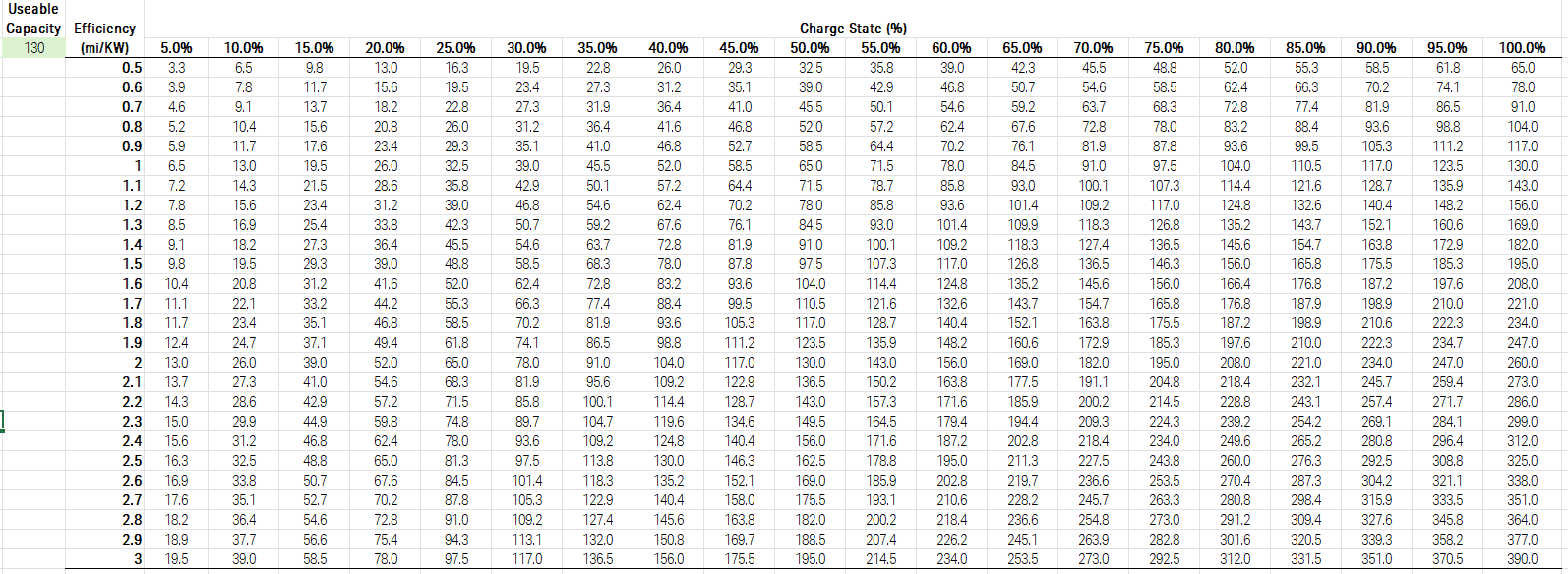
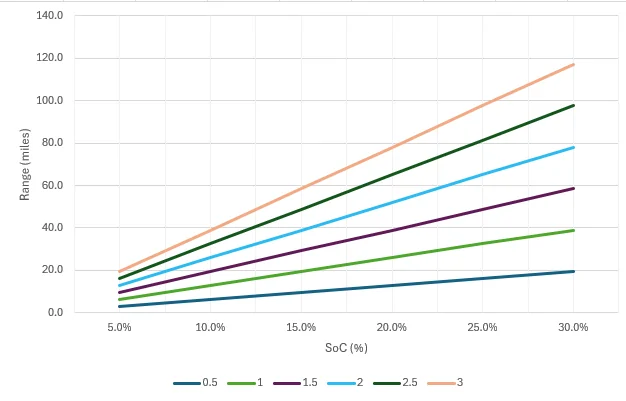
I made the table and chart below that I keep handy on longer trips when I know I need to get to a certain charger or have X miles to go and X battery percentage. I can then evaluate what efficiency I need to get in order to travel that distance and can weigh that against the expected weather/wind/elevation/travel speed, etc. This is for the Gen 1 large, and the spreadsheet adjusts based on what your usable battery capacity is. If you want it, I can certainly send it over, but it literally only took a couple of minutes to generate, and I found it easier than doing the exact math each time in my head when needed.

Rivian R1T R1S Any tricks to improve arrival SOC prediction 1755616173106-fk


Rivian R1T R1S Any tricks to improve arrival SOC prediction 1755616247295-6o
Sponsored


Top