
Sponsored
mikehmb
Well-Known Member
- First Name
- Mike
- Joined
- Jan 12, 2022
- Threads
- 154
- Messages
- 2,303
- Reaction score
- 5,224
- Location
- SF Bay Area
- Vehicles
- My name is Mike, and I have a (car) problem
Only the ones in the app. V3 and I assume v4. V1-2 are a no go.

beatle
Well-Known Member
- Joined
- Jun 20, 2024
- Threads
- 17
- Messages
- 1,148
- Reaction score
- 1,563
- Location
- Springfield, VA
- Vehicles
- '23 R1T PDM Max, '97/'25 Miatas, '19 Monkey
- Occupation
- IT
Most V3 superchargers are open to non-Tesla vehicles with an adapter, but not all. The app and in-vehicle navigation will tell you for sure.
They are just the version/generation of supercharger. Best explanation:
https://en.wikipedia.org/wiki/Tesla_Supercharger
They are just the version/generation of supercharger. Best explanation:
https://en.wikipedia.org/wiki/Tesla_Supercharger
mikehmb
Well-Known Member
- First Name
- Mike
- Joined
- Jan 12, 2022
- Threads
- 154
- Messages
- 2,303
- Reaction score
- 5,224
- Location
- SF Bay Area
- Vehicles
- My name is Mike, and I have a (car) problem
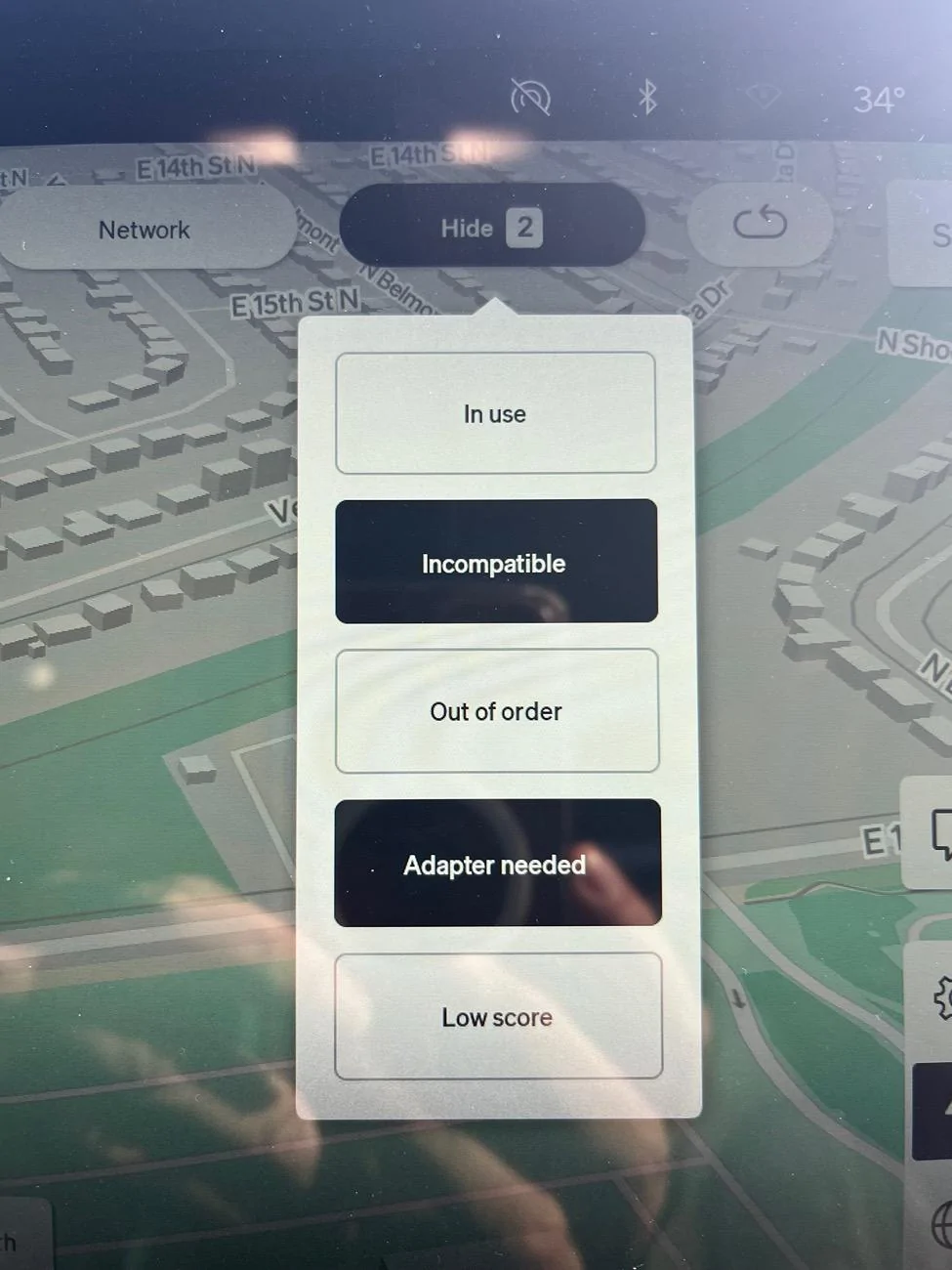
The app has toggles for which ones to hide. Do not hide “adapter needed”
I’ve never played with the toggle for “incompatible”
I’ve never played with the toggle for “incompatible”
Sponsored
SPITmadFIRE
Well-Known Member
Tesla Superchargers have been through multiple hardware generations, starting with V1, then V2, and so on. Older chargers (V1 and V2) will never be supported for non-Tesla vehicles. Only V3 and V4 chargers support non-Tesla charging.You mean the ones after 'Adaptors needed = on' & 'Incompatible = off' filters applied?
What is V1,2,3,4?
Thanks!
In the Rivian app and vehicle nav, you should only hide "incompatible" chargers. Everything else works for you now that you have an adapter.
MidnightRivian
Well-Known Member
You can always double check using Tesla app or PlugShare to find out which stations are open to non-Tesla EV.
Also you can use the below Tesla Find Us link to identify which station require an adapter and which ones already have a built in Magic Dock.
Tesla Find Us Web Link

Also you can use the below Tesla Find Us link to identify which station require an adapter and which ones already have a built in Magic Dock.
Tesla Find Us Web Link

Electrified Outdoors
Well-Known Member
- First Name
- Ken
- Joined
- Jan 30, 2023
- Threads
- 63
- Messages
- 3,683
- Reaction score
- 3,980
- Location
- Mount Airy, Maryland
- Website
- EVoutdoors.org
- Vehicles
- 2024 Rivian R1S Quad, 2024 Silverado EV RST First Edition
- Occupation
- Real Estate
This. The Rivian NAV will also tell you which Tesla stations are open to you. Just make sure you toggle off the option to hide sites that require an adapter. The Rivian NAV will even show you how many stalls are available. I made a video on this not too long ago.You can always double check using Tesla app or PlugShare to find out which stations are open to non-Tesla EV.
Also you can use the below Tesla Find Us link to identify which station require an adapter and which ones already have a built in Magic Dock.
Tesla Find Us Web Link
Riviaenz
Well-Known Member
There are quite a few v3 that are also not compatible. In our region fewer than 40% of Superchargers are compatible with non Tesla. To me it seems more like marketing to claim that they have broad coverage when the reality is it doesn’t really open much more, it’s more like another option, like a Shell opening across the street from a Chevron that’s been there for years.Only the ones in the app. V3 and I assume v4. V1-2 are a no go.
OP
OP
kyunam
Well-Known Member
- Thread starter
- #10
Thanks.This. The Rivian NAV will also tell you which Tesla stations are open to you. Just make sure you toggle off the option to hide sites that require an adapter. The Rivian NAV will even show you how many stalls are available. I made a video on this not too long ago.
So, `Adaptor needed` filter is misleading?
Sponsored

DeafPug
Well-Known Member
No, the menu is labeled Hide. The charging stations that match the selected criteria are hidden from view. Selecting Adapter needed in the Hide menu will hide the (Tesla) stations that require you to supply your own NACS to CCS1 adapter.Thanks.
So, `Adaptor needed` filter is misleading?
OP
OP
kyunam
Well-Known Member
- Thread starter
- #12
Ah... all filters are under "HIDE" !!!No, the menu is labeled Hide. The charging stations that match the selected criteria are hidden from view. Selecting Adapter needed in the Hide menu will hide the (Tesla) stations that require you to supply your own NACS to CCS1 adapter.

Electrified Outdoors
Well-Known Member
- First Name
- Ken
- Joined
- Jan 30, 2023
- Threads
- 63
- Messages
- 3,683
- Reaction score
- 3,980
- Location
- Mount Airy, Maryland
- Website
- EVoutdoors.org
- Vehicles
- 2024 Rivian R1S Quad, 2024 Silverado EV RST First Edition
- Occupation
- Real Estate
The app is pretty frustrating because the app route planner doesn't remember when you deselect "hide sites that require an adapter". You have to select it in there each time you plan a trip.
emoore
Well-Known Member
Seems like it defaults to showing comparable sites even with an adapter. I’m guessing this is on purpose because eventually everyone will have an adapter.The app is pretty frustrating because the app route planner doesn't remember when you deselect "hide sites that require an adapter". You have to select it in there each time you plan a trip.
CharonPDX
Well-Known Member
Use the app. It will show you.You mean the ones after 'Adaptors needed = on' & 'Incompatible = off' filters applied?
What is V1,2,3,4?
Thanks!
Rivian app, or in-vehicle nav will only show you the compatible ones.
The Tesla app lets you "Charge your non Tesla vehicle" - will only show compatible ones.
V1/2/3/4 is the version of Supercharger. You don't need to care about that if you just look in the app for "compatible." But just in case you see one and want to know at a glance:
What you want is a Supercharger stand that looks like one of these:
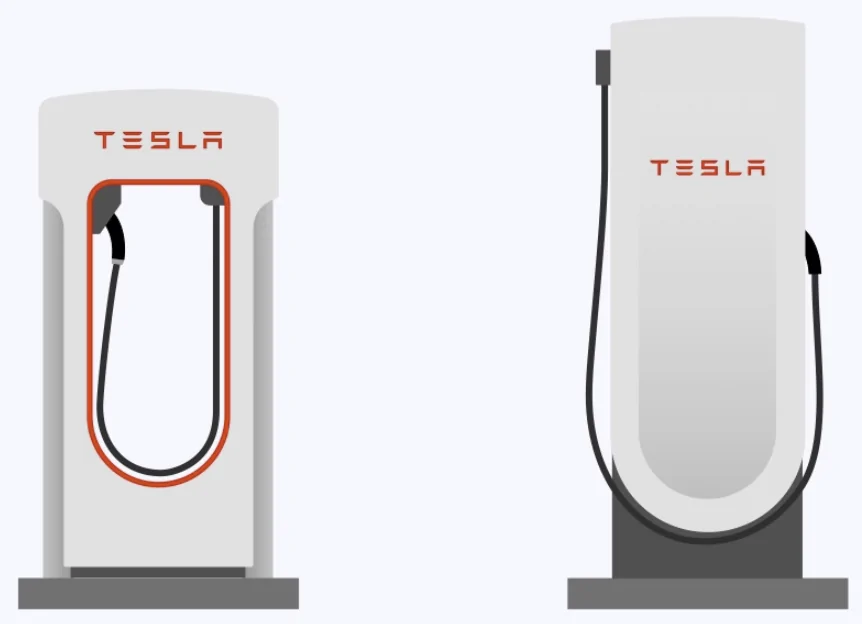
If a V3, the "collar" on the handle will be black instead of silver. (Yes, the diagram I found is wrong.)
Here's from Ford:
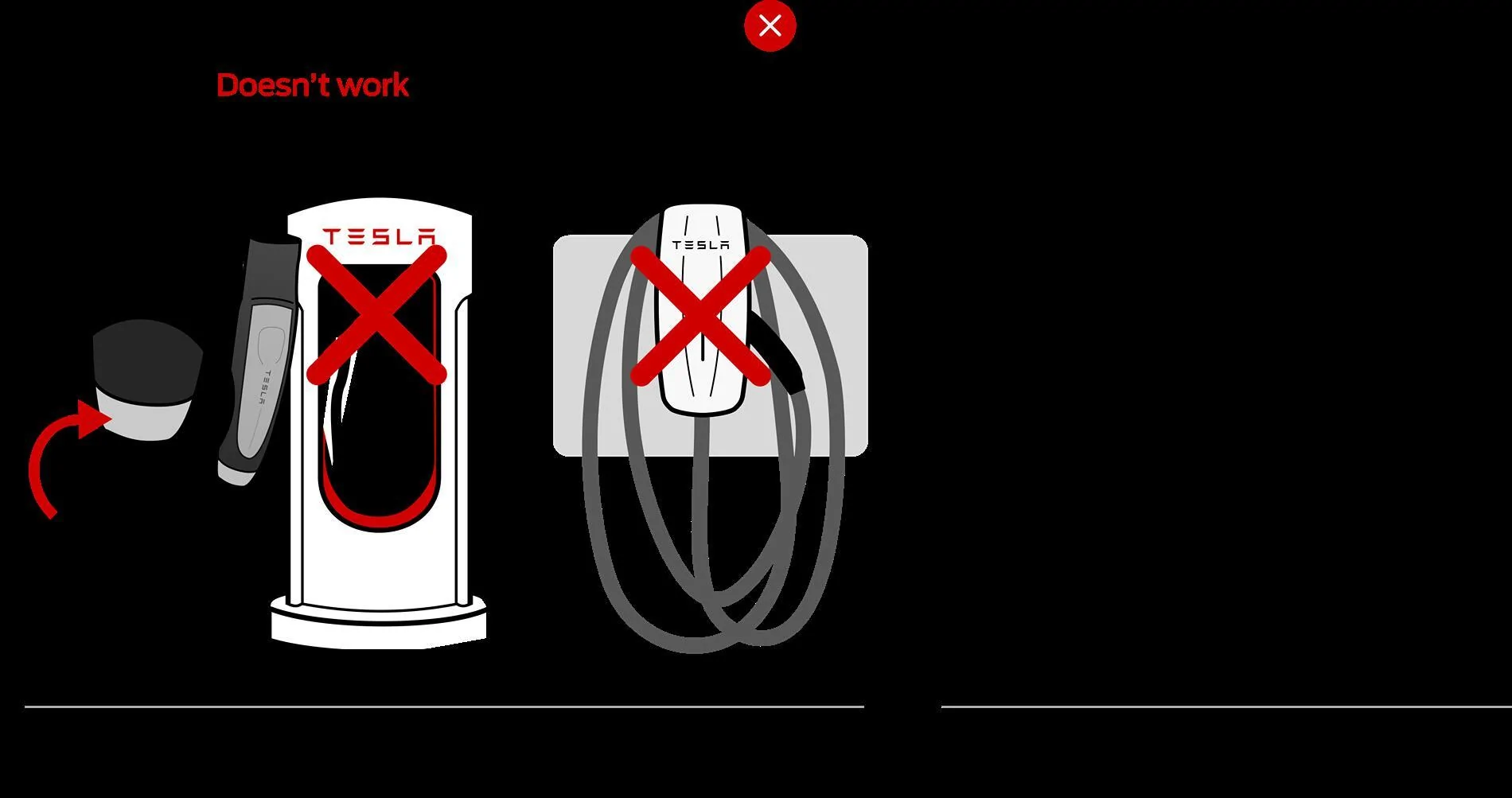
Note that some Supercharger sites have a "Magic Dock" - basically the adapter we're all getting, but built into the station itself (and the system locks it to the end of the Supercharger cable when charging a non-Tesla, and locks it inside the charging station itself when charging a Tesla, so nobody can steal that adapter,) the "Adapter needed" filter still shows those stations, since *ANY* CCS vehicle can charge at those stations, even the brands Tesla hasn't blessed with adapter-access yet.
Also, just to put it here- there *ARE* adapters for "Destination Chargers", AC stations like standard "charge at home" units. Those need a separate adapter since the NACS adapter doesn't have the AC pins connected.
Sponsored
Similar threads

- Replies
- 11
- Views
- 837
- Replies
- 51
- Views
- 4,835

- Replies
- 2,289
- Views
- 621,016


- Replies
- 31
- Views
- 2,254