Sponsored

New Software, New Bugs

DTown3011

Well-Known Member
Joined
Jun 7, 2022
Threads
30
Messages
1,719
Reaction score
2,257
Location
Denver, CO
Vehicles
Rivian R1T
Strange! Hope a reset works for the bugs! My update is working well so far on my 23 R1S. Apple music is nice and the sound seems like it has improved. I have experienced the random glitch in music but Amazon did this too (& it was worse). We have full reception here in the city.

My only comment for improvement is that the apple music volume controls need to be adjusted. The lowest volume is barely audible and the next one is too loud for conversations in the car. There is no nuance compared to the other music apps.

I would also love to be able to swap apple music to my profile. My husband signed in & I’m limited to his stations. Or I have to search to play something I prefer. I’d love to play my stations without having to input a song/artist them every time.
Agree with this. Volume 0 to 1 is MUCH too loud, and totally different than Spotify. In fact all the volume settings in the vehicle changed. What was 15 last time is much louder now.
Sponsored


JWreck

Well-Known Member
First Name
Josh
Joined
Oct 3, 2021
Threads
11
Messages
288
Reaction score
394
Location
Texas
Vehicles
R1S (pre-ordered, Audi RS5 Sportback
Occupation
IT
FWIW I opened a ticket for our ongoing proximity lock issues on Monday morning in the app and have yet to hear back from rivian at all….
 

Coj

Well-Known Member
First Name
Christian
Joined
Oct 25, 2022
Threads
8
Messages
68
Reaction score
29
Location
Connecticut
Vehicles
R1T, XC90 T8
Occupation
Real Estate
I found the same! LOVE having Apple Music, and the sound is improved, to my ear but the volume level now is totally different. I used to listen in the lower teens range NOW its mid single digits. Odd?
 

ForestNSea

Active Member
Joined
Jun 7, 2024
Threads
1
Messages
34
Reaction score
30
Location
San Diego
Vehicles
R1S
Agree with this. Volume 0 to 1 is MUCH too loud, and totally different than Spotify. In fact all the volume settings in the vehicle changed. What was 15 last time is much louder now.
I tried dropping EQ settings like @Kelvn suggested and that helped. I have the volume set at 2 or 3 for regular listening now. Instead of 1 or 2. Haha! I’m happy to have apple music though.
 

EarlyAdptr

Well-Known Member
First Name
Scott
Joined
Feb 17, 2021
Threads
17
Messages
429
Reaction score
579
Location
Seattle
Vehicles
Toyota Sequoia
Occupation
Consultant
Anyone experience odd behavior related to steering wheel and seat heating?

I've jumped into my Gen1 R1S a couple of times in last 2 weeks and the steering while heat is on as is the driver seat heater. It's 60+ degrees outside.

Anyone else have this?

PS I believe this pre-dated my updating to the latest software revision, but not 100% sure of that.
 

Sponsored

CBRacerX

Well-Known Member
Joined
Jun 30, 2024
Threads
3
Messages
271
Reaction score
225
Location
USA
Vehicles
R1T, Defender 110, 958, 987.2, 986S
Anyone experience odd behavior related to steering wheel and seat heating?

I've jumped into my Gen1 R1S a couple of times in last 2 weeks and the steering while heat is on as is the driver seat heater. It's 60+ degrees outside.

Anyone else have this?

PS I believe this pre-dated my updating to the latest software revision, but not 100% sure of that.
Mine switched to heated seats after the update. Had to manually switch back to ventilated. Don’t think the steering wheel heat is on, thankfully.
 

Beachbum

Well-Known Member
First Name
JR
Joined
Dec 31, 2021
Threads
2
Messages
48
Reaction score
41
Location
Danville, CA
Vehicles
2022 R1T & Tesla M3
Add me to the list of significant sw issues. Three of the most significant in order of least to most:

  1. volume from 1 to 2 is too much (Spotify)
  2. PAAK does not recognize the @home setting to only lock. Now, it freely locks and unlocks as I leave and approach the R1T
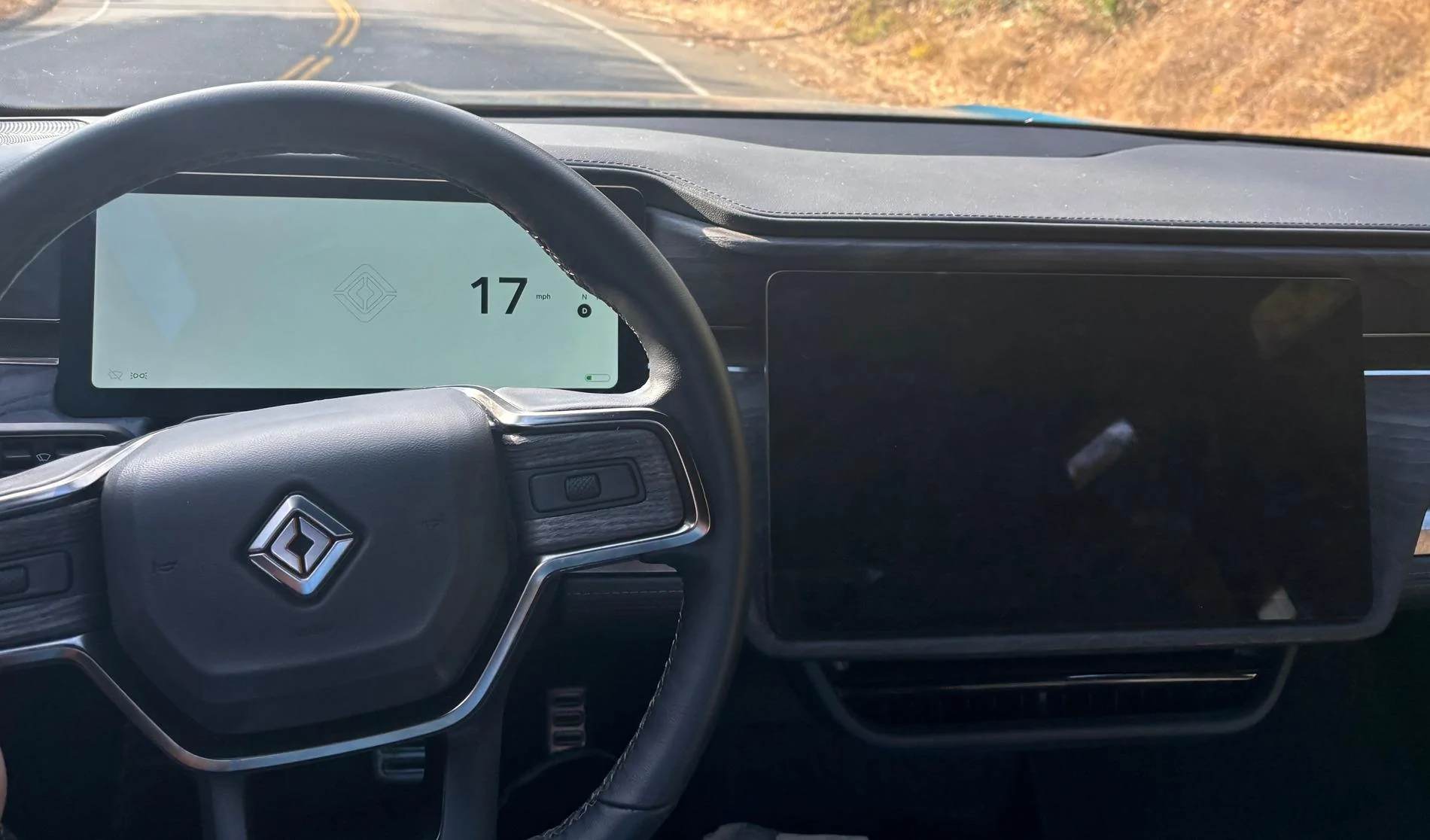
  3. Black screen of death. While driving and using the nav for the first time since update, 10 minutes into the drive, the main screen goes black and secondary screen only shows the speed and RDNP symbols (see image) - driving ability was unaffected. After 2 minutes of black screen, it did reset and was okay for 5-8 minutes before it happened again. During the 50 minute drive, it crashed five times.
I did contact roadside service to report the issue and did a hard reset to capture the log file.

Can they allow us to revert back to the previous sw?

Rivian R1T R1S New Software, New Bugs IMG_0371
 

Tango45

Well-Known Member
First Name
Erik
Joined
Feb 15, 2021
Threads
6
Messages
596
Reaction score
1,494
Location
Northern VA
Vehicles
Ioniq 5, R1S
Clubs
 
Add me to the list of significant sw issues. Three of the most significant in order of least to most:

  1. volume from 1 to 2 is too much (Spotify)
  2. PAAK does not recognize the @home setting to only lock. Now, it freely locks and unlocks as I leave and approach the R1T
  3. Black screen of death. While driving and using the nav for the first time since update, 10 minutes into the drive, the main screen goes black and secondary screen only shows the speed and RDNP symbols (see image) - driving ability was unaffected. After 2 minutes of black screen, it did reset and was okay for 5-8 minutes before it happened again. During the 50 minute drive, it crashed five times.
I did contact roadside service to report the issue and did a hard reset to capture the log file.

Can they allow us to revert back to the previous sw?

IMG_0371.jpeg
This is what I had happen to me and mentioned earlier in the thread. I reported it and also did a reboot for diagnostic data. My R1's in service right now and I told them about this. I don't think this is a service center issue, but a software guys issue, but my hope is that it helps them... honestly, they probably already know the various ways they screwed the pooch on this update and are working on a fix.
 

bjcleaver

Well-Known Member
Joined
Jan 30, 2021
Threads
3
Messages
118
Reaction score
156
Location
Utah
Vehicles
Bronco FE, Tesla Model Y, R1T
Add me to the list of significant sw issues. Three of the most significant in order of least to most:

  1. volume from 1 to 2 is too much (Spotify)
  2. PAAK does not recognize the @home setting to only lock. Now, it freely locks and unlocks as I leave and approach the R1T
  3. Black screen of death. While driving and using the nav for the first time since update, 10 minutes into the drive, the main screen goes black and secondary screen only shows the speed and RDNP symbols (see image) - driving ability was unaffected. After 2 minutes of black screen, it did reset and was okay for 5-8 minutes before it happened again. During the 50 minute drive, it crashed five times.
I did contact roadside service to report the issue and did a hard reset to capture the log file.

Can they allow us to revert back to the previous sw?

IMG_0371.jpeg
I had the same issues with PAAK and the black screen. Seems to have resolved after my third full car reboot, so maybe try the full reset a couple times.
 

tate16t

Well-Known Member
First Name
Robert
Joined
Apr 7, 2022
Threads
64
Messages
1,396
Reaction score
1,181
Location
NY
Vehicles
2023 El Cap Granite R1S
Occupation
Car Enthusiast
Took my first long drive since applying 2024.27.01. I noticed the volume with Apple Music fluctuates based on vehicle speed. I believe this feature existed already but seems more sensitive now. Maybe it’s due to the louder volume? It sounds great and love having it but the volume needs adjusting. I use to be able to set the volume low enough to still hear the music and conduct a conversation with others. Now level 2 I believe is a bit too loud and level 1 is too low. Don’t get me wrong, I like the added boost it has now but the variation is drastic.

WiFi tethering works fine for me however when I arrived home and entered the house, the app showed the vehicle network was offline. It usually connects to LTE or my home network. Anyone noticed problems switching between networks?
 
Last edited:

Sponsored

Killer95Stang

Well-Known Member
First Name
Dan
Joined
Dec 7, 2021
Threads
68
Messages
1,527
Reaction score
3,033
Location
Sunny Socal
Vehicles
Mustang, Falcon, F150, Flex and Explorer
Occupation
Engineer
Add me to the list of significant sw issues. Three of the most significant in order of least to most:

  1. volume from 1 to 2 is too much (Spotify)
  2. PAAK does not recognize the @home setting to only lock. Now, it freely locks and unlocks as I leave and approach the R1T
  3. Black screen of death. While driving and using the nav for the first time since update, 10 minutes into the drive, the main screen goes black and secondary screen only shows the speed and RDNP symbols (see image) - driving ability was unaffected. After 2 minutes of black screen, it did reset and was okay for 5-8 minutes before it happened again. During the 50 minute drive, it crashed five times.
I did contact roadside service to report the issue and did a hard reset to capture the log file.

Can they allow us to revert back to the previous sw?

IMG_0371.jpeg

I had this same issue with the black screen of death. My neighbor a Rivian Engineer reported my software issue with VIN, directly to the software team which is actively trying to figure what is causing this. Apparently others have had this issue with test vehicles as well. He said to hit your emergency lights to tag this event when it happens, so it can tracked easier. It also helps to write down the time and date.
 

Wing

Well-Known Member
First Name
James
Joined
Oct 27, 2023
Threads
11
Messages
401
Reaction score
334
Location
Ottawa
Vehicles
R1T Launch Edition LG/OC 20-inch
The Regen green color changes. Some days it's bright green some it's dark green. Thought I was crazy but wife confirmed.
 

Wing

Well-Known Member
First Name
James
Joined
Oct 27, 2023
Threads
11
Messages
401
Reaction score
334
Location
Ottawa
Vehicles
R1T Launch Edition LG/OC 20-inch
I had this same issue with the black screen of death. My neighbor a Rivian Engineer reported my software issue with VIN, directly to the software team which is actively trying to figure what is causing this. Apparently others have had this issue with test vehicles as well. He said to hit your emergency lights to tag this event when it happens, so it can tracked easier. It also helps to write down the time and date.
My truck rebooted twice today on a short drive and no longer recognizes highways for driver+
 

LittonLad

Well-Known Member
First Name
Simmo
Joined
May 3, 2023
Threads
14
Messages
53
Reaction score
44
Location
Connecticut
Vehicles
2023 R1T Adv, ECG, 21” rims
After a couple of long drives, my G1R1TQM is missing Driver + highways that existed previously. Vampire drain is now 2 to 3% over night. I have the same Apple Music issues documented elsewhere and it resets itself every time I lock the car, rather than picking up where it left off. Heated seat seems like a default, rather than vented.

And I am seeing some odd aircon behavior. It will cool the vehicle perfectly if I precondition before I drive. But once driving cooling is very very weak, and today was even blowing very hot. Completely different behavior to before the last update. It often switches to recirculate and blows hot. And the seat cooling feels warm rather than cooling. Given it cools well when preconditioning, this can’t be a hardware issue, right? Must be software.
 

ciderarchitect

Well-Known Member
First Name
Austin
Joined
Sep 27, 2021
Threads
2
Messages
123
Reaction score
115
Location
Liberty Lake, WA
Vehicles
2023 Rivian R1T, 2018 Honda CRV
Occupation
Architect/Contractor
Clubs
 
Anyone have an issue where the system seems to crash and reboot while driving? I was just out doing an errand and it crashed three times in short succession. Big screen went black and the driver's display went white except for speed, gear indicator, turn signals, and lights... It still drove, but...
Yes, last Tuesday I was going 70 down a small highway in Montana and my center screen went black. Wife asked “shouldn’t we pull over or something?” and I said we just needed to keep driving and let it reboot. Only happened once.
Sponsored


Top