Sponsored

mindstormsguy

Well-Known Member
Joined
Jan 3, 2021
Threads
10
Messages
327
Reaction score
651
Location
Seattle area
Vehicles
Some
I feel like one of the recent updates has it update on occasion for the SOC.
historically it didn’t and I liked to see the estimate vs where I ended up being
Not sure if it was the most recent update or the .31 update when I noticed it seemed to change - but not all the time
Cool. I'll have to keep an eye out for this this weekend when I'm going for a longer trip.

Do you know if it also re-evaluates adding/removing charge stops now then?
Sponsored
 

EVTrukHog

Well-Known Member
First Name
Matt
Joined
Aug 31, 2021
Threads
37
Messages
666
Reaction score
1,018
Location
USA
Vehicles
R1T, C6 Corvette, Ford Explorer
does the pull-down menu give you ETA to final destination or just the next waypoint? This was my frustration on last road trip a couple of weeks ago.
 

whyasky

Well-Known Member
First Name
Yury
Joined
Jul 15, 2020
Threads
6
Messages
247
Reaction score
447
Location
Mid-Atlantic
Vehicles
R1T, ID.4
Right? I was amazed that I couldn't see the estimated SoC upon arrival. I was relegated to canceling and restarting the route in order to see the estimate! Now I feel dumb...
You're not alone. I've done this too many times!

Thanks for the post OP.
 

Dirty_B

Well-Known Member
Joined
Apr 26, 2022
Threads
36
Messages
565
Reaction score
490
Location
USA
Vehicles
Rivian R1T
Occupation
Sales
Ahh if only the manual...wait - I bet users can pass on tips faster than the digital dept at Rivian can write and publish. Crowd source may be the way to go.

Thanks OP didn't know this either.
 

ajbrutman

Well-Known Member
Joined
Aug 4, 2020
Threads
14
Messages
256
Reaction score
415
Location
california
Vehicles
LE R1T, GTI
Clubs
 
So is this why people complained that their estimate never updates? Mine does here and I'm pretty sure always has. I'd still prefer it to always display it though.
As has mine
 

Sponsored

yizzung

Well-Known Member
Joined
Jul 30, 2020
Threads
54
Messages
831
Reaction score
1,510
Location
California / Colorado
Vehicles
R1T | Audi allroad
Occupation
Tech
Can I hijack this thread to lodge my nav complaint? Great!

Today I’m in San Francisco but I want to go to, um, Sacramento. I can zoom out and then zoom in on that area. I see there are 10 chargers that I might want to stop at, so I click on the first one but decide that it’s not my best option and want to look at another one (maybe close to a Starbucks). When I close that window for charger 1, wheeeee, Rivian transports me right back to my current destination in San Francisco, so I have to zoom out/in all over again in my new destination.

Anyone else?
 

bael

Well-Known Member
Joined
Nov 24, 2021
Threads
31
Messages
557
Reaction score
903
Location
GA
Vehicles
LE R1T, X5
Clubs
 
Cool. I'll have to keep an eye out for this this weekend when I'm going for a longer trip.

Do you know if it also re-evaluates adding/removing charge stops now then?
Haven’t done any long trips since noticing, just a few places I didn’t know exactly where I was heading - so more casual observations where I thought, wait, the SOc isn’t what I recall when I started
 

Dirty_B

Well-Known Member
Joined
Apr 26, 2022
Threads
36
Messages
565
Reaction score
490
Location
USA
Vehicles
Rivian R1T
Occupation
Sales
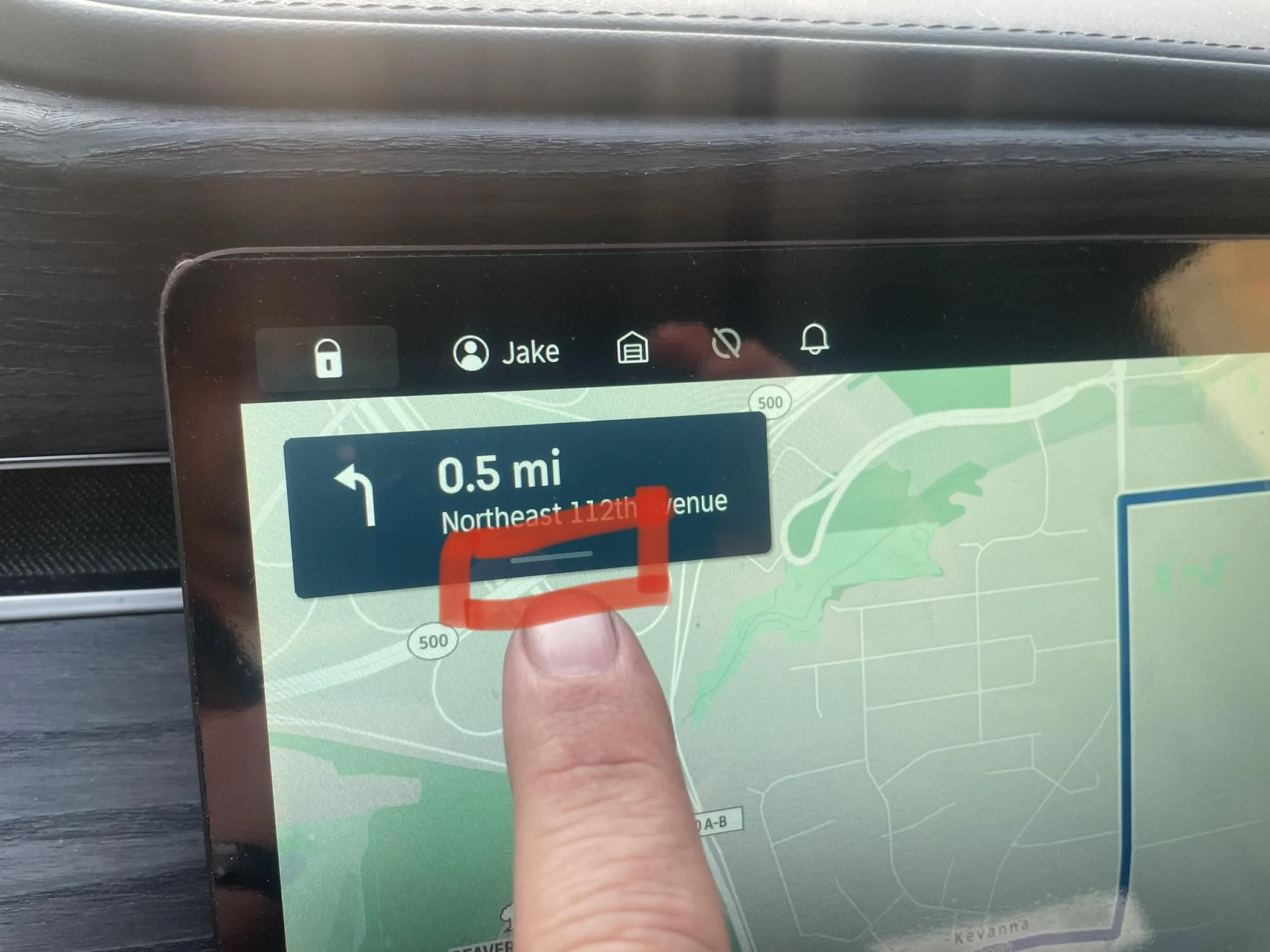
2. Pull down on the direction in the top left corner to reveal all directions, SOC and time at arrival.

2BEF87E4-BD86-4E48-BCC4-198787AA3EA4.jpeg
So I just tried/did this and have a few "adds", updates:
1. It's not a drag down, it's a click inside the Direction window in the top left corner and it expands downward. Then you can scroll amongst the turns and such. My Direction window did not respond to a "drag" on the bar at the bottom or within the Direction window.
2. My range updated dynamically while enroute. Even through switching driving modes while on the highway to always show me what SOC would be at destination - simple calc probably, but at least noted it changed and changed back when going from Conserve to All Purpose to Conserve. As to the accuracy and how dynamic - it was only a 20mi trip so no idea but worth exploring for higher than expected mi/kWh driving.
3. As we discuss and or comment on directions for software and display functionality, it may be best to note what version SW your on, as features, functions, and locations on the display are likely to change throughout time/OTA updates.
All this was on SW 2022.35.3
 
OP
OP
W1SE

W1SE

Well-Known Member
First Name
Jake
Joined
Nov 28, 2021
Threads
52
Messages
555
Reaction score
1,242
Location
Vancouver, WA
Vehicles
2022 R1T Quad, 2024 R1S Max
Occupation
Branch manager
Clubs
 
You're not alone. I've done this too many times!

Thanks for the post OP.
Thanks, I truly love this truck. I want everyone to get everything there is to offer from the R1.
 

Comstockery

Well-Known Member
First Name
Matthew
Joined
Nov 9, 2021
Threads
5
Messages
71
Reaction score
76
Location
Arlington, VA
Vehicles
Rivian R1S (launch green, 22" dark); Jeep Wrangler
Occupation
Attorney
Clubs
 
Slightly off topic, but related to nav. Does the nav system dynamically re-route to account for changing traffic conditions like Waze, Apple Maps, etc.? It doesn't seem to do so for me. In fact, while the nav system shows heavy traffic areas, it doesn't seem to take that into account when route planning. The routes that nav gives me, e.g., from my house to my office, are much different from what Waze gives me (recognizing that Waze will give crazy directions to shave 17 seconds in travel time).
 

Sponsored

OP
OP
W1SE

W1SE

Well-Known Member
First Name
Jake
Joined
Nov 28, 2021
Threads
52
Messages
555
Reaction score
1,242
Location
Vancouver, WA
Vehicles
2022 R1T Quad, 2024 R1S Max
Occupation
Branch manager
Clubs
 
Slightly off topic, but related to nav. Does the nav system dynamically re-route to account for changing traffic conditions like Waze, Apple Maps, etc.? It doesn't seem to do so for me. In fact, while the nav system shows heavy traffic areas, it doesn't seem to take that into account when route planning. The routes that nav gives me, e.g., from my house to my office, are much different from what Waze gives me (recognizing that Waze will give crazy directions to shave 17 seconds in travel time).
It doesn’t appear to reroute based on changing traffic.
 
OP
OP
W1SE

W1SE

Well-Known Member
First Name
Jake
Joined
Nov 28, 2021
Threads
52
Messages
555
Reaction score
1,242
Location
Vancouver, WA
Vehicles
2022 R1T Quad, 2024 R1S Max
Occupation
Branch manager
Clubs
 
1. It's not a drag down, it's a click inside the Direction window in the top left corner and it expands downward.
Thanks. Haha. I always just do a quick swipe down that must work well enough, I edited the original post
 

archiboy

Active Member
First Name
Bob
Joined
Oct 20, 2022
Threads
0
Messages
25
Reaction score
28
Location
California
Vehicles
R1T
Occupation
architect
Does the nav system dynamically re-route to account for changing traffic conditions like Waze, Apple Maps, etc.?
I did 10 hours of driving in the truck last Friday with Nav on for most of the day. The truck demonstrated two behaviors, one good one bad. On two occasions I received an audible alert that the nav system had found a faster route. That route was displayed on the screen and asked if I wanted to follow it. I drive with bifocal sun glasses. I was unable to read any instructions on the screen while freeway driving so I can't accurately report if it was a traffic issue or something else that triggered the alert. That was the good behavior. The bad behavior is when I was stopped in traffic on city streets the nav system is attempting to figure out exactly where the truck is. Frequently it's guessing that I was further along my planned route than I actually was and that I'd missed a turn. Frequently this happens when waiting to make a left turn. The nav system is then rerouting the truck to make some convoluted maneuver (three right turns to get back on track or a u turn). When, in reality, the vehicle is still on track for the original route plan. No big deal, unless I'm in unfamiliar territory. For all of my drive last week it was familiar roads I'd traveled previously. So I knew when to tell Alexa she was wrong...
 

CommodoreAmiga

Well-Known Member
Joined
Dec 30, 2020
Threads
39
Messages
4,104
Reaction score
7,729
Location
INACTIVE
Vehicles
INACTIVE
The bad behavior is when I was stopped in traffic on city streets the nav system is attempting to figure out exactly where the truck is. Frequently it's guessing that I was further along my planned route than I actually was and that I'd missed a turn. Frequently this happens when waiting to make a left turn. The nav system is then rerouting the truck to make some convoluted maneuver (three right turns to get back on track or a u turn). When, in reality, the vehicle is still on track for the original route plan. No big deal, unless I'm in unfamiliar territory. For all of my drive last week it was familiar roads I'd traveled previously. So I knew when to tell Alexa she was wrong...
This happens to me all. the. time. and it's so annoying. What makes it especially bad is that when it re-calculates the route it automatically picks whatever route it wants, and NOT the route that you selected when originally entering your destination.

So if I picked a route to avoid a certain area, I will end up being told to go through that area, anyway, because at some intersection it will think I'm somewhere I am not, recalculate, then send me on the route I didn't want.
Sponsored


Top