TroubledF88
Member
- Thread starter
- #1
This isn't a scientific, controlled test. It's simply my experience from one long road trip.
If you like numbers, they're about halfway down the post. You could probably also copy the whole thing, post it into your favorite AI chat and ask it to summarize it for you.
Trip Details
Rivian R2 Performance Launch Edition
Approximately 80–90°F throughout the trip
Rivian had approximately 700 miles on the odometer at departure
A/C set to 70°F
All-Purpose drive mode
Started at 100% charge
21-inch wheels with Pirelli All Season tires
I paid for the $12.99/month Tesla Supercharging membership to receive the discounted charging rates.
According to Rivian Roamer, my usable battery capacity is 91.6 kWh.
With my dinosaur sludge cars, I could typically make this trip in about 11.5 hours, including gas, food, and restroom stops. This trip took about 13 hours.
For reference, I've owned a:
2021 Tesla Model 3
2025 Tesla Model 3
2026 Tesla Model Y
2023 Tesla Model S
Driving Experience
Universal Hands Free was a good experience overall. I felt it was slightly less confident than Tesla Autopilot. It occasionally drifted slightly toward highway exits before correctly centering itself again. Its biggest weakness seemed to be sharper highway curves, where it occasionally wanted to disengage.
Overall, I actually enjoyed using Universal Hands Free more than Tesla Autopilot. I've never taken a long road trip using Tesla FSD, so I can't make a fair comparison there. I probably used UHF for 90% of the drive.
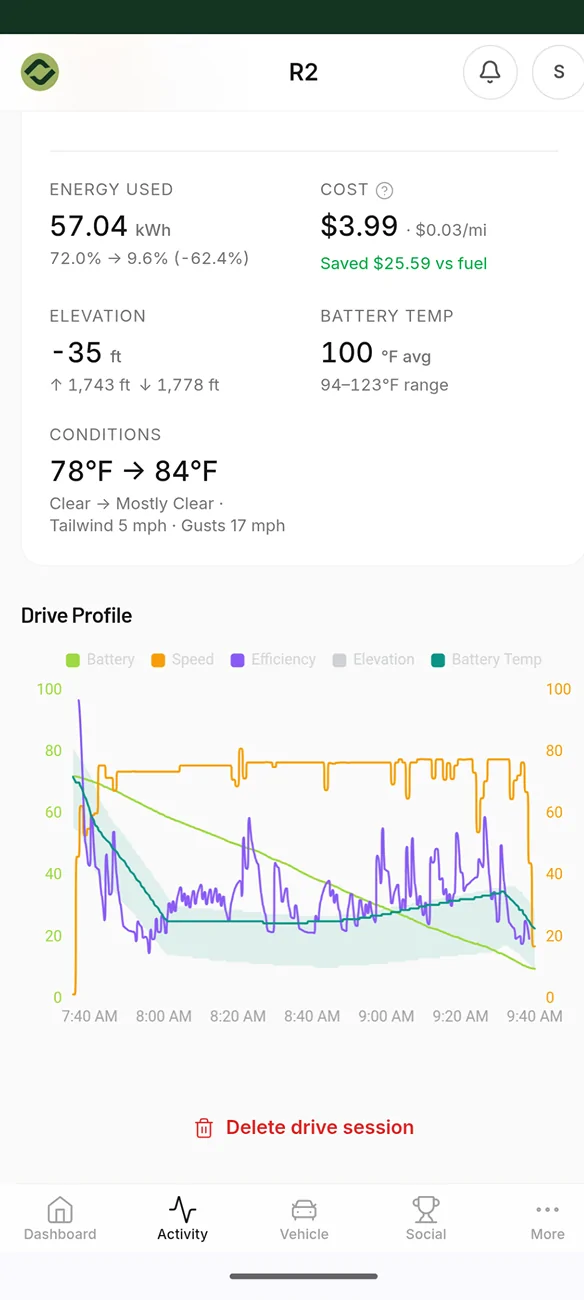
The vehicle began preparing the battery for Supercharging roughly 10 miles before each charging stop. I feel like this had a noticeable impact on efficiency, as my mi/kWh was consistently very low for the first 15 miles or so after leaving a charger—typically around 2.0–2.2 mi/kWh.
I didn't spend much time digging through the navigation settings, so I may have missed it, but I wish there were more charging strategy options. I'd like to be able to choose things like:
More charging stops with shorter sessions
Fewer charging stops with longer sessions
Initially, I had navigation set to arrive with 15% battery remaining, which planned three charging stops.
When I manually changed the arrival percentage to 10%, it increased the trip to four charging stops but reduced the overall travel time by nearly 20 minutes.
Efficiency Observations
There was a surprising amount of variation in both the 15-minute and 1-hour energy usage graphs.
For example, at random checks at 75 mph average speed I saw
As low as 2.00 mi/kWh over a 15-minute period
As high as 3.30+ mi/kWh over a 15-minute period
Pretty much everything in between
Obviously traffic, weather, elevation, and other conditions all affect efficiency.
I also found it interesting how much the in-vehicle data differed from Rivian Roamer's data for each driving segment regarding energy usage.
Data
(My final charging stop was unplanned. I didn't realize my destination didn't have a compatible charging option within 30 miles, and I didn't have a CCS1 adapter to use the available chargers.)
I can basically divide this 780-mile trip into three parts:
Working
Software/UI problems
Working, again.
The one thing all three sections have in common, though, is disappointing efficiency.
Keep in mind that Rivian Roamer includes the following note under efficiency:
"Based on vehicle telemetry which may differ slightly from in-dash readings."
Part 1 - Working
The first 450–480 miles were where everything worked... mostly.
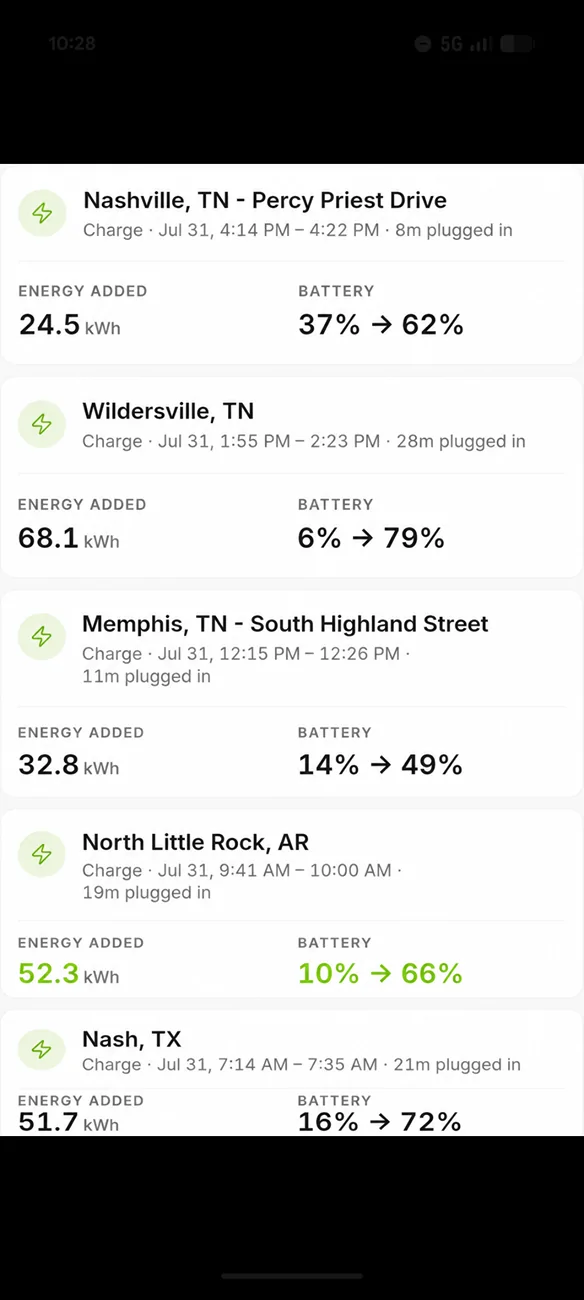
First charging stop - 208 miles into the trip.
Rivian UI
208 miles
69 mph average
2.81 mi/kWh
Rivian Roamer
208 miles
69.5 mph average
2.72 mi/kWh
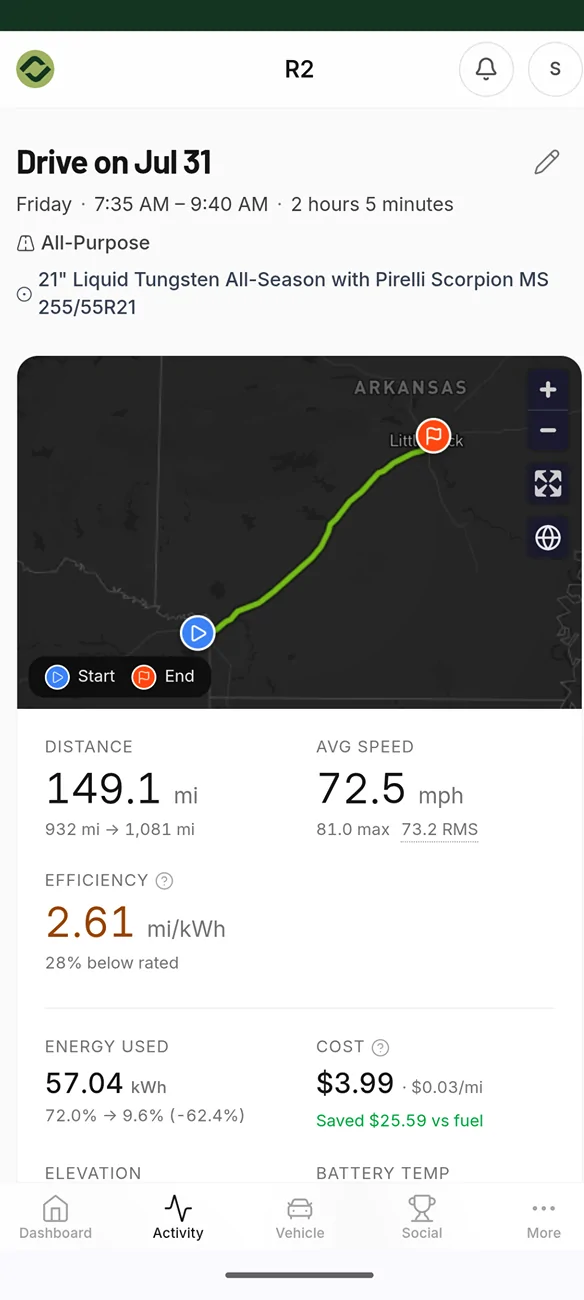
Second charging stop - 358 miles into the trip.
Rivian UI (entire trip to this point)
358 miles
70 mph average
2.81 mi/kWh
Rivian Roamer (this segment only)
149 miles
72.5 mph average
2.61 mi/kWh
Part 2 - Problems Arise
Somewhere around the 7-hour mark (roughly 450–480 miles), the Energy Monitor UI stopped working correctly.
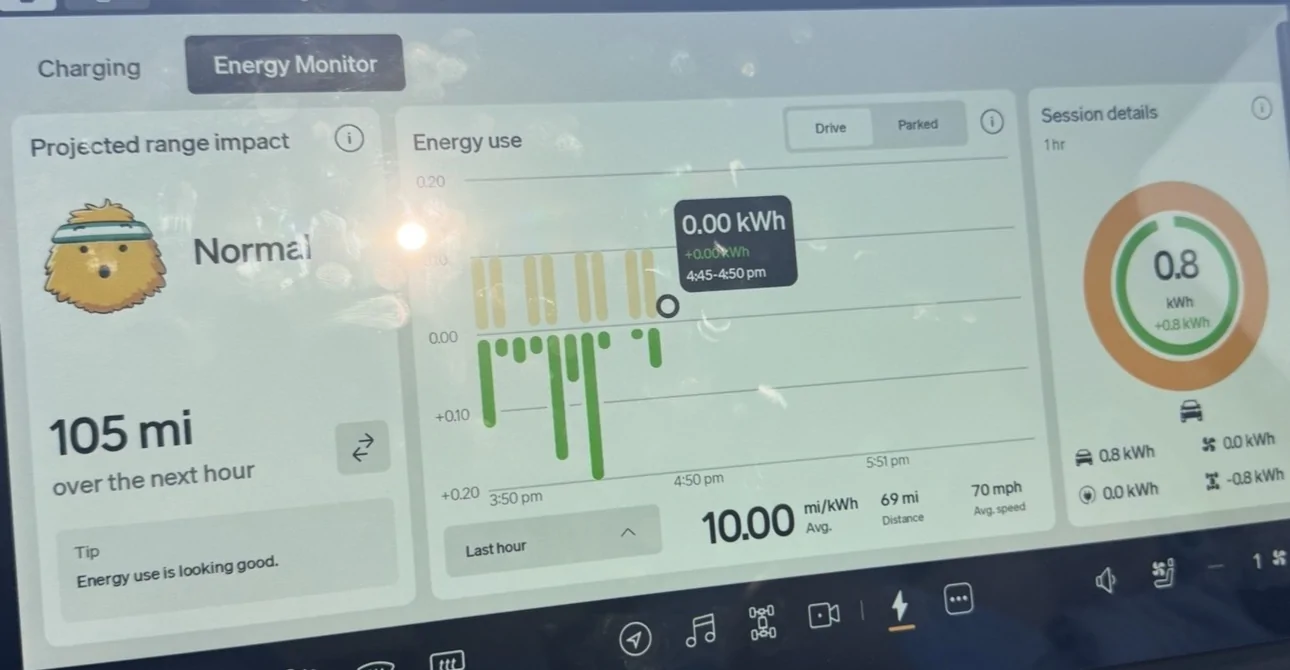
The "Current Drive" and "Last Hour" screens appeared to continue counting miles, but they stopped calculating energy usage properly.
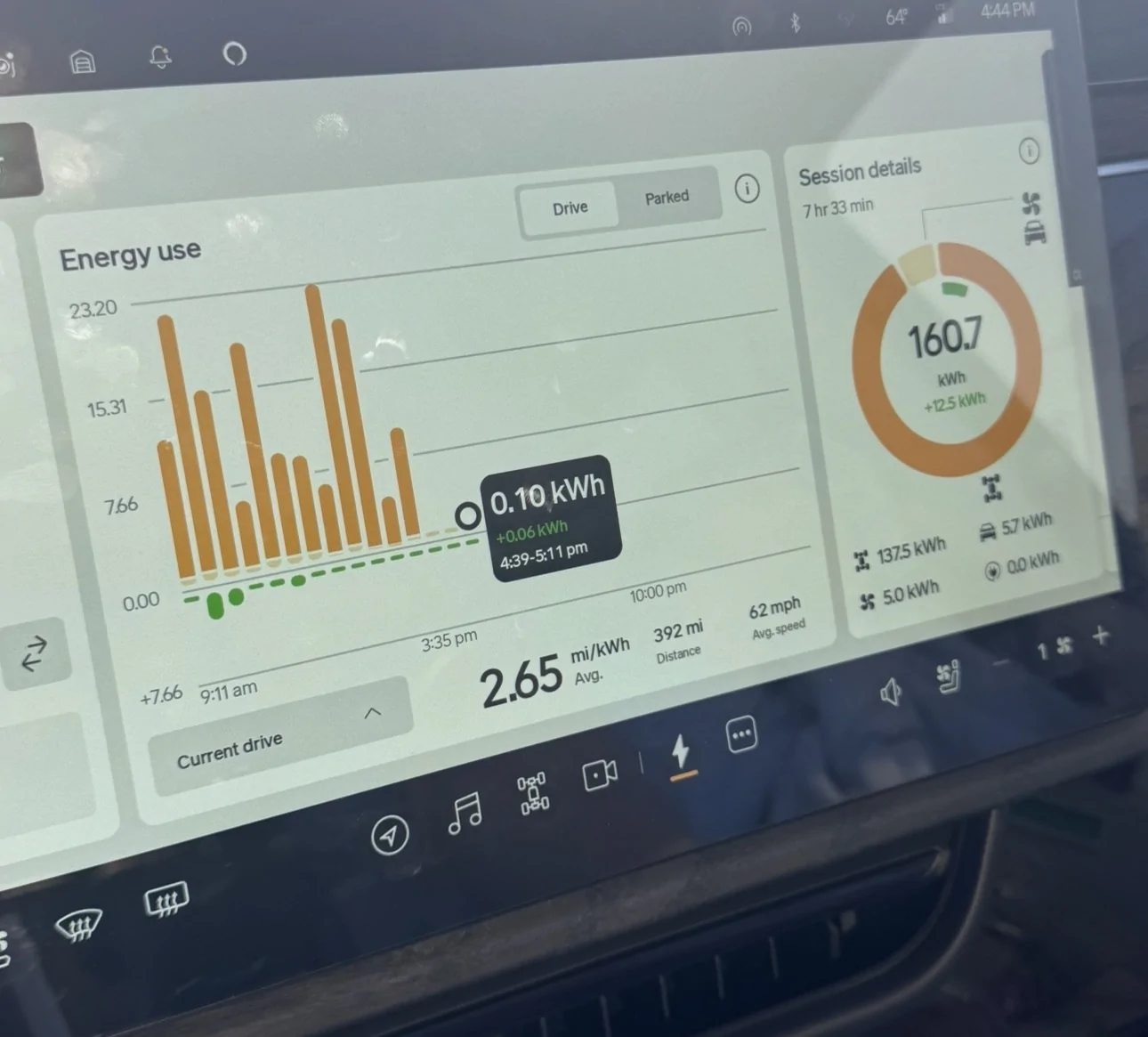
At around 480 miles, the Rivian displayed approximately 2.8 mi/kWh.
By roughly 510 miles, it claimed my "Current Drive" efficiency had increased to nearly 3.10 mi/kWh.
At the same time, the "Last Hour" efficiency was showing 10.00 mi/kWh.
That's obviously impossible.
There's simply no way my average efficiency for the last 510 miles jumped from 2.8 to 3.1 mi/kWh over those 30 miles.
Interestingly, during this entire period I had a constant notification saying:
*"Preparing battery for fast charging."*
Third charging stop - 489 miles into the trip.
Because of the Energy Monitor issue, the Rivian UI reported:
70 mph average
3.03 mi/kWh
*I strongly believe this data was inaccurate and found it extremely frustrating.
Rivian Roamer
136 miles
63.6 mph average
2.79 mi/kWh
The software issues continued through my fourth charging stop.
Fourth charging stop - 596 miles into the trip.
The reported efficiency continued climbing unrealistically.
By this point:
"Current Drive" climbed to 3.59 mi/kWh over 596 miles
"Last Hour" remained permanently stuck at 10.00 mi/kWh
The only screen that may have remained accurate was the Last 15 Minutes view, although I'm not particularly confident that it actually was.
Thankfully, the route planning and remaining battery estimates appeared to remain accurate throughout this issue.
When I stopped to charge ,
Rivian UI reported:
596 miles
68 mph average
3.59 mi/kWh
Again, I believe the miles and mph were correct, however the mi/kWh was very, very off.
Rivian Roamer
101 miles
69.4 mph average
2.54 mi/kWh
Part 3 - Working, again, but everything has a price.
Shortly after leaving that charging stop, I opened the Energy Monitor and noticed everything had reset.
I believe this happened right around the 10-hour mark of the trip.
It was a bit of a catch-22.
I was frustrated that I lost the first 596 miles of trip data, but I was also happy to see the Energy Monitor appeared to be working correctly again.
I'm assuming there's something within the Rivian software that resets trip data after roughly 10 hours.
For this final section, I originally planned to reach my destination without another charging stop.
However, because I hadn't researched charging availability well enough, I had to make an unexpected 8-minute charging stop so I could reach the closest compatible charger, which actually ended up being about 30 miles beyond my destination. I'll deal with that tomorrow.
Rivian UI
182 miles
61 mph average
2.87 mi/kWh
Rivian Roamer split this into two drives because of the charging stop.
Drive 1:
110 miles
60.6 mph average
2.82 mi/kWh
Drive 2:
72 miles
59 mph average
2.60 mi/kWh
Final Numbers
According to Rivian Roamer:
776.7 miles
11 hours 50 minutes of driving
1 hour 28 minutes of charging
2.66 mi/kWh @ 66 mph average speed
(As a reminder, with better planning I could have skipped that last charging stop, saved a little money, and reduced my total trip time.)
Energy used:
289.1 kWh
Energy charged:
229.4 kWh
Total charging cost:
$96.11
Overall Thoughts
Overall, the driving experience was great. The vehicle was extremely comfortable, and Universal Hands Free made the trip enjoyable.
The inaccurate Energy Monitor data was very frustrating.
The trip data resetting after roughly 10 hours was also frustrating, although slightly less so.
What concerns me most, though, is the overall efficiency.
One factor worth mentioning is the elevation changes throughout the drive, I'm not sure how much of an impact the rolling hills had along the way towards the end of the drive.
Final Thoughts
Overall, for me, I drive around 30 miles each way to work and only take one or two long trips each year. The actual driving experience in the R2—both during my daily commute and on this road trip—is outstanding.
The ride is smooth, the seats are comfortable, the A/C keeps the cabin cool even on a low setting, and most of all, it's fun to drive.
The efficiency will undoubtedly be frustrating on those one or two long trips each year, and I hope the issue with the Energy Monitor was simply a one-off software bug or something that Rivian corrects in the near future.
With all that said, I can confidently say I prefer everything the R2 is, and has to offer over any of my previous Teslas.
If you have any questions or comments I'd love to hear them! I also have the same trip but in reverse back home on Monday so if there's any suggestions on what to test on the way back I'd love to hear them.
I also have screen shots and pictures of the data throughout the trip that I'm happy to share but I was uncertain on how to post it without it being confusing.
If you like numbers, they're about halfway down the post. You could probably also copy the whole thing, post it into your favorite AI chat and ask it to summarize it for you.
Trip Details
Rivian R2 Performance Launch Edition
Approximately 80–90°F throughout the trip
Rivian had approximately 700 miles on the odometer at departure
A/C set to 70°F
All-Purpose drive mode
Started at 100% charge
21-inch wheels with Pirelli All Season tires
I paid for the $12.99/month Tesla Supercharging membership to receive the discounted charging rates.
According to Rivian Roamer, my usable battery capacity is 91.6 kWh.
With my dinosaur sludge cars, I could typically make this trip in about 11.5 hours, including gas, food, and restroom stops. This trip took about 13 hours.
For reference, I've owned a:
2021 Tesla Model 3
2025 Tesla Model 3
2026 Tesla Model Y
2023 Tesla Model S
Driving Experience
Universal Hands Free was a good experience overall. I felt it was slightly less confident than Tesla Autopilot. It occasionally drifted slightly toward highway exits before correctly centering itself again. Its biggest weakness seemed to be sharper highway curves, where it occasionally wanted to disengage.
Overall, I actually enjoyed using Universal Hands Free more than Tesla Autopilot. I've never taken a long road trip using Tesla FSD, so I can't make a fair comparison there. I probably used UHF for 90% of the drive.
The vehicle began preparing the battery for Supercharging roughly 10 miles before each charging stop. I feel like this had a noticeable impact on efficiency, as my mi/kWh was consistently very low for the first 15 miles or so after leaving a charger—typically around 2.0–2.2 mi/kWh.
I didn't spend much time digging through the navigation settings, so I may have missed it, but I wish there were more charging strategy options. I'd like to be able to choose things like:
More charging stops with shorter sessions
Fewer charging stops with longer sessions
Initially, I had navigation set to arrive with 15% battery remaining, which planned three charging stops.
When I manually changed the arrival percentage to 10%, it increased the trip to four charging stops but reduced the overall travel time by nearly 20 minutes.
Efficiency Observations
There was a surprising amount of variation in both the 15-minute and 1-hour energy usage graphs.
For example, at random checks at 75 mph average speed I saw
As low as 2.00 mi/kWh over a 15-minute period
As high as 3.30+ mi/kWh over a 15-minute period
Pretty much everything in between
Obviously traffic, weather, elevation, and other conditions all affect efficiency.
I also found it interesting how much the in-vehicle data differed from Rivian Roamer's data for each driving segment regarding energy usage.
Data
(My final charging stop was unplanned. I didn't realize my destination didn't have a compatible charging option within 30 miles, and I didn't have a CCS1 adapter to use the available chargers.)
I can basically divide this 780-mile trip into three parts:
Working
Software/UI problems
Working, again.
The one thing all three sections have in common, though, is disappointing efficiency.
Keep in mind that Rivian Roamer includes the following note under efficiency:
"Based on vehicle telemetry which may differ slightly from in-dash readings."
Part 1 - Working
The first 450–480 miles were where everything worked... mostly.
First charging stop - 208 miles into the trip.
Rivian UI
208 miles
69 mph average
2.81 mi/kWh
Rivian Roamer
208 miles
69.5 mph average
2.72 mi/kWh
Second charging stop - 358 miles into the trip.
Rivian UI (entire trip to this point)
358 miles
70 mph average
2.81 mi/kWh
Rivian Roamer (this segment only)
149 miles
72.5 mph average
2.61 mi/kWh
Part 2 - Problems Arise
Somewhere around the 7-hour mark (roughly 450–480 miles), the Energy Monitor UI stopped working correctly.
The "Current Drive" and "Last Hour" screens appeared to continue counting miles, but they stopped calculating energy usage properly.
At around 480 miles, the Rivian displayed approximately 2.8 mi/kWh.
By roughly 510 miles, it claimed my "Current Drive" efficiency had increased to nearly 3.10 mi/kWh.
At the same time, the "Last Hour" efficiency was showing 10.00 mi/kWh.
That's obviously impossible.
There's simply no way my average efficiency for the last 510 miles jumped from 2.8 to 3.1 mi/kWh over those 30 miles.
Interestingly, during this entire period I had a constant notification saying:
*"Preparing battery for fast charging."*
Third charging stop - 489 miles into the trip.
Because of the Energy Monitor issue, the Rivian UI reported:
70 mph average
3.03 mi/kWh
*I strongly believe this data was inaccurate and found it extremely frustrating.
Rivian Roamer
136 miles
63.6 mph average
2.79 mi/kWh
The software issues continued through my fourth charging stop.
Fourth charging stop - 596 miles into the trip.
The reported efficiency continued climbing unrealistically.
By this point:
"Current Drive" climbed to 3.59 mi/kWh over 596 miles
"Last Hour" remained permanently stuck at 10.00 mi/kWh
The only screen that may have remained accurate was the Last 15 Minutes view, although I'm not particularly confident that it actually was.
Thankfully, the route planning and remaining battery estimates appeared to remain accurate throughout this issue.
When I stopped to charge ,
Rivian UI reported:
596 miles
68 mph average
3.59 mi/kWh
Again, I believe the miles and mph were correct, however the mi/kWh was very, very off.
Rivian Roamer
101 miles
69.4 mph average
2.54 mi/kWh
Part 3 - Working, again, but everything has a price.
Shortly after leaving that charging stop, I opened the Energy Monitor and noticed everything had reset.
I believe this happened right around the 10-hour mark of the trip.
It was a bit of a catch-22.
I was frustrated that I lost the first 596 miles of trip data, but I was also happy to see the Energy Monitor appeared to be working correctly again.
I'm assuming there's something within the Rivian software that resets trip data after roughly 10 hours.
For this final section, I originally planned to reach my destination without another charging stop.
However, because I hadn't researched charging availability well enough, I had to make an unexpected 8-minute charging stop so I could reach the closest compatible charger, which actually ended up being about 30 miles beyond my destination. I'll deal with that tomorrow.
Rivian UI
182 miles
61 mph average
2.87 mi/kWh
Rivian Roamer split this into two drives because of the charging stop.
Drive 1:
110 miles
60.6 mph average
2.82 mi/kWh
Drive 2:
72 miles
59 mph average
2.60 mi/kWh
Final Numbers
According to Rivian Roamer:
776.7 miles
11 hours 50 minutes of driving
1 hour 28 minutes of charging
2.66 mi/kWh @ 66 mph average speed
(As a reminder, with better planning I could have skipped that last charging stop, saved a little money, and reduced my total trip time.)
Energy used:
289.1 kWh
Energy charged:
229.4 kWh
Total charging cost:
$96.11
Overall Thoughts
Overall, the driving experience was great. The vehicle was extremely comfortable, and Universal Hands Free made the trip enjoyable.
The inaccurate Energy Monitor data was very frustrating.
The trip data resetting after roughly 10 hours was also frustrating, although slightly less so.
What concerns me most, though, is the overall efficiency.
One factor worth mentioning is the elevation changes throughout the drive, I'm not sure how much of an impact the rolling hills had along the way towards the end of the drive.
Final Thoughts
Overall, for me, I drive around 30 miles each way to work and only take one or two long trips each year. The actual driving experience in the R2—both during my daily commute and on this road trip—is outstanding.
The ride is smooth, the seats are comfortable, the A/C keeps the cabin cool even on a low setting, and most of all, it's fun to drive.
The efficiency will undoubtedly be frustrating on those one or two long trips each year, and I hope the issue with the Energy Monitor was simply a one-off software bug or something that Rivian corrects in the near future.
With all that said, I can confidently say I prefer everything the R2 is, and has to offer over any of my previous Teslas.
If you have any questions or comments I'd love to hear them! I also have the same trip but in reverse back home on Monday so if there's any suggestions on what to test on the way back I'd love to hear them.
I also have screen shots and pictures of the data throughout the trip that I'm happy to share but I was uncertain on how to post it without it being confusing.
Sponsored
Last edited: