
cwq93r
Well-Known Member
- Joined
- Jun 18, 2026
- Threads
- 1
- Messages
- 46
- Reaction score
- 38
- Location
- Bay Area, CA
- Vehicles
- R2 on Order
- Thread starter
- #1
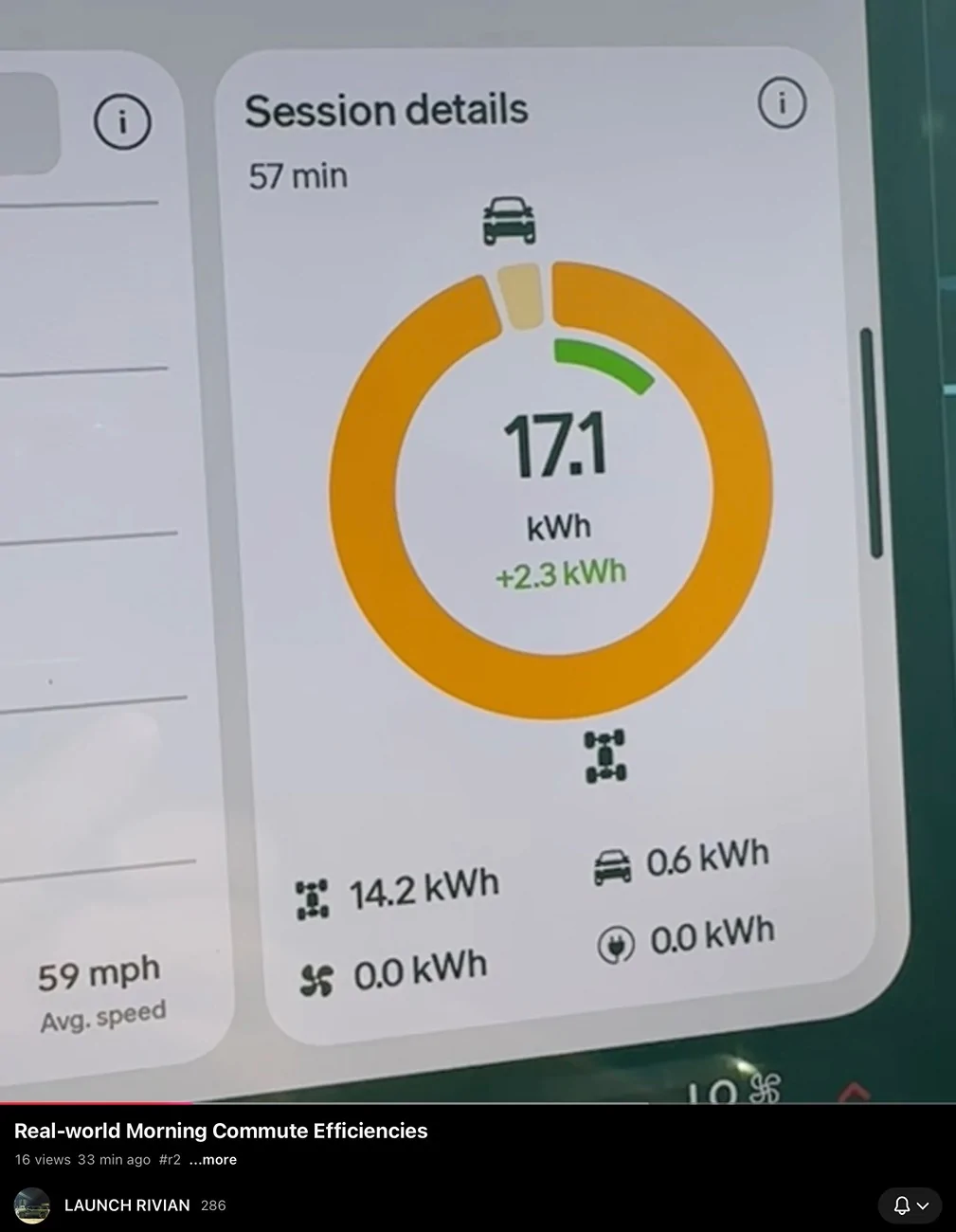
Is there a better way for Rivian to display totals for energy use numbers. I understand the graph, but I’m confused by the big number in the middle. Why is 17.1 listed? Is Rivian is taking the amount of energy used (using the numbers listed at the bottom of the bar) and adding the amount of energy reclaimed using regen or is 17.1 the real number? The energy use numbers at the bottom of the session details bar total 14.8. I think 17.1 is the correct amount of energy used, so the numbers at the bottom of the session details bar should be different (16.5, 0.6). Maybe leave the numbers in the circle as is, but adding “14.8 net” under +2.3 kWh?

Sponsored