Sponsored

2026 R1T Tri - Less 1k miles - ADAC problems - warning icons

wwheelkid

Well-Known Member
Joined
Apr 13, 2023
Threads
23
Messages
113
Reaction score
67
Location
Atlanta, Ga
Vehicles
2026 Rivian R1T Tri
Occupation
Finance
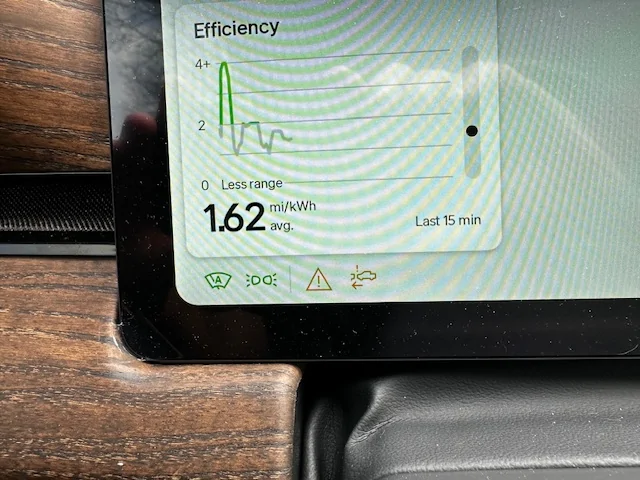
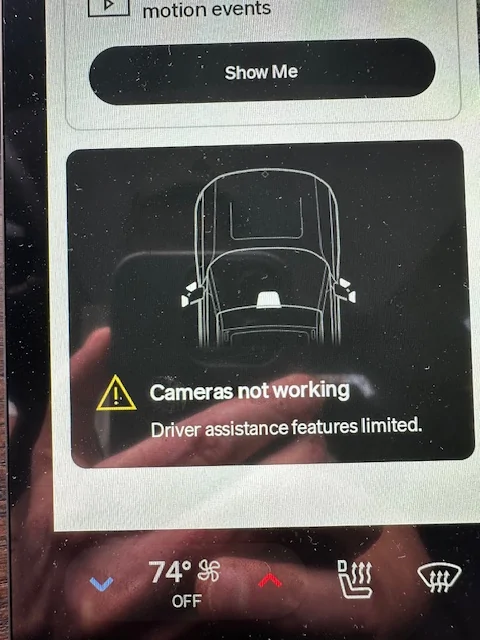
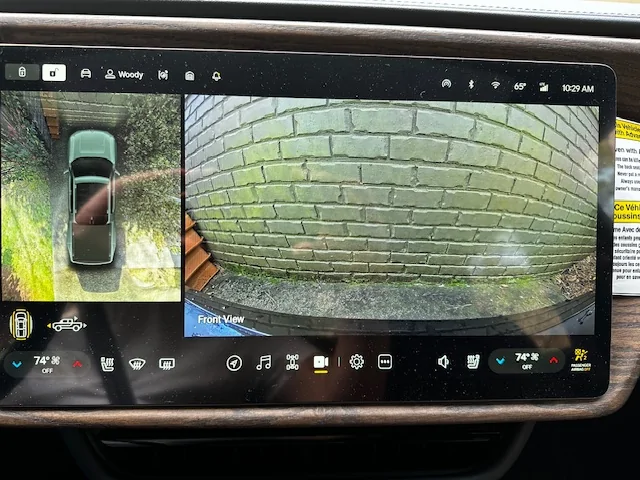
I took my R1T in for service on 3/4 for the same issue that resurfaced today. Nothing was found. Today's (3/7/26) alert said that cameras not working - Driver assistance features limited. So i took a pick of the warning icons, alert message and a picture showing that my cameras appear to be working. I know that simply walking away and coming back will usually fix the issue - but how many times do you do this before requesting a repair service. Also, strangely enough, on my delivery day we had to reboot the computer as the ADAC systems were offline - foreshadowing perhaps. Any thoughts would be greatly appreciated. New service appt 3/16. I documented the alert - noting the time and pressed my profile name to computer the alert - but it didn't seem to do anything - also pressed the hazard button for 10 sec as well. Let's see if they can find something when it goes back in for service.

Rivian R1T R1S 2026 R1T Tri - Less 1k miles - ADAC problems - warning icons IMG_9869


Rivian R1T R1S 2026 R1T Tri - Less 1k miles - ADAC problems - warning icons IMG_9870


Rivian R1T R1S 2026 R1T Tri - Less 1k miles - ADAC problems - warning icons IMG_9871
Sponsored


godfodder0901

Well-Known Member
First Name
Jared
Joined
Mar 12, 2019
Threads
27
Messages
5,748
Reaction score
10,137
Location
Washington
Vehicles
2022 Rivian R1T LE
I took my R1T in for service on 3/4 for the same issue that resurfaced today. Nothing was found. Today's (3/7/26) alert said that cameras not working - Driver assistance features limited. So i took a pick of the warning icons, alert message and a picture showing that my cameras appear to be working. I know that simply walking away and coming back will usually fix the issue - but how many times do you do this before requesting a repair service. Also, strangely enough, on my delivery day we had to reboot the computer as the ADAC systems were offline - foreshadowing perhaps. Any thoughts would be greatly appreciated. New service appt 3/16. I documented the alert - noting the time and pressed my profile name to computer the alert - but it didn't seem to do anything - also pressed the hazard button for 10 sec as well. Let's see if they can find something when it goes back in for service.
IMG_9869.webp


IMG_9870.webp


IMG_9871.webp
FWIW, the camera view you see on the screen is from the bumper, and the ADAS camera is at the top of the windshield. They are not the same camera.
 
Last edited:

Arbitrator

Active Member
First Name
Marc
Joined
Feb 19, 2024
Threads
6
Messages
38
Reaction score
81
Location
Boca Raton Florida
Vehicles
R1S
I took my R1T in for service on 3/4 for the same issue that resurfaced today. Nothing was found. Today's (3/7/26) alert said that cameras not working - Driver assistance features limited. So i took a pick of the warning icons, alert message and a picture showing that my cameras appear to be working. I know that simply walking away and coming back will usually fix the issue - but how many times do you do this before requesting a repair service. Also, strangely enough, on my delivery day we had to reboot the computer as the ADAC systems were offline - foreshadowing perhaps. Any thoughts would be greatly appreciated. New service appt 3/16. I documented the alert - noting the time and pressed my profile name to computer the alert - but it didn't seem to do anything - also pressed the hazard button for 10 sec as well. Let's see if they can find something when it goes back in for service.
IMG_9869.webp


IMG_9870.webp


IMG_9871.webp
FWIW, the camera view you see on the screen is from the bumper, and the ADAS camera is at the top of the windshield. They are not the same camera.
I took my R1T in for service on 3/4 for the same issue that resurfaced today. Nothing was found. Today's (3/7/26) alert said that cameras not working - Driver assistance features limited. So i took a pick of the warning icons, alert message and a picture showing that my cameras appear to be working. I know that simply walking away and coming back will usually fix the issue - but how many times do you do this before requesting a repair service. Also, strangely enough, on my delivery day we had to reboot the computer as the ADAC systems were offline - foreshadowing perhaps. Any thoughts would be greatly appreciated. New service appt 3/16. I documented the alert - noting the time and pressed my profile name to computer the alert - but it didn't seem to do anything - also pressed the hazard button for 10 sec as well. Let's see if they can find something when it goes back in for service.
IMG_9869.webp


IMG_9870.webp


IMG_9871.webp
I had a similar experience with my 2025 R1S. It turned out that the radar detectors inside the rear bumper were not securely attached. I would randomly get similar warning alerts.
 

Rade

Well-Known Member
First Name
Rade
Joined
Sep 19, 2024
Threads
36
Messages
601
Reaction score
768
Location
US - Rhode Island
Website
radmorningcoffee.blogspot.com
Vehicles
2025 Rivian R1T - Large. Delivered on November 23, 2024.
Occupation
Retired
Hard reset should generate an error log for the SC. My R1T nearly bricked in January (every warning light came on). A hard reboot generated the log and cleared it. I have an appointment later this month with the regional SC (if I do not hear back from them by then).
 

godfodder0901

Well-Known Member
First Name
Jared
Joined
Mar 12, 2019
Threads
27
Messages
5,748
Reaction score
10,137
Location
Washington
Vehicles
2022 Rivian R1T LE
Hard reset should generate an error log for the SC. My R1T nearly bricked in January (every warning light came on). A hard reboot generated the log and cleared it. I have an appointment later this month with the regional SC (if I do not hear back from them by then).
No need to reboot for logs. Long press your username on the center screen.
 

Sponsored

Rade

Well-Known Member
First Name
Rade
Joined
Sep 19, 2024
Threads
36
Messages
601
Reaction score
768
Location
US - Rhode Island
Website
radmorningcoffee.blogspot.com
Vehicles
2025 Rivian R1T - Large. Delivered on November 23, 2024.
Occupation
Retired
OP
OP
wwheelkid

wwheelkid

Well-Known Member
Joined
Apr 13, 2023
Threads
23
Messages
113
Reaction score
67
Location
Atlanta, Ga
Vehicles
2026 Rivian R1T Tri
Occupation
Finance
Thanks for the tip!!
I have done that a couple of times - and I think I saw a message saying "diagnosis captured" or something like that - however this time - I long pressed multiple time and never got a message - so not sure that worked - but yes - this is one method and I also have been instructed to push on hold the hazard button for 10 sec as well. Which I did - still not message - so who knows.

Do you guys think it is worth taking into the SC for them to look at it again - as it was just there last week for the same issue - it would be nice to be able to call and discuss with someone - I may see if I can find a phone number to call - but it would be nice to actually talk with an engineer to see what he/she says.;
 

krb1183

Well-Known Member
Joined
Mar 2, 2022
Threads
4
Messages
226
Reaction score
167
Location
Huntsville, AL
Vehicles
2025 R1S
Being that it is so new, i bet there was a factory install issue. I had a similar experience when i picked up my 2025 R1S in August 2024. Multiple random 'camera not working issues' coupled with drivers assistance features not working, etc. Many trips to the SC to calibrate cameras, etc did not end up solving the issue. Strangely, as colder weather started to set in through fall/winter it seemed to be getting worse. They ended up tracing the wiring, continuity checks, and it was at the shop for weeks, a month this time around. They found a bent pin in a connector in the camera circuit in my drivers side mirror, apparently, as the weather got colder it was enough for the pin to lose contact even more frequently. They replaced the drivers side mirror, and it has been completely fine since. But the first 6 months of ownership were rough while they were trying to figure out what was wrong. To the point my wife was asking me when we were going to get rid of it. To Rivian's credit, they did not give up trying to solve the issue.
 

Donald Stanfield

Well-Known Member
First Name
Donald
Joined
Jul 31, 2022
Threads
59
Messages
8,307
Reaction score
16,656
Location
USA
Vehicles
2025 R1S Tri Ascend, 2024 i4 M50
Occupation
Stuff and things
Mine is doing the exact same thing. Keep this post updated because I need mine fixed as well.
 

krb1183

Well-Known Member
Joined
Mar 2, 2022
Threads
4
Messages
226
Reaction score
167
Location
Huntsville, AL
Vehicles
2025 R1S
I took my R1T in for service on 3/4 for the same issue that resurfaced today. Nothing was found. Today's (3/7/26) alert said that cameras not working - Driver assistance features limited. So i took a pick of the warning icons, alert message and a picture showing that my cameras appear to be working. I know that simply walking away and coming back will usually fix the issue - but how many times do you do this before requesting a repair service. Also, strangely enough, on my delivery day we had to reboot the computer as the ADAC systems were offline - foreshadowing perhaps. Any thoughts would be greatly appreciated. New service appt 3/16. I documented the alert - noting the time and pressed my profile name to computer the alert - but it didn't seem to do anything - also pressed the hazard button for 10 sec as well. Let's see if they can find something when it goes back in for service.

IMG_9869.webp


IMG_9870.webp


IMG_9871.webp
Curious, When driving do you see all the cars around you or do you only see the lead car in front of you?
 

Sponsored

OP
OP
wwheelkid

wwheelkid

Well-Known Member
Joined
Apr 13, 2023
Threads
23
Messages
113
Reaction score
67
Location
Atlanta, Ga
Vehicles
2026 Rivian R1T Tri
Occupation
Finance
Curious, When driving do you see all the cars around you or do you only see the lead car in front of you?
Good Q - As i can recall - I did not notice any differences on the screen - so i will keep a look out - I just hope I get a better result than 6 mos. in the shop - which his post (and others) may just help me - as I plan on informing the service advisor the solutions that have been mentioned here. Hopefully a few more get posted so they can track down these issues one by one until they find it. I will keep you guys informed.
 

Mathme

Well-Known Member
First Name
Matt
Joined
Jul 25, 2022
Threads
3
Messages
1,375
Reaction score
1,808
Location
Los Altos, CA
Vehicles
R1T: El Cap, OC, 20AT, Off road package
Occupation
High Tech
The next time it happens, press and hold your profile name on the center display (I believe yours is Woody based on the screen shots above). This will capture the logs for the tech to review. Also make a note of the day/time so you can point them to the correct log readings.
 
OP
OP
wwheelkid

wwheelkid

Well-Known Member
Joined
Apr 13, 2023
Threads
23
Messages
113
Reaction score
67
Location
Atlanta, Ga
Vehicles
2026 Rivian R1T Tri
Occupation
Finance
Just took it in to the service center - yesterday 3/16 - and I'll let you guys know what they find - I am not too hopeful as the warning has only appeared once. But I did capture with some pictures above - so i hope they can see the error message in the computer log.
 
OP
OP
wwheelkid

wwheelkid

Well-Known Member
Joined
Apr 13, 2023
Threads
23
Messages
113
Reaction score
67
Location
Atlanta, Ga
Vehicles
2026 Rivian R1T Tri
Occupation
Finance
Update - they found a module they want to replace - part was ordered and came in today - 3/20 - was dropped off on 3/16 - they need to calibrate the module - which, per Rivian, will take some significant time - so hopefully by late Monday or Tuesday I should get it back.
 
OP
OP
wwheelkid

wwheelkid

Well-Known Member
Joined
Apr 13, 2023
Threads
23
Messages
113
Reaction score
67
Location
Atlanta, Ga
Vehicles
2026 Rivian R1T Tri
Occupation
Finance
Got the truck yesterday - and it seems to be working only time will tell - however the truck shows my name but with no keys assigned - but the app shows the digital key is set up - removed both the phone and the apple watch - also the card from the apple wallet - and boom - I can NOT set up my phone as the apple wallet is not allowing Rivian to put the Rivian card in the wallet - called Rivian and after multiple attempts this has not be resolved - escalating this up the ladder - luckily the key card works...whew...
Sponsored


Top