Sponsored

How can I remove PAAK and use the fob only? PAAK can F all the the way off

Rade

Well-Known Member
First Name
Rade
Joined
Sep 19, 2024
Threads
36
Messages
614
Reaction score
780
Location
US - Rhode Island
Website
radmorningcoffee.blogspot.com
Vehicles
2025 Rivian R1T - Large. Delivered on November 23, 2024.
Occupation
Retired
PaaK is really starting to piss me off. In the first months I had the R1T, it would lose the connectivity to the truck occasionally. Now it's happening once a week; both to my Android phone and to my husbands iPhone. I always have my card key in my wallet, and I am getting good at "Delete the key from the app and re-add the key through the app", but I should not have to do that THIS MUCH! I can see if there is some app update, but nothing like that happens and the PaaK stops working.
Sponsored
 

electruck

Well-Known Member
Joined
Oct 6, 2019
Threads
74
Messages
4,169
Reaction score
7,744
Location
Dallas, TX
Vehicles
2023 Rivian R1S
For the unlucky people having problems with PaaK, please provide the phone and OS version you are using.
 
OP
OP
2kwik4u

2kwik4u

Well-Known Member
First Name
Michael
Joined
Jan 8, 2025
Threads
11
Messages
841
Reaction score
1,094
Location
Western NY State
Vehicles
2024 Rivian R1T ; 2018 Nissan Rogue
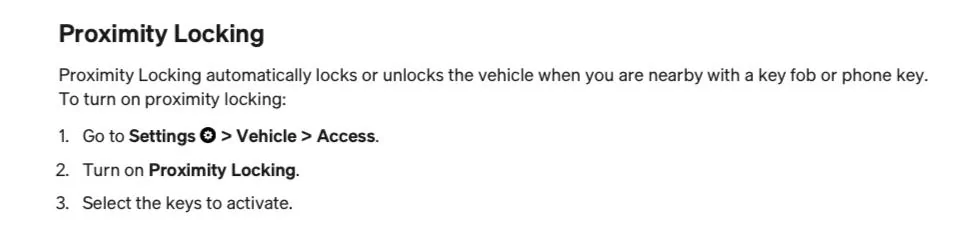
There’s one slider in the Settings -> Vehicle -> Access menu where all you had to do was turn off phone PAAK and leave FOB on.

First page of the table of contents in your manual links you to:

IMG_4824.jpeg


I only use my FOB because PAAK was too inconsistent. When the FOB doesn’t work great, I sometimes take it out of my pocket and move it closer to the door handle.

I hope the rest of your week is better than your weekend.
I had tried this when I first got he truck, because I had watched another Rivian user fight with PAAK.

The problem here is that when doing this (as I have it setup now), and disabling proximity lock with the phone and leaving the fob enabled; is that the truck would STILL sometimes choose to use the fob and sometimes use the phone as the actual "key" to drive the vehicle. This lead to all sorts of wonky behavior between BT not pairing properly between truck and phone, or at all, as well as things like leaving the fob in the truck while I ran into the store, and the truck "turning off" with 3 other people in the car because it thought I took the "key" away with me.

SO, this setting only addresses PART of the problem, not the whole of the problem. I really want my phone to NOT be any level of key for the truck. I don't want them integrated at all, however it hamstrings parts of the app that I use, and forces me into it.

We'll see how this week goes. So far, this morning, it worked OK to get me to the office and out of the driveway. However it did take two attempts to wake and open the truck in the driveway this morning, I'm guessing the truck was asleep when I walked out, and it had to wake, then pair with BT, then allow the open command to be activated.
 

NY_Rob

Well-Known Member
First Name
Rob
Joined
Feb 9, 2022
Threads
23
Messages
5,435
Reaction score
8,016
Location
long island
Vehicles
Model 3 LR AWD, BMW i3 REX, 2024 Rubicon 4xe
Occupation
IT
^ Sorry this happened to you Op, I also disabled PAAK after trying it for a short period. I found the Fob 99.999% reliable and the one time the Fob failed to unlock my R1T (in 2yrs of ownership) the card didn't work either. In another thread I was just explaining/defending my desire to also have cabin access via a physical key for situations like this where a hard/full reboot would possibly fix whatever software gremlin was mucking up access comms.

My daily driver (Wrangler 4xe) has a physical key built in to the Fob and it really relieves a lot of worry about being locked out of the vehicle.

PS.. yeah, the constant phone app nagging "set up PAAK now" is absolutely ridiculous if you choose to use the app without using PAAK. It's like the app devs never even remotely considered the possibility the maybe some people don't want to use PAAK. How about a simple "don't remind me about this again" option in the app?
 
Last edited:

Sponsored

OP
OP
2kwik4u

2kwik4u

Well-Known Member
First Name
Michael
Joined
Jan 8, 2025
Threads
11
Messages
841
Reaction score
1,094
Location
Western NY State
Vehicles
2024 Rivian R1T ; 2018 Nissan Rogue
My daily driver (Wrangler 4xe) has a physical key built in to the Fob and it really relieves a lot of worry about being locked out of the vehicle.
My Audi was the same way. RF remote in the fob with a physical key hidden inside. Door handle had capacitive touch sensors that would lock/unlock if I had the fob within range. Door handle on the drivers door also had a small cover that could be easily popped off allowing access to a physical key hole, that turned a physical mechanism to release the door and allow access. All the "beauty" of a clean looking exterior with all the security and convenience of a physical system.

Had that system fail ONCE in the 3.5yrs I owned it, and that was because I put the battery in the fob in backwards. Physical key let me in, and I was able to start the car by holding the fob to the console and pushing the start button.

Also, that system didn't lock/unlock every time I walked past it in the garage. The physical touch portion of the system really worked well there for maintaining a state previously set by the operator.
 

NY_Rob

Well-Known Member
First Name
Rob
Joined
Feb 9, 2022
Threads
23
Messages
5,435
Reaction score
8,016
Location
long island
Vehicles
Model 3 LR AWD, BMW i3 REX, 2024 Rubicon 4xe
Occupation
IT
^ our i3 has the same access system.. a key built in to the Fob. If needed you use the tip of the built in key to pry off a little cover on the door handle to unlock the car manually. It's a great system and you don't see the lock face till you pry off the little beauty cover. Simple, reliable and still looks great.
 

mudito

Well-Known Member
First Name
Aldo
Joined
Jul 30, 2024
Threads
18
Messages
1,011
Reaction score
1,414
Location
Texas
Vehicles
Rivian R1T
I had issues with PaaK so what I do is to disable Proximity for the PaaK, and also in my Android Rivian App, I removed "Nearby Devices" permission for it so the truck NEVER recognizes my phone as it will otherwise wake while sitting in my garage.

I use the KeyFob, and as a backup, I have the key card in my wallet. Finally, if a last resort is required, I can re-enable Nearby Devices for the App and drive away using my phone.

100% understand your frustration. I was frustrated in a similar way when my 12V died and I had my work laptop inside and couldn't start my working day until I was able to Jump it and open the doors.
 

RandomMcRandomFace

Well-Known Member
Joined
Aug 25, 2023
Threads
3
Messages
237
Reaction score
521
Location
Elsewhere
Vehicles
R1S
It is so wild how different everyone’s experiences are. I’ve never (not one time) used the FOB. PAAK is as good as it was on my Tesla at this point. My main frustration is it is too good. I’ll walk by my car and it unlocks and locks (which is of course fine) even when I am not trying to unlock it.

(Gen 1 R1S w/ an iPhone)
 
OP
OP
2kwik4u

2kwik4u

Well-Known Member
First Name
Michael
Joined
Jan 8, 2025
Threads
11
Messages
841
Reaction score
1,094
Location
Western NY State
Vehicles
2024 Rivian R1T ; 2018 Nissan Rogue
I had issues with PaaK so what I do is to disable Proximity for the PaaK, and also in my Android Rivian App, I removed "Nearby Devices" permission for it so the truck NEVER recognizes my phone as it will otherwise wake while sitting in my garage.

I use the KeyFob, and as a backup, I have the key card in my wallet. Finally, if a last resort is required, I can re-enable Nearby Devices for the App and drive away using my phone.

100% understand your frustration. I was frustrated in a similar way when my 12V died and I had my work laptop inside and couldn't start my working day until I was able to Jump it and open the doors.
First I've heard of the the permission disabling. I had seen it elsewhere in searches, but it was vague and seemed to be for Apple devices, not android.

I've removed those permissions on mine, and we'll see what shakes out. I'll report back.

Thank you!

In other thoughts, I had the 12V die with my wallet inside last week. I was unable to access my office keys because they were in the console and Rivian didn't want me "jump starting" the truck without a tech there. So they sent a tow truck driver out at 11pm that opened the truck by placing an airbag in the door frame and using a long metal rod to pull the door handle. Got my wallet out of the floor storage area, but couldn't access my office keys in the console because the 12V latch on the console lid wouldn't actuate. I've added "12V console latch" to the "Dumb shit Rivian shouldn't have made digital" list.
 

Sponsored

GRC

Well-Known Member
First Name
GC
Joined
Dec 18, 2022
Threads
14
Messages
239
Reaction score
175
Location
GTA Ontario
Vehicles
2024 R1S
Occupation
still figuring it out
Clubs
 
For the unlucky people having problems with PaaK, please provide the phone and OS version you are using.
I realize you are asking those for those that are having problems but I wanted to share config for someone NOT having problems also in case that helps getting to the bottom of this.

Samsung Galaxy Flip6 and no issues with PaaK Gen1
once every few months, the locks don't open as I get to the driver's door and reach for the phone in my pocket and as I am unlocking my phone it opens the door handles so a few second delayb but 99% of the time it works flawlessly for me.
 
Last edited:
OP
OP
2kwik4u

2kwik4u

Well-Known Member
First Name
Michael
Joined
Jan 8, 2025
Threads
11
Messages
841
Reaction score
1,094
Location
Western NY State
Vehicles
2024 Rivian R1T ; 2018 Nissan Rogue
I realize you are asking those for those that are having problems but I wanted to share config for someone NOT having problems also in case that helps getting to the bottom of this.

Samsung Galaxy Fold6 and no issues with PaaK Gen1
once every few months, the locks don't open as I get to the driver's door and reach for the phone in my pocket and as I am unlocking my phone it opens the door handles so a few second delayb but 99% of the time it works flawlessly for me.
What version and build of Android?

I'm not completely oblivious to the premise that I'm running a few generations older phone here and that could be complicating issues.
 

GRC

Well-Known Member
First Name
GC
Joined
Dec 18, 2022
Threads
14
Messages
239
Reaction score
175
Location
GTA Ontario
Vehicles
2024 R1S
Occupation
still figuring it out
Clubs
 
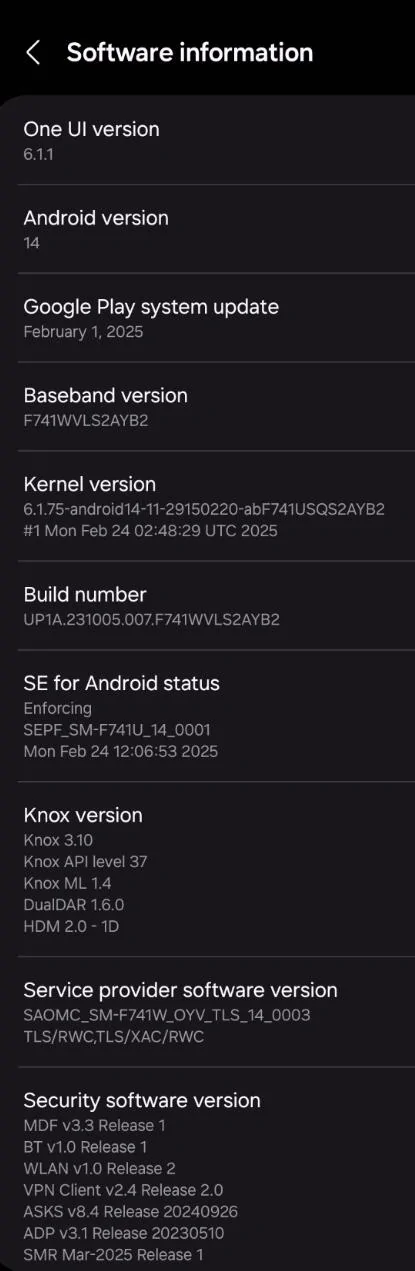
What version and build of Android?

I'm not completely oblivious to the premise that I'm running a few generations older phone here and that could be complicating issues.
Android 14 - see additional info in the screenshot
I know you have a Gen2 and there are changes in the PAAK in Gen2 so that should also be considered.
Rivian R1T R1S How can I remove PAAK and use the fob only? PAAK can F all the the way off 1743442157826-5q
 
OP
OP
2kwik4u

2kwik4u

Well-Known Member
First Name
Michael
Joined
Jan 8, 2025
Threads
11
Messages
841
Reaction score
1,094
Location
Western NY State
Vehicles
2024 Rivian R1T ; 2018 Nissan Rogue
Android 14 - see additional info in the screenshot
I know you have a Gen2 and there are changes in the PAAK in Gen2 so that should also be considered.
Looks like the same version of Android, but a different build than I'm on.

I'm in a Gen 1 (2024) R1T.
 

GRC

Well-Known Member
First Name
GC
Joined
Dec 18, 2022
Threads
14
Messages
239
Reaction score
175
Location
GTA Ontario
Vehicles
2024 R1S
Occupation
still figuring it out
Clubs
 
Looks like the same version of Android, but a different build than I'm on.

I'm in a Gen 1 (2024) R1T.
have you always had this issue? We got our R1S last year (2024 also) and just hit the 1 year mark and it works fine on my android and my wife's iphone. Having read through other posts on this forum there have been 'hardware issues' that come across intermittently....
Sponsored


Top