Sponsored

echerod

Well-Known Member
First Name
Rodolfo
Joined
Mar 23, 2021
Threads
50
Messages
204
Reaction score
422
Location
Costa Rica
Vehicles
Rivian R1S, Tesla Model 3, BMW i3
Occupation
Finance

godfodder0901

Well-Known Member
First Name
Jared
Joined
Mar 12, 2019
Threads
27
Messages
5,760
Reaction score
10,148
Location
Washington
Vehicles
2022 Rivian R1T LE

Condor

Well-Known Member
First Name
CJ
Joined
Sep 5, 2021
Threads
5
Messages
81
Reaction score
62
Location
Cincinnati, OH
Vehicles
Tesla Model 3, Rivian R1S
My T is connected to my android phone hotspot and can see on my phone that my T is connected. My T shows I'm connected to my phone wifi. However, when I switch to drive, my wifi disconnect. My phone hotspot shows no device is connected. Not sure why my T doesn't stay connected.
same and I’m using an iPhone
 

rutiger

Well-Known Member
Joined
Jul 4, 2023
Threads
8
Messages
181
Reaction score
245
Location
WA
Vehicles
2 x '25 Tri S's, '25 750S

YellowR1T

Well-Known Member
First Name
Brian
Joined
Oct 12, 2020
Threads
3
Messages
132
Reaction score
99
Location
83704
Vehicles
R1T
Occupation
Retired Air Force
Clubs
 
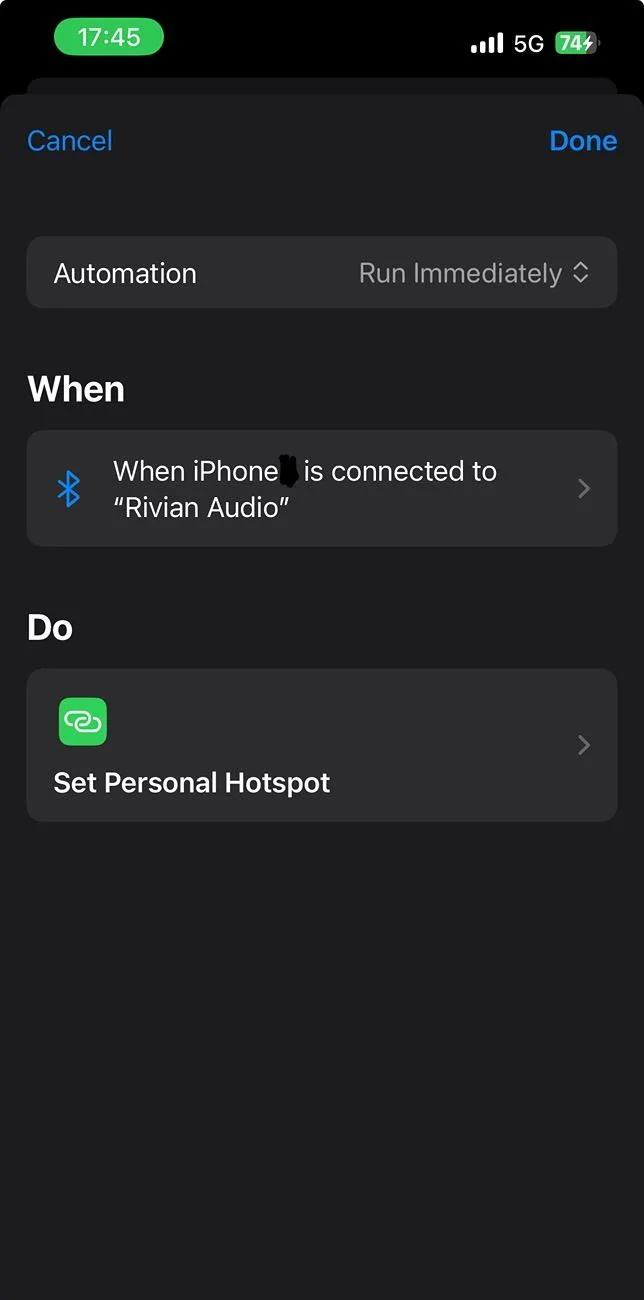
Using the Shortcuts app on iOS, you can set up a very simple automation to activate your iPhone hotspot for your Rivian.

Once your Rivian is connected to your hotspot once, it remembers it. This automation seems to re-activate the hotspot on your phone, and the Rivian automatically connects.

The action is set personal hotspot to “on “.

This will allow your infotainment apps to work normally without paying for Connect+.

IMG_9003.jpeg


Updated with video showing how:


In this video, I show you how to configure Wi-Fi tethering from your phone hotspot to your Rivian vehicle so you can use the native streaming apps and not have to pay for Connect+. This requires your Rivian to be running software 2024.27 or higher.
One critical step was missing (stumbled on it after too much time): once the shortcut app is open, go to the bottom of the screen and pick the middle option for automations. If you stay in the shortcut section, you will go nuts trying to set this up and mirror the excellent example posted.
 

Sponsored

bhlackey

Well-Known Member
Joined
Feb 28, 2022
Threads
6
Messages
150
Reaction score
268
Location
San Diego
Vehicles
R1T G1, KTM SX-450F
This is handy, but also could be limiting. Not all phone plans have unlimited Hotspot data. Also if someone else is driving the car and you're not there, No connectivity for them.
 

RivAW

Well-Known Member
First Name
Alex
Joined
Mar 9, 2023
Threads
1
Messages
871
Reaction score
852
Location
MA
Vehicles
R1T, Glacier White, Black Mountain, Black AT 20s,
Clubs
 
What is the advantage or gain from doing so?
It’s for people that don’t want to start paying $150/year for “connect+”, which is essentially the paywall Rivian called and “update” to start charging for previously included LTE service and the items that use it
 

TexasBob

Well-Known Member
First Name
Bob
Joined
Jan 15, 2022
Threads
49
Messages
1,210
Reaction score
2,671
Location
Houston
Vehicles
2024 R1T DM LRG, 2025 R1S Dune
It’s for people that don’t want to start paying $150/year for “connect+”, which is essentially the paywall Rivian called and “update” to start charging for previously included LTE service and the items that use it
The big question I have is whether all the software associated with C+ will work with tethering (e.g. built-in Streaming, satellite maps, alexa connected commands).
 

Rickmc

Well-Known Member
First Name
Rick
Joined
May 11, 2023
Threads
9
Messages
103
Reaction score
117
Location
Centreville, VA
Vehicles
2022 R1T
Occupation
Vacation Rentals
The big question I have is whether all the software associated with C+ will work with tethering (e.g. built-in Streaming, satellite maps, alexa connected commands).
From what I have read, no. No satellite maps any longer and no Alexa other than "basic" commands which are limited to in vehicle commands like "open frunk".

Pretty sad they put those behind the paywall if you are tether and using your own data that you already pay for on the phone.
 

Sponsored

Rizzian

Well-Known Member
First Name
Eric
Joined
Apr 25, 2024
Threads
8
Messages
155
Reaction score
196
Location
NE Florida
Vehicles
'24 R1S Adventure Quad, '93 Honda Del Sol
Occupation
Healthcare IT
Clubs
 
Cool! I'm already paying for 5G connectivity with iPhone, so it seems kind of dumb to pay an additional $15 a month for a slower (LTE) connection, unless Rivian found a way to get my Gen1 R1S on a 5G network with my Connect+ subscription.
 

Tim-in-CA

Well-Known Member
Joined
Sep 30, 2021
Threads
46
Messages
1,795
Reaction score
3,434
Location
So Cal
Vehicles
Gen 1 R1S, Lucid Air, T-Bird
I have an Eero node in my garage, so hopefully I won't have to manually disconnect from my hotspot as I just keep it on all the time. I expect that when I'm am out of the garage, the Wifi strength from the Eero is stronger than my phone's hotspot connection. I don't really need to fiddle with this until October comes around, but I don't plan to as currently the "value" isn't there yet, perhaps when remote viewing of GG videos are enabled, I'll reconsider.

Using your automation idea, don't you also need an automation to turn hotspot off when Rivian?
 
Last edited:

keithcroshaw

New Member
First Name
Keith
Joined
Jul 30, 2024
Threads
0
Messages
3
Reaction score
5
Location
NJ USA
Vehicles
Jeep Gladiator (Spousal R2 Reservation)
From what I have read, no. No satellite maps any longer and no Alexa other than "basic" commands which are limited to in vehicle commands like "open frunk".

Pretty sad they put those behind the paywall if you are tether and using your own data that you already pay for on the phone.
That's my fear too based off of what I read.
The tethering seems to be a bare minimum option tossed to the common folk to make them frustrated and give in to pay for C+.
Even though we're already paying for cellular and Apple Music (or whatever).
I don't believe in free updates, there's no free lunch, but without those two services I won't mention that Rivian is lacking that most vehicles come with to fill this void current users are getting less functionality than vehicles that are on the market and now have to pay more.
I think Rivian is in a period where they can play with this, people who are willing to spend as much as an R1T/S cost are likely to just pay for the service, but once us R2 plebs show up (if I do) it'll be another story.
 

PappaBolt

Well-Known Member
First Name
Don
Joined
Aug 20, 2022
Threads
44
Messages
1,165
Reaction score
1,681
Location
Bainbridge Island, WA
Vehicles
R1S, Corvette, 911
Occupation
Tech
Clubs
 
I must be missing something. I enabled personal hotspot in iOS, but it doesn’t appear as a selection in the Rivian available WiFi list. Anyone else?

EDIT: no special characters allowed in your device name. A rivian bug. In my case I removed an apostrophe from the device name and it then appeared in the available WiFi list on the Rivian screen.
 
Last edited:

schlosrat

Well-Known Member
First Name
Steve
Joined
Jun 23, 2024
Threads
6
Messages
191
Reaction score
179
Location
Vancouver, WA
Vehicles
2024 R1T Dual Large
Occupation
Engineer
Can you write up some steps on how to do this? I am iPhone noob
This is probably not an obvious process at all for those of us who have not yet set up a personal automation. Here are the steps I followed to get to the screenshot the OP posted.

  1. Start the shortcuts app on your iOS device
  2. Make sure you're on the first screen. For me, the app started out inside a folder full of shortcuts and not on the first screen (helpful, isn't it?). If, at the top of your screen, you see "< Shortcuts" then click that to get to the first screen for the shortcuts app. If you're at the first screen, then at the bottom of your screen you'll see icons with the labels "Shortcuts", "Automation", and "Gallery".
  3. Click on the Automation icon/text at the bottom of the screen
  4. On the Automation screen, click the + icon in the upper right to add a new automation
  5. On the Personal Automation screen, scroll down and click on Bluetooth. The gray text below will read "E.g. "When my iPhone connects to Airpods". We're going to make an automation that will happen whenever your phone connects to Rivian Audio via Bluetooth, so this is the one we want.
  6. On the When screen where it says "Device" click on "Choose"
  7. Under "MY DEVICES" pick "Rivian Audio". You'll get a blue check mark next to that, after which you can click Done
  8. Make sure "Is Connected" is selected and not "Is Disconnected"
  9. Below that make sure "Run Immediately" is selected and not "Run After Confirmation"
  10. Click Next in the upper right
  11. On the "When iPhone xxx is connected to "Rivian Audio" enter "Set Personal Hotspot" in the search text. Pick that gadget when the search has found it
That's it. You're done. =)
Sponsored


Top