Sponsored

Question about the Rivian app for R2

JPatton

Member
Joined
Apr 22, 2026
Threads
1
Messages
10
Reaction score
16
Location
Salt Lake City, UT
Vehicles
2019 RAV4 hybrid XSE
Occupation
Speech language pathologist
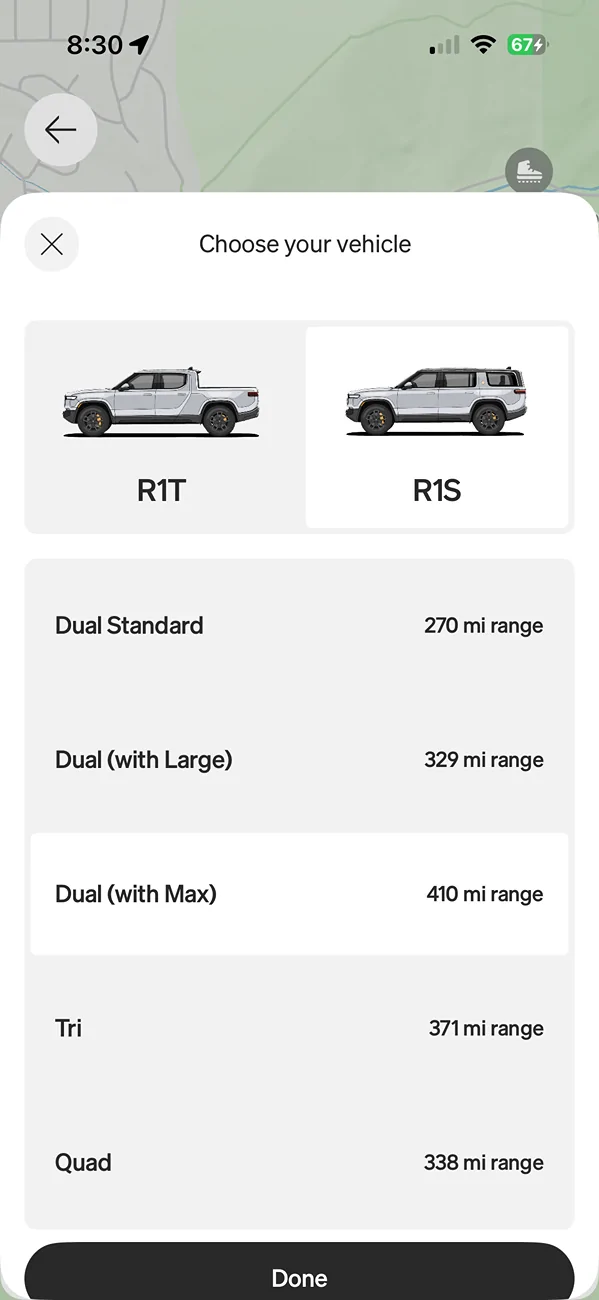
I do not yet own Rivian, but will be getting an R2 just as soon as I can get my paws on one this fall. In the meantime, I have downloaded the Rivian app to manage my reservation. The trip planner is something I would enjoy playing around with in the app to see how a projected road trip might be accomplished in the R2 but right now I can only choose from the R1S and the R1T when selecting a vehicle to model a road trip with. Is anybody able to see the R2 in the trip planner or is it just not there yet? Thanks!
Sponsored

 

morph860

Well-Known Member
Joined
May 30, 2026
Threads
1
Messages
62
Reaction score
64
Location
NSB, FL
Vehicles
‘24 Wrangler 4xe, Rivian R2 reservation
I only see those in my app as well. I'm only a reservation holder right now too.
 

WoodChips

Active Member
Joined
Apr 11, 2026
Threads
1
Messages
30
Reaction score
24
Location
Idaho
Vehicles
'04 Ram 1500, '06 XB, R2 waiting list
Occupation
Truck Driver
I have been using ABRP to check the distances I am I more likely to drive. It was mentioned in another thread and it has some nice options you can play with.

https://abetterrouteplanner.com/

Like yourself I have downloaded the Rivian app but without a vehicle it's limited, though I can see my order number and should be able to use it to "build" my vehicle when my window opens.

*The R2 will by my first EV, the R3 will probably be my second.
 
OP
OP
JPatton

JPatton

Member
Joined
Apr 22, 2026
Threads
1
Messages
10
Reaction score
16
Location
Salt Lake City, UT
Vehicles
2019 RAV4 hybrid XSE
Occupation
Speech language pathologist
I have been using ABRP to check the distances I am I more likely to drive. It was mentioned in another thread and it has some nice options you can play with.

https://abetterrouteplanner.com/

Like yourself I have downloaded the Rivian app but without a vehicle it's limited, though I can see my order number and should be able to use it to "build" my vehicle when my window opens.

*The R2 will by my first EV, the R3 will probably be my second.
Thanks for that link!
 

Sponsored

dduffey

Well-Known Member
First Name
David
Joined
Apr 1, 2022
Threads
19
Messages
446
Reaction score
424
Location
Texas
Vehicles
R1T Quad LE, R2 LE
Yes, I can swipe between vehicles and get routing and charging for the R2 or R1T.
 

SANZC02

Well-Known Member
First Name
Bob
Joined
Feb 11, 2021
Threads
51
Messages
7,568
Reaction score
12,978
Location
California
Vehicles
Tesla Model S, LE - R1S, LE - R2
Occupation
Retired
I do not yet own Rivian, but will be getting an R2 just as soon as I can get my paws on one this fall. In the meantime, I have downloaded the Rivian app to manage my reservation. The trip planner is something I would enjoy playing around with in the app to see how a projected road trip might be accomplished in the R2 but right now I can only choose from the R1S and the R1T when selecting a vehicle to model a road trip with. Is anybody able to see the R2 in the trip planner or is it just not there yet? Thanks!
I could not see the R2 until we picked ours up and then it was available as a selection.

My suggestion, if you want to play around with routes, use (ABRP) they have an app you can put on your phone or tablet, there is also a web site you can use on a PC.

I’ve done many long trips in my EVs and most of my planning has been with this APP. There are numbers in there for the R2 for range and selecting it will direct you to R2 compatible chargers along the routes.
 

dduffey

Well-Known Member
First Name
David
Joined
Apr 1, 2022
Threads
19
Messages
446
Reaction score
424
Location
Texas
Vehicles
R1T Quad LE, R2 LE
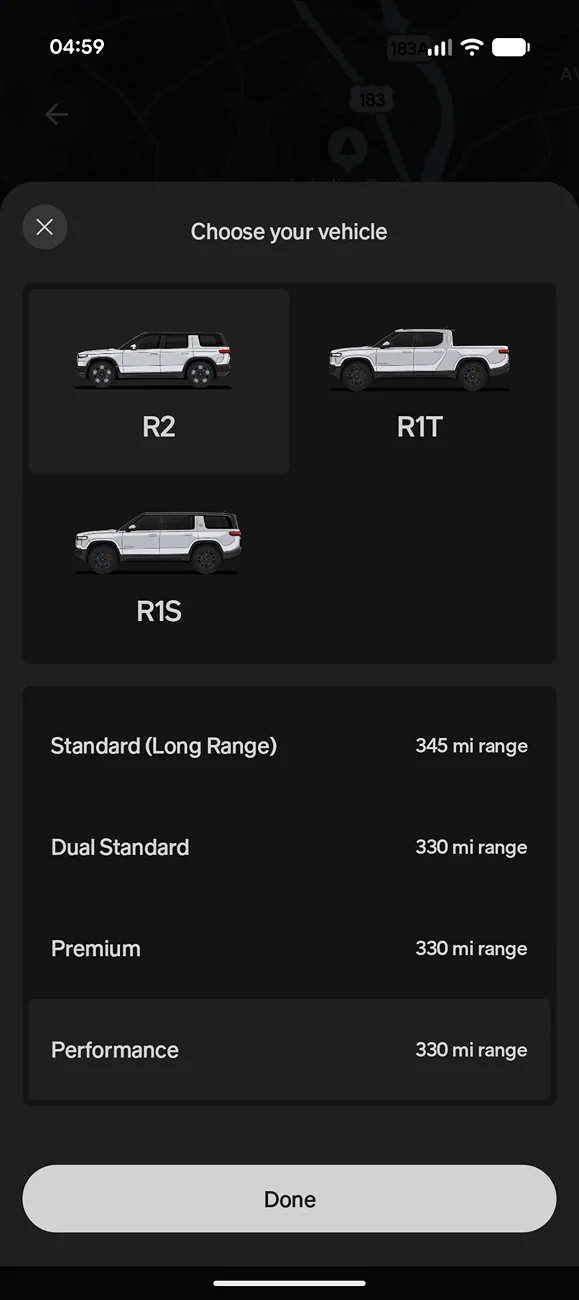
But no R1S? This is what I see:
I see all variants of R1T/S and R2 under "plan a trip", but I can also use the "navigate" button on each of the vehicles I own in the app and swipe to, and it defaults to that specific model, config and drive settings for planning. I don't own an R1S which is why I didn't mention it. If I plan and save a route when on one vehicle, I can open that route in either vehicle in the app and it adjusts to its capabilities automatically without having to choose the model and config.

Rivian R1T R1S Question about the Rivian app for R2 92


It's the one thing that is done pretty well with multiple vehicles. I wish the key card and bluetooth worked as well for multi driver multiple car household.

Oh, I found a bug where I can choose sport mode on R1T but not R2 ... submitting bug.
 
Last edited:

Sponsored

aak7268

Well-Known Member
First Name
Anthony
Joined
Jun 17, 2026
Threads
6
Messages
55
Reaction score
127
Location
Sarasota, FL
Vehicles
R2
Occupation
Writer
Yeah the app isn't updated to have the R2 as a vehicle in the Plan tile, which is weird because I certainly can plan a trip using the regular function for my vehicle, so the data does exist.
 

JungGravy

Member
Joined
May 1, 2024
Threads
0
Messages
15
Reaction score
9
Location
Georgia
Vehicles
'22 Grand Cherokee 4xe Trailhawk
Occupation
Homemaker
I'm only a rez holder, but the Rivian app shows all 3 vehicles as options, and route planning works (by variant but not by drive mode). Problems I see are 1) ltd selection of charging networks 2) no ability to choose min interim SOC. I don't trust network info on up status and availability enough to go to 5%... especially in very rural areas
 

Mos Eisley

Well-Known Member
First Name
Chris
Joined
Feb 24, 2026
Threads
32
Messages
698
Reaction score
1,214
Location
Minnesota
Vehicles
Mazda CX-5, CX-30 & R2 on the way!
Occupation
Marketing & Sales Consultant, Freelance Photographer
I'm only a rez holder, but the Rivian app shows all 3 vehicles as options, and route planning works (by variant but not by drive mode). Problems I see are 1) ltd selection of charging networks 2) no ability to choose min interim SOC. I don't trust network info on up status and availability enough to go to 5%... especially in very rural areas
I'm a rez holder and the app only shows me R1T and S. No option to slide over to R2 🤷 iPhone, app v3.14.0
Sponsored


Top