Sponsored

Key Fob issues?

smashweights

Well-Known Member
Joined
Oct 28, 2025
Threads
20
Messages
126
Reaction score
121
Location
USA
Vehicles
2022 Rivian R1T Launch Edition
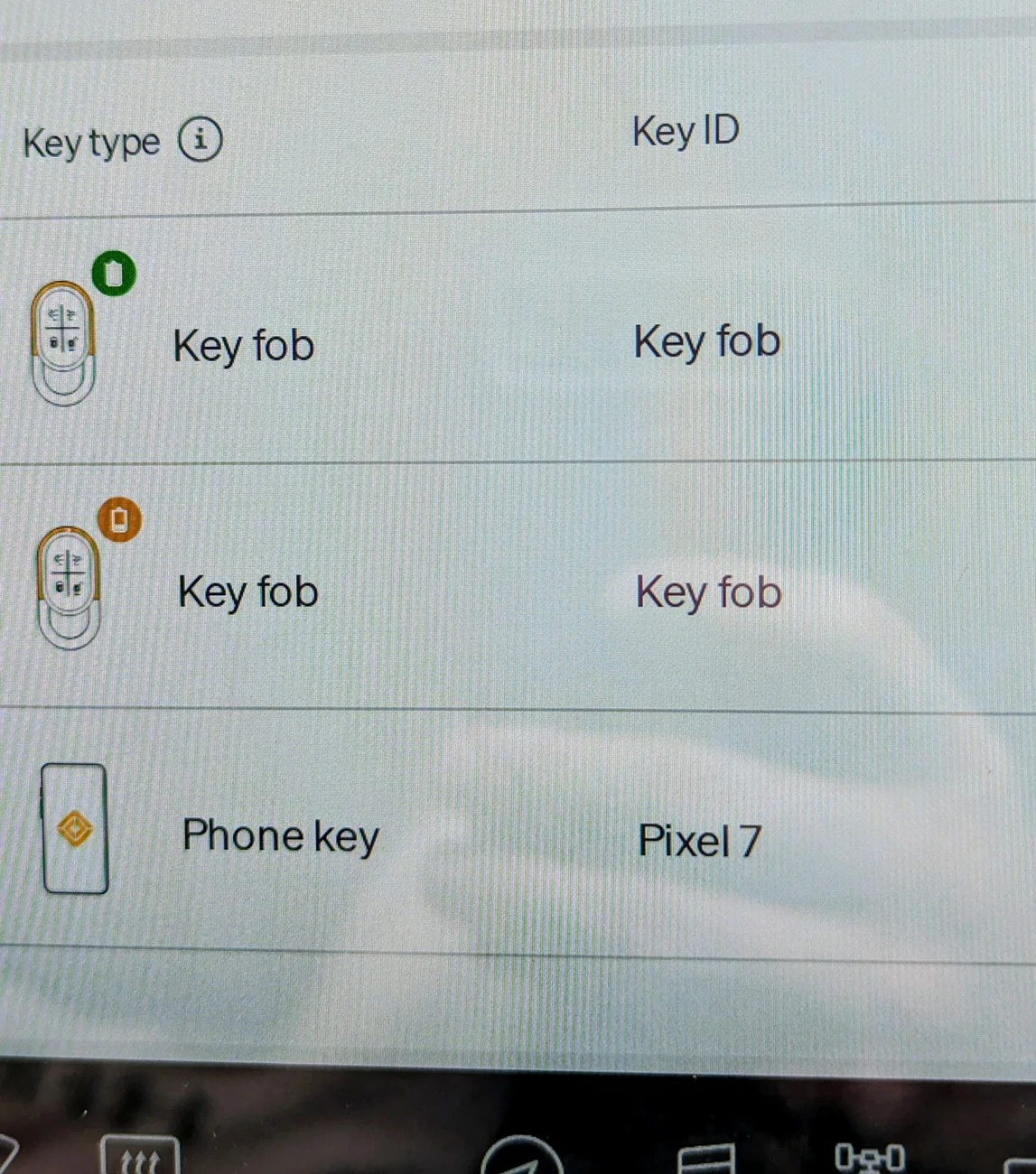
Me again, I have a new to me '22 R1T and the truck, even after transferring ownership and resetting the infotainment still shows two keyfobs. The one I have is brand new and was programmed to the car by Rivian just this week because the original was missing when I got it.

It works great but I have two "issues"

1. There's still a key fob registered to the car that I don't have. Is there a way to remove that? I don't like the idea there's a key floating around out there my car will accept. I was able to disable a key card I don't have in the app but keyfobs seem different in options. One fob shows lower battery, which would be odd for my current fob since it's brand new?

2. Even when using the fob, the infotainment shows unknown version and seems to act like the fob isn't in the truck. Any suggestions? I updated to 2025.38.0 this week and full reset the truck to fix some connectivity issues as well.

Rivian R1T R1S Key Fob issues? PXL_20251101_171812505~2
Sponsored


aloha808

New Member
Joined
Aug 29, 2025
Threads
0
Messages
2
Reaction score
1
Location
Orlando FL
Vehicles
2025 R1T
Clubs
 
Did you try from the app itself? Go down to Security and Access button, then drivers and keys, select the driver with the old fob, then select the old fob, and at the bottom deactivate key. I dont have a key fob to see if that works, but as a software architect that is where I would assume it to be.
 
OP
OP
smashweights

smashweights

Well-Known Member
Joined
Oct 28, 2025
Threads
20
Messages
126
Reaction score
121
Location
USA
Vehicles
2022 Rivian R1T Launch Edition
Did you try from the app itself? Go down to Security and Access button, then drivers and keys, select the driver with the old fob, then select the old fob, and at the bottom deactivate key. I dont have a key fob to see if that works, but as a software architect that is where I would assume it to be.
Unfortunately there's a few issues, first there's no way to tell which of the two fobs is the one I actually have as there is no identifiers like the alphanumeric code on the key cards. Second, the only option is to reassign the key fob to another driver profile on my account.
 

Singletracker

Well-Known Member
Joined
Mar 10, 2022
Threads
39
Messages
1,303
Reaction score
1,274
Location
NV
Vehicles
2023 R1T QM w/20” A/T’s
I lost a fob and had it replaced. My Rivian app still shows the original fob, but shows it is as inactive. I’m not worried about any security issues, as I know roughly where it was lost and it poses no threat. As to identifying which of your fobs is which, remove the battery from your current fob. The app should identify that fob as having no battery. Rivian should be able to deactivate the missing fob. I’m assuming they also have serial #’s on those fobs.

If you go into you truck and go to System>Access you will see what keys are active. In my case, while the missing inactive fob appears in my App, it does not appear in my truck. If both of your fobs show up as active, there is the option to Lock/Unlock any key. You could lock one fob and see how your fob reacts. This would solve the identity problem and you can lock the missing fob. I would check with Rivian to make sure that by locking your fob it doesn’t require a reprogram to unlock. I assume that it wouldn’t.
Sponsored

 
Last edited:


Top