Sponsored

downloading Gearguard video to USB C

the long way downunder

Well-Known Member
First Name
Adam
Joined
Jan 15, 2021
Threads
3
Messages
944
Reaction score
998
Location
charging
Vehicles
Tesla
Occupation
WFH
Gear Guard video backup to USB-C drive doesn't work on my R1T. RIVIAN5 has no recommendations on what works and no debug tips. My R1 is going in this week to check out this bug and other things like a-pillar wind noise. Some say it works on their R1 and one person said it created the gearguardvideo folder. Maybe it works only with specific 64GB drives. I have tried 32GB, 64GB and 128GB (the 128 is the only drive I have that's USB-C, the others requires a USB-A adapter … really shouldn't matter, but like Tesla's first attempt at "flash" drive backup, it's primitive code.)
My real grip with Gear Guard is that it doesn't include dashcam operation - bizarre omission.
 

User433

Well-Known Member
Joined
Jun 16, 2021
Threads
21
Messages
125
Reaction score
167
Location
Seattle
Vehicles
R1T, Yukon Denali
I got past the initial prompt for a thumbdrive. Let me go try and pull a video.
 

User433

Well-Known Member
Joined
Jun 16, 2021
Threads
21
Messages
125
Reaction score
167
Location
Seattle
Vehicles
R1T, Yukon Denali
The video never copied. It looked like it was trying (flash drive light came on) but after 30min nothing happened. No progress bar, no UI indicator. Then when I removed and reinserted it, it's now the old prompt about needing a FAT formatted drive.

It's frustrating as I caught someone on video trying to access my truck bed and need to share the video with security.
 
OP
OP
C.R. Rivian

C.R. Rivian

Well-Known Member
First Name
Charles
Joined
Nov 16, 2020
Threads
69
Messages
695
Reaction score
611
Location
South Puget Sound
Vehicles
Kia Niro EV...R1T Launch Edition, Gen1
Occupation
retired
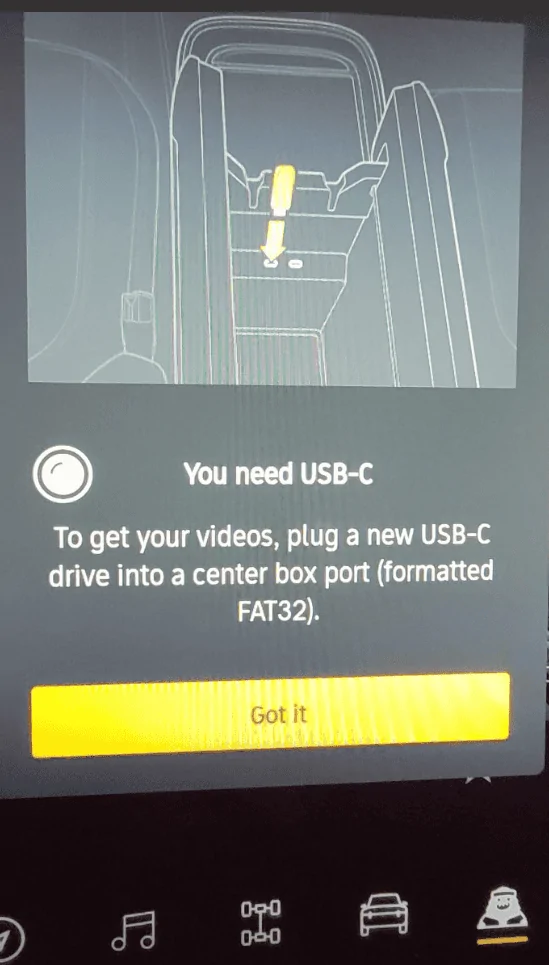
I tried a Samsung Duo Plus 128GB - 400MB/s USB 3.1 Flash Drive (MUF-128DB/AM). This has a USB-C connector. It came formatted as Fat32. I put in the required directory. Couldn't get any farther than:
Rivian R1T R1S downloading Gearguard video to USB C 1649297786655

Unless Rivian is using a definition of USB-C that I am not aware of, well, 'Normal, I think we have a problem...'
 

Sponsored

Ainsleyiv

Member
First Name
Bill
Joined
Apr 9, 2022
Threads
2
Messages
12
Reaction score
9
Location
Charlotte
Vehicles
R1T
Disappointed that this is not working. Better selecting options would help tremendously, would like to select a day and star them all. Currently the only way to star is to select each individual clip and click star. The other thing they should do is capacity delete not time based delete. Dedicate 32GB to gear guard then keep the last 32GB of videos until you record more. Also worried that there is no troubleshooting steps, it works or it don’t, no clue why not working.
 

godfodder0901

Well-Known Member
First Name
Jared
Joined
Mar 12, 2019
Threads
27
Messages
5,774
Reaction score
10,167
Location
Washington
Vehicles
2022 Rivian R1T LE
Not sure if this is because of the 2022.11.2 update or not, but I got Gear Guard videos to transfer via USB-C. I used a 32GB (I know! Less than 64GB minimum spelled out in the manual) SanDisk Cruzer Switch formatted as Fat32 with the root directory of GearGuardvideo. This drive is not a native USB-C, so I had to use a Samsung USB-C OTG adapter that came with my Galaxy Note10+.

Videos transfer as H264 - MPEG-4 AVC (part 10) (avc1) with a resolution of 1280x720 @ 7013kbps and 30.00fps for the bed camera and 1376x976 @ 9997kbps and 30.00fps for the front, rear, and side cameras.
 

MrZardos

New Member
First Name
Mark
Joined
Apr 10, 2022
Threads
0
Messages
3
Reaction score
1
Location
NJ
Vehicles
R1T
Not sure if this is because of the 2022.11.2 update or not, but I got Gear Guard videos to transfer via USB-C. I used a 32GB (I know! Less than 64GB minimum spelled out in the manual) SanDisk Cruzer Switch formatted as Fat32 with the root directory of GearGuardvideo. This drive is not a native USB-C, so I had to use a Samsung USB-C OTG adapter that came with my Galaxy Note10+.

Videos transfer as H264 - MPEG-4 AVC (part 10) (avc1) with a resolution of 1280x720 @ 7013kbps and 30.00fps for the bed camera and 1376x976 @ 9997kbps and 30.00fps for the front, rear, and side cameras.
I had the same issue, USB-C copy not working (256GB stick), but now, after the 2022.11.2 SW update it works perfectly ?
 

jerseyff

Well-Known Member
First Name
Darren
Joined
Aug 3, 2020
Threads
17
Messages
737
Reaction score
986
Location
McDonald, TN
Vehicles
R1T; Model 3 Highland
Occupation
IT
I know manual says 64GB minimum, what sizes do people have and are they too small/large for moving files?

I was leaning towards 128 or 256 GB.

Do we know how much internal storage is allocated for Gear Guard? Don't see that in manual.
 

Sponsored

OP
OP
C.R. Rivian

C.R. Rivian

Well-Known Member
First Name
Charles
Joined
Nov 16, 2020
Threads
69
Messages
695
Reaction score
611
Location
South Puget Sound
Vehicles
Kia Niro EV...R1T Launch Edition, Gen1
Occupation
retired
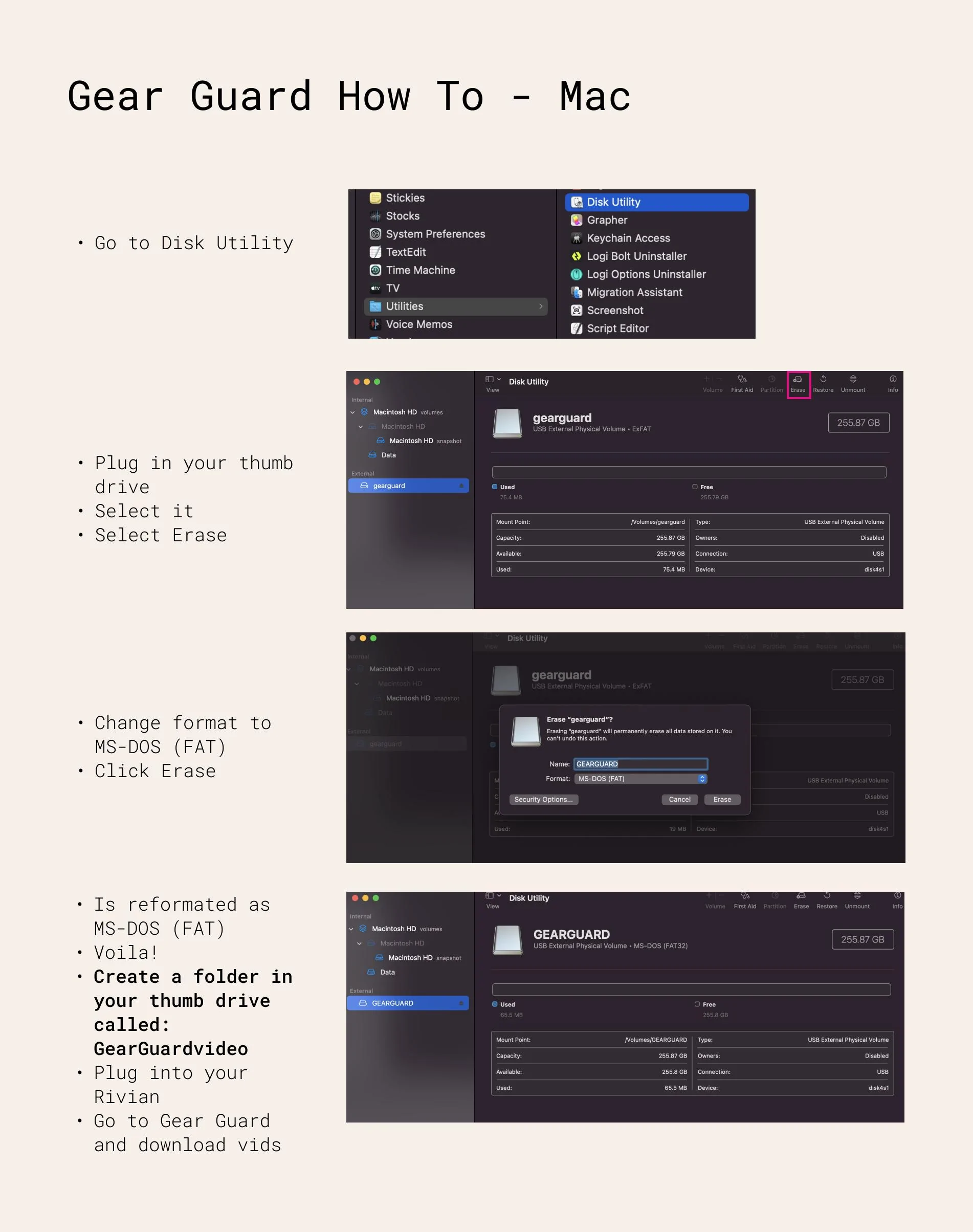
64 is OK since you probably won't be downloading a bunch at once. I got a Samsung Duo Plus 128GB - 400MB/s USB 3.1 Flash Drive (MUF-128DB/AM). This has a USB-C connector. It came formatted as Fat32. I added the directory. Good to get one preformatted as FAT32 since most modern operating systems don't offer that old format as an option.
 

godfodder0901

Well-Known Member
First Name
Jared
Joined
Mar 12, 2019
Threads
27
Messages
5,774
Reaction score
10,167
Location
Washington
Vehicles
2022 Rivian R1T LE
I know manual says 64GB minimum, what sizes do people have and are they too small/large for moving files?

I was leaning towards 128 or 256 GB.

Do we know how much internal storage is allocated for Gear Guard? Don't see that in manual.
32gb works for me.
 

domoplaytime

Well-Known Member
First Name
Robert
Joined
Jun 29, 2022
Threads
24
Messages
500
Reaction score
773
Location
Maui
Vehicles
2022 R1T Adventure
Clubs
 
I have a new USB C drive that is correctly formatted and configured. It doesn't work on my truck, but does on a friend's. Looks like I'll need to create a service ticket.


Top