Sponsored

captainjp

Well-Known Member
First Name
John
Joined
Oct 18, 2024
Threads
9
Messages
1,223
Reaction score
1,849
Location
New Jersey
Vehicles
Gen 2 R1T
Clubs
 
MFA with phones might be the most effective, or even in some sense a pre-requisite to implementing MFA on the Rivian screen. Integrating to the Rivian screen might be a part of other changes in the que (text messaging, etc.) and require other things be in place.
Don’t you DARE say CarPlay. You know how much of a trigger word that is…
🤣
Sponsored


sphereobject

Well-Known Member
Joined
Jan 31, 2023
Threads
16
Messages
180
Reaction score
160
Location
USA
Vehicles
R1S on order
Occupation
Troll
have to agree to disagree, the ipad on a seat back has proven problematic for us

as well even currently Rivian supports 2 concurrent bluetooth connections so there’s no technical roadblock to allowing a bluetooth connection to the rear screen only.
Angle is no issue for us my kids spend an inordinate amount of time tapping it and watching Gary wave as it is
I have a Tesla with the screen in the back in the same place as the Rivian screen. The kids use it to watch Netflix, YouTube, or Disney all the time. It's baffling why Rivian does not enable this for the back screen. When my kids get in the back of the R1S they say things like "have the lazy Rivian software developers enabled streaming back here yet? Why don't they just ask chatGPT how to do it and get it done?" They are not wrong.
 

Conseil

Active Member
First Name
John
Joined
Apr 26, 2024
Threads
3
Messages
44
Reaction score
18
Location
California
Vehicles
2025 R1T G2, 2008 Tacoma for sale
Occupation
Retired Engineer
Rivian Tracker has the 2025.18 update notes.


GEN 1 (2021-2024)

Multi-factor Drive
You can now enable Multi-factor Drive to require a second form of authentication before starting your vehicle. This industry-leading feature increases the security of your vehicle by requiring you to authenticate each time you drive it. When Multi-factor Drive is enabled and you press the brake to shift out of P (Park), a notification appears on the center display. Then you can authenticate from the Rivian mobile app, version 3.1 or later, or via the actionable notification on your smartwatch. If you do not receive the notification, you can also enter a time-based passcode that displays on your smartphone.

To enable Multi-factor Drive, log in to the primary owner account in the Rivian mobile app, go to Security and access, and turn on Multi-factor Drive.


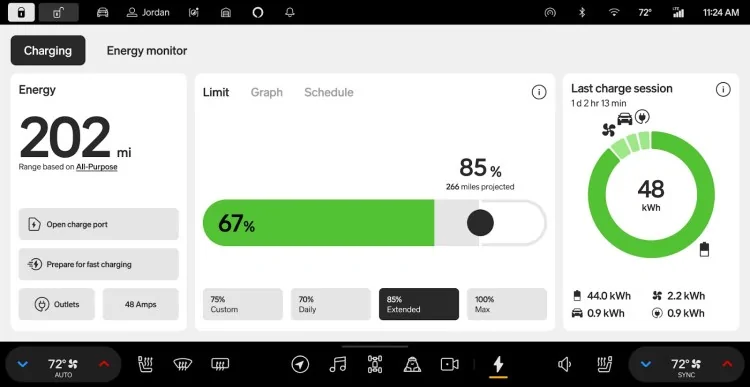
New Rivian Energy App
The new Rivian Energy app introduced features and improvements to increase your understanding and control over your vehicle’s energy consumption while driving, parked, or charging. In addition, you can now precondition your battery on demand for fast charging and view your charge curve in the vehicle with improved charge time accuracy. This can help with trip planning and provide greater peace of mind by making your energy usage easier to understand and visualize.

Energy Monitor Tab
  • Projected range impact: Increase your understanding of your actual energy consumption versus what’s expected while driving and while in P (Park). You can gain insight into how your driving behavior affects your range and get useful driving tips. You can also view your parked energy usage on the Rivian mobile app.
  • Usage: Dive deep into your energy usage over selectable timeframes.
  • Session details: View a comprehensive distribution of systems in your vehicle that are consuming energy, including Gear Guard, outlets, and climate.
Charging Tab
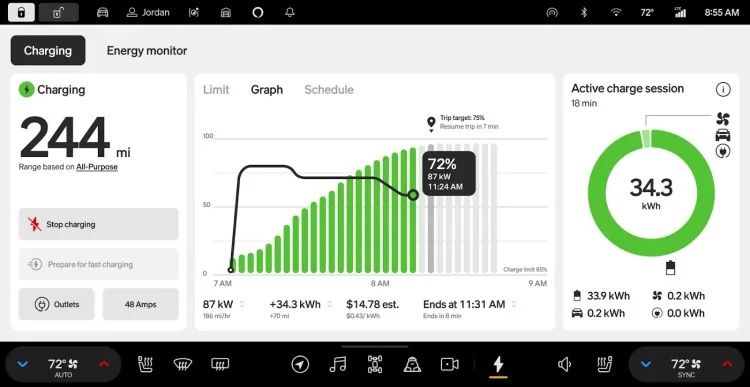
  • Graph: Visualize your active or latest charging session with an interactive graph.
  • Target level for charging stops: When using navigation for a trip that includes a charging stop, now it’s easy to see the recommended charge target for your trip from the vehicle or the Rivian mobile app. Simply start your charge, and the app will calculate and notify you (both in the vehicle and on the Rivian mobile app) when you’ve reached the ideal charge level for your trip.
  • On-demand battery preconditioning: Precondition your battery on demand for fast charging. The system heats or cools the battery to the optimal temperature for fast charging.
View the new Energy app on your center display and on the Rivian mobile app, version 3.1 or later.

Charging Improvements
We’ve improved DC fast charging performance and consistency for Max pack batteries. Max pack batteries now have improved charge times and expanded capability across a larger range of temperatures.

  • Optimized charging algorithms to reduce the time required when charging the battery from 10% to 80%.
Additional Improvements
  • Enhanced the vehicle visualizations with new, more details vehicle models on the driver display.
  • Improved the responsiveness of Go Chime, resulting in fewer extraneous chimes.
  • Improved the stability and responsiveness of the infotainment system.
  • Improved the performance and stability of media apps.


GEN 2 (2025)

Multi-factor Drive
You can now enable Multi-factor Drive to require a second form of authentication before starting your vehicle. This industry-leading feature increases the security of your vehicle by requiring you to authenticate each time you drive it. When Multi-factor Drive is enabled and you press the brake to shift out of P (Park), a notification appears on the center display. Then you can authenticate from the Rivian mobile app, version 3.1 or later, or via the actionable notification on your smartwatch. If you do not receive the notification, you can also enter a time-based passcode that displays on your smartphone.

To enable Multi-factor Drive, log in to the primary owner account in the Rivian mobile app, go to Security and access, and turn on Multi-factor Drive.


New Rivian Energy App
The new Rivian Energy app introduced features and improvements to increase your understanding and control over your vehicle’s energy consumption while driving, parked, or charging. In addition, you can now precondition your battery on demand for fast charging and view your charge curve in the vehicle with improved charge time accuracy. This can help with trip planning and provide greater peace of mind by making your energy usage easier to understand and visualize.

Energy Monitor Tab
  • Projected range impact: Increase your understanding of your actual energy consumption versus what’s expected while driving and while in P (Park). You can gain insight into how your driving behavior affects your range and get useful driving tips. You can also view your parked energy usage on the Rivian mobile app.
  • Usage: Dive deep into your energy usage over selectable timeframes.
  • Session details: View a comprehensive distribution of systems in your vehicle that are consuming energy, including Gear Guard, outlets, and climate.
Charging Tab
  • Graph: Visualize your active or latest charging session with an interactive graph.
  • Target level for charging stops: When using navigation for a trip that includes a charging stop, now it’s easy to see the recommended charge target for your trip from the vehicle or the Rivian mobile app. Simply start your charge, and the app will calculate and notify you (both in the vehicle and on the Rivian mobile app) when you’ve reached the ideal charge level for your trip.
  • On-demand battery preconditioning: Precondition your battery on demand for fast charging. The system heats or cools the battery to the optimal temperature for fast charging.
View the new Energy app on your center display and on the Rivian mobile app, version 3.1 or later.

Charging Improvements
We’ve improved DC fast charging performance and consistency for all battery pack variants. All battery pack variants now have improved charge times and expanded capability across a larger range of temperatures.

  • Max Pack and Standard Pack: Optimized charging algorithms to reduce the time required when charging the battery from 10% to 80%.
  • Large Pack: Optimized charging algorithms to:
    • Improve peak charge rate.
    • Reduce the time required when charging the battery from 10% to 80%
    • Increase the number of miles added in the first 15 minutes of charging.
Additional Improvements
  • Fixed a rare issue that caused camera views and recorded videos to be unavailable in the Gear Guard app.
  • Enhanced the vehicle visualizations with new, more details vehicle models on the driver display.
  • Enhanced the driver display to show a great number of vehicles across five lanes and in more diverse situations, such as cross-traffic, oncoming traffic, and parked vehicles.
  • Improved the stability and responsiveness of the infotainment system.
  • Improved the performance and stability of media apps.
  • Optimized low voltage battery management to improve long-term battery health.
Rivian Tracker has the 2025.18 update notes.


GEN 1 (2021-2024)

Multi-factor Drive
You can now enable Multi-factor Drive to require a second form of authentication before starting your vehicle. This industry-leading feature increases the security of your vehicle by requiring you to authenticate each time you drive it. When Multi-factor Drive is enabled and you press the brake to shift out of P (Park), a notification appears on the center display. Then you can authenticate from the Rivian mobile app, version 3.1 or later, or via the actionable notification on your smartwatch. If you do not receive the notification, you can also enter a time-based passcode that displays on your smartphone.

To enable Multi-factor Drive, log in to the primary owner account in the Rivian mobile app, go to Security and access, and turn on Multi-factor Drive.


New Rivian Energy App
The new Rivian Energy app introduced features and improvements to increase your understanding and control over your vehicle’s energy consumption while driving, parked, or charging. In addition, you can now precondition your battery on demand for fast charging and view your charge curve in the vehicle with improved charge time accuracy. This can help with trip planning and provide greater peace of mind by making your energy usage easier to understand and visualize.

Energy Monitor Tab
  • Projected range impact: Increase your understanding of your actual energy consumption versus what’s expected while driving and while in P (Park). You can gain insight into how your driving behavior affects your range and get useful driving tips. You can also view your parked energy usage on the Rivian mobile app.
  • Usage: Dive deep into your energy usage over selectable timeframes.
  • Session details: View a comprehensive distribution of systems in your vehicle that are consuming energy, including Gear Guard, outlets, and climate.
Charging Tab
  • Graph: Visualize your active or latest charging session with an interactive graph.
  • Target level for charging stops: When using navigation for a trip that includes a charging stop, now it’s easy to see the recommended charge target for your trip from the vehicle or the Rivian mobile app. Simply start your charge, and the app will calculate and notify you (both in the vehicle and on the Rivian mobile app) when you’ve reached the ideal charge level for your trip.
  • On-demand battery preconditioning: Precondition your battery on demand for fast charging. The system heats or cools the battery to the optimal temperature for fast charging.
View the new Energy app on your center display and on the Rivian mobile app, version 3.1 or later.

Charging Improvements
We’ve improved DC fast charging performance and consistency for Max pack batteries. Max pack batteries now have improved charge times and expanded capability across a larger range of temperatures.

  • Optimized charging algorithms to reduce the time required when charging the battery from 10% to 80%.
Additional Improvements
  • Enhanced the vehicle visualizations with new, more details vehicle models on the driver display.
  • Improved the responsiveness of Go Chime, resulting in fewer extraneous chimes.
  • Improved the stability and responsiveness of the infotainment system.
  • Improved the performance and stability of media apps.


GEN 2 (2025)

Multi-factor Drive
You can now enable Multi-factor Drive to require a second form of authentication before starting your vehicle. This industry-leading feature increases the security of your vehicle by requiring you to authenticate each time you drive it. When Multi-factor Drive is enabled and you press the brake to shift out of P (Park), a notification appears on the center display. Then you can authenticate from the Rivian mobile app, version 3.1 or later, or via the actionable notification on your smartwatch. If you do not receive the notification, you can also enter a time-based passcode that displays on your smartphone.

To enable Multi-factor Drive, log in to the primary owner account in the Rivian mobile app, go to Security and access, and turn on Multi-factor Drive.


New Rivian Energy App
The new Rivian Energy app introduced features and improvements to increase your understanding and control over your vehicle’s energy consumption while driving, parked, or charging. In addition, you can now precondition your battery on demand for fast charging and view your charge curve in the vehicle with improved charge time accuracy. This can help with trip planning and provide greater peace of mind by making your energy usage easier to understand and visualize.

Energy Monitor Tab
  • Projected range impact: Increase your understanding of your actual energy consumption versus what’s expected while driving and while in P (Park). You can gain insight into how your driving behavior affects your range and get useful driving tips. You can also view your parked energy usage on the Rivian mobile app.
  • Usage: Dive deep into your energy usage over selectable timeframes.
  • Session details: View a comprehensive distribution of systems in your vehicle that are consuming energy, including Gear Guard, outlets, and climate.
Charging Tab
  • Graph: Visualize your active or latest charging session with an interactive graph.
  • Target level for charging stops: When using navigation for a trip that includes a charging stop, now it’s easy to see the recommended charge target for your trip from the vehicle or the Rivian mobile app. Simply start your charge, and the app will calculate and notify you (both in the vehicle and on the Rivian mobile app) when you’ve reached the ideal charge level for your trip.
  • On-demand battery preconditioning: Precondition your battery on demand for fast charging. The system heats or cools the battery to the optimal temperature for fast charging.
View the new Energy app on your center display and on the Rivian mobile app, version 3.1 or later.

Charging Improvements
We’ve improved DC fast charging performance and consistency for all battery pack variants. All battery pack variants now have improved charge times and expanded capability across a larger range of temperatures.

  • Max Pack and Standard Pack: Optimized charging algorithms to reduce the time required when charging the battery from 10% to 80%.
  • Large Pack: Optimized charging algorithms to:
    • Improve peak charge rate.
    • Reduce the time required when charging the battery from 10% to 80%
    • Increase the number of miles added in the first 15 minutes of charging.
Additional Improvements
  • Fixed a rare issue that caused camera views and recorded videos to be unavailable in the Gear Guard app.
  • Enhanced the vehicle visualizations with new, more details vehicle models on the driver display.
  • Enhanced the driver display to show a great number of vehicles across five lanes and in more diverse situations, such as cross-traffic, oncoming traffic, and parked vehicles.
  • Improved the stability and responsiveness of the infotainment system.
  • Improved the performance and stability of media apps.
  • Optimized low voltage battery management to improve long-term battery health.
Hmmm...Self driving preview? Bueller...Bueller? Anyone?
 

DuncIT

Well-Known Member
First Name
Duncan
Joined
Sep 19, 2024
Threads
7
Messages
120
Reaction score
88
Location
Radnor, PA
Vehicles
25 R1T, 25 Polestar 3, 18 Model 3, 90 MX5, 51 Hudson Pacemaker
Clubs
 
When is texting gonna be a thing, every other car on the road can read a text or send one for you, this would really be an update we could all use...
Yeah! I want / need texting more than anything! I certainly don't want 2FA - I open the car with my phone, and then I need to receive a text message / code on the same phone to drive it?! I know - other drivers. Still, not needed in my opinion.

Duncan
 

Sponsored

captainjp

Well-Known Member
First Name
John
Joined
Oct 18, 2024
Threads
9
Messages
1,223
Reaction score
1,849
Location
New Jersey
Vehicles
Gen 2 R1T
Clubs
 
Yeah! I want / need texting more than anything! I certainly don't want 2FA - I open the car with my phone, and then I need to receive a text message / code on the same phone to drive it?! I know - other drivers. Still, not needed in my opinion.

Duncan
“You can now enable Multi-factor Drive to require a second form of authentication before starting your vehicle.”

It’s not a requirement to drive unless you make it so.
 

2kwik4u

Well-Known Member
First Name
Michael
Joined
Jan 8, 2025
Threads
11
Messages
818
Reaction score
1,061
Location
Western NY State
Vehicles
2024 Rivian R1T ; 2018 Nissan Rogue
Most of the time I'd just love to be able to put something else on that part of the display as it's generally of no value to me. So I don't really care what it shows. However, it is annoying as crap sitting at a light watching the cars in front of you doing the Macarena in the display! 🤣
Agreed. I don't use it often, and when I do I only barely care. With that said, I do appreciate that it's more detailed than my Nissan Rogue that just has an icon of a car, or not.

I really want elevation on the top right of the drivers display. Feels like an easy ask, maybe I'm missing something?
 

not_a_car_guy

Well-Known Member
Joined
Oct 23, 2023
Threads
4
Messages
141
Reaction score
224
Location
Massachusetts
Vehicles
R1T Perf Dual Motor
Occupation
Engineer
Clubs
 
Maybe the new energy display will show this, but does anyone have a data on how much preconditioning costs?

I.e., what is the tradeoff between spending energy on preconditioning and charging taking longer because of higher kWh needed vs. taking longer due to non-ideal battery temp?

Is there a rough rule of thumb when to manually enable preconditioning and when it isn't worth it?
 

VSG

Well-Known Member
Joined
Oct 3, 2022
Threads
4
Messages
3,208
Reaction score
6,004
Location
WA
Vehicles
R1T LE/RB/OC/20
It's not really a cost issue IMO - it's a time issue. It will take less time to charge if the battery is in the optimal temperature range (improved charging curve). If you can get the battery into that range while driving via preconditioning, that saves time sitting at the charger. I think it's basically a wash in terms of cost because the vehicle is going to heat/cool the battery when you're at the charger if it's not already in the optimal range, so you're going to have to spend that preconditioning energy either way.

If I'm really low on battery on my way to a DCFC I will turn off the preconditioning to save battery, at the expense of maybe needing to spend more time at the charger. ("Maybe" because preconditioning doesn't do actually anything unless the battery temperature *needs* to be changed.) That's better than running out of charge before I get to the charger ...
 

Sponsored

racekarl

Well-Known Member
Joined
Jan 5, 2023
Threads
9
Messages
555
Reaction score
825
Location
MA
Vehicles
2023 R1T
MFA adds a second layer (something you have, like a phone or token), drastically increasing security. A 4-digit PIN is not as secure and can be guessed.
This is the thing that puzzles me a bit about this implementation. Typically the multiple factors are "something you know" (e.g. your password) and "something you have" (e.g. your phone). In this case it seems like a bit of a weak implementation because it's just at most two of the same factor (e.g. something you have - fob and phone) or in the case of PAAK, not at all since the two things you have are the same thing (your phone). This reminds me of Bank of America's old wish-it-was-MFA where you had to pick a photo to go with your account, which was really just another "something you know."

A PIN to drive would seem to be *more* secure in the sense that it requires two separate factors that cannot be combined.

ETA: I suppose you could consider your phone's PIN (assuming you have it active) as the "something you know" since presumably the phone has to be unlocked to respond to the notification or see the time-based code, but now we're just back to a PIN with more steps.
 

UnsungZero_OldTimeAdMan

Well-Known Member
First Name
Barnum
Joined
Mar 20, 2023
Threads
66
Messages
8,561
Reaction score
11,755
Location
SoCal
Vehicles
'23 GW Quad-Large R1T "Ghost"
Occupation
Advertising Circus
This is the thing that puzzles me a bit about this implementation. Typically the multiple factors are "something you know" (e.g. your password) and "something you have" (e.g. your phone). In this case it seems like a bit of a weak implementation because it's just at most two of the same factor (e.g. something you have - fob and phone) or in the case of PAAK, not at all since the two things you have are the same thing (your phone). This reminds me of Bank of America's old wish-it-was-MFA where you had to pick a photo to go with your account, which was really just another "something you know."

A PIN to drive would seem to be *more* secure in the sense that it requires two separate factors that cannot be combined.

ETA: I suppose you could consider your phone's PIN (assuming you have it active) as the "something you know" since presumably the phone has to be unlocked to respond to the notification or see the time-based code, but now we're just back to a PIN with more steps.
I think Wassym has already said PIN to drive is arriving later.
 

godfodder0901

Well-Known Member
First Name
Jared
Joined
Mar 12, 2019
Threads
27
Messages
5,749
Reaction score
10,139
Location
Washington
Vehicles
2022 Rivian R1T LE
This is the thing that puzzles me a bit about this implementation. Typically the multiple factors are "something you know" (e.g. your password) and "something you have" (e.g. your phone). In this case it seems like a bit of a weak implementation because it's just at most two of the same factor (e.g. something you have - fob and phone) or in the case of PAAK, not at all since the two things you have are the same thing (your phone). This reminds me of Bank of America's old wish-it-was-MFA where you had to pick a photo to go with your account, which was really just another "something you know."

A PIN to drive would seem to be *more* secure in the sense that it requires two separate factors that cannot be combined.

ETA: I suppose you could consider your phone's PIN (assuming you have it active) as the "something you know" since presumably the phone has to be unlocked to respond to the notification or see the time-based code, but now we're just back to a PIN with more steps.
Not really. It's offloading the other factor to your phone. Yes, you need to have your phone but also need the something you know (phone PIN), or something you are (Phone biometric) in order to authenticate the drive.
Sponsored


Top