
-
👉 R2 Orders ➡ Add Your R2 Orders / VIN / Delivery Info 📊
Sponsored
Loading

SANZC02
Well-Known Member
- First Name
- Bob
- Joined
- Feb 11, 2021
- Threads
- 52
- Messages
- 7,767
- Reaction score
- 13,359
- Location
- California
- Vehicles
- Tesla Model S, LE - R1S, LE - R2
- Occupation
- Retired
It seems to work pretty well on the G1 series.
A few quick things I noticed
1) Looks like they removed the Rivian Assistant keep listening option
2) List view for podcast seems to be back in the tune in app, much easier to find things over the icon format
3) Camera format seems to have changed, ratios are different and bird’s eye view frame is larger making front and rear cameras smaller
4) Nothing added to the right side scroll wheel, was hoping to get HVAC controls like on the R2
Performance does seem to be pretty good on the G1 hardware. The clock is moved to a better location, the current drive window is nice.
Over all first impression is positive.
A few quick things I noticed
1) Looks like they removed the Rivian Assistant keep listening option
2) List view for podcast seems to be back in the tune in app, much easier to find things over the icon format
3) Camera format seems to have changed, ratios are different and bird’s eye view frame is larger making front and rear cameras smaller
4) Nothing added to the right side scroll wheel, was hoping to get HVAC controls like on the R2
Performance does seem to be pretty good on the G1 hardware. The clock is moved to a better location, the current drive window is nice.
Over all first impression is positive.
Golfer04
Well-Known Member
Just drove my Tri post update. Going to have to re-learn the truck . Quite a bit new actually. Not sure how much of it I will use besides the map update with weather, waze, etc. Assume this is preparing for point to point destination.
. Quite a bit new actually. Not sure how much of it I will use besides the map update with weather, waze, etc. Assume this is preparing for point to point destination.
UnsungZero_OldTimeAdMan
Well-Known Member
Per riviantrackr’s vid, Road Cam record button is now one layer deep instead of being always present at top. Less readily accessible. Not sure how I feel about that.It seems to work pretty well on the G1 series.
A few quick things I noticed
1) Looks like they removed the Rivian Assistant keep listening option
2) List view for podcast seems to be back in the tune in app, much easier to find things over the icon format
3) Camera format seems to have changed, ratios are different and bird’s eye view frame is larger making front and rear cameras smaller
4) Nothing added to the right side scroll wheel, was hoping to get HVAC controls like on the R2
Performance does seem to be pretty good on the G1 hardware. The clock is moved to a better location, the current drive window is nice.
Over all first impression is positive.
Shaqdeez
Well-Known Member
- First Name
- Shaq
- Joined
- Jun 17, 2022
- Threads
- 9
- Messages
- 145
- Reaction score
- 158
- Location
- Buffalo NY
- Vehicles
- 2024 Rivian R1S Glacier White /OC/22 Brights
I noticed in the rivian advertisement video for this new operating system that at 21 seconds you can change the drive modes from the steering wheel knob which was an R1 steering wheel. I don't see how that's possible. Did you?
Sponsored
C12farmer
Well-Known Member
I thought the Gen1 and Gen2 R1 had the same infotainment computers. Only the Autonomy driving computers were upgraded in Gen2.
Does the press release below imply this is using the Autonomy computers for "infotainment" related compute?
Powered by Rivian Unified Intelligence
Unifying our software platform allows R1 vehicles to fully tap into Rivian Unified Intelligence, providing a common AI foundation that connects select vehicle, mobile, and service experiences.
Hybrid Edge Compute & Local AI Processing: R2 and Gen 2 R1 models have more computing power, enabling advanced, low-latency processing.
Core Smart Features: Both Gen 1 and Gen 2 R1 models receive expanded cloud-assisted voice capabilities and refreshed driver display hierarchies.
Does the press release below imply this is using the Autonomy computers for "infotainment" related compute?
Powered by Rivian Unified Intelligence
Unifying our software platform allows R1 vehicles to fully tap into Rivian Unified Intelligence, providing a common AI foundation that connects select vehicle, mobile, and service experiences.
Hybrid Edge Compute & Local AI Processing: R2 and Gen 2 R1 models have more computing power, enabling advanced, low-latency processing.
Core Smart Features: Both Gen 1 and Gen 2 R1 models receive expanded cloud-assisted voice capabilities and refreshed driver display hierarchies.
jrmbadger
Well-Known Member
Agree with you. I don't like that at all.Per riviantrackr’s vid, Road Cam record button is now one layer deep instead of being always present at top. Less readily accessible. Not sure how I feel about that.
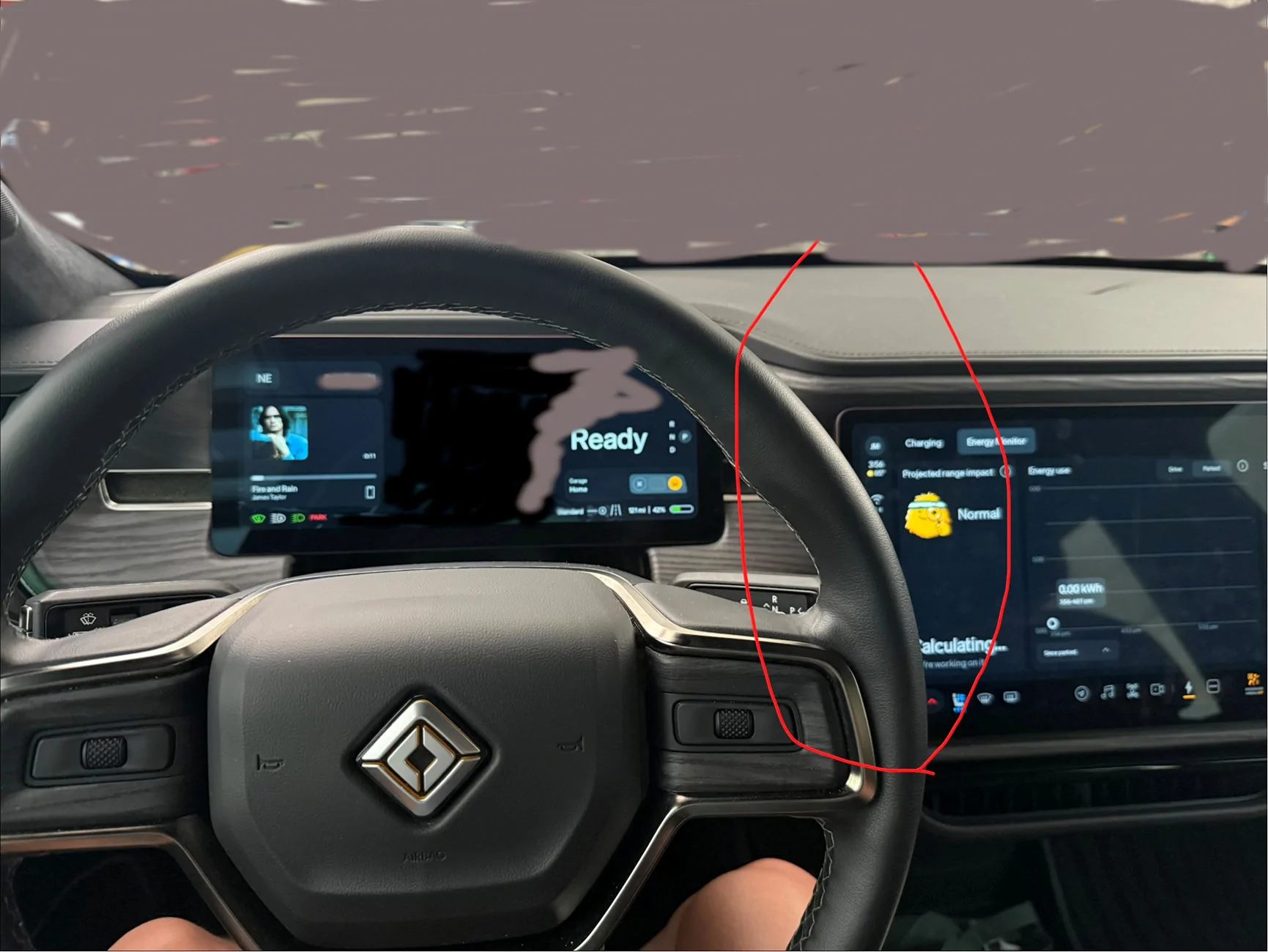
While the new interface is snappy and responsive, I can't say I like the new dock. Maybe its just my seating position and steering wheel position, but almost the entire dock is hidden by the steering wheel in the R1.
Singletracker
Well-Known Member
Got my update installed and spent a little time relearning everything. It does seem like a worthwhile update, with some interesting and useful features. I do have one question, however. How the heck does one zero out the Current Drive display on the Drivers Display? It seems to have a mind of its own. I thought resetting my Trip Meter might also reset the Current Drive, but it doesn’t. I would just like to reset all data, including the drive time, to zero. Gotta be a way right?
UnsungZero_OldTimeAdMan
Well-Known Member
That doesn’t bother me since I can’t even answer how often I look at it per week. The record button, by the time I bring it up to capture an incident the moment has long passed. Not that I need it often. Usually use it to capture and share dumb things with friend to have a laugh—like the previous gen Prius I saw yesterday with a Civic Type-R style rear wing.Agree with you. I don't like that at all.
While the new interface is snappy and responsive, I can't say I like the new dock. Maybe its just my seating position and steering wheel position, but almost the entire dock is hidden by the steering wheel in the R1.

Last edited:

VandalSibs
Well-Known Member
- First Name
- Andrew
- Joined
- Dec 27, 2023
- Threads
- 16
- Messages
- 1,762
- Reaction score
- 3,111
- Location
- Eastern Washington State
- Website
- www.sibulskymusic.com
- Vehicles
- R1T Dual Motor Large Pack
- Occupation
- Composer, IT Service Desk Analyst
I think that little panel reflects the "Current Drive" data on the Energy app.... Which doesn't have a reset other than not having driven for a while...Got my update installed and spent a little time relearning everything. It does seem like a worthwhile update, with some interesting and useful features. I do have one question, however. How the heck does one zero out the Current Drive display on the Drivers Display? It seems to have a mind of its own. I thought resetting my Trip Meter might also reset the Current Drive, but it doesn’t. I would just like to reset all data, including the drive time, to zero. Gotta be a way right?
Sponsored
UnsungZero_OldTimeAdMan
Well-Known Member
Yup. Trips A and B are to-date averages since last reset. Driver display’s “current” is this drive right now—since you last entered and begun to drive, until you park.I think that little panel reflects the "Current Drive" data on the Energy app.... Which doesn't have a reset other than not having driven for a while...

emroch
Well-Known Member
- First Name
- Eric
- Joined
- Jun 9, 2026
- Threads
- 6
- Messages
- 394
- Reaction score
- 819
- Location
- Austin, TX
- Website
- r2-dashboard.pages.dev
- Vehicles
- 2027 R2 Launch Edition, Chevy Equinox
- Occupation
- HW Verification Engineer
Could always just lay on the horn to trigger a recording, that doesn't require any menu diggingPer riviantrackr’s vid, Road Cam record button is now one layer deep instead of being always present at top. Less readily accessible. Not sure how I feel about that.

jrmbadger
Well-Known Member
Yeah, and given that the horn is so weak, the other driver wouldn't notice anyway.Could always just lay on the horn to trigger a recording, that doesn't require any menu digging
UnsungZero_OldTimeAdMan
Well-Known Member
You might want to lay on the horn every single time you see something you want to record. Not me. Not every situation warrant use of horn. And I added a second horn.Could always just lay on the horn to trigger a recording, that doesn't require any menu digging
SANZC02
Well-Known Member
- First Name
- Bob
- Joined
- Feb 11, 2021
- Threads
- 52
- Messages
- 7,767
- Reaction score
- 13,359
- Location
- California
- Vehicles
- Tesla Model S, LE - R1S, LE - R2
- Occupation
- Retired
Yes I saw that as well. I have used it prior, I noticed it on the R2 as well.Per riviantrackr’s vid, Road Cam record button is now one layer deep instead of being always present at top. Less readily accessible. Not sure how I feel about that.
I’m not one to use the horn but I guess that might be my go to to trigger it now.
You can have it on the screen if not using the audio screen but my guess is that is not how most people will have that panel displayed.
Sponsored
Similar threads


- Replies
- 84
- Views
- 12,278


- Replies
- 9
- Views
- 1,314
- Replies
- 4
- Views
- 1,079

- Replies
- 24
- Views
- 4,553