
-
👉 R2 Orders ➡ Add Your R2 Orders / VIN / Delivery Info 📊
Sponsored
Got my R2 today, and walk away question
- Thread starter evilyn
- Start date
- Watchers 23
-
- Tags
- walk away lock
iamnid
Well-Known Member
- Joined
- Aug 10, 2023
- Threads
- 7
- Messages
- 826
- Reaction score
- 1,199
- Location
- California
- Vehicles
- Mercedes EQE, Rivian R1S
Seriously though, I wish they'd give us the option to turn off the auto lock/unlock at more places than just "home."
I end up having to lock the vehicle and then disable bluetooth whenever I go to our condo as it is constantly locking unlocking as I walk around.
Tesla gives the option to disable when at "favorite" places -- please give us this option too.
I end up having to lock the vehicle and then disable bluetooth whenever I go to our condo as it is constantly locking unlocking as I walk around.
Tesla gives the option to disable when at "favorite" places -- please give us this option too.
This wasn't working for me last night. I'll try it again.If unlock at home is disabled you can unlock it by pushing on the dimple on the driver's handle. Must have your Iphone in your pocket or your AW on.
hammick
Well-Known Member
We have an R1. No idea if the R2 has the handle dimple.This wasn't working for me last night. I'll try it again.

emroch
Well-Known Member
- First Name
- Eric
- Joined
- Jun 9, 2026
- Threads
- 6
- Messages
- 331
- Reaction score
- 724
- Location
- Austin, TX
- Website
- r2-dashboard.pages.dev
- Vehicles
- 2027 R2 Launch Edition, Chevy Equinox
- Occupation
- HW Verification Engineer
R2 does have a dimple on the handle, but I don't think it is touch/force sensitive. It's just there to mark where to put the key card for NFC unlock. Its possible they included hardware for that and will enable in a future OTA, but I don't think it works as of today. I similarly cannot get the doors to lock manually without pulling out the NFC card or opening my phone wallet (ie no Express Mode).We have an R1. No idea if the R2 has the handle dimple.
BTW, it is helpful to qualify your statements about R1 experiences/behaviors as we are in an R2 forum. Adding un-labelled R1 information can just cause confusion, especially for people new to the brand (which we hope are many).
Sponsored
RivAW
Well-Known Member
Use your key card to tap, use your key fob to unlock, or manually unlock via your appNew to rivian so sorry if this is a stupid question. If you disable “unlock at home” then what are the options to unlock? Can you tap the door handle? Or do you have to use the app to unlock?

VandalSibs
Well-Known Member
- First Name
- Andrew
- Joined
- Dec 27, 2023
- Threads
- 16
- Messages
- 1,719
- Reaction score
- 3,030
- Location
- Eastern Washington State
- Website
- www.sibulskymusic.com
- Vehicles
- R1T Dual Motor Large Pack
- Occupation
- Composer, IT Service Desk Analyst
If you want to leave Bluetooth on on your phone, put R2 into camp mode. It disabled proximity lock/unlock, among a few other things.I end up having to lock the vehicle and then disable bluetooth whenever I go to our condo as it is constantly locking unlocking as I walk around.
emroch
Well-Known Member
- First Name
- Eric
- Joined
- Jun 9, 2026
- Threads
- 6
- Messages
- 331
- Reaction score
- 724
- Location
- Austin, TX
- Website
- r2-dashboard.pages.dev
- Vehicles
- 2027 R2 Launch Edition, Chevy Equinox
- Occupation
- HW Verification Engineer
Does PAAK proximity even use Bluetooth? I thought it was UWB?If you want to leave Bluetooth on on your phone, put R2 into camp mode. It disabled proximity lock/unlock, among a few other things.
And unfortunately the R2 does not have a Camp Mode yet. Maybe it will arrive with the next OTA if they manage to reach feature parity with R1 features in the new OS.
VandalSibs
Well-Known Member
- First Name
- Andrew
- Joined
- Dec 27, 2023
- Threads
- 16
- Messages
- 1,719
- Reaction score
- 3,030
- Location
- Eastern Washington State
- Website
- www.sibulskymusic.com
- Vehicles
- R1T Dual Motor Large Pack
- Occupation
- Composer, IT Service Desk Analyst
Ah, I thought the first update that came out for R2 included Camp Mode - my bad! I also have been using the term "Proximity Lock/Unlock", when Rivian uses "Passive Entry".Does PAAK proximity even use Bluetooth? I thought it was UWB?
And unfortunately the R2 does not have a Camp Mode yet. Maybe it will arrive with the next OTA if they manage to reach feature parity with R1 features in the new OS.
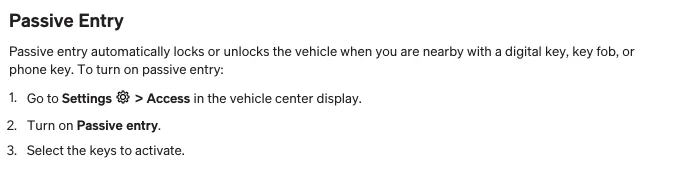
That being said, Rivian states in the R2 manual that "Passive Entry" applies to phone keys (Bluetooth), Digital Keys (UWB), and key fobs (which I believe also use Bluetooth):
emroch
Well-Known Member
- First Name
- Eric
- Joined
- Jun 9, 2026
- Threads
- 6
- Messages
- 331
- Reaction score
- 724
- Location
- Austin, TX
- Website
- r2-dashboard.pages.dev
- Vehicles
- 2027 R2 Launch Edition, Chevy Equinox
- Occupation
- HW Verification Engineer
Yeah, looks like the App key (Bluetooth) has a separate Passive Entry setting in the app than the one on the Digital Key (UWB) in Wallet. So you could toggle Passive Entry off temporarily for whichever key type you have, but it's probably not as simple as turning off Bluetooth.Ah, I thought the first update that came out for R2 included Camp Mode - my bad! I also have been using the term "Proximity Lock/Unlock", when Rivian uses "Passive Entry".
That being said, Rivian states in the R2 manual that "Passive Entry" applies to phone keys (Bluetooth), Digital Keys (UWB), and key fobs (which I believe also use Bluetooth):

Sponsored
iamnid
Well-Known Member
- Joined
- Aug 10, 2023
- Threads
- 7
- Messages
- 826
- Reaction score
- 1,199
- Location
- California
- Vehicles
- Mercedes EQE, Rivian R1S
It must use Bluetooth of some sort as turning it off disables passive entry -- and I'm using the newest key in the phone's wallet with an UWB equipped phone. Maybe my phone turns off UWB with the bluetooth toggle.Does PAAK proximity even use Bluetooth? I thought it was UWB?
And unfortunately the R2 does not have a Camp Mode yet. Maybe it will arrive with the next OTA if they manage to reach feature parity with R1 features in the new OS.
Gonna have to experiment with this. I like to leave my phone in my car when I play pickleball and just use my watch to get back in. It was easy in the m3, I just turned off Bluetooth and left the phone in the car. Would be nice if that worked with the UWB digital key.It must use Bluetooth of some sort as turning it off disables passive entry -- and I'm using the newest key in the phone's wallet with an UWB equipped phone. Maybe my phone turns off UWB with the bluetooth toggle.
emroch
Well-Known Member
- First Name
- Eric
- Joined
- Jun 9, 2026
- Threads
- 6
- Messages
- 331
- Reaction score
- 724
- Location
- Austin, TX
- Website
- r2-dashboard.pages.dev
- Vehicles
- 2027 R2 Launch Edition, Chevy Equinox
- Occupation
- HW Verification Engineer
You can toggle Passive Entry off in the Wallet app on your phone, but leave it on for the watch. That should theoretically let the phone stay in the car and still auto-lock/unlock with your watch. Apparently you can still use the phone key by holding it up to the car and double-clicking the side button, but its not as convenient as the Express Mode tap for transit/Home Key. If you always wear your watch, maybe you won't notice though.Gonna have to experiment with this. I like to leave my phone in my car when I play pickleball and just use my watch to get back in. It was easy in the m3, I just turned off Bluetooth and left the phone in the car. Would be nice if that worked with the UWB digital key.
Jeremy3292
Well-Known Member
- First Name
- Jeremy
- Joined
- Apr 27, 2026
- Threads
- 8
- Messages
- 1,224
- Reaction score
- 2,227
- Location
- South Carolina
- Vehicles
- R2
Is this any different than a Tesla? Confused by the locking unlocking issues.
emroch
Well-Known Member
- First Name
- Eric
- Joined
- Jun 9, 2026
- Threads
- 6
- Messages
- 331
- Reaction score
- 724
- Location
- Austin, TX
- Website
- r2-dashboard.pages.dev
- Vehicles
- 2027 R2 Launch Edition, Chevy Equinox
- Occupation
- HW Verification Engineer
Never owned a Tesla, so IDK. I'm speaking from what I would find convenient, not necessarily the way it is intended to work (ie I'm not saying there are any bugs).Is this any different than a Tesla? Confused by the locking unlocking issues.
Sponsored
Similar threads

- Replies
- 404
- Views
- 32,474
- Replies
- 61
- Views
- 5,349


- Replies
- 40
- Views
- 10,517

- Replies
- 1,218
- Views
- 237,858