Sponsored

How-to Soft Reboot / Hard Reboot a Rivian?

good2go

Well-Known Member
First Name
Dean
Joined
Oct 15, 2024
Threads
7
Messages
205
Reaction score
235
Location
WY
Vehicles
R1S
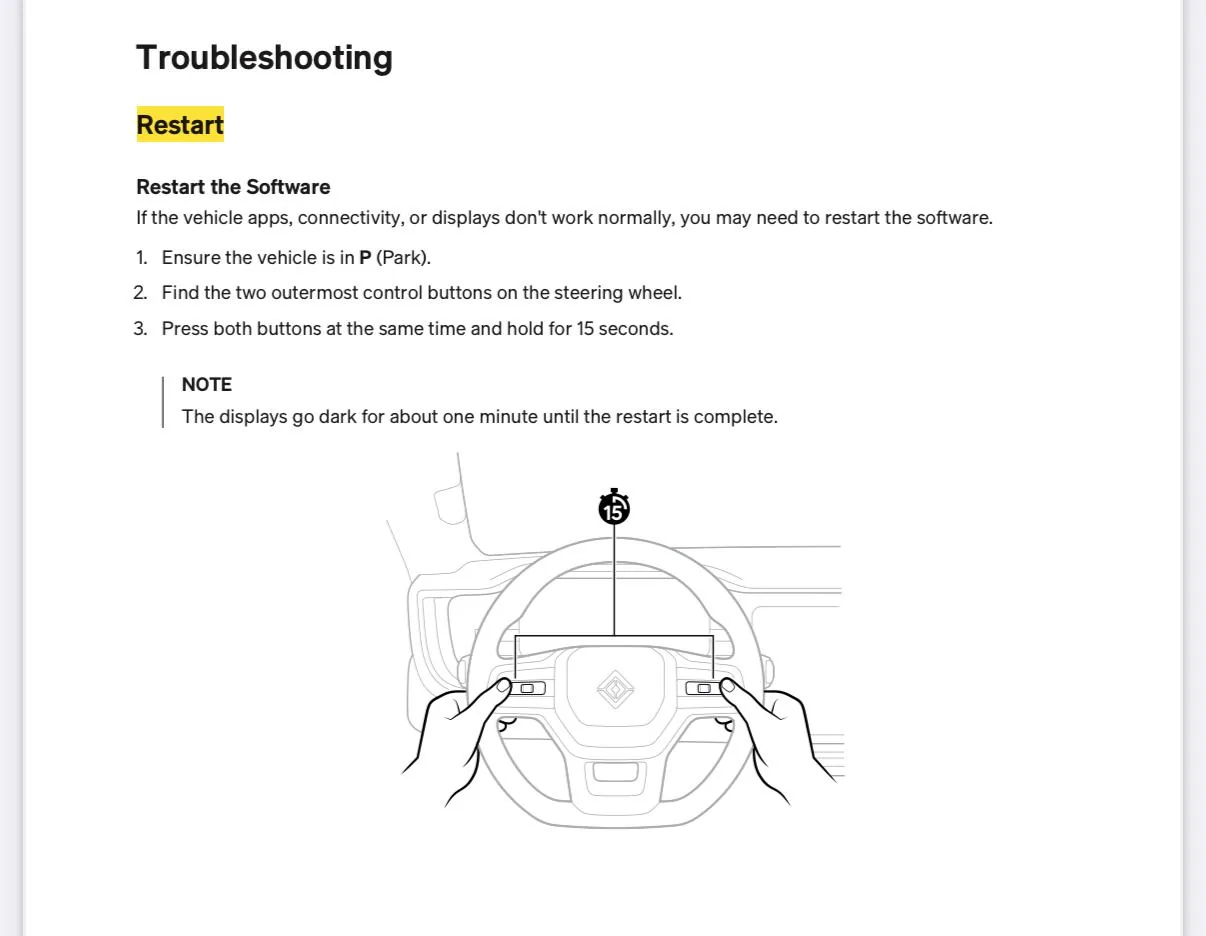
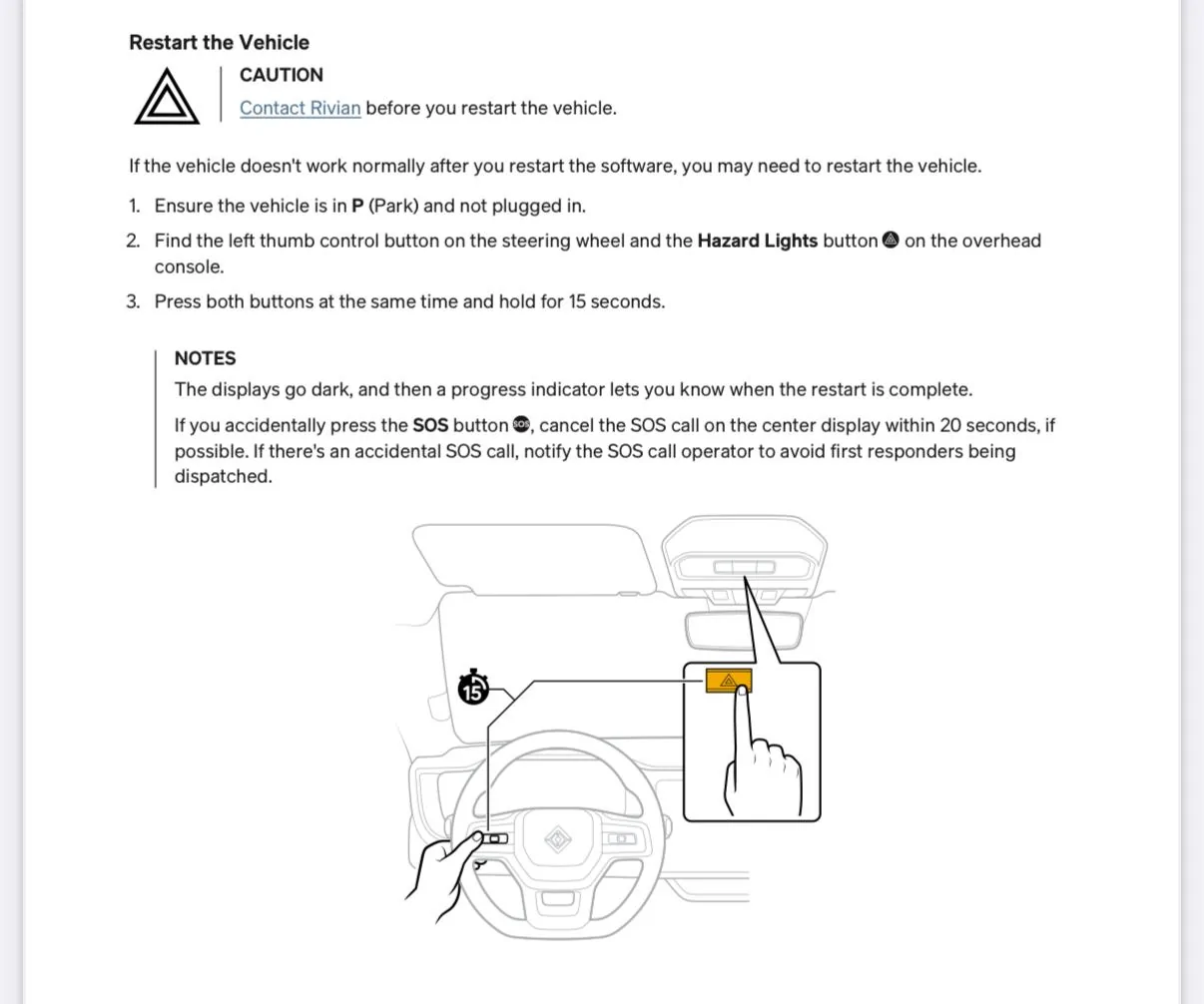
So many people recommend doing a Soft Reboot and Hard Reboot, you cannot search for how to do either.

Can someone post steps for a soft reboot? Hard Reboot?

Thanks
Sponsored


COdogman

Well-Known Member
First Name
Brian
Joined
Jan 21, 2022
Threads
33
Messages
11,641
Reaction score
34,494
Location
CO
Vehicles
2023 R1T
Occupation
Cyber defender
Clubs
 
If you ever forget which is which (you will), remember you can access the entire owners guide in the infotainment system in your Rivian. Swipe up from the app tray and you’ll find it with the additional apps. It’s also available online…
 
OP
OP
good2go

good2go

Well-Known Member
First Name
Dean
Joined
Oct 15, 2024
Threads
7
Messages
205
Reaction score
235
Location
WY
Vehicles
R1S
Perfect. Thank you. I’ve been going through the manual to see if I notice something that would help.

I have seen people reference hit the frunk button 5 times. Or taping the top menu bar five times.

are there ways into locked screen? Is the frunk another way to do a hard rest?

thanks in advance.
 

Sponsored

SPITmadFIRE

Well-Known Member
Joined
Jul 27, 2021
Threads
10
Messages
842
Reaction score
1,388
Location
CA
Vehicles
2024 R1S PDM Max Pack 20" AT
I have seen people reference hit the frunk button 5 times. Or taping the top menu bar five times.
Hitting the menu bar five times is part of the hidden procedure to get to the diagnostic app named "Ride", but that's not documented in the user manual. It's not really meant for end users but instead meant for service staff to use to quickly read off some diagnostic information. Some folks here use the Ride app to see precise battery temperatures, voltages, and current while charging for example.

 
OP
OP
good2go

good2go

Well-Known Member
First Name
Dean
Joined
Oct 15, 2024
Threads
7
Messages
205
Reaction score
235
Location
WY
Vehicles
R1S
Hitting the menu bar five times is part of the hidden procedure to get to the diagnostic app named "Ride", but that's not documented in the user manual. It's not really meant for end users but instead meant for service staff to use to quickly read off some diagnostic information. Some folks here use the Ride app to see precise battery temperatures, voltages, and current while charging for example.

What are the steps to get into ride app?
 

SPITmadFIRE

Well-Known Member
Joined
Jul 27, 2021
Threads
10
Messages
842
Reaction score
1,388
Location
CA
Vehicles
2024 R1S PDM Max Pack 20" AT
What are the steps to get into ride app?
Again, it's really only meant for service staff to use. Don't go poking around too much if you're unfamiliar with everything.

To enable the Ride app and dashboards:
  1. Put the vehicle into service mode
  2. Tap on the menu bar where the yellow "Service Mode" button is shown 5 times in quick succession
  3. Swipe up on the app dock; you'll now see a "Ride" app with an R logo.
  4. Open the Ride app
  5. Tap on the quote 5 times in quick succession; a keypad will appear.
  6. Enter the 33748 key code
You're now in the ride app with access to dashboards.
Sponsored


Top