Sponsored

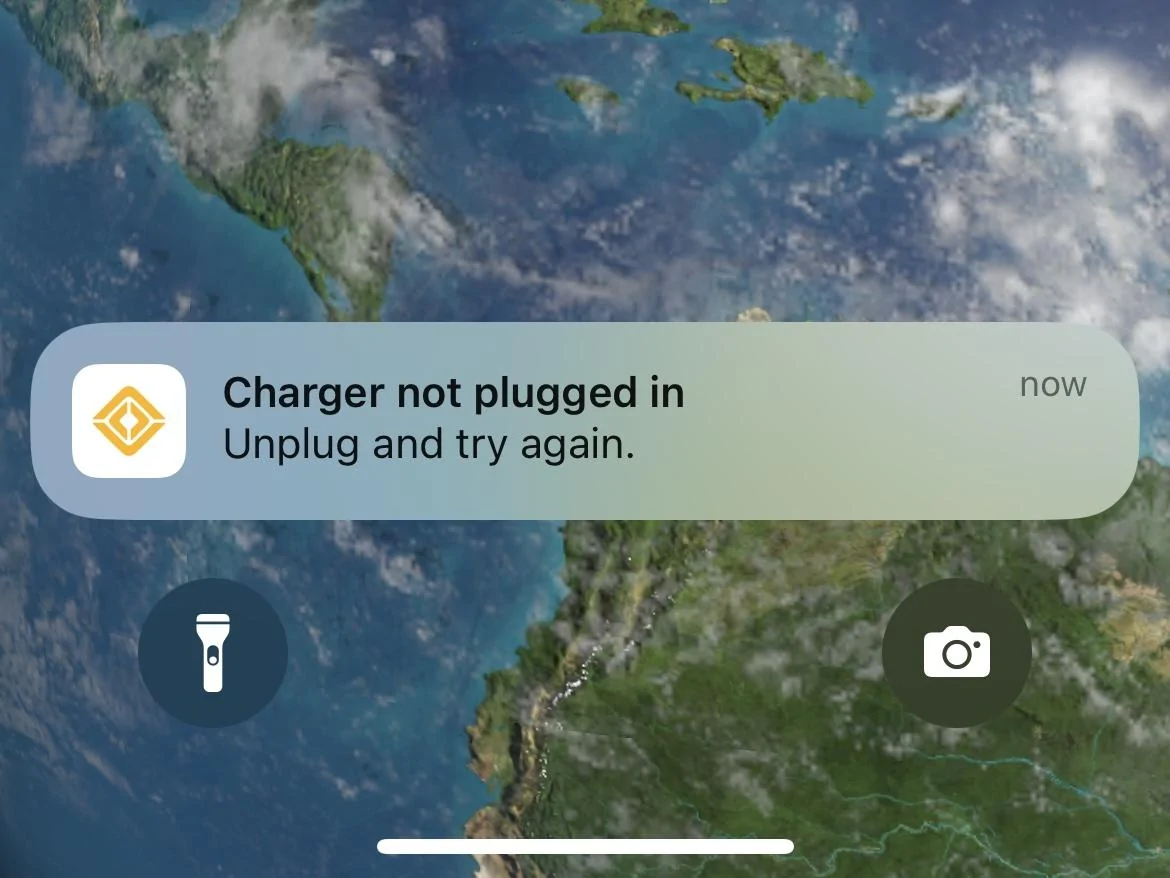
"Charger not plugged in" notification every time I unplug my R1S

Rizzian

Well-Known Member
First Name
Eric
Joined
Apr 25, 2024
Threads
8
Messages
156
Reaction score
196
Location
NE Florida
Vehicles
'24 R1S Adventure Quad, '93 Honda Del Sol
Occupation
Healthcare IT
Clubs
 
Rivian R1T R1S "Charger not plugged in" notification every time I unplug my R1S IMG_3505

Both my wife and I get this notification every time I unplug my R1S from our home charger.
It seems like it started with the latest iOS app update. I'm unsure why the app needs to inform me whenever I intentionally disconnect my charging cable before driving out of my garage. It happens when I actively interrupt charging in progress, but also when charging is complete and I don't even have an option to "Stop Charging" on the app before unplugging. It's every time I unplug my charger. I understand the scenario where it might be nice to know if you are plugged in at a public charger and someone has disconnected your car or if the cable was garbage and falls out, but in my home location, every time? Buetooth is on, the app is open...It lets me enter the car and drive it - so It knows that I'm right here when it is being disconnected. Is there a new setting or could there be an issue with my charger (Emporia) or cable?
Is anyone else getting this notification daily now?
Sponsored

 

ChiefBushWookie

Well-Known Member
Joined
Jul 4, 2023
Threads
2
Messages
47
Reaction score
67
Location
North Carolina
Vehicles
R1T
Occupation
Military
Clubs
 
I have not had this occur with the new update. I suspect there is something causing an issue in the communication between the EVSE and the vehicle. Are you able to stop the charging from the home charger before unplugging? Have you seen this when unplugging from a DCFC? What about other Level 2 chargers? You can try the portable EVSE and see if you get the same notification as well.
 

technerd

Well-Known Member
Joined
Jan 23, 2022
Threads
5
Messages
301
Reaction score
355
Location
SE PA
Vehicles
2022 Bronco, 2022 R1T
Clubs
 
I have not had this issue yet, maybe try a hard restart and see if that helps. I almost always just unplug instead of hitting Stop Charging, and I have yet to receive this message, and I'm running version 2.12.0.
 

Redline

Well-Known Member
Joined
Jul 22, 2021
Threads
50
Messages
2,302
Reaction score
4,757
Location
Edina, MN
Vehicles
Rivian R1S
Clubs
 
Open a ticket.
 

SANZC02

Well-Known Member
First Name
Bob
Joined
Feb 11, 2021
Threads
50
Messages
7,444
Reaction score
12,749
Location
California
Vehicles
Tesla Model S, LE - R1S
Occupation
Retired
Do you have a charge schedule set in the app? I do not have a schedule set and do not see that message, it is possible it is tied to scheduling.
 

Sponsored

OP
OP
Rizzian

Rizzian

Well-Known Member
First Name
Eric
Joined
Apr 25, 2024
Threads
8
Messages
156
Reaction score
196
Location
NE Florida
Vehicles
'24 R1S Adventure Quad, '93 Honda Del Sol
Occupation
Healthcare IT
Clubs
 
Thanks everyone. Now I'm thinking this might have more to do with my charger. It doesn't seem to "click" into place as solidly as it used to. Previously, when I was done charging and ready to disconnect the cable, I'd push down with on the release with my thumb to unlatch the cable lock and the charger would stop charging, or some sort of signal would register with the car or charger before I physically pulled the cable out of the Rivian charge port. I think theee used to be the "click" of something physically disconnecting before I pulled out the cable. Going to try resetting my charger or maybe using Rivian's charge cable that came with the R1S to determine if the issue is with my charger or the Rivian.
 

Meltdwn

Well-Known Member
First Name
Scott
Joined
May 20, 2023
Threads
0
Messages
51
Reaction score
25
Location
Atlanta
Vehicles
R1T LE
Occupation
Business Owner
Thanks everyone. Now I'm thinking this might have more to do with my charger. It doesn't seem to "click" into place as solidly as it used to. Previously, when I was done charging and ready to disconnect the cable, I'd push down with on the release with my thumb to unlatch the cable lock and the charger would stop charging, or some sort of signal would register with the car or charger before I physically pulled the cable out of the Rivian charge port. I think theee used to be the "click" of something physically disconnecting before I pulled out the cable. Going to try resetting my charger or maybe using Rivian's charge cable that came with the R1S to determine if the issue is with my charger or the Rivian.
Just an FYI... It is not recommended to stop charging using the method you describe. (pressing the disconnect lever on the charging handle). I think this is called a "hot disconnect" as you are relying on a safety switch in the charging handle to disconnect the charge. This works for awhile but eventually leads to issues with the charger. It is better to either stop the charge using the app or on the main screen in the energy menu.
 

mpshizzle

Well-Known Member
Joined
Jun 16, 2024
Threads
76
Messages
1,307
Reaction score
2,180
Location
Utah
Vehicles
2025 R1S Dual Max (Baymax)
Just an FYI... It is not recommended to stop charging using the method you describe. (pressing the disconnect lever on the charging handle). I think this is called a "hot disconnect" as you are relying on a safety switch in the charging handle to disconnect the charge. This works for awhile but eventually leads to issues with the charger. It is better to either stop the charge using the app or on the main screen in the energy menu.
True for DC chargers - not true for AC chargers. The switch in the handle is not connected to the charging lines on a level 2 EVSE. It interrupts the control pilot signal (the signal that the EVSE sends to the car that tells the car how much current it's allowed to draw.) Interrupting this signal tells the car and EVSE both to stop charging and open up the contactor.

I've used this as a stop mechanism on my home charger for years with no issue.

For DC charging, though, yes. It is recommended to stop charging from the vehicle screen or charger screen. Not the handle. That one (as far as I know) IS just a physical disconnect of the charging lines.


----EDIT-----
When I say I've been using the handle button for years, this is what my process is:
1) push the button
2) wait to hear the contactor click
3) pull plug out

I do not just pull it out in one go


That being said, I agree with the OP... Sounds like it could be an EVSE issue in his case
 
Last edited:

Dark-Fx

Well-Known Member
First Name
Brian
Joined
Jul 15, 2020
Threads
148
Messages
13,611
Reaction score
27,525
Location
Michigan
Vehicles
R1T, R1S, Livewire One, Sierra EV, R1S
Occupation
Engineering
Clubs
 
Proximity circuit wires are getting disconnected instead of changing to a "not ready" state before removal. Both will cause charging to cease but disconnecting will cause an error state. Most likely an issue in the handle of the EVSE cable, but I would verify that by using a different L2 charger.
 

mpshizzle

Well-Known Member
Joined
Jun 16, 2024
Threads
76
Messages
1,307
Reaction score
2,180
Location
Utah
Vehicles
2025 R1S Dual Max (Baymax)
Both will cause charging to cease but disconnecting will cause an error state. Most likely an issue in the handle of the EVSE cable, but I would verify that by using a different L2 charger.
Granted, I've not taken delivery of my Rivian yet, but I can say owning both Ford and Tesla EVs that neither of those brands care one bit if you stop AC charging with the handle.

Agree though, sounds like an EVSE issue for OP
 

Sponsored

Dark-Fx

Well-Known Member
First Name
Brian
Joined
Jul 15, 2020
Threads
148
Messages
13,611
Reaction score
27,525
Location
Michigan
Vehicles
R1T, R1S, Livewire One, Sierra EV, R1S
Occupation
Engineering
Clubs
 
Granted, I've not taken delivery of my Rivian yet, but I can say owning both Ford and Tesla EVs that neither of those brands care one bit if you stop AC charging with the handle.

Agree though, sounds like an EVSE issue for OP
They aren't supposed to if the proximity circuit is being handled properly.

This video describes how the voltage division in the circuit works (5:34 on if the timestamp doesn't come through)
 

UnsungZero_OldTimeAdMan

Well-Known Member
First Name
Barnum
Joined
Mar 20, 2023
Threads
68
Messages
8,744
Reaction score
11,982
Location
SoCal
Vehicles
'23 GW Quad-Large R1T "Ghost"
Occupation
Advertising Circus
Just the way current software is, made for specific scenarios with unintended consequences. Just ignore it.
 

mpshizzle

Well-Known Member
Joined
Jun 16, 2024
Threads
76
Messages
1,307
Reaction score
2,180
Location
Utah
Vehicles
2025 R1S Dual Max (Baymax)
They aren't supposed to if the proximity circuit is being handled properly.

This video describes how the voltage division in the circuit works (5:34 on if the timestamp doesn't come through)
Right, so probably a malfunction on the EVSE side.. (great descriptive video BTW)
 
OP
OP
Rizzian

Rizzian

Well-Known Member
First Name
Eric
Joined
Apr 25, 2024
Threads
8
Messages
156
Reaction score
196
Location
NE Florida
Vehicles
'24 R1S Adventure Quad, '93 Honda Del Sol
Occupation
Healthcare IT
Clubs
 
Thanks for the video and explanations folks... While it seems like a pretty simple fix to replace the handle (I've installed 240v conduit and drops to heavy machinery before), I'm hoping this could be a warranty thing with Emporia as I've only been using it for 3 months.
Sponsored


Top