Sponsored

boise_mountain_biker

Active Member
Joined
Jun 11, 2022
Threads
3
Messages
27
Reaction score
30
Location
Boise, ID
Vehicles
Tesla S Plaid, Lexus GX460
Occupation
Medical professional
Clubs
 
Background

I needed a Level 2 charger for my 2 EVs: Rivian R1S and Tesla S Plaid. When I got the Plaid earlier this year, it was an occasional weekend car so the 120V wall plug worked just fine (4 miles/hr), as I also have an ICE SUV. However, with the R1S, being a daily driver, less efficient energy usage, and relatively slow charging (maybe 1.5 miles/hr charge speed on 120V), I truly needed a L2 charger in my garage. Ultimately, I wanted just a single EV charger that could easily work for both cars and I didn’t want to mess with bulky adapters. Given recent news events that most major car manufacturers were going the Tesla NACS charge connector route (holdouts as of today are Stellantis and VW), I also knew long-term I would need a charger that had NACS built-in to future proof my purchase.

Solution

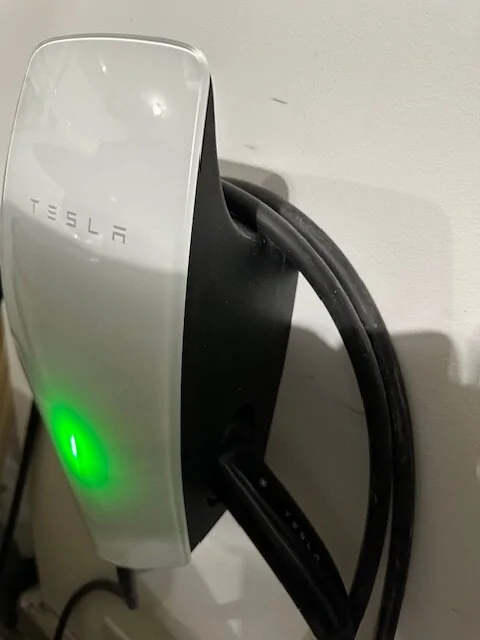
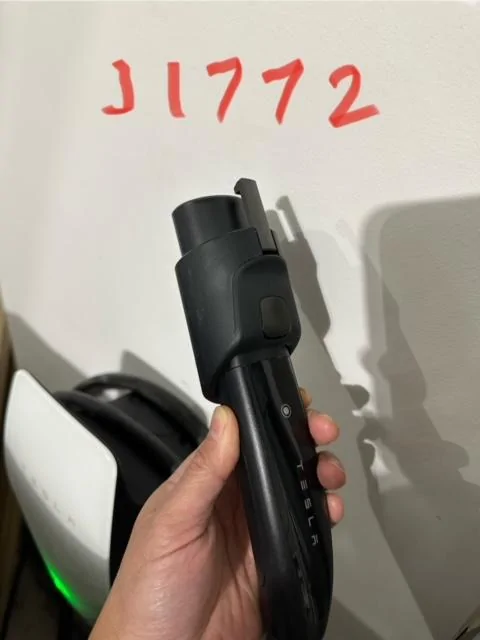
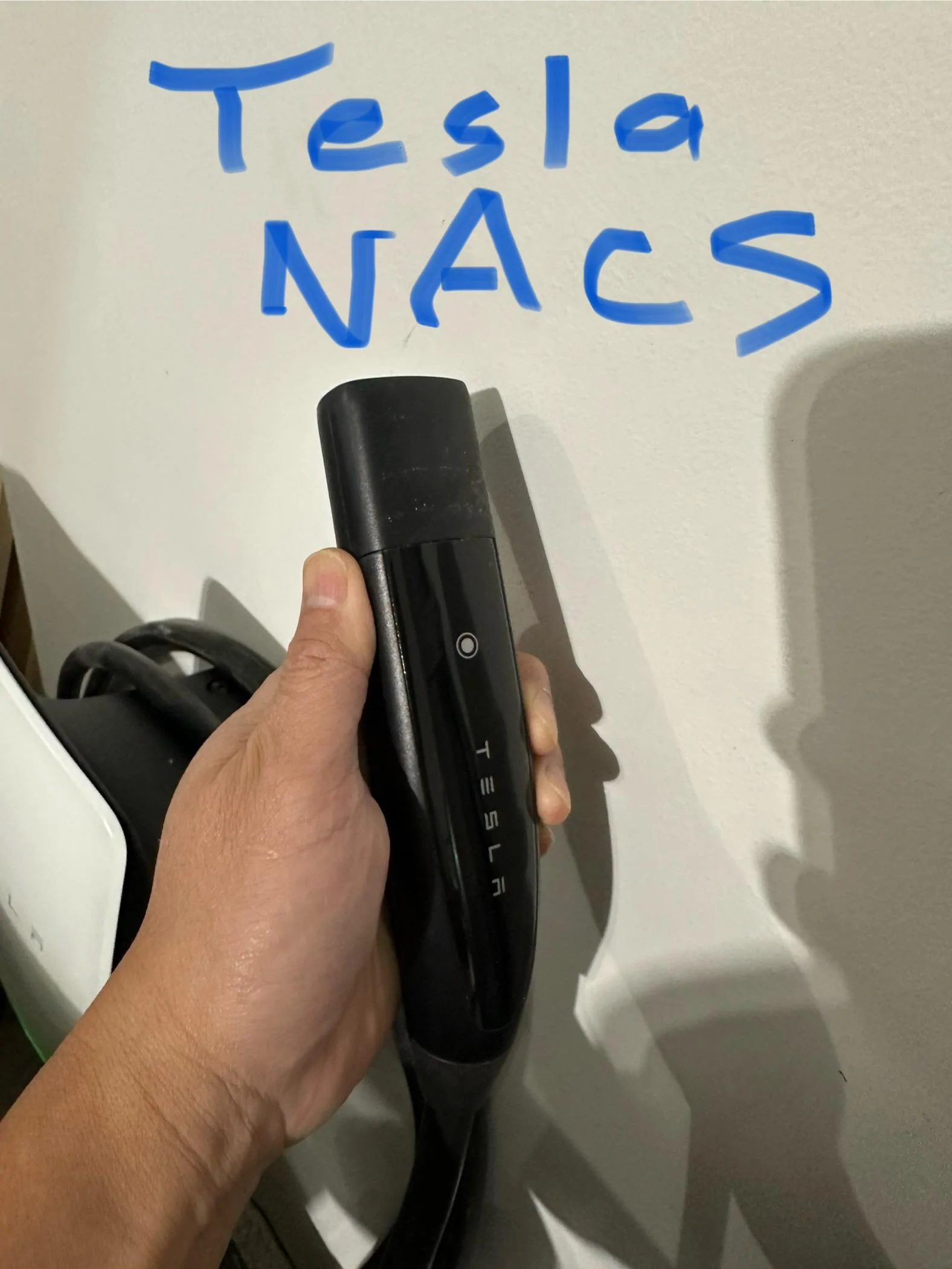
Tesla Universal Wall Connector. Tesla just released this dual connection charger earlier this month. It has both NACS and J1772 connectors. It’s basically an updated Tesla NACS charger that also has a low-profile collared J1772 adapter integrated in. The J1772 adapter is held on magnetically or has some sort of latch that does so, so you absolutely can’t lose it. It's also designed so you can't remove it from either the charger or the charger end cable when you are using it. It’s quite easy to use and it minimizes adapter frustration. I originally ordered the Rivian Wall charger (J1772) and a regular Tesla Wall charger (NACS only) but I returned both since this Tesla Universal Charger does what I need. In my opinion, this is probably the best charger currently available for those needing J1772 and NACS charging from a single unit. It's currently $595.

Usage:

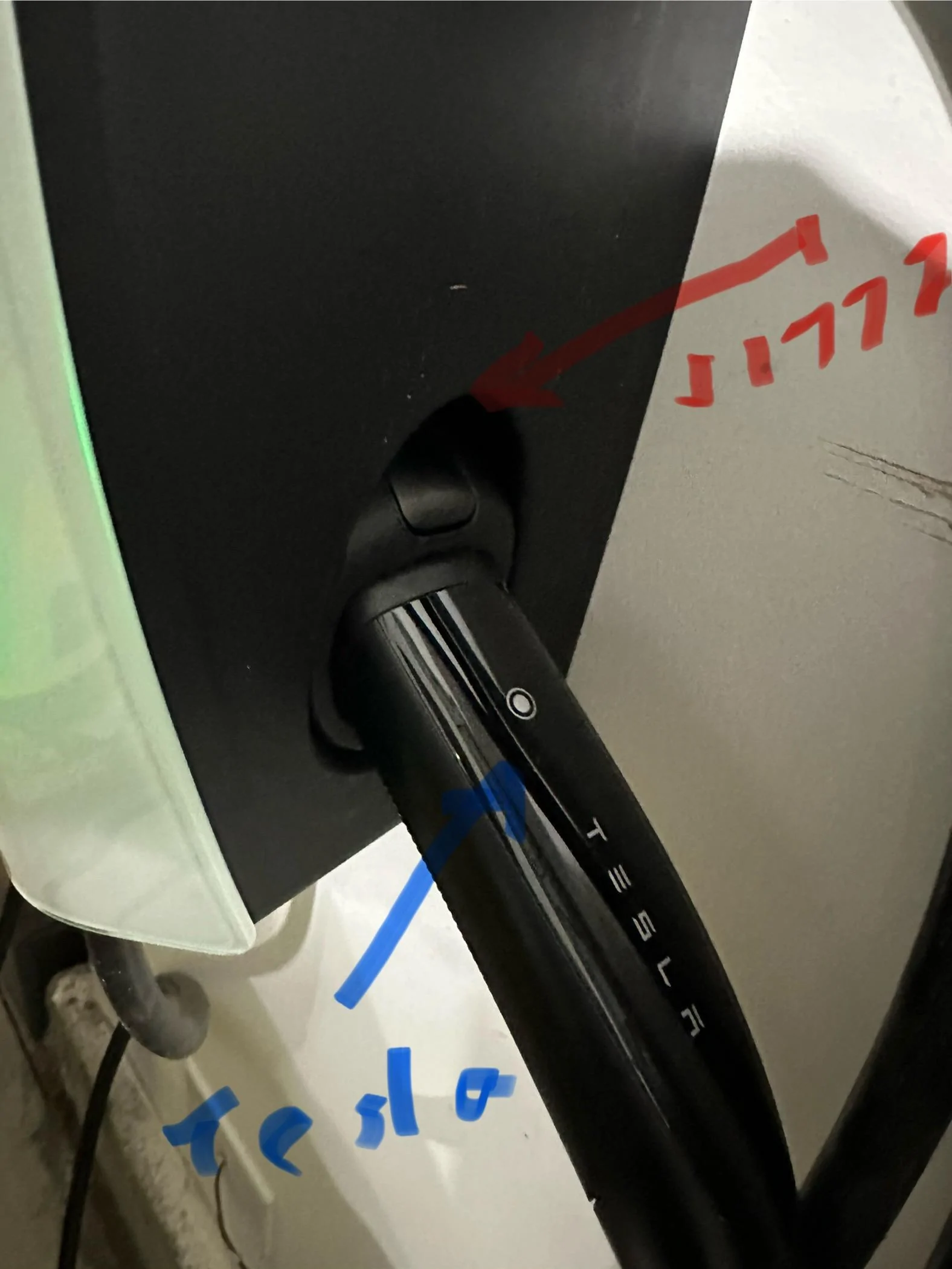
I love how simple this Tesla Universal Wall Connector is to use. Just push button for the charger end port that you want and it releases from the charger ready to be used.

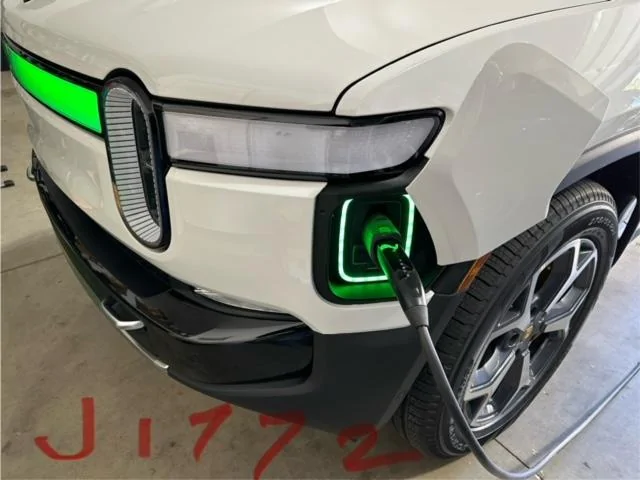
To use the J1772 connector (for our Rivian). Just push the J1772 button (red arrow) and the cord gets released with the J1772 adapter collar on it. Just plug into the Rivian and you’re good to go.

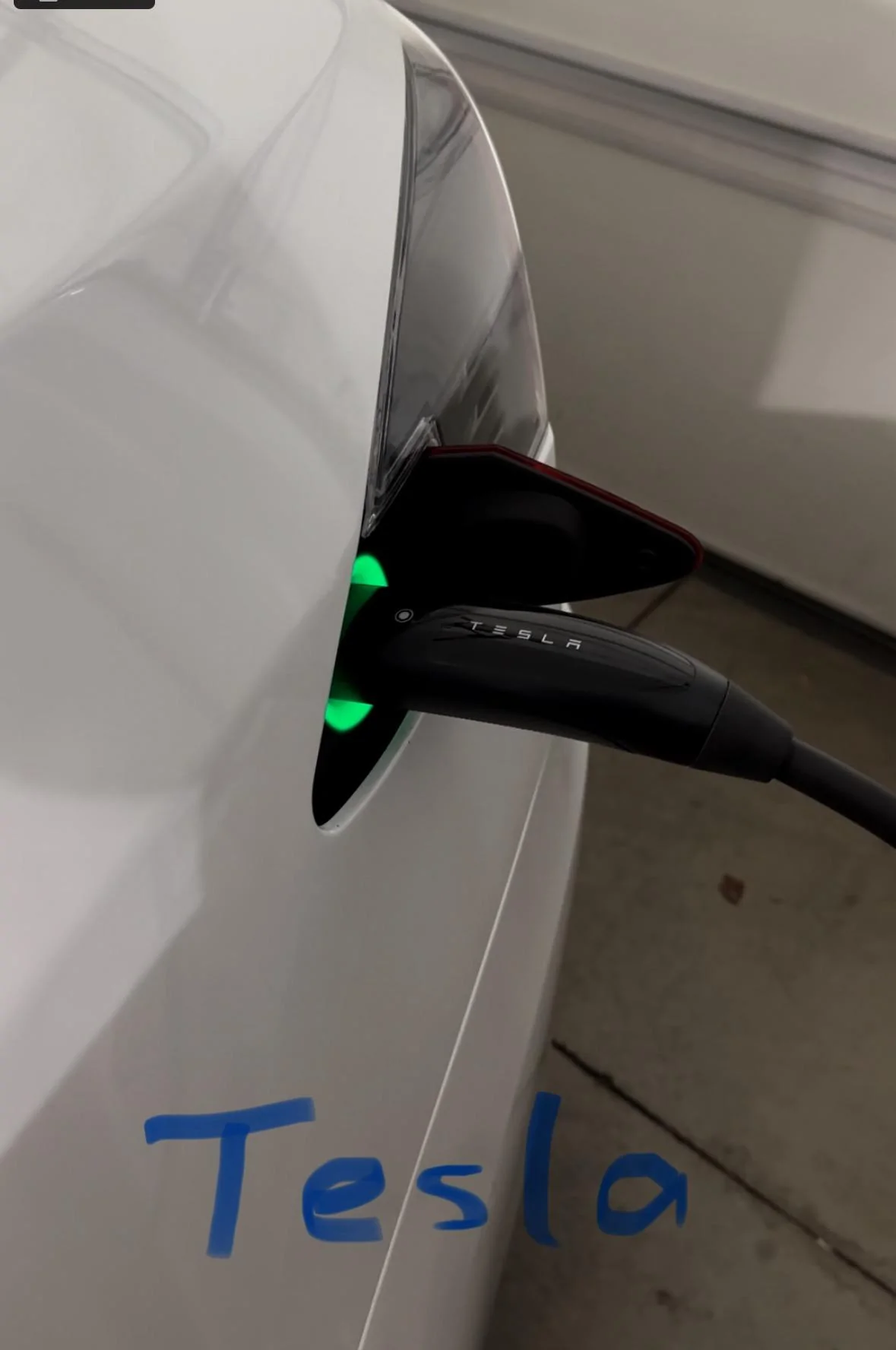
To use the NACS connector (for Teslas). Just push the NACS button (blue arrow) and the cord gets released with just the NACS end. Just plug into the Tesla (or NACS port equipped vehicle) and you’re good to go.

The cord is 24 feet, so it’s plenty long for what you need to use it for.

While the charger works exactly as billed for charging, my only minor issue with the charger is that it is mounted close to my Tesla, every time I push any of the buttons to release a connector (regardless if it's being used for the J1772 or NACS port that is needed), my Tesla charge port auto-opens. The Tesla Plaid charge port should only open if I pushed the NACS port to be released on the charger. I would imagine this may be able to be fixed in a future firmware release but it's a pretty minor item as the Tesla car will autoclose the port a few minutes later.

EDIT (11/2/23): I emailed Tesla support and my charger appears to now work as I would have wanted it--push the J1772 button to release from the charger body and my nearby Tesla charge port does NOT open (desired action) and when I push the NACS button to release from the charger body, the Tesla charge port automatically opens.

Again, in my opinion, for the price and convenience, this is currently the best single EV charger on the market for those wanting flexibility for J1772 and NACS equipped cars. I'm impressed with the build quality of this dual plug charger.

https://shop.tesla.com/product/universal-wall-connector

You can also get this from other retailers like Best Buy.

Rivian R1T R1S Tesla Universal Charger review (J1772 and NACS): Best available single charger a

Rivian R1T R1S Tesla Universal Charger review (J1772 and NACS): Best available single charger


Rivian R1T R1S Tesla Universal Charger review (J1772 and NACS): Best available single charger c


Rivian R1T R1S Tesla Universal Charger review (J1772 and NACS): Best available single charger r

Rivian R1T R1S Tesla Universal Charger review (J1772 and NACS): Best available single charger d


Rivian R1T R1S Tesla Universal Charger review (J1772 and NACS): Best available single charger t


Side notes:

1. Tesla recommends mounting at 45” on the wall (mounting height range 20”-65”). That’s a good starting height but I wanted slightly more usable cord length so I mounted it around 37” height (I originally had it at 65” but it came just a few inches short for my Rivian)—your use case may vary.

2. The Tesla charger is good for up to 48A (if you use a 60A breaker)

3. The Tesla charger can talk to other Tesla chargers on your breaker (if setup), so it doesn’t draw too much power at once when charging multiple vehicles. Not needed in my case, but could be useful in large charging scenarios.

4. EDIT. During initial provisioning, to ensure maximum compatibility, make sure the charger is set to charge ALL CARS. You have 3 options on initial setup (all cars, Teslas only, and only certain Tesla (up to 10 VIN numbers). Apparently some folks have issues where it won't charge their Rivian (J1772) as they used the wrong initial settings (i.e. they set it up for "Tesla only").

5. EDIT. Firmware update. I also had to do a firmware update when I first setup the charger (the electrician installed the breaker and wiring, and I took care of the provisioning/setup of the charger as I'm relatively tech savvy). This involved directly connecting wirelessly to charger using my phone (or a laptop) (1. connect your phone/laptop up via WiFi directly to the charger (you have 15 minutes to do this upon first boot up or push and hold down the NACS button on the charger end port for 5 seconds to turn back on the charger WiFi connection), 2. Go to the IP address of the charger on a browser (192.168.92.1), 3. Enter in the home WiFi credentials, and 4. Go through the provisioning questions, and 5. Update the firmware).
Sponsored

 
Last edited:

Stack

Well-Known Member
First Name
Michael
Joined
Jan 27, 2022
Threads
2
Messages
53
Reaction score
33
Location
Kansas City
Vehicles
Tesla Model YP, Rivian R1T (Limestone, 20" AT)
Once again Tesla leads the way. I bought the Tesla wall charger w/ J1772 and it’s awesome. Easily the best and fastest level 2. I wish this new version had come out sooner as now I have two TWCs!
 

RayzorBEV

Well-Known Member
Joined
Dec 8, 2019
Threads
2
Messages
528
Reaction score
656
Location
Texas
Vehicles
R1T QM, R1S QM, M3 P, Zero SZF, Cyberbeast
Occupation
Electric bum
Background

I needed a Level 2 charger for my 2 EVs: Rivian R1S and Tesla S Plaid. When I got the Plaid earlier this year, it was an occasional weekend car so the 120V wall plug worked just fine (4 miles/hr), as I also have an ICE SUV. However, with the R1S, being a daily driver, less efficient energy usage, and relatively slow charging (maybe 1.5 miles/hr charge speed on 120V), I truly needed a L2 charger in my garage. Ultimately, I wanted just a single EV charger that could easily work for both cars and I didn’t want to mess with bulky adapters. Given recent news events that most major car manufacturers were going the Tesla NACS charge connector route (holdouts as of today are Stellantis and VW), I also knew long-term I would need a charger that had NACS built-in to future proof my purchase.

Solution

Tesla Universal Wall Connector. Tesla just released this dual connection charger earlier this month. It has both NACS and J1772 connectors. It’s basically an updated Tesla NACS charger that also has a low-profile collared J1772 adapter integrated in. The J1772 adapter is held on magnetically or has some sort of latch that does so, so you absolutely can’t lose it. It's also designed so you can't remove it from either the charger or the charger end cable when you are using it. It’s quite easy to use and it minimizes adapter frustration. I originally ordered the Rivian Wall charger (J1772) and a regular Tesla Wall charger (NACS only) but I returned both since this Tesla Universal Charger does what I need. In my opinion, this is probably the best charger currently available for those needing J1772 and NACS charging from a single unit. It's currently $595.

Usage:

I love how simple this Tesla Universal Wall Connector is to use. Just push button for the charger end port that you want and it releases from the charger ready to be used.

To use the J1772 connector (for our Rivian). Just push the J1772 button (red arrow) and the cord gets released with the J1772 adapter collar on it. Just plug into the Rivian and you’re good to go.

To use the NACS connector (for Teslas). Just push the NACS button (blue arrow) and the cord gets released with just the NACS end. Just plug into the Tesla (or NACS port equipped vehicle) and you’re good to go.

The cord is 24 feet, so it’s plenty long for what you need to use it for.

While the charger works exactly as billed for charging, my only minor issue with the charger is that it is mounted close to my Tesla, every time I push any of the buttons to release a connector (regardless if it's being used for the J1772 or NACS port that is needed), my Tesla charge port auto-opens. The Tesla Plaid charge port should only open if I pushed the NACS port to be released on the charger. I would imagine this may be able to be fixed in a future firmware release but it's a pretty minor item as the Tesla car will autoclose the port a few minutes later.

Again, in my opinion, for the price and convenience, this is currently the best single EV charger on the market for those wanting flexibility for J1772 and NACS equipped cars. I'm impressed with the build quality of this dual plug charger.

https://shop.tesla.com/product/universal-wall-connector

You can also get this from other retailers like Best Buy.

a.jpg

b.jpg


c.jpg


r.jpg

d.jpg


t.jpg


Side notes:

1. Tesla recommends mounting at 45” on the wall (mounting height range 20”-65”). That’s a good starting height but I wanted slightly more usable cord length so I mounted it around 37” height (I originally had it at 65” but it came just a few inches short for my Rivian)—your use case may vary.

2. The Tesla charger is good for up to 48A (if you use a 60A breaker)

3. The Tesla charger can talk to other Tesla chargers on your breaker (if setup), so it doesn’t draw too much power at once when charging multiple vehicles. Not needed in my case, but could be useful in large charging scenarios.
Mine is on its way. I will be using it to charge my Rivian R1T, R1S and my MY. I can't wait!
 

MDH

Well-Known Member
Joined
Nov 11, 2022
Threads
0
Messages
73
Reaction score
134
Location
Carson City
Vehicles
Model Y Performance, LE R1T
Occupation
Retired Chemical Engineer
Background

I needed a Level 2 charger for my 2 EVs: Rivian R1S and Tesla S Plaid. When I got the Plaid earlier this year, it was an occasional weekend car so the 120V wall plug worked just fine (4 miles/hr), as I also have an ICE SUV. However, with the R1S, being a daily driver, less efficient energy usage, and relatively slow charging (maybe 1.5 miles/hr charge speed on 120V), I truly needed a L2 charger in my garage. Ultimately, I wanted just a single EV charger that could easily work for both cars and I didn’t want to mess with bulky adapters. Given recent news events that most major car manufacturers were going the Tesla NACS charge connector route (holdouts as of today are Stellantis and VW), I also knew long-term I would need a charger that had NACS built-in to future proof my purchase.

Solution

Tesla Universal Wall Connector. Tesla just released this dual connection charger earlier this month. It has both NACS and J1772 connectors. It’s basically an updated Tesla NACS charger that also has a low-profile collared J1772 adapter integrated in. The J1772 adapter is held on magnetically or has some sort of latch that does so, so you absolutely can’t lose it. It's also designed so you can't remove it from either the charger or the charger end cable when you are using it. It’s quite easy to use and it minimizes adapter frustration. I originally ordered the Rivian Wall charger (J1772) and a regular Tesla Wall charger (NACS only) but I returned both since this Tesla Universal Charger does what I need. In my opinion, this is probably the best charger currently available for those needing J1772 and NACS charging from a single unit. It's currently $595.

Usage:

I love how simple this Tesla Universal Wall Connector is to use. Just push button for the charger end port that you want and it releases from the charger ready to be used.

To use the J1772 connector (for our Rivian). Just push the J1772 button (red arrow) and the cord gets released with the J1772 adapter collar on it. Just plug into the Rivian and you’re good to go.

To use the NACS connector (for Teslas). Just push the NACS button (blue arrow) and the cord gets released with just the NACS end. Just plug into the Tesla (or NACS port equipped vehicle) and you’re good to go.

The cord is 24 feet, so it’s plenty long for what you need to use it for.

While the charger works exactly as billed for charging, my only minor issue with the charger is that it is mounted close to my Tesla, every time I push any of the buttons to release a connector (regardless if it's being used for the J1772 or NACS port that is needed), my Tesla charge port auto-opens. The Tesla Plaid charge port should only open if I pushed the NACS port to be released on the charger. I would imagine this may be able to be fixed in a future firmware release but it's a pretty minor item as the Tesla car will autoclose the port a few minutes later.

Again, in my opinion, for the price and convenience, this is currently the best single EV charger on the market for those wanting flexibility for J1772 and NACS equipped cars. I'm impressed with the build quality of this dual plug charger.

https://shop.tesla.com/product/universal-wall-connector

You can also get this from other retailers like Best Buy.

a.jpg

b.jpg


c.jpg


r.jpg

d.jpg


t.jpg


Side notes:

1. Tesla recommends mounting at 45” on the wall (mounting height range 20”-65”). That’s a good starting height but I wanted slightly more usable cord length so I mounted it around 37” height (I originally had it at 65” but it came just a few inches short for my Rivian)—your use case may vary.

2. The Tesla charger is good for up to 48A (if you use a 60A breaker)

3. The Tesla charger can talk to other Tesla chargers on your breaker (if setup), so it doesn’t draw too much power at once when charging multiple vehicles. Not needed in my case, but could be useful in large charging scenarios.
Replaced my Tesla Gen 2 wall charger with the Universal about a month ago. I no longer have to back the R1T into the garage for charging. Handles the Rivian and Tesla flawlessly. If you plan to do a similar swap, check multiple times and ways to be sure the power is off and torque the screws to spec. Follow the instructions to sync the system.
 

Sponsored

SolartoEV

Well-Known Member
Joined
Dec 30, 2021
Threads
17
Messages
594
Reaction score
1,186
Location
Western NY
Vehicles
R1T VIN 269*, 2019 RAV4 Hybrid, 1999 Ford F-250
Once again Tesla leads the way. I bought the Tesla wall charger w/ J1772 and it’s awesome. Easily the best and fastest level 2. I wish this new version had come out sooner as now I have two TWCs!
I couldn't help myself.....

It's not any faster at delivering electricity than any other 48amp charger. Technically there are also vehicles currently that can accept up to 19.2 kW so wouldn't be great for them.

We can both still enjoy a affordable product tho.
 

SANZC02

Well-Known Member
First Name
Bob
Joined
Feb 11, 2021
Threads
50
Messages
7,439
Reaction score
12,745
Location
California
Vehicles
Tesla Model S, LE - R1S
Occupation
Retired
…..Easily the best and fastest level 2….
Just curious, can you explain what you mean by fastest? There are a lot of 48 amp chargers out there.
 

Stack

Well-Known Member
First Name
Michael
Joined
Jan 27, 2022
Threads
2
Messages
53
Reaction score
33
Location
Kansas City
Vehicles
Tesla Model YP, Rivian R1T (Limestone, 20" AT)
The Tesla wall charger is 48 amps, but charges cars faster than anything else out there so a far. Even my Rivian tech (who used to work for Tesla) said the same thing. It charges at a faster rate than the Rivian wall charger. Basically all 48 amp chargers are not the same.
 

Sponsored

SANZC02

Well-Known Member
First Name
Bob
Joined
Feb 11, 2021
Threads
50
Messages
7,439
Reaction score
12,745
Location
California
Vehicles
Tesla Model S, LE - R1S
Occupation
Retired
The Tesla wall charger is 48 amps, but charges cars faster than anything else out there so a far. Even my Rivian tech (who used to work for Tesla) said the same thing. It charges at a faster rate than the Rivian wall charger. Basically all 48 amp chargers are not the same.
48 amps is 48 amps, they max out at 11.5 kWh. I’d be curious to see any test data to back up anyone claiming this Tesla charger to be faster.

It is kind of like saying a pound of steel is heavier than a pound of feathers.
 

godfodder0901

Well-Known Member
First Name
Jared
Joined
Mar 12, 2019
Threads
27
Messages
5,767
Reaction score
10,155
Location
Washington
Vehicles
2022 Rivian R1T LE
The Tesla wall charger is 48 amps, but charges cars faster than anything else out there so a far. Even my Rivian tech (who used to work for Tesla) said the same thing. It charges at a faster rate than the Rivian wall charger. Basically all 48 amp chargers are not the same.
48 amps is 48 amps, they max out at 11.5 kWh. I’d be curious to see any test data to back up anyone claiming this Tesla charger to be faster.

It is kind of like saying a pound of steel is heavier than a pound of feathers.
The only way I could see this being remotely possible is if one charger could deliver that 48amps more reliably than the other, possibly due to better thermal management. But this doesn't appear to be the case in the TUWC vs Rivian Wall Charger conversation.
 

UnsungZero_OldTimeAdMan

Well-Known Member
First Name
Barnum
Joined
Mar 20, 2023
Threads
68
Messages
8,731
Reaction score
11,972
Location
SoCal
Vehicles
'23 GW Quad-Large R1T "Ghost"
Occupation
Advertising Circus
The Tesla wall charger is 48 amps, but charges cars faster than anything else out there so a far. Even my Rivian tech (who used to work for Tesla) said the same thing. It charges at a faster rate than the Rivian wall charger. Basically all 48 amp chargers are not the same.
Yah that isn't how it works. Just hearsay. The 48A number is a measure of current—how much juice is flowing through, theoretical maximum, at any moment. Like how much water can flow through a certain sized pipe at any time. The only way it can charge faster is how little that flow rate fluctuates over a certain span of time, compared to others capable of the same 48A max. rating. And there's no proof of it being the case. Plus, if judging/deciding between all 48A EVSEs by speed, you're kind of splitting hairs. It's the same size "pipe".

The best selling point about this EVSE is that it's most future-proof, as we are now in a world that is straddling J1772 and NACS. If it costs X amount to have an electrician hardwire one, it's a no brainer to install one that is already compliant with both standards.
 
Last edited:

RivianRunner

Banned
Well-Known Member
First Name
Marcus
Joined
Sep 14, 2021
Threads
0
Messages
732
Reaction score
629
Location
Bellingham, WA
Vehicles
Cybertruck DM, F-150, Suzuki DR650
Occupation
Tester
Yah that isn't how it works. Just hearsay. The 48A number is a measure of current—how much juice is flowing through, theoretical maximum, at any moment. Like how much water can flow through a certain sized pipe at any time.
While that is technically true, it's only addressing the maximum possible current.

The Wall Connector communicates the 48-amp limit to the car. It has thermocouple probes at the charging plug. If it detects excessive heating, it communicates to the car to draw less current. Some plugs generate more heat than others so are more likely to slow down. The Tesla plug is well-designed from a thermal management perspective, to conduct as much heat as possible down the conductors and away from the connection to the charge port. Better thermal conductivity equals less chance of limiting the charge current based on excessive heat at the charge port, especially as the plugs wear and age.

10.5 kW is a lot of power to pass through two conductors.
 

Throwdown

Well-Known Member
Joined
Mar 14, 2023
Threads
0
Messages
424
Reaction score
487
Location
Colorado
Vehicles
R1t launch edition#2650
Occupation
Technician
48 amps is 48 amps, they max out at 11.5 kWh. I’d be curious to see any test data to back up anyone claiming this Tesla charger to be faster.

It is kind of like saying a pound of steel is heavier than a pound of feathers.
But steel is heavier than feathers......
Sponsored


Top