Sponsored

Undocumented Changes in 2025.06

CBRacerX

Well-Known Member
Joined
Jun 30, 2024
Threads
3
Messages
271
Reaction score
225
Location
USA
Vehicles
R1T, Defender 110, 958, 987.2, 986S
I've seen an increase in the BT range used to unlock the car. Previously I could have my phone two stories away from the R1 in the driveway and it would remain locked. Now it unlocks from this distance. I have changed the BT Unlock to exclude home to resolve.
Sponsored
 

elektrode

Well-Known Member
First Name
Bran
Joined
Jul 11, 2022
Threads
42
Messages
978
Reaction score
1,601
Location
NC
Vehicles
Honda Ridgeline to R1T
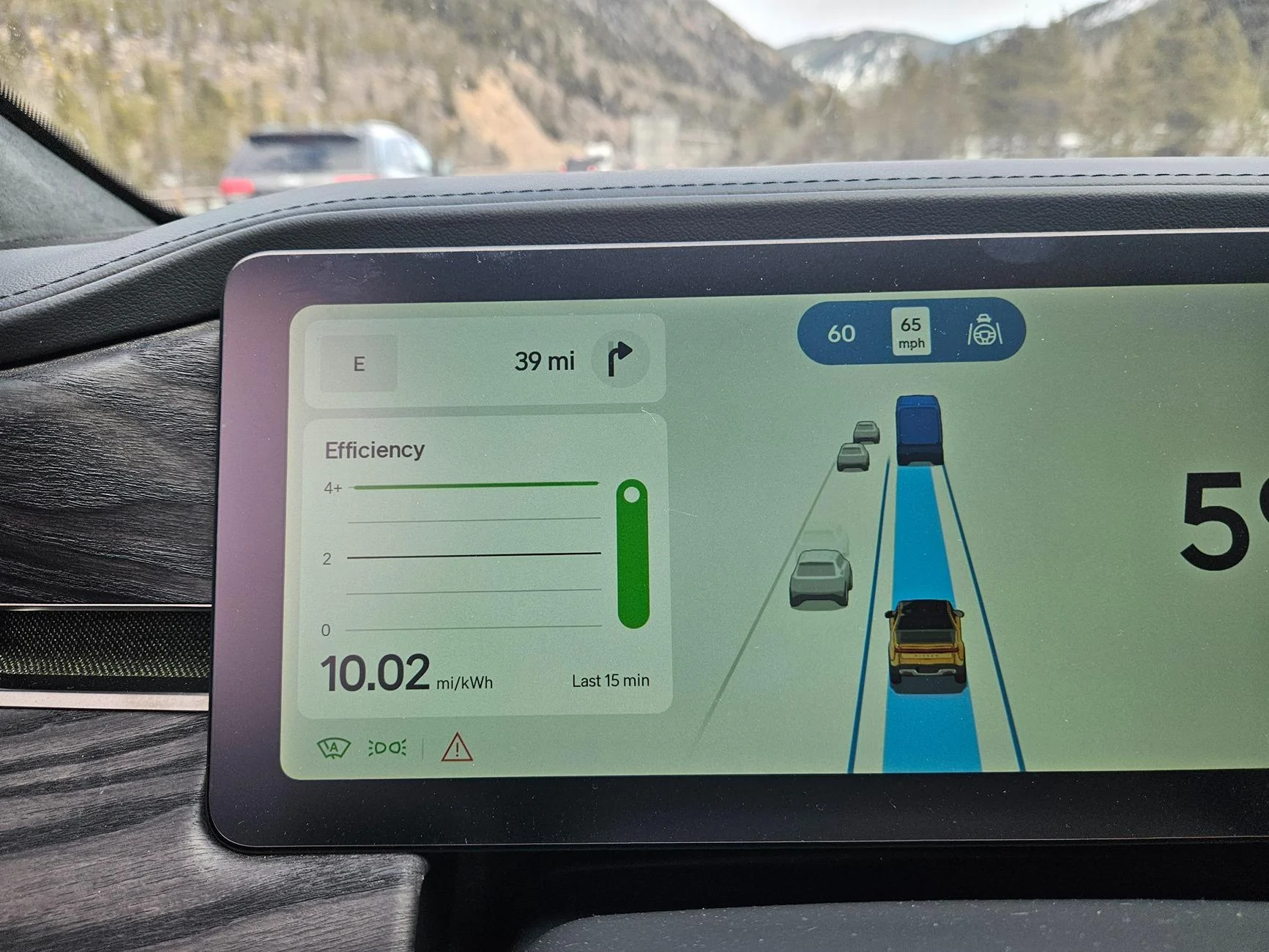
maybe because you are in FL and it doesn't get above 4? My 10.02 max recorded reading was on a 20 mile mountain decent.
Since most of us had not seen it, we assumed you meant the graph height increased to 10 instead of just the bottom left number.
 
  • Like
Reactions: VSG

kevinhanff

Active Member
First Name
Kevin
Joined
Jun 4, 2024
Threads
0
Messages
30
Reaction score
32
Location
Pensacola, FL
Vehicles
2024 Rivian R1T, 2021 Toyota Rav4 Prime
Occupation
Retired federal agent
maybe because you are in FL and it doesn't get above 4? My 10.02 max recorded reading was on a 20 mile mountain decent.
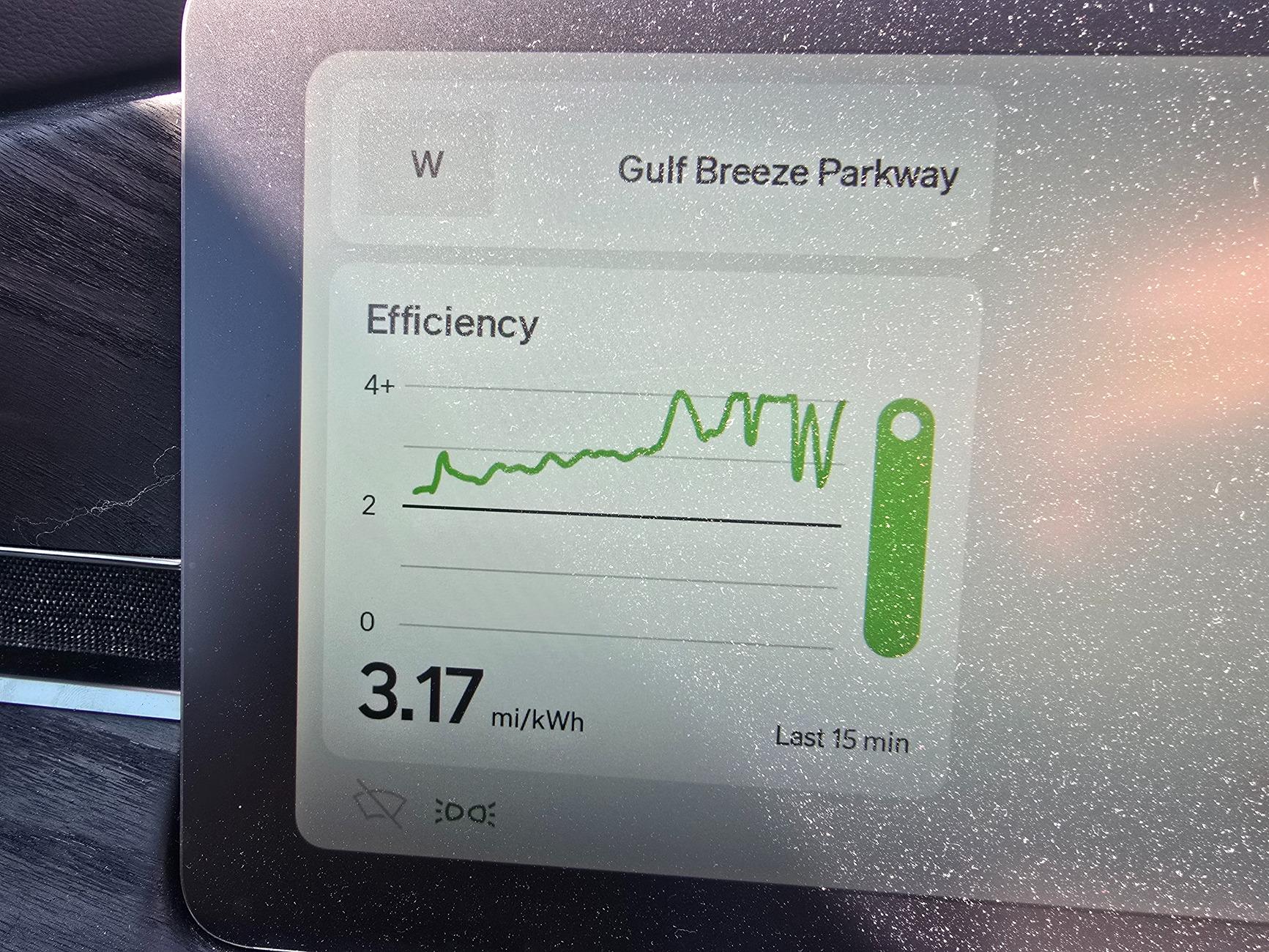
Judging from this graph, I'm gonna go with "nope, location not a limitation".
Rivian R1T R1S Undocumented Changes in 2025.06 1000013003
 

16'-Red-Canoe

Active Member
First Name
Matthew
Joined
Dec 30, 2024
Threads
7
Messages
25
Reaction score
17
Location
Canada
Vehicles
Gen 1 R1S quad
Occupation
self employed engineer
Is anybody know when we're getting the manual battery preconditioning option?
 

Sponsored

Erik+

Well-Known Member
First Name
Erik
Joined
Sep 2, 2024
Threads
5
Messages
360
Reaction score
553
Location
Colorado
Vehicles
2023 R1T
Occupation
Engineering
Judging from this graph, I'm gonna go with "nope, location not a limitation".
1000013003.jpg
As a math and science major, my approximate interpolation of the average values across the graph you posted depicting the last 15 minutes average, the 3.17 looks accurate, since for at least half of the 15 minutes your efficiency was around or below 2.0

If you want to get it above 4.0, the entire graph will be flatlined on the 4+ mark. If you look back through the thread, someone posted the graph and their 10.02 fifteen minute average.
 

Green Mean Machine

Well-Known Member
First Name
Michael
Joined
Jun 18, 2023
Threads
1
Messages
61
Reaction score
36
Location
Gainesville
Website
www.ppsnow.com
Vehicles
23 R1T Quad, 20 Lotus Evora GT, 02 BMW Z3, 13 Audi A6 3.0T&11 Q5, 18 RAV4
Occupation
Lead PDM, Engineer, Inventor
Clubs
 
That's good to hear! Did you enjoy the drive without needing hands on? I imagine it a weird experience.

On the update note, my side mirrors do not tilt in reverse, so don't know if there is a setting for it, but couldn't find it on quick browse.
Its a setting that needs to be turn on. By default is off. Also it lets you adjust the mirrors to your liking and save the settings.
 

bfilippo

Well-Known Member
First Name
Benjamin
Joined
Sep 16, 2024
Threads
39
Messages
682
Reaction score
694
Location
Downeast Maine
Vehicles
2022 Launch Edition R1S Limestone, 2026 Gen2 R1T Tri Max AT, Storm Blue
Occupation
Consultant
Okay, maybe a dumb question- How do I bring up this efficiency display? Is it only when using Driver+? Have never seen this display on my Gen2 or recently acquired Gen1.
 

RJK75

Member
First Name
Robert
Joined
Dec 6, 2024
Threads
7
Messages
22
Reaction score
8
Location
Dublin, CA
Vehicles
Tesla Model Y, Chrysler Pacificia hybrid
Speaking of the efficient graph I would love just a little view of the efficiency I don’t need the giant graph and would rather use that for directions but just see a single high tile always on showing efficacy.
 
OP
OP
mpshizzle

mpshizzle

Well-Known Member
Joined
Jun 16, 2024
Threads
76
Messages
1,307
Reaction score
2,179
Location
Utah
Vehicles
2025 R1S Dual Max (Baymax)
Okay, maybe a dumb question- How do I bring up this efficiency display? Is it only when using Driver+? Have never seen this display on my Gen2 or recently acquired Gen1.
Push and hold the left/right buttons on the left of the steering wheel (usually used for prev/next track). This will change what is displayed on the left of the driver screen. It will cycle between map, efficiency, music, and tire pressure.
 

Sponsored

kevinhanff

Active Member
First Name
Kevin
Joined
Jun 4, 2024
Threads
0
Messages
30
Reaction score
32
Location
Pensacola, FL
Vehicles
2024 Rivian R1T, 2021 Toyota Rav4 Prime
Occupation
Retired federal agent
Since most of us had not seen it, we assumed you meant the graph height increased to 10 instead of just the bottom left number.
This. The “graph” - the actual sqiggly line - won’t go above 4, no matter what the number shown bottom left displays. The original post didn’t say it did or didn’t and some of us (me included) assumed the squiggly line scaled to reflect the number at the bottom. This led to wondering if Gen 2 vehicles scaled the graph, because Gen 1 vehicles clearly do not.

There have been a few times when, stuck in slow moving, but definitely moving at reduced speeds, I’ve managed to get efficiency to display 4.0, but never above. I’m not eager to go find a traffic jam to see the number could exceed 4, but the squiggly line (which will be flat, not squiggly) will never rise above 4. It would be an improvement if it DID scale because the graph could provide a more accurate rendering, although “last 15 minutes” can be useful or useless, depending on the circumstances.
 

dleepnw

Well-Known Member
Joined
May 13, 2021
Threads
148
Messages
3,011
Reaction score
3,417
Location
WA
Vehicles
Rivian, Toyota, Lexus
Clubs
 
Every update seems to have a change or two that's undocumented, I've found a couple already!

1: Driver Display Visuals
They said they just added small SUVs, which is true. But they also appear to have made a few other changes.

The biggest one is the display of lane lines. I presume that they used to be handled by the mobile eye system. With only a vague resemblance to what's actually happening in real life. Now the lines appear to be very much less stable BUT more accurate. Quite possible that it's now the Rivian system driving the lane lines (I'll have to redo my tape testing).

Along with the more accurate depiction of lane lines, it appears to be a MUCH another visual transition when you're changing lanes (even when you're not on the highway using highway assist). It used to be that when you were changing lanes, about halfway through the entire display would reset and there would be an abrupt jump as it shifted to focus on the new Lane. Now it's smoothly transitions between lanes (mostly).

Another change that I noticed is that it is suddenly showing far more vehicles. It will display a much greater quantity of vehicles that are farther away. This may be tied to the new lane display system, since in previous versions the number of cars that were displayed was very heavily tied to the vehicle's perception of lane lines (only showing vehicles in directly adjacent lanes). These rules still seem to be in place, but less strict. (The rule of not showing parked vehicles when you are traveling over 30 mph still seems to be in place)

A funny demo of the less stable lane lines:


2: The Dual Motor "Bump"
The bump from the last update appears to be gone again

What undocumented changed have you noticed?
It'd be helpful to share what Gen vehicle you have. It sounds like Gen2 from your description (and profile) but not everyone will know that.
 
OP
OP
mpshizzle

mpshizzle

Well-Known Member
Joined
Jun 16, 2024
Threads
76
Messages
1,307
Reaction score
2,179
Location
Utah
Vehicles
2025 R1S Dual Max (Baymax)
It'd be helpful to share what Gen vehicle you have. It sounds like Gen2 from your description (and profile) but not everyone will know that.
You are correct. Gen 2
 

TomServo2112

Well-Known Member
Joined
Aug 13, 2024
Threads
2
Messages
163
Reaction score
214
Location
Southern California
Vehicles
Gen 2 R1S DPM, Large Pack, R2 res holder
That's good to hear! Did you enjoy the drive without needing hands on? I imagine it a weird experience.
I just finished a 1200 mile trip. During the drive up to my destination the Enhanced assist worked very well, when it worked. It very clearly needs a database update as soon as possible. As soon as I hit the CA/NV border, into NV, it shut off right away. It didn't announce its availability again until I was in Las Vegas, then lasted until just after I left. On the way back the reverse was true. WIthin a quarter-mile of passing. from NV into CA it became available again. There are some tighter, windier canyons where it stayed active when I expected it not to. Driving home from the trip, the most impressive part for me was that It stayed active and in control for maybe 60 of the last 80 miles, even navigating through the 15S to the 210W interchange. That took me by surprise.

However, it does not detect my eyes very well. It became quite an annoyance to be staring straight ahead on the road and the car yelling at me telling me I don't have my eyes on the road. A reset seemed to clear it up but it did come back again. Hopefully Rivian can fine-tune that. It was bad enough that I would just keep my hand on the wheel for long stretches, rather than tempt the wrath
 
OP
OP
mpshizzle

mpshizzle

Well-Known Member
Joined
Jun 16, 2024
Threads
76
Messages
1,307
Reaction score
2,179
Location
Utah
Vehicles
2025 R1S Dual Max (Baymax)
I just finished a 1200 mile trip. During the drive up to my destination the Enhanced assist worked very well, when it worked. It very clearly needs a database update as soon as possible. As soon as I hit the CA/NV border, into NV, it shut off right away. It didn't announce its availability again until I was in Las Vegas, then lasted until just after I left. On the way back the reverse was true. WIthin a quarter-mile of passing. from NV into CA it became available again. There are some tighter, windier canyons where it stayed active when I expected it not to. Driving home from the trip, the most impressive part for me was that It stayed active and in control for maybe 60 of the last 80 miles, even navigating through the 15S to the 210W interchange. That took me by surprise.

However, it does not detect my eyes very well. It became quite an annoyance to be staring straight ahead on the road and the car yelling at me telling me I don't have my eyes on the road. A reset seemed to clear it up but it did come back again. Hopefully Rivian can fine-tune that. It was bad enough that I would just keep my hand on the wheel for long stretches, rather than tempt the wrath
I haven't been on any trips with mine yet, but the mapping bit tracks - near my house there's a random section of I-15 that is not mapped for hands free in either direction. Very strange, as that section of highway is no different from any other part of the highway, just a random gap. Perhaps it was under construction when it was mapped or something?

Being tied to mapping drives me nuts. I really hope they drop that sooner than later. I recently got a survey from Rivian asking how I liked my vehicle after the first 6 months. On the whole I gave very high ratings, but i harped on removing mapping restrictions, any place where it asked about autonomy.

Glad to hear that it quit nagging you about eyes when you put your hands on the wheel. Ford's Blue Cruise has a nasty habit of nagging you for eye-line, even if you are not in hands free mode.

As I said, I haven't done too many miles with the hands free highway assist, but so far I haven't run into the issue of it nagging me, even when I am looking at the road. Though it does seem very aware of when I'm looking down at the driver's screen for too long.
Sponsored


Top