

Rivian Roamer
Well-Known Member
- Joined
- Jul 18, 2024
- Threads
- 2
- Messages
- 470
- Reaction score
- 658
- Location
- Seattle, WA
- Website
- rivianroamer.com
- Vehicles
- 2024 R1S Quad Large, 2025 R1T Tri Max
- Occupation
- Adventurer
What I mean is that RR shows just a single "99%" datapoint, see the graph below from the same session as the ElectraFi screenshots above. Immediately to the left is "98.5%".When you say Rivian Roamer merges the records, can you explain what you mean by this?
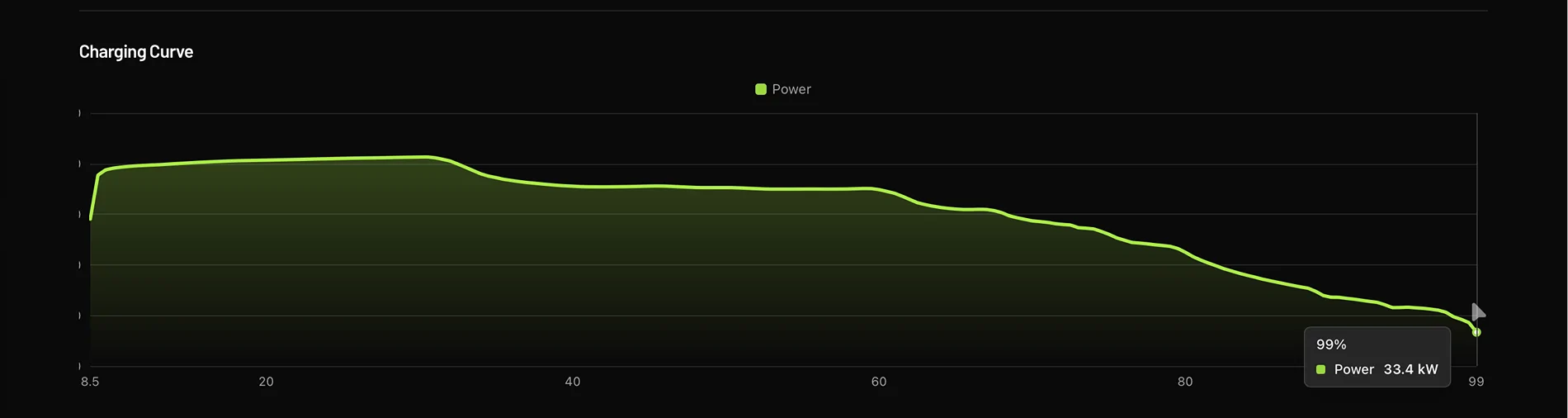
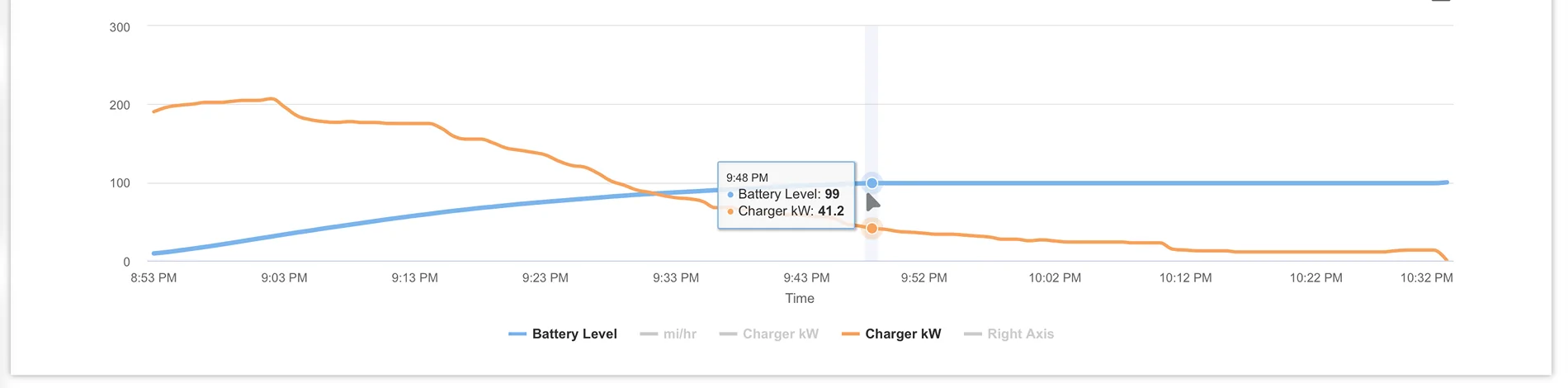
Oh, I understand now.What I mean is that RR shows just a single "99%" datapoint, see the graph below from the same session as the ElectraFi screenshots above. Immediately to the left is "98.5%".
I also pasted the ElectraFi graph for this session. You can see it shows "99%" at the middle of the graph, and then there are dozens of additional "99%" datapoints after that. Since my vehicle spends up an hour at "99%", it makes sense to graph all of this.
To be clear, I don't think RR is doing anything wrong! It's just that how you present the data hides the bug, if present. You're showing the charge curve by %, rather than showing charging power over time. Whereas if you used time as the X axis, my graph would have a ton more data points and the problem would be more obvious. Your method is fine for a normal vehicle.
I think you have all that data, since it's in the csv you emailed me, but it doesn't show on the website dashboard for me. Is there a way to see this, without bugging you? A graph of charging power over time, or just the raw data?


I really thought it was a cell balance issue, I kept insisting that they do balancing tests until they did, and supposedly everything is normal. I actually have rock sliders that I've been waiting to install for almost a year, because I kept thinking that my battery pack must have some cell issue and that the SC wouldn't want to lift it with the sliders.When it hits 99%, all that remains should be balancing the cells. If it adds that much power, that means the cells are really, really unbalanced. So weird Rivian Service says your pack is OK. Maybe the DCF charging process is hosed.
You know what.I really thought it was a cell balance issue, I kept insisting that they do balancing tests until they did, and supposedly everything is normal. I actually have rock sliders that I've been waiting to install for almost a year, because I kept thinking that my battery pack must have some cell issue and that the SC wouldn't want to lift it with the sliders.
This really seems to be some bug around how capacity or voltage calibration works. The vehicle sets the point for when it expects to be at "99%" way too low (115kWh in my vehicle, even though it's consistently ~134kWh from true 99%), and it gets there sooner than expected, and has to hang out at "99%" while it adds the rest.
I think they're doing some bad math or using the wrong variable or something like that, in at least one place in their BMS-related code. There are other issues, like degradation doesn't seem to be taken into account for the rated range calculation, only temperature fluctuations. (I think THAT bug may be stacked on top of getting to "99%" too early...and then the second bug makes it treat the 115kWh at the start of "99%" as the same as 134kWh at the end of "99%".)
If it showed the proper rated range, this would be less of a big deal, even if it was pegged at "99%". But it shows "370 miles" both at 115kWh and 134kWh, and I think the nav system uses that value and that causes my range estimate issues.
The tech who finally diagnosed the issue had that as a theory, when I was first chatting with him. They looked into that, it doesn't seem to be the case.You know what.
I wonder if your vehicles were originally Large packs that had them swapped out. Or Large+ that had the cap removed.
I have quite a few folks on Rivian Roamer that have Standard or Large pack vehicles that have a Max pack installed in them but software limited. This almost looks like the software thinks it has a Large.
When Large+ first launched I worked with someone who exhibited the exact same behavior you're seeing because Rivian forgot to cap the charging. This sounds eerily similar to that. I don't think this is a BMS issue.
I think this actually may confirm my hypothesis. I've had a few support emails on RR from customers who had issues pop up after updates where a config was mis-flashed, or when changing wheel/tire combos (Which does the same thing).The tech who finally diagnosed the issue had that as a theory, when I was first chatting with him. They looked into that, it doesn't seem to be the case.
I also didn't have the problem when the vehicle was new. It started a couple days after the 2025.22.30 update, so hypothetically a module could've been mis-flashed then (this was the tech's theory.)
And the problem also got worse gradually over time...it was 10kWh after 99% first, then it crept up to 15kWh, now closer to 20kWh on average. This took months, it wasn't just a quick recalibration.
I also note that Rivian took a brand new, pre-delivery gen2 Max Pack to a RAN alongside my vehicle, and it exhibited similar behavior. I don't have that graph unfortunately, it may have had a milder version like I did initially.
It may be that almost nobody has seen this because my vehicle is affected worse, due to degradation and/or heavy DCFC activity. It could also be that others are "affected" in that they'll develop the problem in the future if it's not fixed, but very few vehicles could be actively impacted.
I would be surprised if there were more than a couple other gen2 Max Packs in the fleet that have had as much heavy 100% DCFC activity as mine, over almost 50k miles, with 10k of that being long-distance towing at ~0.9mi/kWh, and lots of draining to 0%, plus dozens of nights of car camping (and powering the trailer too.) So my vehicle could be expected to discover bugs like this much sooner than others, perhaps.

So cool you actually use every bit of what the truck has to offer, from range to towing capacity.The tech who finally diagnosed the issue had that as a theory, when I was first chatting with him. They looked into that, it doesn't seem to be the case.
I also didn't have the problem when the vehicle was new. It started a couple days after the 2025.22.30 update, so hypothetically a module could've been mis-flashed then (this was the tech's theory.)
And the problem also got worse gradually over time...it was 10kWh after 99% first, then it crept up to 15kWh, now closer to 20kWh on average. This took months, it wasn't just a quick recalibration.
I also note that Rivian took a brand new, pre-delivery gen2 Max Pack to a RAN alongside my vehicle, and it exhibited similar behavior. I don't have that graph unfortunately, it may have had a milder version like I did initially.
It may be that almost nobody has seen this because my vehicle is affected worse, due to degradation and/or heavy DCFC activity. It could also be that others are "affected" in that they'll develop the problem in the future if it's not fixed, but very few vehicles could be actively impacted.
I would be surprised if there were more than a couple other gen2 Max Packs in the fleet that have had as much heavy 100% DCFC activity as mine, over almost 50k miles, with 10k of that being long-distance towing at ~0.9mi/kWh, and lots of draining to 0%, plus dozens of nights of car camping (and powering the trailer too.) So my vehicle could be expected to discover bugs like this much sooner than others, perhaps.
Interesting that wheel/tire changes could trigger similar issues. I actually swapped to aftermarket ATs (Toyo SLs, so same efficiency anyways) a month prior to when I started having issues, but it was fine for a while. I don't know if that could be related. I also assume the other vehicle they tested with had OEM tires. Feel free to share my VIN with them if it's helpful. Thanks for looking into this!I think this actually may confirm my hypothesis. I've had a few support emails on RR from customers who had issues pop up after updates where a config was mis-flashed, or when changing wheel/tire combos (Which does the same thing).
I'll send this along to someone at Rivian.
Well, the reason it can trigger it is the way Rivian setup wheel/tire swaps.Interesting that wheel/tire changes could trigger similar issues. I actually swapped to aftermarket ATs (Toyo SLs, so same efficiency anyways) a month prior to when I started having issues, but it was fine for a while. I don't know if that could be related. I also assume the other vehicle they tested with had OEM tires. Feel free to share my VIN with them if it's helpful. Thanks for looking into this!
I've found the behavior highly variable. I try not to go below 10 - 15% with the trailer, 5% without it.Have you ever had an issue running it down to 0%?
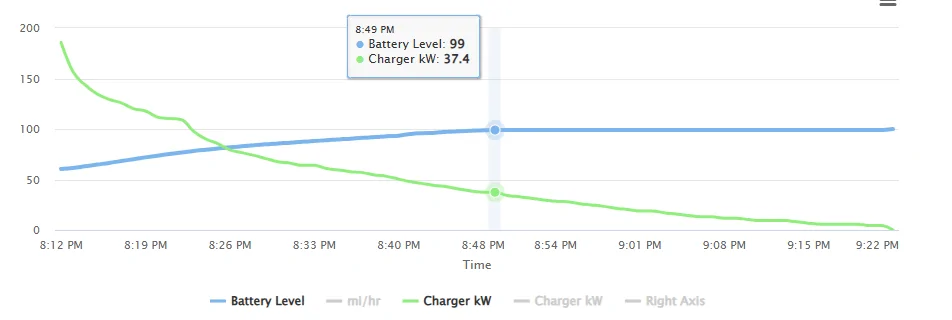
I think this IS the issue. When I first saw the problem, it presented like yours w 10kWh added. Prior to 2025.22.30, it added 5kWh after 99%, then it went up to 10kWh after the update, then it slowly creeped up to the current 20kWh.It was at 99% for 33 minutes and during that time the truck accepted 9.87 kWh.
The chart below is marked at the point it hit 99%.

This seems normal to me. It make sense that all 10 kWh is needed to balance the cells, and that it took 33 minutes to do it. When L2 charging, it takes longer at 99%, which also makes sense.
Sorry, but it appears my truck does not have the same issue as your truck. When it hit 99% and sat there for a while I began to think I had the same problem. But then it completed and it didn't drag on like it first looked like it would.
The nominal gross capacity of a max pack is 150 kWh. There is the real possibility this is a bug in Rivians secret reservation they do. My Gen 1 large stops increasing range at 97%.I think this IS the issue. When I first saw the problem, it presented like yours w 10kWh added. Prior to 2025.22.30, it added 5kWh after 99%, then it went up to 10kWh after the update, then it slowly creeped up to the current 20kWh.
10kWh is ~7% of a 140kWh pack, a lot to be stuffed into a single %. Mine is 15% of the pack in 1%. It should adjust the 99% point if the vehicle can consistently add that much, this is part of the issue.
It doesn't matter if the additional capacity past that comes from normal charging or balancing, if it can always be added (and drains back out in the expected way) then the % level should reflect that.
I think if you conducted the full test (tracking drain with the trip meter), you'd see ~130kWh from where it flips to "99%", and ~140kWh at 100%. Does this make sense? Shouldn't ~130kWh show up as 93% instead? And you'll also see the rated range (in miles) is the same at both points.
I suspect that Max Packs with less mileage and/or less DCFC may be at a baseline 10kWh now (given that Rivian saw "unexpected behavior" on a brand new Max Pack), and that other vehicles will likely creep up over time if this problem isn't fixed.


