Sponsored

Apple Phone Key .. update problem is push to unlock

Bob Kruger

New Member
First Name
Bob
Joined
Nov 17, 2023
Threads
1
Messages
2
Reaction score
1
Location
Seattle
Vehicles
Toyota Tacoma. BMW X3
Occupation
Environmental Scientist
It works perfectly for me, both with Apple Watch and iPhone. Previous setup was terrible. Super stoked about the new Apple Key.
Sponsored


Jim4

Well-Known Member
Joined
Jan 1, 2024
Threads
11
Messages
142
Reaction score
72
Location
CT
Vehicles
R1S
Just delete this thread 😂.
 

RMSko

Well-Known Member
First Name
Rich
Joined
Oct 22, 2025
Threads
7
Messages
57
Reaction score
27
Location
NJ
Vehicles
R1S
It's been a worse experience for me. For the most part, it's normal. The car sense me before I get to the doors usually about 75% of the time. This morning it did not recognize me, so I had to pull out my phone and manually unlock. Got in and it wouldn't let me drive until I took out my key card and put it on the sensor. That was a bit frustrating. Got back home, did a reset and it's working again.

But it never recognizes my Apple Watch as a key, despite it showing in my apple wallet on both my phone and watch AND the vehicle shows my watch as a key.

Normally I would consider that a "nice to have" but I'm a runner who often parks, leaves my phone in the car and goes for a run. I deleted WAAK when I added my watch as a key and now it won't allow me to go back to using WAAK and my watch key doesn't work either.

I need to call service but I assume they are dealing with bigger issues right now.
I had the same issue with the Watch and then realized that it needed a separate setup. You need to go into the Apple Watch app on your phone and go into the Wallet app and then select the Rivian key and activate it.
 

SoCal Rob

Well-Known Member
First Name
Rob
Joined
Apr 19, 2021
Threads
39
Messages
2,808
Reaction score
5,963
Location
Laguna Niguel / Palm Springs / Pioneertown
Vehicles
2025 Rivian R1S & 2021 VW ID.4 (2023 R1S sold)
Occupation
Information Technology
Clubs
 
For folks seeing no change in performance even though everything is working, it would be helpful if you check the phone hardware and watch hardware you have. For Apple devices, ultra wide band (UWB) hardware was included starting with iPhone 11 models and Apple Watch Series 6. My understanding is that If your hardware doesn’t have UWB then you aren’t getting anything beyond what you had before this update.
 

David Cieslak

Member
First Name
David
Joined
May 27, 2024
Threads
1
Messages
23
Reaction score
8
Location
Eagle, ID
Vehicles
R1T G2
Occupation
CPA
Working great for me now (iPhone 15 and Apple Watch Ultra 2), but did have to remove previous phone keys first. A few reboots required, but ultimately got everything all configured.
 

Sponsored

Donald Stanfield

Well-Known Member
First Name
Donald
Joined
Jul 31, 2022
Threads
59
Messages
8,307
Reaction score
16,656
Location
USA
Vehicles
2025 R1S Tri Ascend, 2024 i4 M50
Occupation
Stuff and things
iPhone 15 Pro works much better than the Bluetooth implementation. Unlocks have all been perfect so far.
 

captainjp

Well-Known Member
First Name
John
Joined
Oct 18, 2024
Threads
9
Messages
1,220
Reaction score
1,843
Location
New Jersey
Vehicles
Gen 2 R1T
Clubs
 
iPhone 17PM and Apple Watch Ultra 3. Flawless.
Haptic tap from watch upon lock/unlock. Love it
 

Sgt Beavis

Well-Known Member
First Name
Rick
Joined
Sep 28, 2021
Threads
79
Messages
2,115
Reaction score
4,513
Location
Colorado
Vehicles
2022 Rivian R1T, 2021 Jeep Wrangler Rubicon
Occupation
Overpaid Computer Nerd
Clubs
 
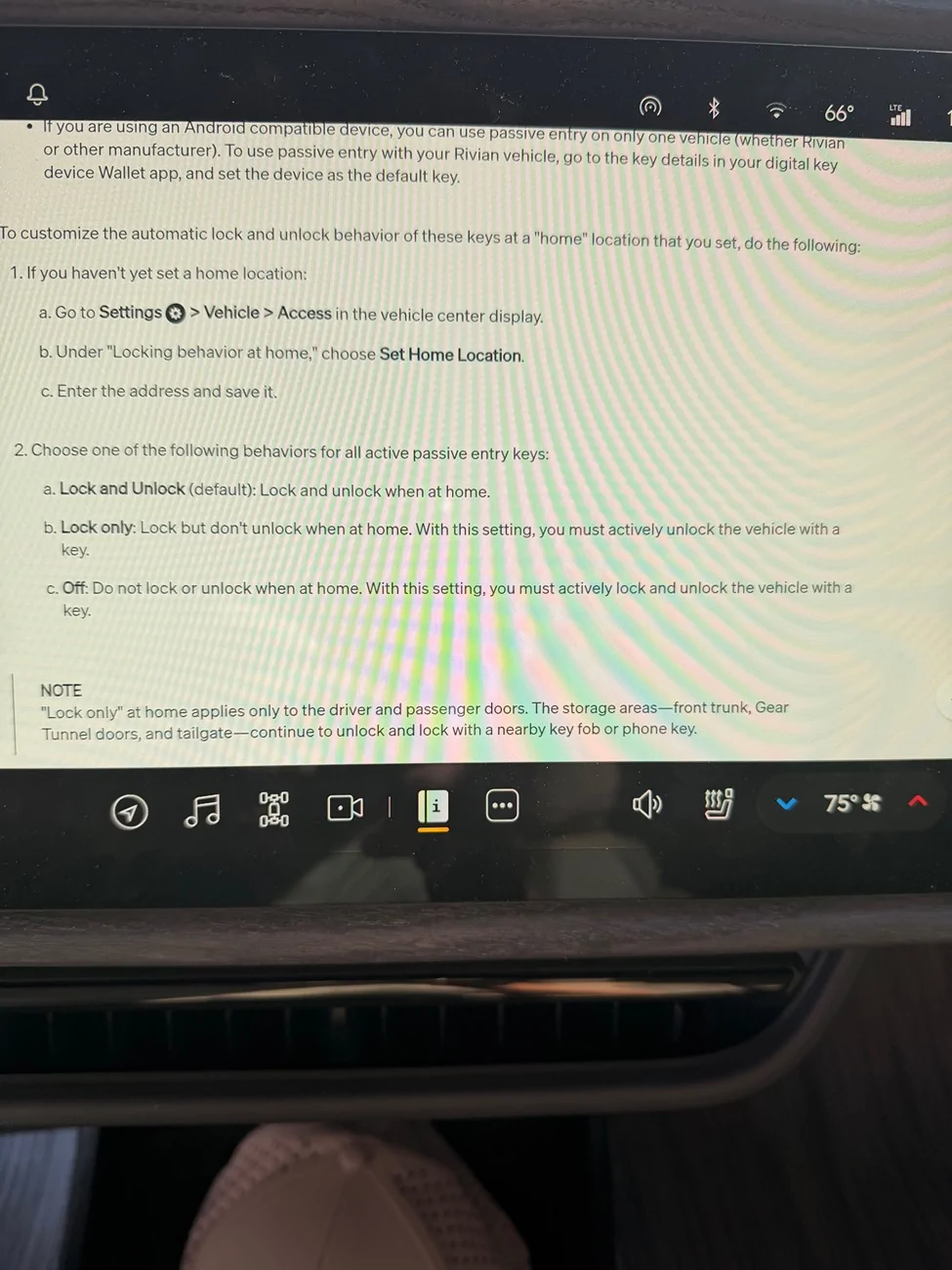
Maybe y’all can give me some advice on this. For the most part, I’m very happy with the digital key. It works exactly as expected when away from the house. It’s at the house that it’s a little annoying. For the longest time I’ve had my gen 2 set to only lock when at home. Never unlock because it it would always unlock when I’m in the kitchen or even when I’m in my upstairs office.

Since getting the digital key, I tried turning that setting off. the good news is that the truck doesn’t unlock from my office, but it does still do this when I’m in the kitchen, where the R1S is on the other side of the wall. Does anyone have any thoughts on how to minimize this? I really don’t want to turn off unlocking at home because I’d either have to start pulling my phone out again or carrying the key fob.
 
OP
OP

Explorer83

Well-Known Member
First Name
WB
Joined
Jul 6, 2025
Threads
4
Messages
50
Reaction score
71
Location
Florida East Coast
Vehicles
2025 R1T Dual Large Forest Green, Ocean Coast
To be honest this is all about the locking behavior at home. It’s incredibly frustrating and I’m not sure why I’m having such a bad result when it seems like everyone else is happy. I turned off the unlocked with Bluetooth setting in the app and no change. The truck still refuses to unlock with the phone in my hand.

I’ve deleted and reinstalled the key and even tried it on my wife’s phone no change. I have an iPhone 17 and she has a 15 still no difference. I’ve had resort to turning on the auto unlock at home. Or I can use the action key on my iPhone 17 to lock and unlock the truck which is literally the exact same thing I was doing before the update.

soft restart no change. Phone has to come out of my pocket and screen comes on and then it may unlock…. Sometimes if it feels like it.
 
Last edited:
OP
OP

Explorer83

Well-Known Member
First Name
WB
Joined
Jul 6, 2025
Threads
4
Messages
50
Reaction score
71
Location
Florida East Coast
Vehicles
2025 R1T Dual Large Forest Green, Ocean Coast
Oh, and the Apple Watch integration literally never worked. Said it was installed when I tried to use it. Truck completely did not recognize it.

update here. Evidently I have the Apple Watch SE series 2, which does not have UWB so I guess I’m just out of luck with that.
 
Last edited:

Sponsored

OP
OP

Explorer83

Well-Known Member
First Name
WB
Joined
Jul 6, 2025
Threads
4
Messages
50
Reaction score
71
Location
Florida East Coast
Vehicles
2025 R1T Dual Large Forest Green, Ocean Coast
TLDR: the problem surrounds the lock only behavior at home for passive entry and the push to unlock feature, which works only very intermittently.

Just got off the phone with Rivian Support and got to what I think is the bottom of the issue. When lock only is enabled at home, the vehicle will allow you to unlock the trunk gear, tunnels, and the bed without unlocking the vehicle.
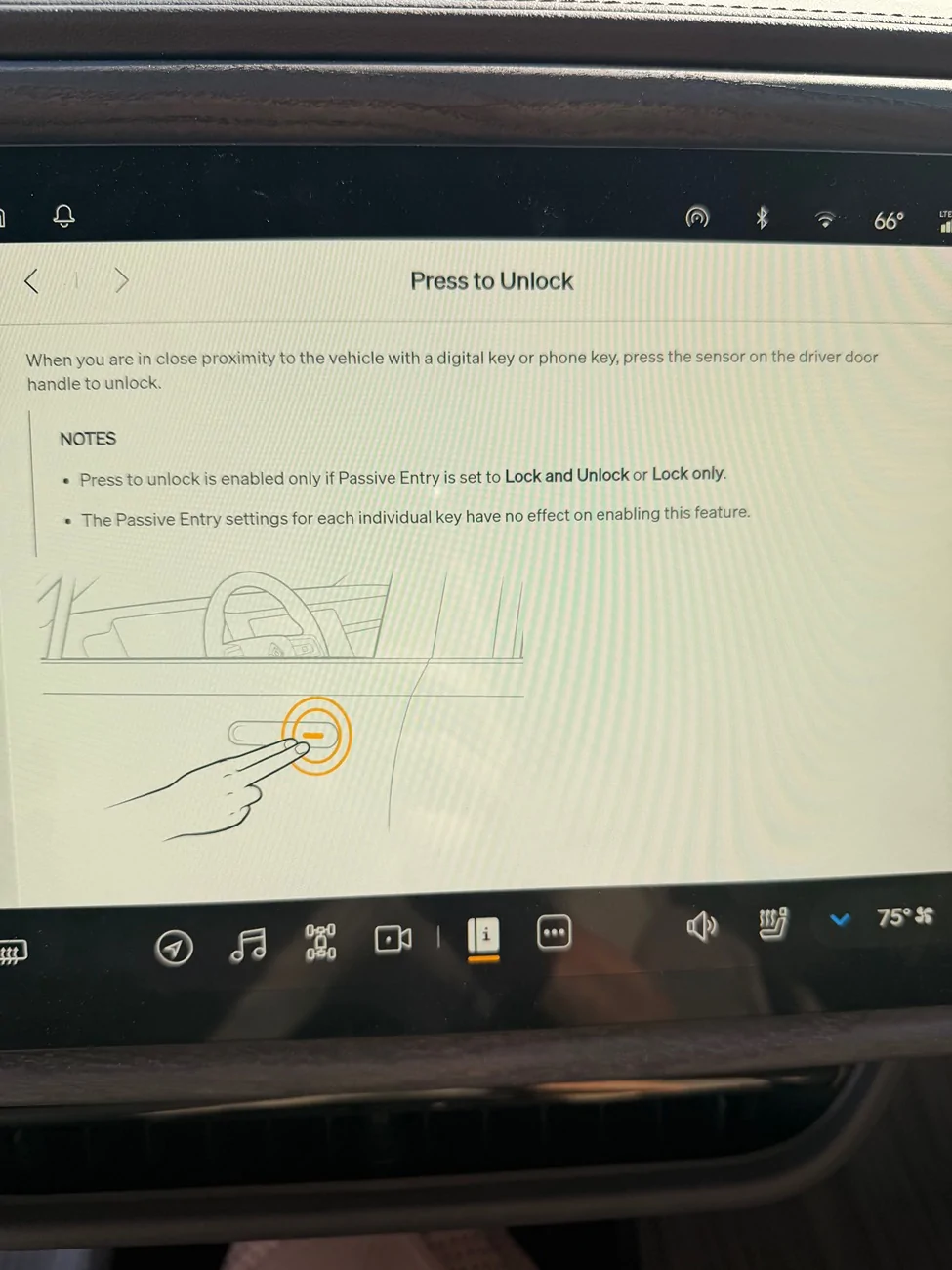
What it will not do in any circumstances is passively unlock the vehicle’s cabin. The only choice when that option is selected at home is through a button, on your phone, key fob or supposedly press to unlock on the door handle itself.
My problem is that the press to unlock feature is frankly unreliable at the best of times. While on the phone with tech-support and the phone in my hand and awake the feature failed multiple times to unlock the vehicle and sometimes would work after 2, 3 or 7 presses or only one.
After 30 minutes on the phone I've decided that passive unlock on the iPhone is working (more or less) as intended. The problem is with press to unlock. Bug report inbound.

Rivian R1T R1S Apple Phone Key .. update problem is push to unlock IMG_3978


Rivian R1T R1S Apple Phone Key .. update problem is push to unlock IMG_3977
 

ATLRivvy

Well-Known Member
Joined
Jan 5, 2025
Threads
2
Messages
175
Reaction score
225
Location
Atlanta
Vehicles
R1S
Night and day improvement so far for me with iPhone 15 Pro. Before the update - car had terrible response time coming out of sleep and I frequently had to manually unlock and wait. So far has been flawless with Digital Key installed.
Sponsored


Top