Sponsored

Yota2R1T

Well-Known Member
First Name
Rich
Joined
Nov 21, 2022
Threads
7
Messages
210
Reaction score
246
Location
Calgary, Canada
Vehicles
Blue 2024 R1T, Large-DM, 21", OC int.
Occupation
Solar PV professional
Clubs
 
Rivian R1T R1S Post your commute stats - New energy monitor is great! 1000009634


Just getting used to the new in-vehicle energy app and wanted to post my thoughts.

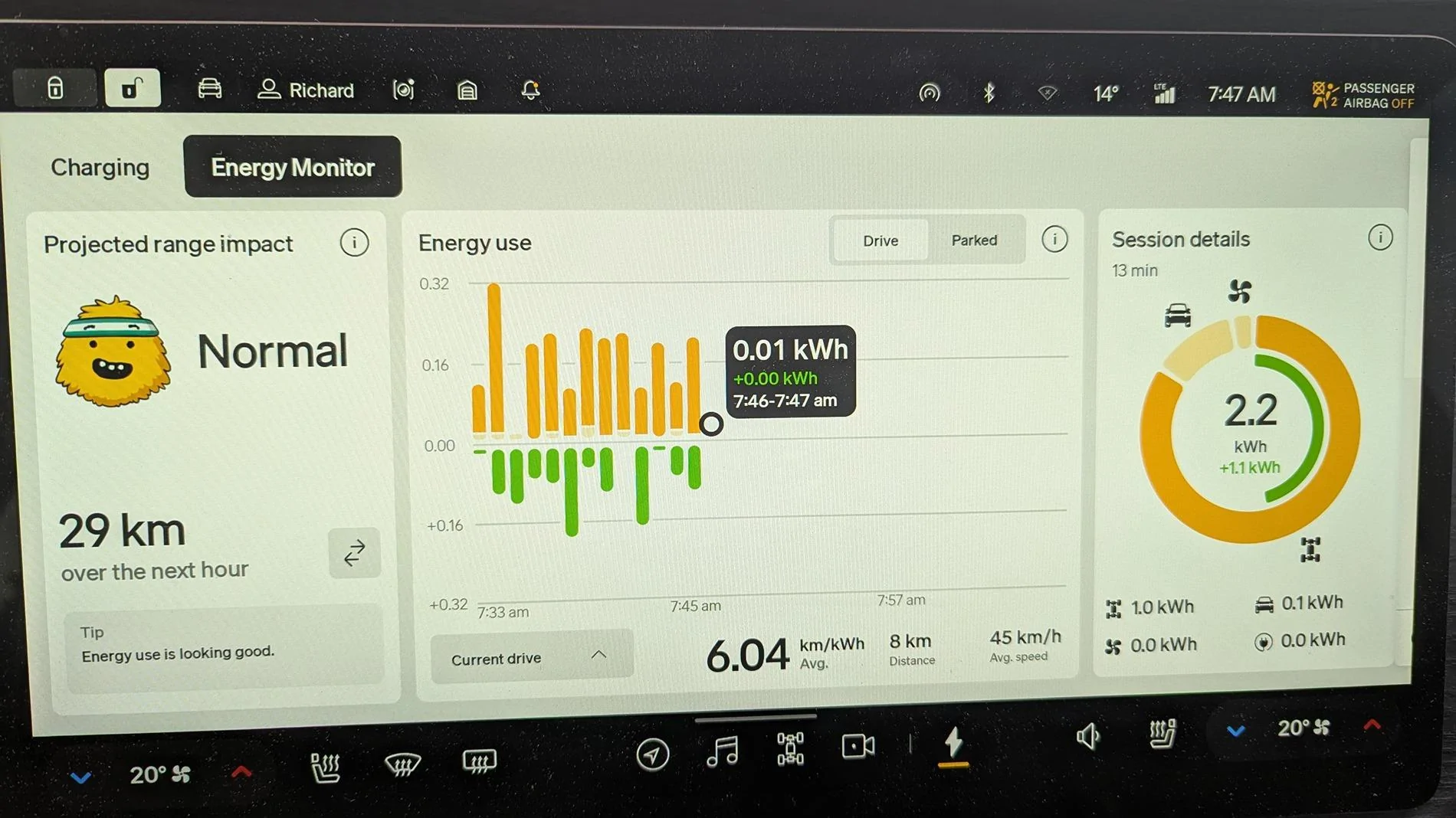
Also, let's see your commute stats... Can you beat 2.2kWh with 1.1kWh of regen??

I think if there was a less cutesy interface I would prefer it, but I get the branding and approachable vibe.

Session details I love. Just the info I wanted to see - thank you Rivian!

Energy use is on 1 minute intervals, which is what I would expect. Feedback from some online reviews/figures had me expecting random, or ~ like 16 min intervals.

Showing coloured break-down of the use-categories is great!

Parked stats is super cool, can't wait to play around and start understanding the year-round energy use on climate control, etc.

Let me know what you think about this new feature!
Enjoy
Sponsored

 

natcc99

Well-Known Member
Joined
Apr 29, 2024
Threads
7
Messages
108
Reaction score
166
Location
California
Vehicles
R1S & R2 on Reserved
Let me know what you think about this new feature!
Enjoy
I like it too. Like you said, it's easy to understand.

The scale of the y axis going from drive to park alarmed me the first time I saw it. I can see why they didn't make it consistent between the two; as it would have made it hard to see the parking status.

I'm glad they kept the one on the steering column too because that's really easy to view at a glance while driving.

Anyways, I appreciate Rivian doing this. It's great to know more about the vehicle.
I think Rivian already pulls data from us; so it's a nice that they give back and we see data about our cars.
 

narmstrong79

Well-Known Member
First Name
Nick
Joined
Apr 2, 2022
Threads
62
Messages
864
Reaction score
1,206
Location
New Hampshire
Website
www.youtube.com
Vehicles
2024 Rivian R1S Performance Dual Motor Standard+
Occupation
Marketing
Clubs
 
The energy app is a great step forward, but it's not great. I think the way they display regen is less intuitive than just having that built into a single bar, but overall I am happy they finally added this.
 

MrMusAddict

Well-Known Member
Joined
Oct 29, 2022
Threads
42
Messages
323
Reaction score
890
Location
Oregon
Vehicles
2023 Rivian R1T
Occupation
Data Analyst
One thing I noticed about the chart on the dashboard is that they decreased how much the average rolls.

I know it shows data from the last 15 minutes, but each point on the Y-axis felt like it was taking a 5-min average. Now it feels like each point is taking a 30-second average, or something like that.

I.e., the chart is "spikier", and I approve!
 

zefram47

Well-Known Member
First Name
Aaron
Joined
Feb 6, 2022
Threads
18
Messages
2,751
Reaction score
4,515
Location
Denver, CO
Vehicles
Rivian R1T, Alfa Romeo 4C
Occupation
Software Engineer
The driving energy monitor is great so far, but I'm pretty irritated what I'm seeing on the "parked" page. As with what I'm seeing in ElectraFi, my truck basically doesn't sleep while I'm at the office, so it uses a lot more energy than it should. If it does sleep, I might see around 1.5 kWh/day if it's just sitting. But I was somewhere yesterday for about 2 hours and it burned through 0.5 kWh in that time just doing nothing and it was all "systems" with maybe 0.1 kWh being Gear Guard. I started using the key fob again with proximity turned off for my phone because it would keep locking/unlocking even when I wasn't particularly close, but turning off proximity has no effect on the truck staying awake a lot of the time.
 

Sponsored

R1Thor

Well-Known Member
First Name
Joe
Joined
Aug 9, 2023
Threads
8
Messages
1,536
Reaction score
2,421
Location
Lancaster, PA
Vehicles
23QM R1T, Limestone + Ocean Coast, 21" & UBS
Occupation
Mechanical Engineering Lead
Clubs
 
28kW net with 5.3kW regen
One way
 

CANCERDOC

Well-Known Member
First Name
Eric
Joined
Oct 26, 2023
Threads
14
Messages
738
Reaction score
1,129
Location
Southern California
Vehicles
2024 R1S PDM
Occupation
Healthcare
I know the Out of Spec guy didn't like the energy screen but he's also a blabbermouth and likes to have the compass on the nav always pointing North, which is just a weird way to look at a map for a moving vehicle (it is a perfect fine way to look at a paper map however).

I do like the "instantaneous" (ok 1-2 min intervals) of energy use - it encourages one to be lighter on the pedal and to use more regen. The icons on the right side are also easy to interpret.

I do not understand however, the 1/3rd of the screen on the left side and what the purpose is. I don't care how many miles of range I will use up in an hour. It's such an irrelevant number. miles/KwH is the only value that matters. A smiling Gary and the energy feedback is fine, but the number should be replaced with something like "miles gained or lost" due to good use or poor use of regen, just to encourage the driver. Modern hybrids like to report how many miles you "saved" or "gained" via the hybrid regen. Maybe that should be the value on the left side instead of "how many miles you will use up in an hour of driving."
 

mikehmb

Well-Known Member
First Name
Mike
Joined
Jan 12, 2022
Threads
154
Messages
2,303
Reaction score
5,224
Location
SF Bay Area
Vehicles
My name is Mike, and I have a (car) problem
I know the Out of Spec guy didn't like the energy screen but he's also a blabbermouth and likes to have the compass on the nav always pointing North, which is just a weird way to look at a map for a moving vehicle (it is a perfect fine way to look at a paper map however).
Alright dangit - I'm ALSO one of those weirdos that keeps the map pointing north.
 

mkhuffman

Well-Known Member
First Name
Mike
Joined
Nov 9, 2020
Threads
14
Messages
2,870
Reaction score
3,219
Location
Virginia
Vehicles
2025 R1T Tri-Max, Jeep GC-L, VW Jetta
The driving energy monitor is great so far, but I'm pretty irritated what I'm seeing on the "parked" page. As with what I'm seeing in ElectraFi, my truck basically doesn't sleep while I'm at the office, so it uses a lot more energy than it should. If it does sleep, I might see around 1.5 kWh/day if it's just sitting. But I was somewhere yesterday for about 2 hours and it burned through 0.5 kWh in that time just doing nothing and it was all "systems" with maybe 0.1 kWh being Gear Guard. I started using the key fob again with proximity turned off for my phone because it would keep locking/unlocking even when I wasn't particularly close, but turning off proximity has no effect on the truck staying awake a lot of the time.
There are multiple vampire drain threads that discuss this issue, but I have noticed the same thing. At home it sleeps almost all the time. Away from home it never seems to sleep. Why?

I recommend we move this discussion here:
https://www.rivianforums.com/forum/threads/vampire-drain-0-2-day-essentially-zero.45842/
 

Polar

Well-Known Member
First Name
Scott
Joined
Feb 16, 2022
Threads
33
Messages
1,098
Reaction score
2,039
Location
WA
Vehicles
C40, LE CY R1S
Occupation
IT
Clubs
 
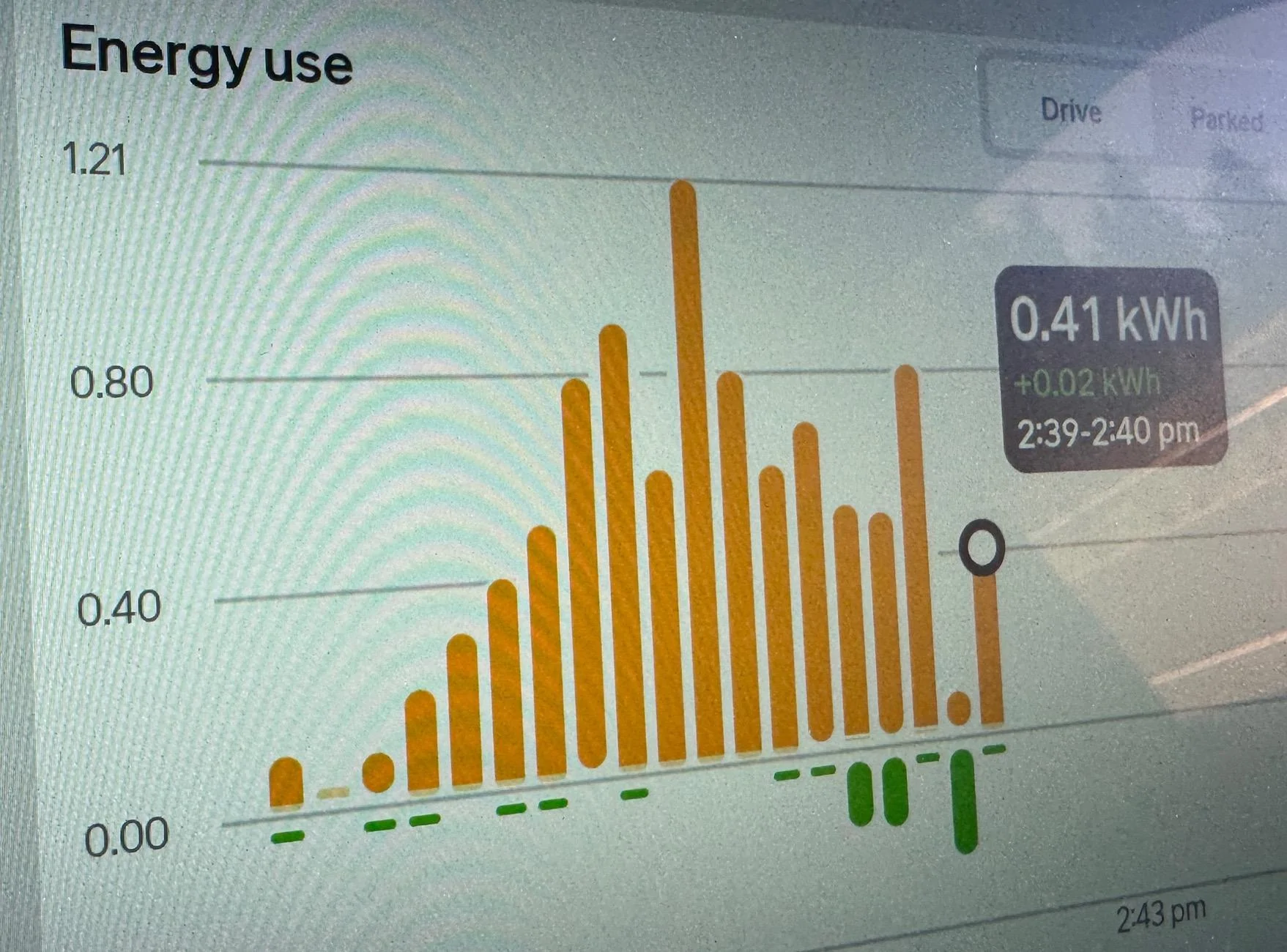
This one made me incredibly happy as look at the peak value - so I got instant Back to the Future vibes. Also, instead of kilowatts, I now refer to them as Garywatts.

I took the photo a few minutes before I got home so it didn’t change the scale on me.
Rivian R1T R1S Post your commute stats - New energy monitor is great! IMG_6203
 

Sponsored

goldburger

Well-Known Member
Joined
Feb 5, 2022
Threads
18
Messages
1,730
Reaction score
2,038
Location
Los Angeles
Vehicles
2022 R1T
Sorry if this has been covered before but the Miles on the right confuses me.
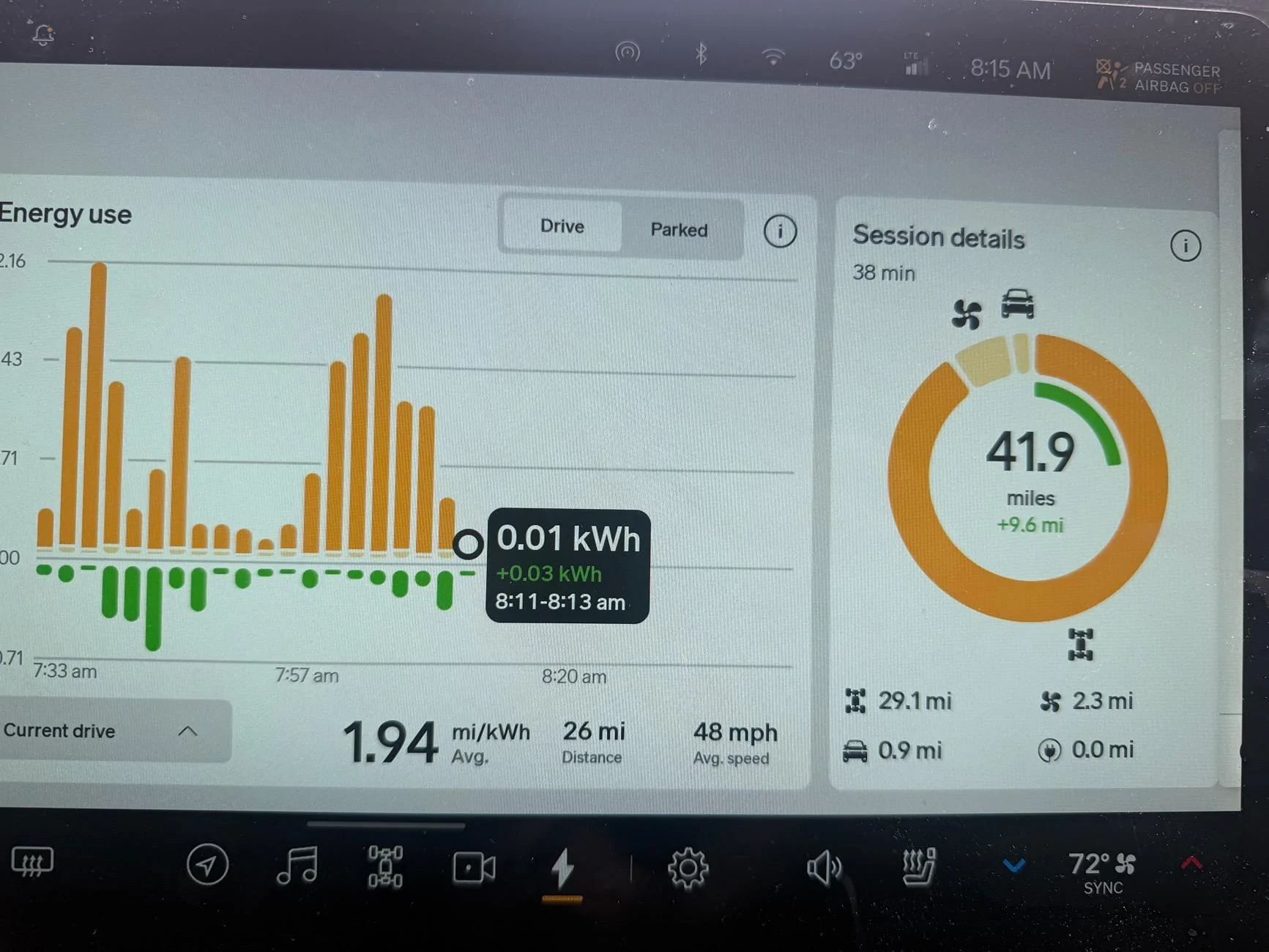
It says 41.9 miles but the math for energy used is 32.3. So it *adds* regenerated miles to it? Shouldn’t it be subtracting those miles? Right now it reads as it taking me 41.9 to drive 26 miles, but if you subtract the 9.6 regenerated miles it’s 22.7 to drive 26… I’m confused…
Rivian R1T R1S Post your commute stats - New energy monitor is great! IMG_8186
 

blank_lemur

Well-Known Member
First Name
Todd
Joined
May 13, 2024
Threads
4
Messages
105
Reaction score
150
Location
Folsom, CA
Website
www.printables.com
Vehicles
2023 R1S Gen1 Quad
Tap the "41.9 miles" so it switches the units to kWh and don't go back :)

edit: and for clarity on what this means... it says you consumed a total of "41.9 miles" of energy (which doesn't really make much sense imo, hence using kWh), but regenerative braking gave back 9.6 miles of energy. This means you used a net of 32.3, which is broken out below: 29.1 was used to move your vehicle, 2.3 was used for AC, 0.9 for general system stuff.
 

goldburger

Well-Known Member
Joined
Feb 5, 2022
Threads
18
Messages
1,730
Reaction score
2,038
Location
Los Angeles
Vehicles
2022 R1T
Tap the "41.9 miles" so it switches the units to kWh and don't go back :)
Sure but that still doesn’t explain it… why is regenerated miles added to used miles, or why is regenerated kWh added to used kWh… shouldn’t it still be sibtracted?
 

blank_lemur

Well-Known Member
First Name
Todd
Joined
May 13, 2024
Threads
4
Messages
105
Reaction score
150
Location
Folsom, CA
Website
www.printables.com
Vehicles
2023 R1S Gen1 Quad
Sure but that still doesn’t explain it… why is regenerated miles added to used miles, or why is regenerated kWh added to used kWh… shouldn’t it still be sibtracted?
Sorry, I had edited my previous post with slightly more details, but it probably also still doesn't answer this question. The graph is showing "consumed" energy, hence they could be all considered negative values (though it doesn't show that), so it shows "+9.6" to indicate you added this much energy from regen.
 

goldburger

Well-Known Member
Joined
Feb 5, 2022
Threads
18
Messages
1,730
Reaction score
2,038
Location
Los Angeles
Vehicles
2022 R1T
Sorry, I had edited my previous post with slightly more details, but it probably also still doesn't answer this question. The graph is showing "consumed" energy, hence they could be all considered negative values (though it doesn't show that), so it shows "+9.6" to indicate you added this much energy from regen.
Oh I see the edit… so the bottom numbers are the net, after the regen is taken out?…. But that still is an illogical way to display it. How is it distributing that 9.6 miles… I guess maybe directly onto the propulsion? So only propulsion is minus reign, but the rest are spot on? My brain hurts and I feel the net number should be the largest visible one, so much so I feel they accidentally did PLUS region instead of MINUS ¯\_(ツ)_/¯
Sponsored


Top