Sponsored

fxstein

Well-Known Member
First Name
Oliver
Joined
Sep 17, 2024
Threads
10
Messages
126
Reaction score
249
Location
California
Vehicles
2023 R1T Quad Adventure
Clubs
 
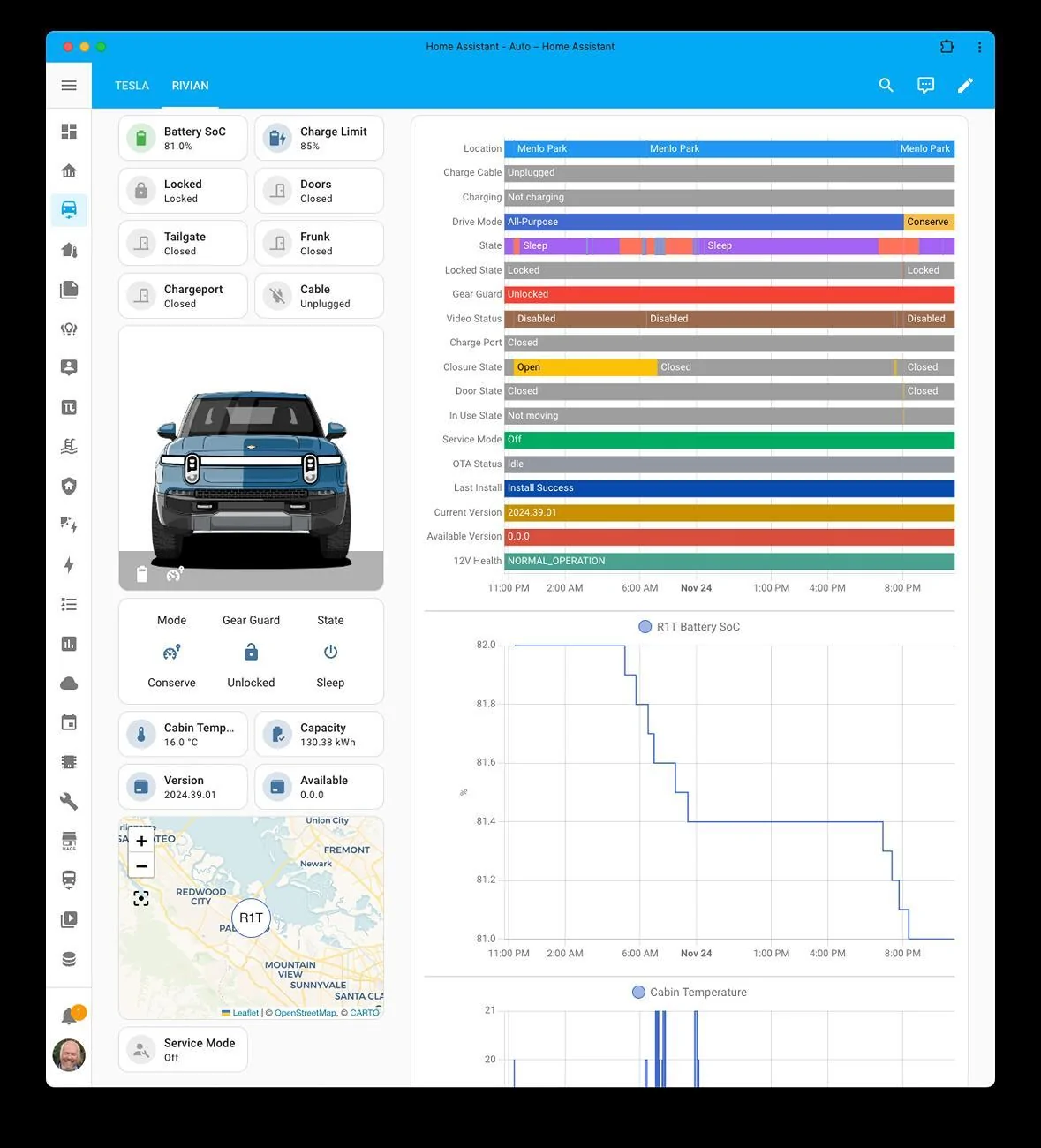
As I am doing final preparations to ship our R1T Quad to Europe in Q1 2025 I have finally setup a detailed dashboard for the R1T with our Home Assistant instance, similar to what I have been using for our Tesla's. The unofficial Rivian API is still a bit limited but does provide a wealth of information that can be tracked over time.
The plan is to do a 5-6 weeks unplugged storage test over the holidays. I plan to post regular updates along the way and compare them to best in class measurements of other vehicles. In addition to the dashboard I have a history view that shows all these metrics over weeks and possible months.

Take a look and let me know what you think.

If you are interested on how to get HomeAssistant up and running for yourself I have posted a thread about it here: Installing HomeAssistant to capture Rivian API data

Rivian R1T R1S Rivian Dashboard for Upcoming Longterm Phantom Drain Test Screenshot 2024-11-24 at 1.46.49 PM
Sponsored

 
Last edited:

Cycliste

Well-Known Member
First Name
Scott
Joined
Jul 7, 2023
Threads
11
Messages
1,192
Reaction score
1,674
Location
Solano County, California
Vehicles
2023 R1T/20AT Brights, BMC TMR01/SRAM AXS/454 NSW
Occupation
Amateur aero weenie
Clubs
 
I would tend to use kWh for state of charge instead of percentage. That way, I get to feel the pain of losing 2 kWh per day (~0.75 mWh/year!) at $0.36/kWh off peak for phantom drain.
 
OP
OP
fxstein

fxstein

Well-Known Member
First Name
Oliver
Joined
Sep 17, 2024
Threads
10
Messages
126
Reaction score
249
Location
California
Vehicles
2023 R1T Quad Adventure
Clubs
 
I would tend to use kWh for state of charge instead of percentage. That way, I get to feel the pain of losing 2 kWh per day (~0.75 mWh/year!) at $0.36/kWh off peak for phantom drain.
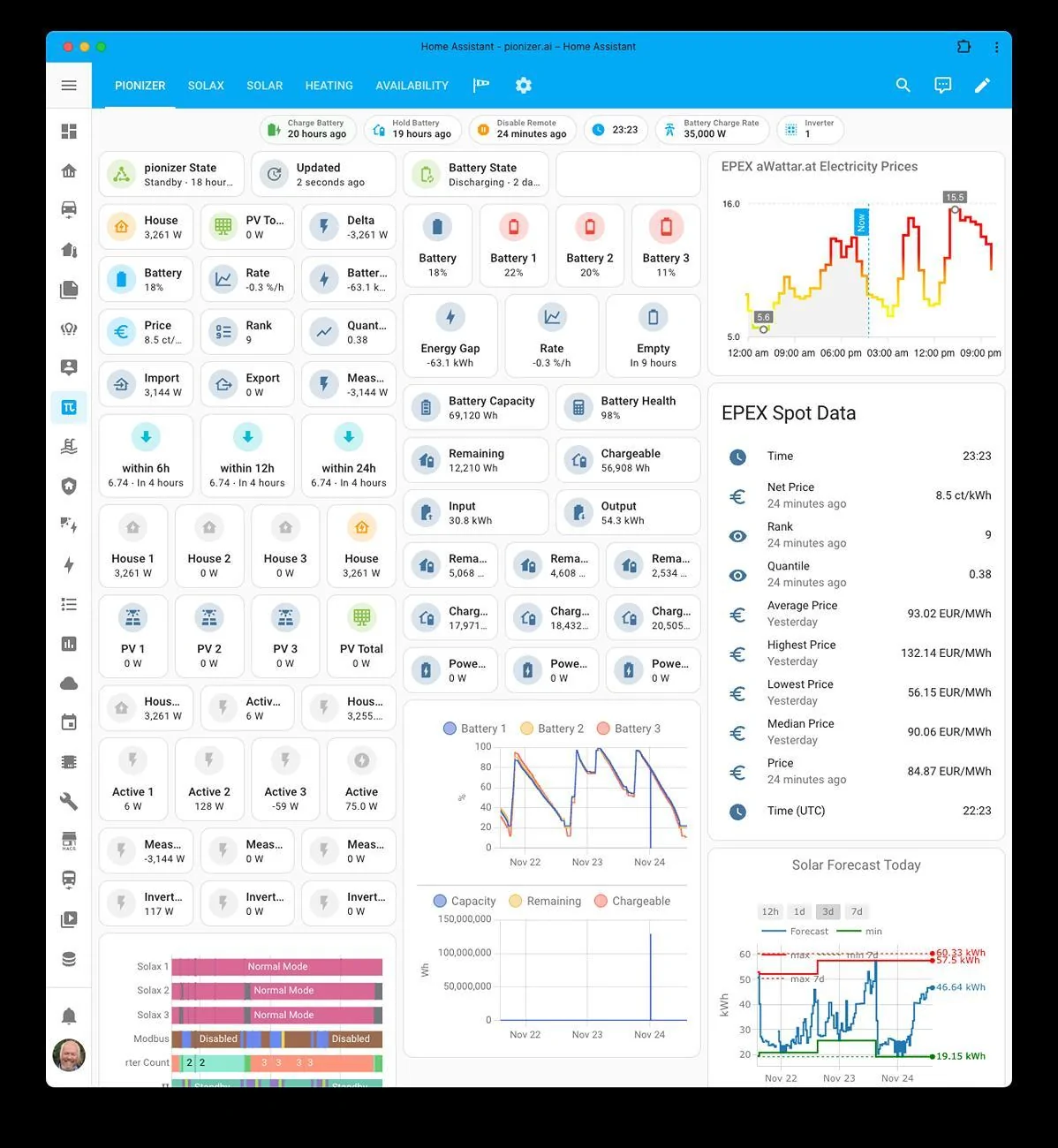
I hear you. The Rivian dashboard is only a summary of the data the Rivian API provides by itself.

Here is a sneak peak on how detailed this system tracks and calculates energy usage, storage, pricing, ...

Rivian R1T R1S Rivian Dashboard for Upcoming Longterm Phantom Drain Test Screenshot 2024-11-24 at 2.23.58 PM
 
OP
OP
fxstein

fxstein

Well-Known Member
First Name
Oliver
Joined
Sep 17, 2024
Threads
10
Messages
126
Reaction score
249
Location
California
Vehicles
2023 R1T Quad Adventure
Clubs
 
Looks good please share the code
Here we go. You need the unofficial Rivian API integration for HA from HACS and replace all the_crazy_one_r1t with the name of your vehicle (given when setting up the integration - can be different from the vehicle name in the Rivian App)


YAML:
  - type: sections
    max_columns: 4
    title: Rivian
    path: rivian
    sections:
      - type: grid
        cards:
          - type: tile
            entity: sensor.the_crazy_one_r1t_battery_state_of_charge
            show_entity_picture: false
            vertical: false
            state_content: state
            name: Battery SoC
            grid_options:
              columns: 6
              rows: 1
          - type: tile
            entity: sensor.the_crazy_one_r1t_battery_state_of_charge_limit
            show_entity_picture: false
            vertical: false
            state_content: state
            name: Charge Limit
            grid_options:
              columns: 6
              rows: 1
          - type: tile
            entity: binary_sensor.the_crazy_one_r1t_locked_state
            show_entity_picture: false
            vertical: false
            state_content: state
            name: Locked
            grid_options:
              columns: 6
              rows: 1
          - type: tile
            entity: binary_sensor.the_crazy_one_r1t_door_state
            show_entity_picture: false
            vertical: false
            state_content: state
            name: Doors
            grid_options:
              columns: 6
              rows: 1
          - type: tile
            entity: binary_sensor.the_crazy_one_r1t_tailgate
            show_entity_picture: false
            vertical: false
            state_content: state
            name: Tailgate
            grid_options:
              columns: 6
              rows: 1
          - type: tile
            entity: binary_sensor.the_crazy_one_r1t_front_trunk
            show_entity_picture: false
            vertical: false
            state_content: state
            name: Frunk
            grid_options:
              columns: 6
              rows: 1
          - type: tile
            entity: binary_sensor.the_crazy_one_r1t_charge_port
            show_entity_picture: false
            vertical: false
            state_content: state
            name: Chargeport
            grid_options:
              columns: 6
              rows: 1
          - type: tile
            entity: binary_sensor.the_crazy_one_r1t_charger_connection
            show_entity_picture: false
            vertical: false
            state_content: state
            name: Cable
            grid_options:
              columns: 6
              rows: 1
          - camera_view: auto
            type: picture-glance
            image: https://demo.home-assistant.io/stub_config/kitchen.png
            entities:
              - entity: sensor.the_crazy_one_r1t_battery_state_of_charge
              - entity: sensor.the_crazy_one_r1t_drive_mode
            image_entity: image.the_crazy_one_r1t_front_light
            grid_options:
              columns: 12
              rows: auto
            entity: sensor.the_crazy_one_r1t_power_state
          - show_name: true
            show_icon: true
            show_state: true
            type: glance
            entities:
              - entity: sensor.the_crazy_one_r1t_drive_mode
                name: Mode
              - entity: binary_sensor.the_crazy_one_r1t_gear_guard
                name: Gear Guard
              - entity: sensor.the_crazy_one_r1t_power_state
                name: State
            state_color: false
          - type: tile
            entity: sensor.the_crazy_one_r1t_cabin_temperature
            show_entity_picture: false
            vertical: false
            state_content: state
            name: Cabin Temperature
            grid_options:
              columns: 6
              rows: 1
          - type: tile
            entity: sensor.the_crazy_one_r1t_battery_capacity
            show_entity_picture: false
            vertical: false
            state_content: state
            name: Capacity
            grid_options:
              columns: 6
              rows: 1
          - type: tile
            entity: sensor.the_crazy_one_r1t_software_ota_current_version
            show_entity_picture: false
            vertical: false
            state_content: state
            name: Version
            grid_options:
              columns: 6
              rows: 1
          - type: tile
            entity: sensor.the_crazy_one_r1t_software_ota_available_version
            show_entity_picture: false
            vertical: false
            state_content: state
            name: Available
            grid_options:
              columns: 6
              rows: 1
          - type: map
            entities:
              - entity: device_tracker.the_crazy_one_r1t_location
                name: R1T
            theme_mode: auto
            default_zoom: 10
            hours_to_show: 24
          - type: tile
            entity: sensor.the_crazy_one_r1t_service_mode
            show_entity_picture: false
            vertical: false
            state_content: state
            name: Service Mode
            grid_options:
              columns: 6
              rows: 1
      - type: grid
        cards:
          - type: history-graph
            entities:
              - entity: device_tracker.the_crazy_one_r1t_location
                name: Location
              - entity: binary_sensor.the_crazy_one_r1t_charger_connection
                name: Charge Cable
              - entity: binary_sensor.the_crazy_one_r1t_charging_status
                name: Charging
              - entity: sensor.the_crazy_one_r1t_drive_mode
                name: Drive Mode
              - entity: sensor.the_crazy_one_r1t_power_state
                name: State
              - entity: binary_sensor.the_crazy_one_r1t_locked_state
                name: Locked State
              - entity: binary_sensor.the_crazy_one_r1t_gear_guard
                name: Gear Guard
              - entity: sensor.the_crazy_one_r1t_gear_guard_video_status
                name: Video Status
              - entity: sensor.the_crazy_one_r1t_battery_state_of_charge
                name: R1T Battery SoC
              - entity: binary_sensor.the_crazy_one_r1t_charge_port
                name: Charge Port
              - entity: binary_sensor.the_crazy_one_r1t_closure_state
                name: Closure State
              - entity: binary_sensor.the_crazy_one_r1t_door_state
                name: Door State
              - entity: binary_sensor.the_crazy_one_r1t_in_use_state
                name: In Use State
              - entity: sensor.the_crazy_one_r1t_service_mode
                name: Service Mode
              - entity: sensor.the_crazy_one_r1t_software_ota_status
                name: OTA Status
              - entity: sensor.the_crazy_one_r1t_software_ota_status_current
                name: Last Install
              - entity: sensor.the_crazy_one_r1t_software_ota_current_version
                name: Current Version
              - entity: sensor.the_crazy_one_r1t_software_ota_available_version
                name: Available Version
              - entity: sensor.the_crazy_one_r1t_12v_battery_health
                name: 12V Health
              - entity: sensor.the_crazy_one_r1t_cabin_temperature
                name: Cabin Temperature
            grid_options:
              columns: 24
              rows: auto
        column_span: 2
    dense_section_placement: true
    cards: []
 

Sponsored

tate16t

Well-Known Member
First Name
Robert
Joined
Apr 7, 2022
Threads
65
Messages
1,407
Reaction score
1,185
Location
NY
Vehicles
2023 El Cap Granite R1S
Occupation
Car Enthusiast
Great stuff! How and where do you replace the code within HA? Do you use the Yaml editor app? I think that’s what it’s called. I haven’t drove to deep with HA but do have the integration setup.
 
OP
OP
fxstein

fxstein

Well-Known Member
First Name
Oliver
Joined
Sep 17, 2024
Threads
10
Messages
126
Reaction score
249
Location
California
Vehicles
2023 R1T Quad Adventure
Clubs
 
Great stuff! How and where do you replace the code within HA? Do you use the Yaml editor app? I think that’s what it’s called. I haven’t drove to deep with HA but do have the integration setup.
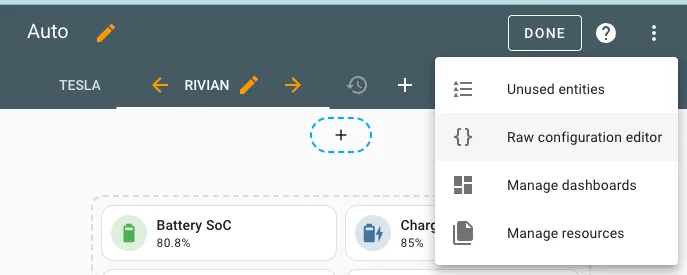
Its on the right top of every dashboard. Hit EDIT then the three dots and you will find the editor for that specific dashboard:

Rivian R1T R1S Rivian Dashboard for Upcoming Longterm Phantom Drain Test Screenshot 2024-11-24 at 6.35.31 PM


Hope this helps!

Really recommend reading up on HA and watching youtube videos from various people. And in most cases ChatGPT is your friend.
 

tate16t

Well-Known Member
First Name
Robert
Joined
Apr 7, 2022
Threads
65
Messages
1,407
Reaction score
1,185
Location
NY
Vehicles
2023 El Cap Granite R1S
Occupation
Car Enthusiast
Its on the right top of every dashboard. Hit EDIT then the three dots and you will find the editor for that specific dashboard:

Screenshot 2024-11-24 at 6.35.31 PM.png


Hope this helps!

Really recommend reading up on HA and watching youtube videos from various people. And in most cases ChatGPT is your friend.
Thanks, already started reading ?
 

WorldComposting

Well-Known Member
Joined
Oct 27, 2022
Threads
4
Messages
299
Reaction score
283
Location
Maryland
Website
www.worldcomposting.com
Vehicles
Rivian R1S, Subaru Ascent
Occupation
Project Manager
Clubs
 
Are you worried about issues as there are no service centers in Europe?

Also if you are willing to answer where are going to in Europe?
 

Sponsored

Dark-Fx

Well-Known Member
First Name
Brian
Joined
Jul 15, 2020
Threads
148
Messages
13,589
Reaction score
27,458
Location
Michigan
Vehicles
R1T, R1S, Livewire One, Sierra EV, R1S
Occupation
Engineering
Clubs
 
Kinda wondering how they secure the trucks in this situation. The air suspension on my R1T will leak out completely in the front over the course of several weeks. Bump stops are still lower than lowest or kneel mode.
 

Jiji

Well-Known Member
First Name
Rick
Joined
Jun 21, 2023
Threads
17
Messages
296
Reaction score
430
Location
Finger Lakes, NY
Website
github.com
Vehicles
Rivian Blue R1S
Take a look and let me know what you think.
Nice HA setup but wouldn’t it be better to put it in shipping mode and walk away? All the Rivian API hits must have some contribution to the phantom drain and in this test live data is your enemy and not your friend.

Setting shipping mode and measuring a one week sleep, a two week sleep, and a three week sleep takes the same six weeks but probably gives a better estimate of actual loss during shipping.
 
OP
OP
fxstein

fxstein

Well-Known Member
First Name
Oliver
Joined
Sep 17, 2024
Threads
10
Messages
126
Reaction score
249
Location
California
Vehicles
2023 R1T Quad Adventure
Clubs
 
Are you worried about issues as there are no service centers in Europe?

Also if you are willing to answer where are going to in Europe?
Worried? Well yes but it’s a risk we are willing to take. We are not the first ones, there is a tiny community forming in Europe. Already in touch with several European Rivian owners.
Heading to Austria.
 
OP
OP
fxstein

fxstein

Well-Known Member
First Name
Oliver
Joined
Sep 17, 2024
Threads
10
Messages
126
Reaction score
249
Location
California
Vehicles
2023 R1T Quad Adventure
Clubs
 
Kinda wondering how they secure the trucks in this situation. The air suspension on my R1T will leak out completely in the front over the course of several weeks. Bump stops are still lower than lowest or kneel mode.
That happens all the time when the truck sits for a few weeks, even when plugged in. I assume the wheels get secured and the truck sits however high it sits above.
 
OP
OP
fxstein

fxstein

Well-Known Member
First Name
Oliver
Joined
Sep 17, 2024
Threads
10
Messages
126
Reaction score
249
Location
California
Vehicles
2023 R1T Quad Adventure
Clubs
 
Nice HA setup but wouldn’t it be better to put it in shipping mode and walk away? All the Rivian API hits must have some contribution to the phantom drain and in this test live data is your enemy and not your friend.

Setting shipping mode and measuring a one week sleep, a two week sleep, and a three week sleep takes the same six weeks but probably gives a better estimate of actual loss during shipping.
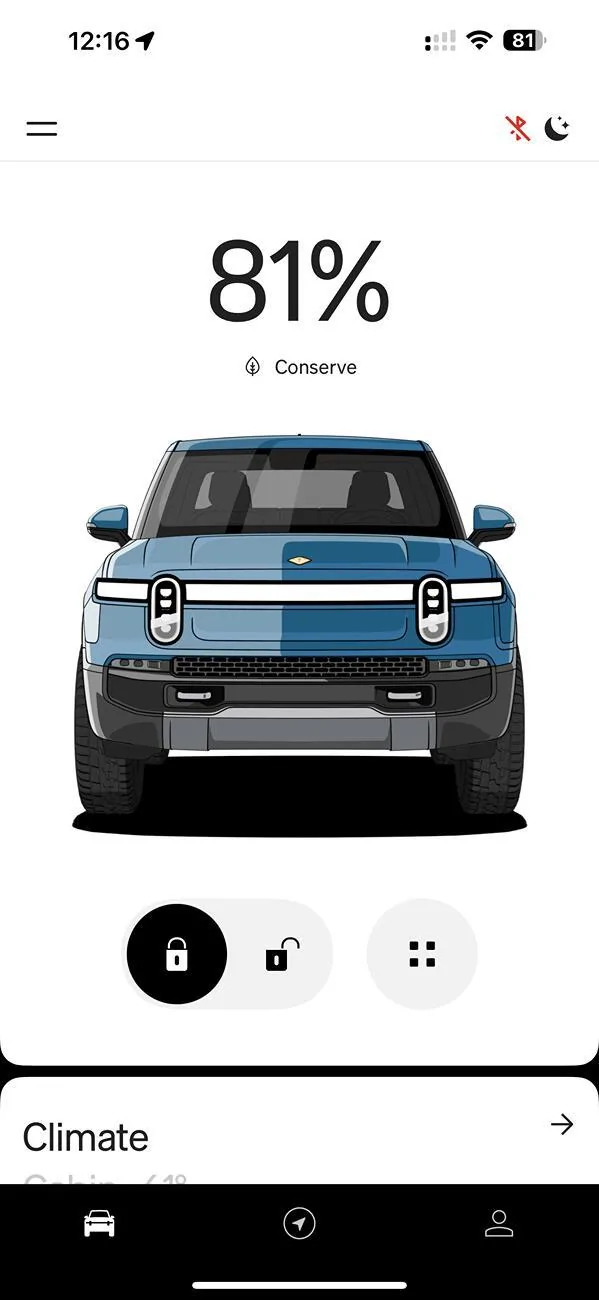
Yes wouldn’t that be nice. The car as-is is sitting in shipping mode, with proximity and AC turned off, software updates turned off, API is setup read only and will not wake the truck. Just like when the app shows the truck sleeping. The API is whatever Rivian has on the truck, not calling the truck directly.
All windows and doors closed and locked. Nothing on the seats, all belts unbuckled.

Rivian R1T R1S Rivian Dashboard for Upcoming Longterm Phantom Drain Test IMG_7049


Even like that andthe truck sitting in a garage at a balmy 50-60F, the operating system will come out of sleep 2-3 times per day for as much a 90 min each, loosing about 1% of charge per day.
This is a 2023 R1T with single 12V battery and capacitor, comprehensive serviced last week including the factory recall to a brand new 12V battery.
After thanksgiving I will do a 6 weeks test and share progress every few days.

FYI Doing this all the time with a 2024 Model Y sitting at Munich Airport for 6-8 weeks at a time. Right now in close to freezing temps and it looses less than 1% per week and only wakes up for a few minutes every other day. It looses about 5% plus whatever valet driving (eg when they wash and clean the car towards the end of the stay). That battery is literally half the size of the Rivian.
Sponsored


Top