Sponsored

bigsky

Banned
Well-Known Member
Joined
Jan 8, 2024
Threads
12
Messages
1,098
Reaction score
740
Location
MUM
Vehicles
MUM
  • Thread starter
  • Banned
  • #1
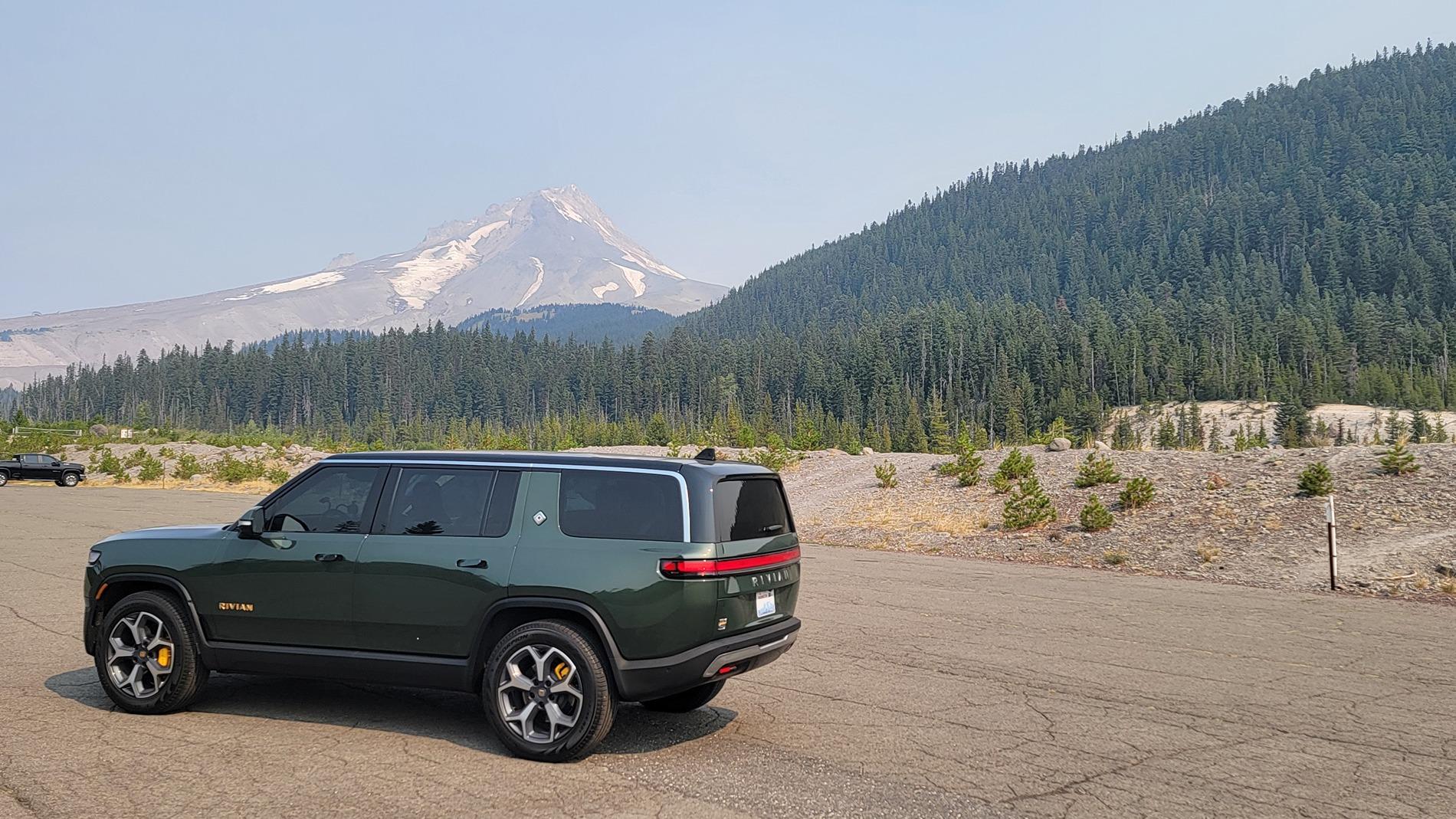
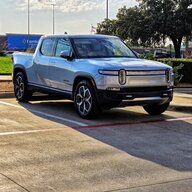
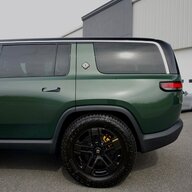
Took a long trip through OR on my R1S Roberta last week. 1,100 miles.
Used three Tesla superchargers (two required NACS adapter; had my A2Z Typhoon PRO) and one RAN charger.

Total kWh used, cost:
Home charging: 55.5 kWh $4.00
Tesla SC Boardman OR, has Magic Dock: 60.7 kWh $free (dispenser error)
RAN charger, The Dalles OR: 31.7 kWh $11.39
Tesla SC, Hillsboro OR: A2Z adapter required, 45.9 kWh $15.61
Where I stayed: 55.5 kWh, 12.9 kWh, 52.3 kWh, free
RAN charger, The Dalles OR: 68.8 kWh $24.78
Tesla SC Boardman OR, has Magic Dock: 51.7 kWh $23,39
Tesla SC Sprague WA: A2Z adapter required, 38.1 kWh $21.80
Home charging: 31.3 kWh $2.00

Total kWh: 534.4. Total cost: $103
Deliberately avoided the onerous chargers from other lesser networks out there. No way.

Some NERDY stuff:
I was in no big fat hurry; kept speed at 65 on interstates always.
I did use pet comfort often and for long periods (69 deg). My dogs were living it up.
Overall energy usage: 2.06 miles/kWh
Overall cost per mile: $0.09 (skewed by the free electricity)
Never used Rivian app, only Tesla app to charge at Tesla SCs. Initial set up at each session such as identify charger, select dispenser, start charging. Not a big deal. Charging worked flawlessly with either Magic Dock or A2Z Typhoon PRO.
Roberta performed brilliantly. No functional issues of any kind. Indeed, since taking delivery in January 2024, Roberta has not had any functional issues whatsoever (knock on my head!)
Saw charging rates up to 218 kWh with the A2Z Typhoon PRO adapter. A true dumb pass-through adapter.
Make no mistake, A2Z adapter gets a bit warm.
Did not use, will not use Driver+. Adaptive Cruise Control all the way. It works great!

Glitches:

Tesa app did not GPS-locate supercharger in Sprague WA automatically for me. Had to search for it and manually enter it.

My R1S suddenly lost front camera and sensors once, and took ACC down with it. Had to pull over and perform a hard reset to restore (soft reset would not do it.) Have seen similar glitches with my Teslas. Same solution. when all else fails, pull the plug or Ctrl-Alt-Del.

LAST and definitely not least: came upon one of those truck weigh-check stations on the side of the road. I just had to find out for myself. R1S: 7,750 lb.

The R1S is the ultimate road-tripper. Super comfortable, big and it feels it. No slacker here.

Rivian R1T R1S R1S Long Trip Results (2024 R1S) Roberta at Mount Hood
Sponsored

 
Last edited:

Rivianready

Well-Known Member
First Name
Michael
Joined
Dec 2, 2021
Threads
32
Messages
159
Reaction score
179
Location
Richmond, VA
Vehicles
2023 Rivian R1S Adventure Quad, Suburban LTZ
Occupation
Business owner
Clubs
 
Thanks for sharing. I’m going on a 1,000+ mile trek in October. I just bought the A2Z Tiphoon Pro. I’m really excited to us the Tesla Supercharger Network. It’s a game changer- I mapped out the trip with and without using the Tesla network and it makes a big (positive) difference- easier, shorter routes.
 

MidnightRivian

Well-Known Member
Joined
Jun 21, 2021
Threads
98
Messages
2,296
Reaction score
3,671
Location
USA
Vehicles
Rivian R1S
Clubs
 
Thanks for sharing your experience.
 

Electrified Outdoors

Well-Known Member
First Name
Ken
Joined
Jan 30, 2023
Threads
63
Messages
3,683
Reaction score
3,980
Location
Mount Airy, Maryland
Website
EVoutdoors.org
Vehicles
2024 Rivian R1S Quad, 2024 Silverado EV RST First Edition
Occupation
Real Estate
Clubs
 
Sounds like an awesome trip! The Tesla superchargers are great. I had the same issue with my Tesla app GPS. You have to hit the little navigation arrow (locate icon) and then it will usually refresh your GPS location and work. You may have to turn off battery optimization for the Tesla app as that may be...at least in my case...shutting off access to GPS to save battery.

Between Disney, Boston, and supercharging adapter testing my last CC statement had just under $500 in supercharging fees ?. I drive a little faster on the highway...just under 85... allegedly.
 
OP
OP

bigsky

Banned
Well-Known Member
Joined
Jan 8, 2024
Threads
12
Messages
1,098
Reaction score
740
Location
MUM
Vehicles
MUM
  • Thread starter
  • Banned
  • #5
Thanks for sharing. I’m going on a 1,000+ mile trek in October. I just bought the A2Z Tiphoon Pro. I’m really excited to us the Tesla Supercharger Network. It’s a game changer- I mapped out the trip with and without using the Tesla network and it makes a big (positive) difference- easier, shorter routes.
Please do tell us about it when you get back!
 

Sponsored

OP
OP

bigsky

Banned
Well-Known Member
Joined
Jan 8, 2024
Threads
12
Messages
1,098
Reaction score
740
Location
MUM
Vehicles
MUM
  • Thread starter
  • Banned
  • #6
Sounds like an awesome trip! The Tesla superchargers are great. I had the same issue with my Tesla app GPS. You have to hit the little navigation arrow (locate icon) and then it will usually refresh your GPS location and work. You may have to turn off battery optimization for the Tesla app as that may be...at least in my case...shutting off access to GPS to save battery.

Between Disney, Boston, and supercharging adapter testing my last CC statement had just under $500 in supercharging fees ?. I drive a little faster on the highway...just under 85... allegedly.
Thank you for the tip. Have only used the Tesla app hundreds of times, but this is the first time that it did not locate me. Will check your suggestion next time it happens!
Had an ICE SUV forever that my R1S sent to death row. Trips lasting a couple of weeks, 19 MPG. With a tailwind. Gas stations, Big Oil loved me then.
 

DKM_R1S

Well-Known Member
First Name
Dan
Joined
Apr 2, 2024
Threads
44
Messages
318
Reaction score
211
Location
West Chicago Suburbs
Vehicles
R1S
Occupation
Manufacturing
Clubs
 
Nice trip report. Isn’t it nice you didn’t have to use Electify America or other lesser EV charging networks?
 

mudito

Well-Known Member
First Name
Aldo
Joined
Jul 30, 2024
Threads
18
Messages
1,011
Reaction score
1,414
Location
Texas
Vehicles
Rivian R1T
(Probably) Dumb question here. Is it always cheaper to start the charge on Teslas SC from the Tesla App rather than just Plug and Charge?

Or was it because you had s SC Subscription and hence you got better rates?
thanks!
 

JerseyGreens

Well-Known Member
Joined
Nov 7, 2019
Threads
3
Messages
681
Reaction score
838
Location
NJ
Vehicles
2023 R1S ADV
Occupation
CAT Property Underwriter
(Probably) Dumb question here. Is it always cheaper to start the charge on Teslas SC from the Tesla App rather than just Plug and Charge?

Or was it because you had s SC Subscription and hence you got better rates?
thanks!
I believe it's best to start the charge from the Tesla app.
 

DKM_R1S

Well-Known Member
First Name
Dan
Joined
Apr 2, 2024
Threads
44
Messages
318
Reaction score
211
Location
West Chicago Suburbs
Vehicles
R1S
Occupation
Manufacturing
Clubs
 
I believe it's best to start the charge from the Tesla app.
If you do not start the session from the Tesla app, then it defaults to just the default “RIVIANs can charge on TESLA plug and charge” plan at $0.50+ per kWh rate. If you initiate the charging session From the TESLA app via “Charge Your Other EV” make sure you follow these steps in specific order one you have arrived at the supercharger.

I am not trying to come across as anal retentive, but I’ve charged our R1 on the Tesla network probably close to 100 times & learned some lessons.

1) Get out your NACS to CCS adapter, get out of the vehicle and set it on your driver’s seat. You should have your Tesla app already open. Select Charge your Other EV in the App.
2) Read the post number of the charging stall your at, i.e. 1A, 1B, 1C, & etc.
3) Select the supercharger (if you’re at it, the distance should say 0.0 miles)
4) Click the “Charge Here” large rectangular blue button
5) Select the correct charging stall under “Choose Post Number“ i.e. 1A, 1B, 1C, & etc.
6) Click “Start Charging”
Wait for the “Attach Adapter and Plug In” Screen
7) Take your NACS to CCS adapter, attach it, lock it onto the Tesla handle and plug in. (Note: these are the instructions that shipped with my A2Z Typhoon 1st gen adapter).
8) Keep your phone in front of you with the Tesla App still open.
9) Wait until the Tesla app says the charging session has started.

If you do not time these steps correctly, you may plug in too soon or not soon enough and switch over to the more expensive plug and play charging plan. You’ll know this has happened if you receive Billing Summary right away in the Tesla App with a $0.00 charge and the R1 has started charging.
 

Sponsored

OP
OP

bigsky

Banned
Well-Known Member
Joined
Jan 8, 2024
Threads
12
Messages
1,098
Reaction score
740
Location
MUM
Vehicles
MUM
I use the Tesla app because it is a Tesla supercharger and I added my R1S to my Tesla account.
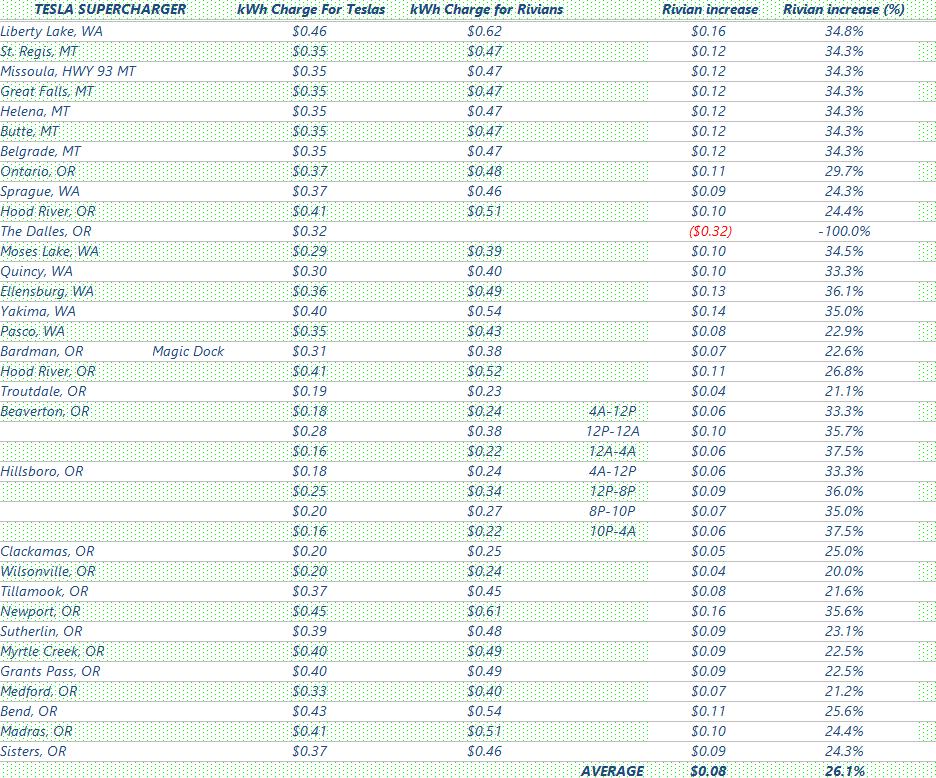
On average, Tesla charges a 26% markup over the rates I pay to charge my Teslas. I do not pay for a Tesla membership as the only times I would use a Tesla supercharger is when I go on vacations or very long trips. Not worth it.
I might have ended up paying the same with the lower rates and membership fee this time. So it was a wash.
 

JerseyGreens

Well-Known Member
Joined
Nov 7, 2019
Threads
3
Messages
681
Reaction score
838
Location
NJ
Vehicles
2023 R1S ADV
Occupation
CAT Property Underwriter
If you do not start the session from the Tesla app, then it defaults to just the default “RIVIANs can charge on TESLA plug and charge” plan at $0.50+ per kWh rate. If you initiate the charging session From the TESLA app via “Charge Your Other EV” make sure you follow these steps in specific order one you have arrived at the supercharger.

I am not trying to come across as anal retentive, but I’ve charged our R1 on the Tesla network probably close to 100 times & learned some lessons.

1) Get out your NACS to CCS adapter, get out of the vehicle and set it on your driver’s seat. You should have your Tesla app already open. Select Charge your Other EV in the App.
2) Read the post number of the charging stall your at, i.e. 1A, 1B, 1C, & etc.
3) Select the supercharger (if you’re at it, the distance should say 0.0 miles)
4) Click the “Charge Here” large rectangular blue button
5) Select the correct charging stall under “Choose Post Number“ i.e. 1A, 1B, 1C, & etc.
6) Click “Start Charging”
Wait for the “Attach Adapter and Plug In” Screen
7) Take your NACS to CCS adapter, attach it, lock it onto the Tesla handle and plug in. (Note: these are the instructions that shipped with my A2Z Typhoon 1st gen adapter).
8) Keep your phone in front of you with the Tesla App still open.
9) Wait until the Tesla app says the charging session has started.

If you do not time these steps correctly, you may plug in too soon or not soon enough and switch over to the more expensive plug and play charging plan. You’ll know this has happened if you receive Billing Summary right away in the Tesla App with a $0.00 charge and the R1 has started charging.
Thanks for running through the exact steps - I needed to hear this for an upcoming trip!

What about parts of the country where the rate is greater than .50? Does it make more sense to just plug and play?
 
OP
OP

bigsky

Banned
Well-Known Member
Joined
Jan 8, 2024
Threads
12
Messages
1,098
Reaction score
740
Location
MUM
Vehicles
MUM
With the markup at Tesla superchargers for Rivian charging, expect to pay more than $0.50 at several Tesla superchargers. It depends on the local utility rates.

Here is a rundown of Tesla superchargers and charging costs in the area of my trip last week. Proces might have changed already. I noticed that the charging rate for Rivians in Sprague WA jumped to $0.56!
It would have cost me nothing had I used my Model S.
Check the Tesla app for charging prices on the area you want to visit. Bring up the Tesla app, select location or navigate, turn on superchargers and tap on each one for detailed information on pricing.

Rivian R1T R1S R1S Long Trip Results (2024 R1S) Supercharger prices
 

SANZC02

Well-Known Member
First Name
Bob
Joined
Feb 11, 2021
Threads
50
Messages
7,426
Reaction score
12,718
Location
California
Vehicles
Tesla Model S, LE - R1S
Occupation
Retired
With the markup at Tesla superchargers for Rivian charging, expect to pay more than $0.50 at several Tesla superchargers. It depends on the local utility rates.

Here is a rundown of Tesla superchargers and charging costs in the area of my trip last week. Proces might have changed already. I noticed that the charging rate for Rivians in Sprague WA jumped to $0.56!
It would have cost me nothing had I used my Model S.
Check the Tesla app for charging prices on the area you want to visit. Bring up the Tesla app, select location or navigate, turn on superchargers and tap on each one for detailed information on pricing.

Supercharger prices.jpg
Worth noting the Rivian pricing should say non-Tesla pricing. On a trip or if people need to frequently charge at a Tesla Supercharger the 12.99 monthly membership gets you the Tesla pricing anything over 100 kWh a month of SC charging pays for itself and saves money.

I did not pay the membership on my last trip as I was not planning on using Tesla SC much. However, in 6 charges I averaged 75 kWh a charge, even after the 12.99 membership I would have saved a little over 30 dollars on those 6 charges had I paid for the membership.
 
OP
OP

bigsky

Banned
Well-Known Member
Joined
Jan 8, 2024
Threads
12
Messages
1,098
Reaction score
740
Location
MUM
Vehicles
MUM
I think it all comes down to how much you will use Tesla superchargers. My long trip was largely a one-off as the vast majority of my charging is done at home.
I may very well start going on long trips more often, and at that time absolutely it will be worth paying the Rivian Tesla membership fee. Or else, I may decide to take my Tesla Model Y and pay the standard Tesla rates, or else I may take my Tesla Model S, which comes with free Tesla supercharger charging for life. Then again, I just took my R1S on a long trip!
Yours indeed is an excellent point. Everybody needs to evaluate whether or not the membership fee works for him/her. Thank you.
Sponsored


Top