Sponsored

Solved: After last update got kicked out Apple Music and unable to sign back in. "Subscription not found"

TBL

Member
Joined
Jun 23, 2022
Threads
4
Messages
21
Reaction score
25
Location
Tennessee
Vehicles
R1S
Clubs
 
Update 1/14: Solution
Original problem: Unable to sign in to Apple Music despite scanning the QR code with the
Error message: "Subscription not found"
Solution:
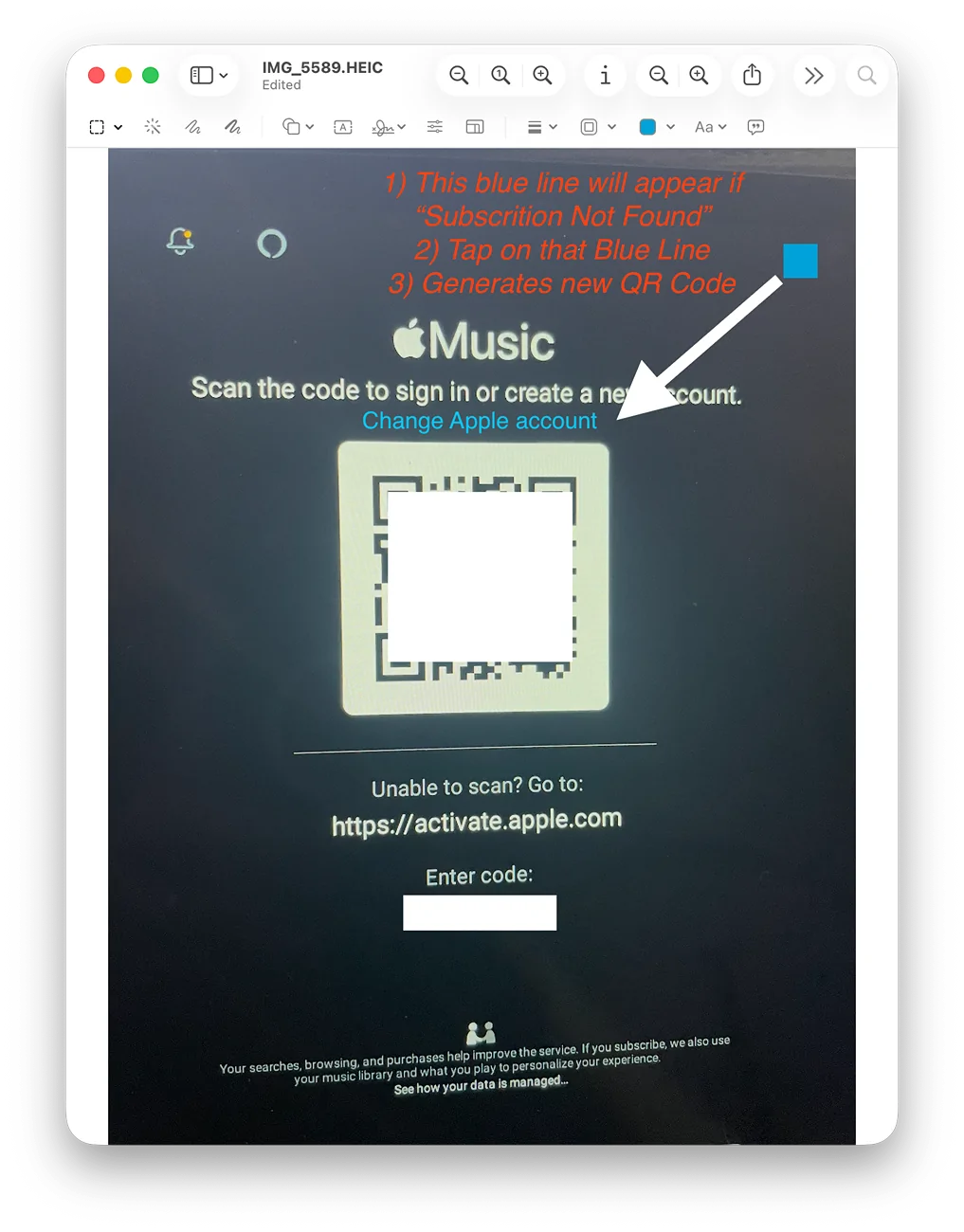
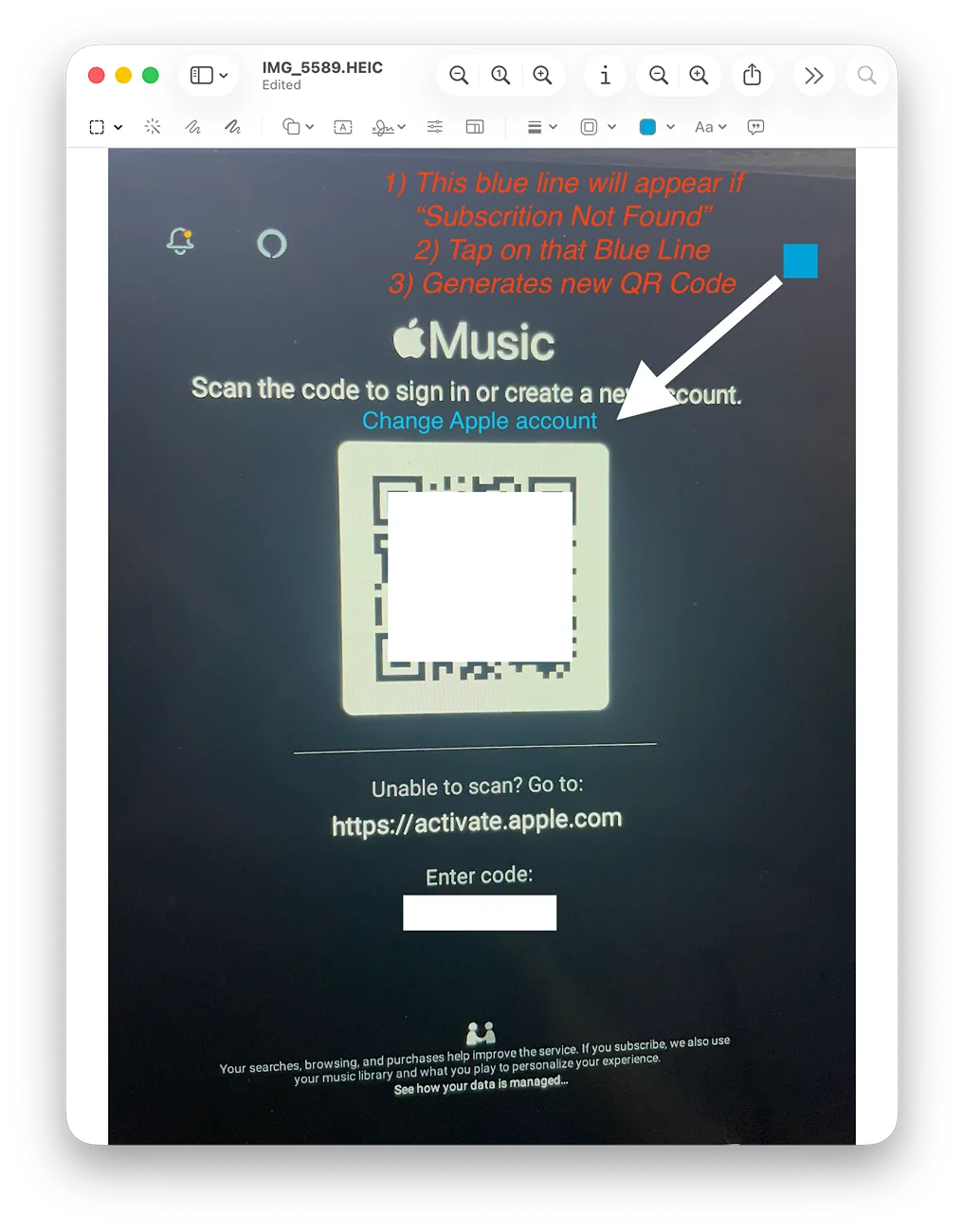
On the screen with the QR code, just above the QR code is a little inconspicuous blue line appearing
Saying something like :" Change Apple Account" (I'm not 100% sure of the precise wording)
1) You need to tap on exactly that blue line to generate a new QR code and will be taken back to the original Sign in Screen
2) Now tap on Sign in (to Apple Music)
3) Now you are back to the screen with the QR code, but it is a different one that should now let you activate the Apple Music again

Rivian R1T R1S Solved: After last update got kicked out Apple Music and unable to sign back in. "Subscription not found" 1768437492122-fq


Original Post from 1/13:
After the most recent update to 2025.46.0 and while trying to use Apple Music, the UI triggered a new login screen.
This has not happened after previous updates and no mater what I tried, QR code scan or entering the provided code on the provided apple page, I will receive an error message: "Subscription Not Found". Apple music works fine on all my other devices
I tried the RIVIAN soft reset, and yes I have the Apple Music and Rivian Connect+ subscriptions and also logged out and back in to Apple Music on my iphone.
Placed a service ticket (2 1/2 month from now) 😞

A convenient Apple Music access is the main reason for me to have the Connect+ subscription.

Anyone who encountered this issue and found a fix?

Rivian R1T R1S Solved: After last update got kicked out Apple Music and unable to sign back in. "Subscription not found" 1768331205643-wf


Rivian R1T R1S Solved: After last update got kicked out Apple Music and unable to sign back in. "Subscription not found" 1768437479968-45
Sponsored

 
Last edited:

captainjp

Well-Known Member
First Name
John
Joined
Oct 18, 2024
Threads
9
Messages
1,230
Reaction score
1,866
Location
New Jersey
Vehicles
Gen 2 R1T
Clubs
 
After the most recent update to 2025.46.0 and while trying to use Apple Music, the UI triggered a new login screen.
This has not happened after previous updates and no mater what I tried, QR code scan or entering the provided code on the provided apple page, I will receive an error message: "Subscription Not Found". Apple music works fine on all my other devices
I tried the RIVIAN soft reset, and yes I have the Apple Music and Rivian Connect+ subscriptions and also logged out and back in to Apple Music on my iphone.
Placed a service ticket (2 1/2 month from now) 😞

A convenient Apple Music access is the main reason for me to have the Connect+ subscription.

Anyone who encountered this issue and found a fix?
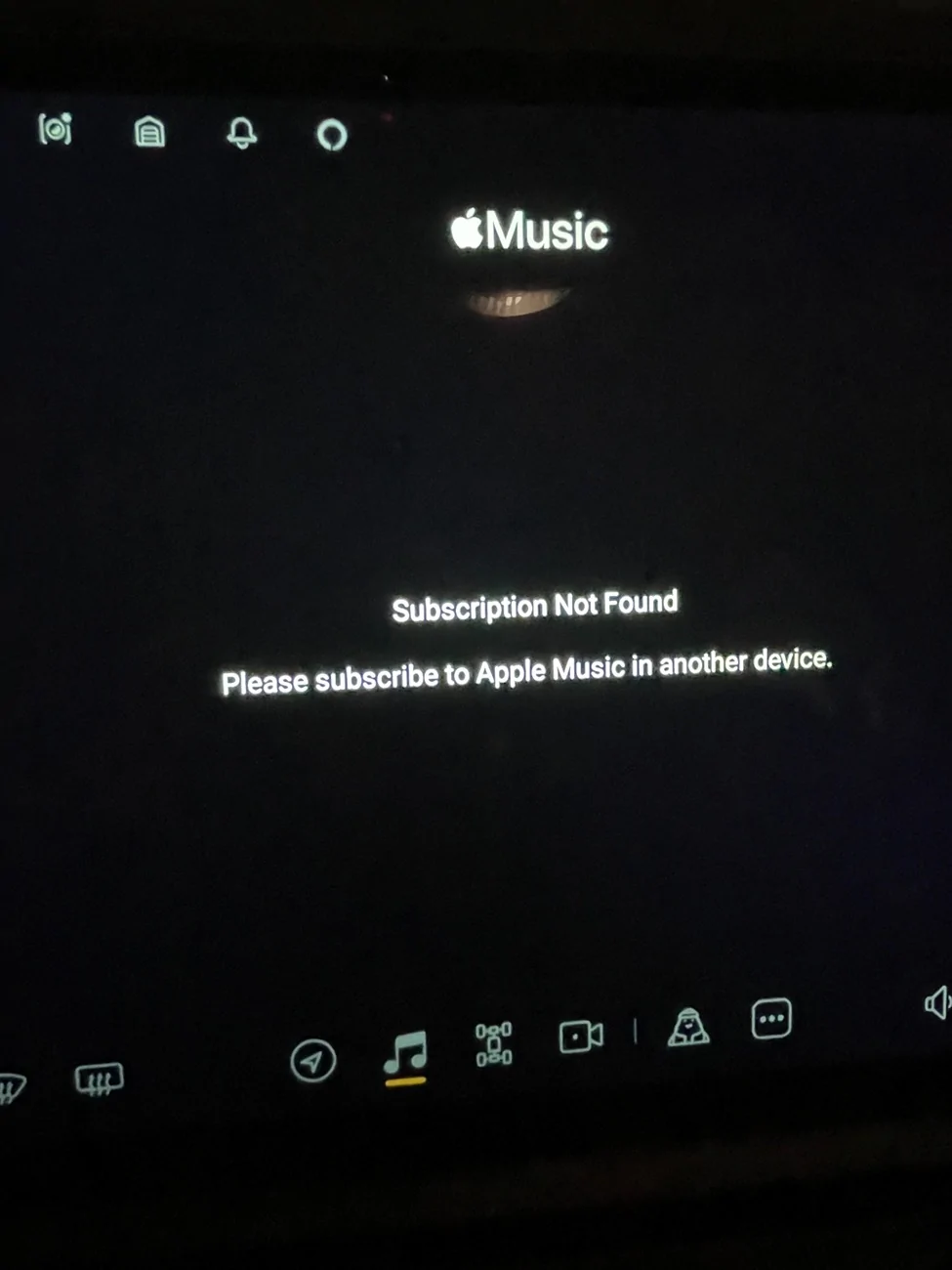
1768331205643-wf.webp
I had this happen as well. I THINK what I did was log out of Apple Music app altogether on the Rivian and start all over.
Rather than trying to re-authorize the account, that is.

Hasn’t happened since.
 
OP
OP
TBL

TBL

Member
Joined
Jun 23, 2022
Threads
4
Messages
21
Reaction score
25
Location
Tennessee
Vehicles
R1S
Clubs
 
I had this happen as well. I THINK what I did was log out of Apple Music app altogether on the Rivian and start all over.
Rather than trying to re-authorize the account, that is.

Hasn’t happened since.
I thought I'm logged out, hence it triggered the message to log back into Apple Music.
Is there a separate way to logout? What am I missing? 🙏
 

captainjp

Well-Known Member
First Name
John
Joined
Oct 18, 2024
Threads
9
Messages
1,230
Reaction score
1,866
Location
New Jersey
Vehicles
Gen 2 R1T
Clubs
 
You’re not really logged out, I don’t think. You’re re-authorizing your account. I believe if you click on the settings in the top right you should be able to log out. Again, I’m trying to recall from memory how I did it. Definitely no service ticket required.
 
OP
OP
TBL

TBL

Member
Joined
Jun 23, 2022
Threads
4
Messages
21
Reaction score
25
Location
Tennessee
Vehicles
R1S
Clubs
 
I just found another thread on this forum describing a similar issue.
The difference for me was that I got the QR code and could use it on my phone and seened to be working only to get on the Rivian screen the message "Subscription not found."

The only thing that seemed to have fixed it for some was waiting for the next software update

https://www.rivianforums.com/forum/threads/apple-music-troubleshooting.47527/
 
Last edited:

Sponsored

Singletracker

Well-Known Member
Joined
Mar 10, 2022
Threads
39
Messages
1,307
Reaction score
1,278
Location
NV
Vehicles
2023 R1T QM w/20” A/T’s
I had this issue some time ago. Select the setup with a different device option. You should get a new QR code to follow. Then just set it back up using the SAME device (your phone) and same account. I’m trying to remember, but I think that was all there was to it.
 
  • Like
Reactions: TBL

captainjp

Well-Known Member
First Name
John
Joined
Oct 18, 2024
Threads
9
Messages
1,230
Reaction score
1,866
Location
New Jersey
Vehicles
Gen 2 R1T
Clubs
 
I had this issue some time ago. Select the setup with a different device option. You should get a new QR code to follow. Then just set it back up using the SAME device (your phone) and same account. I’m trying to remember, but I think that was all there was to it.
Oh yeah, maybe that’s it. Basically you bypass that prompt to re authorize your account. I just can’t remember what I did, however it was a simple fix.

You def don’t have to wait for the next software update.
 
OP
OP
TBL

TBL

Member
Joined
Jun 23, 2022
Threads
4
Messages
21
Reaction score
25
Location
Tennessee
Vehicles
R1S
Clubs
 
I had this issue some time ago. Select the setup with a different device option. You should get a new QR code to follow. Then just set it back up using the SAME device (your phone) and same account. I’m trying to remember, but I think that was all there was to it.
Does not work for me :crying:
I tried that via QR code scan or directly entering the code on my iphone. Also logged out and back into the apple music accounts and different devices.
Initially it seems to work since I get a message that I successfully signed back in, but then it is followed by the Rivian screen notifying me: "Subscription Not found".
 
Last edited:

Singletracker

Well-Known Member
Joined
Mar 10, 2022
Threads
39
Messages
1,307
Reaction score
1,278
Location
NV
Vehicles
2023 R1T QM w/20” A/T’s
Does not work for me :crying:
I tried that via QR code scan or directly entering the code on my iphone. Also logged out and back into the apple music accounts and different devices.
Initially it seems to work since I get a message that I successfully signed back in, but then it is followed by the Rivian screen notifying me: "Subscription Not found".
To be clear, there should be an option to sign in with a different device. As I recall, it was an inconspicuous link at the top of the page. After clicking that link, you should get a new QR code and can sign in with your original phone/account. If you used that link and had no luck, I don’t know what to tell you. Good luck.
 
OP
OP
TBL

TBL

Member
Joined
Jun 23, 2022
Threads
4
Messages
21
Reaction score
25
Location
Tennessee
Vehicles
R1S
Clubs
 
To be clear, there should be an option to sign in with a different device. As I recall, it was an inconspicuous link at the top of the page. After clicking that link, you should get a new QR code and can sign in with your original phone/account. If you used that link and had no luck, I don’t know what to tell you. Good luck.
You were right :) there was this little inconspicuous blue line just above the QR code.
It should be differently worded since it is not clear that tapping on that line is essential to generate the new QR code. May mistake was that I assumed it was already a new QR code presented and I just repeated the same process over and over.

Thanks for your help 🙏 :clap:
 

Singletracker

Well-Known Member
Joined
Mar 10, 2022
Threads
39
Messages
1,307
Reaction score
1,278
Location
NV
Vehicles
2023 R1T QM w/20” A/T’s
You were right :) there was this little inconspicuous blue line just above the QR code.
It should be differently worded since it is not clear that tapping on that line is essential to generate the new QR code. May mistake was that I assumed it was already a new QR code presented and I just repeated the same process over and over.

Thanks for your help 🙏 :clap:
You’re welcome. I remember, like you, it took me a bunch of failed attempts before I focused in on that link. I think I ignored it as it referenced logging in with a different device, and I only had the one device.
Sponsored

 
  • Like
Reactions: TBL


Top