Sponsored

Solved (post #14): Superchargers not Included in Trip Navigation

Aardvark

Well-Known Member
Joined
Dec 29, 2021
Threads
6
Messages
654
Reaction score
1,339
Location
Colorado
Vehicles
R1S, Model 3
I have a vague memory of someone posting something similar, but I could not find it.

I'm getting ready for my 5th Rivian trip from Colorado to the east coast (3800 miles round trip), but my first with a NACS-to-CCS adapter.

If I use the phone app to trip plan, and select Rivian and Tesla as my preferred networks, the trip plan is perfect. I can do the entire trip, except one leg through eastern CO using only RAN and Superchargers.

However, if I plan to the same destination in the truck, selecting Rivian and Tesla as preferred networks, and making sure that "Hide- Adapter Required" is deselected, the proposed route shows up without a single Tesla Supercharger selected. Remedies I've tried so far:
- Screen reset
- Resetting all nav preference selections (ie Speed, Networks, Hide) then only selecting Rivian and Tesla under networks
- Same as above but only selecting Tesla

The result is always the same. I get my usual routing through RAN, EA, and EVGo stations, but not a single supercharger. The one thing I have not tried yet is sending the trip plan from my phone to the truck, but I would really like to understand what's going on if I plan it from the truck only.

I would greatly appreciate any suggestions!
Thanks.
Sponsored

 

SANZC02

Well-Known Member
First Name
Bob
Joined
Feb 11, 2021
Threads
50
Messages
7,431
Reaction score
12,724
Location
California
Vehicles
Tesla Model S, LE - R1S
Occupation
Retired
I have a vague memory of someone posting something similar, but I could not find it.

I'm getting ready for my 5th Rivian trip from Colorado to the east coast (3800 miles round trip), but my first with a NACS-to-CCS adapter.

If I use the phone app to trip plan, and select Rivian and Tesla as my preferred networks, the trip plan is perfect. I can do the entire trip, except one leg through eastern CO using only RAN and Superchargers.

However, if I plan to the same destination in the truck, selecting Rivian and Tesla as preferred networks, and making sure that "Hide- Adapter Required" is deselected, the proposed route shows up without a single Tesla Supercharger selected. Remedies I've tried so far:
- Screen reset
- Resetting all nav preference selections (ie Speed, Networks, Hide) then only selecting Rivian and Tesla under networks
- Same as above but only selecting Tesla

The result is always the same. I get my usual routing through RAN, EA, and EVGo stations, but not a single supercharger. The one thing I have not tried yet is sending the trip plan from my phone to the truck, but I would really like to understand what's going on if I plan it from the truck only.

I would greatly appreciate any suggestions!
Thanks.
In my trips I use ABRP to plan the route and just use the onboard navigation to get to the next charge stop. Works great for me and helps kill a few minutes while charging. I never had an issue with the onboard navigation using this method.

The next OTA update is supposed to have navigation improvements, it may solve your issue.
 

evcars4all

Active Member
Joined
Jan 18, 2024
Threads
1
Messages
39
Reaction score
39
Location
California
Vehicles
2023 Tesla Model S
I would greatly appreciate any suggestions!
Nothing you can do right now

A couple of releases ago, Rivian added support for 'grades' (think A, B, C, D) for chargers, and modified the routing software to ignore any charger with a grade of C or lower.

Go ahead, select an EA or RAN charger on the map and look at the info - there will be a letter grade. The problem is that Tesla stations have no grade at all. The routing software ignores them.

When the grading system was released, we were told that "something" would "learn" the grades as charging stations get used. I have no idea if that was ever implemented. Or, why Rivian didn't just give all superchargers a starting grade of "A" (or "B" even, who cares) so that they'd be eligible for routing.
 

Bobrobheimer

Well-Known Member
Joined
Aug 3, 2024
Threads
4
Messages
49
Reaction score
49
Location
Colorado
Vehicles
R1T dual gen 1
Occupation
Contractor
I just picked up my truck in Florida and drove it back to CO in about 2 days last week. I also noticed the truck nav didn’t want to use super chargers. I did mostly what Ardvark suggested above and used ABRP and then put the next charge stop into the truck. alternatively I had the whole route in on the truck nav but would add the stop I wanted for the next charger per ABRP. Just don’t let the nav re direct you as it tried to do to me a couple times.

also, In general I felt like the truck nav defaulted to much longer charge times and bigger gaps between charges. That seemed less efficient since it was taking it above 80% when there was often another very convenient charger less far. (I also like driving for about 2.5hrs and then stopping for 15 or 20min)
 
OP
OP
Aardvark

Aardvark

Well-Known Member
Joined
Dec 29, 2021
Threads
6
Messages
654
Reaction score
1,339
Location
Colorado
Vehicles
R1S, Model 3
Nothing you can do right now

A couple of releases ago, Rivian added support for 'grades' (think A, B, C, D) for chargers, and modified the routing software to ignore any charger with a grade of C or lower.

Go ahead, select an EA or RAN charger on the map and look at the info - there will be a letter grade. The problem is that Tesla stations have no grade at all. The routing software ignores them.

When the grading system was released, we were told that "something" would "learn" the grades as charging stations get used. I have no idea if that was ever implemented. Or, why Rivian didn't just give all superchargers a starting grade of "A" (or "B" even, who cares) so that they'd be eligible for routing.
Thanks for the explanation.
The strange thing is that in the phone app, the Tesla stations all have a grade. It should be a simple step to have the car show the grades also.
 

Sponsored

BCondrey

Well-Known Member
First Name
Barry
Joined
Dec 12, 2021
Threads
0
Messages
699
Reaction score
709
Location
Richmond, VA
Vehicles
R1T
Occupation
IT
Nothing you can do right now

A couple of releases ago, Rivian added support for 'grades' (think A, B, C, D) for chargers, and modified the routing software to ignore any charger with a grade of C or lower.

Go ahead, select an EA or RAN charger on the map and look at the info - there will be a letter grade. The problem is that Tesla stations have no grade at all. The routing software ignores them.

When the grading system was released, we were told that "something" would "learn" the grades as charging stations get used. I have no idea if that was ever implemented. Or, why Rivian didn't just give all superchargers a starting grade of "A" (or "B" even, who cares) so that they'd be eligible for routing.
I will have to look at this. When I select only Tesla and RAN, it will route me to Tesla. Perhaps it is taking longer to update some of the SCs than others?

The obvious flaw in the logic of the grades is that if you never route anyone to the chargers, no grades will ever be updated, and nothing will change (or it will take longer).

If I have to use something other than Tesla or RAN, I am checking plugshare first.
 

Tlohrenz

Well-Known Member
First Name
Tim
Joined
Jun 16, 2024
Threads
17
Messages
75
Reaction score
52
Location
Golden, CO
Vehicles
2023 Rivian R1T
Occupation
Retired
I'm not seeing your issue on my R1T. I'm in Golden and I entered Stowe, VT and it routed me to use 1 ChargePoint, 6 Tesla's requiring my adapter, 2 Tesla's not requiring an adapter, and 2 EV Go chargers.
 

onesoil

Well-Known Member
First Name
Sid
Joined
Jun 16, 2022
Threads
3
Messages
391
Reaction score
560
Location
Montpelier VT
Vehicles
2022 Rivian R1T
Occupation
Director of Operations at Vermont Compost Company
Clubs
 
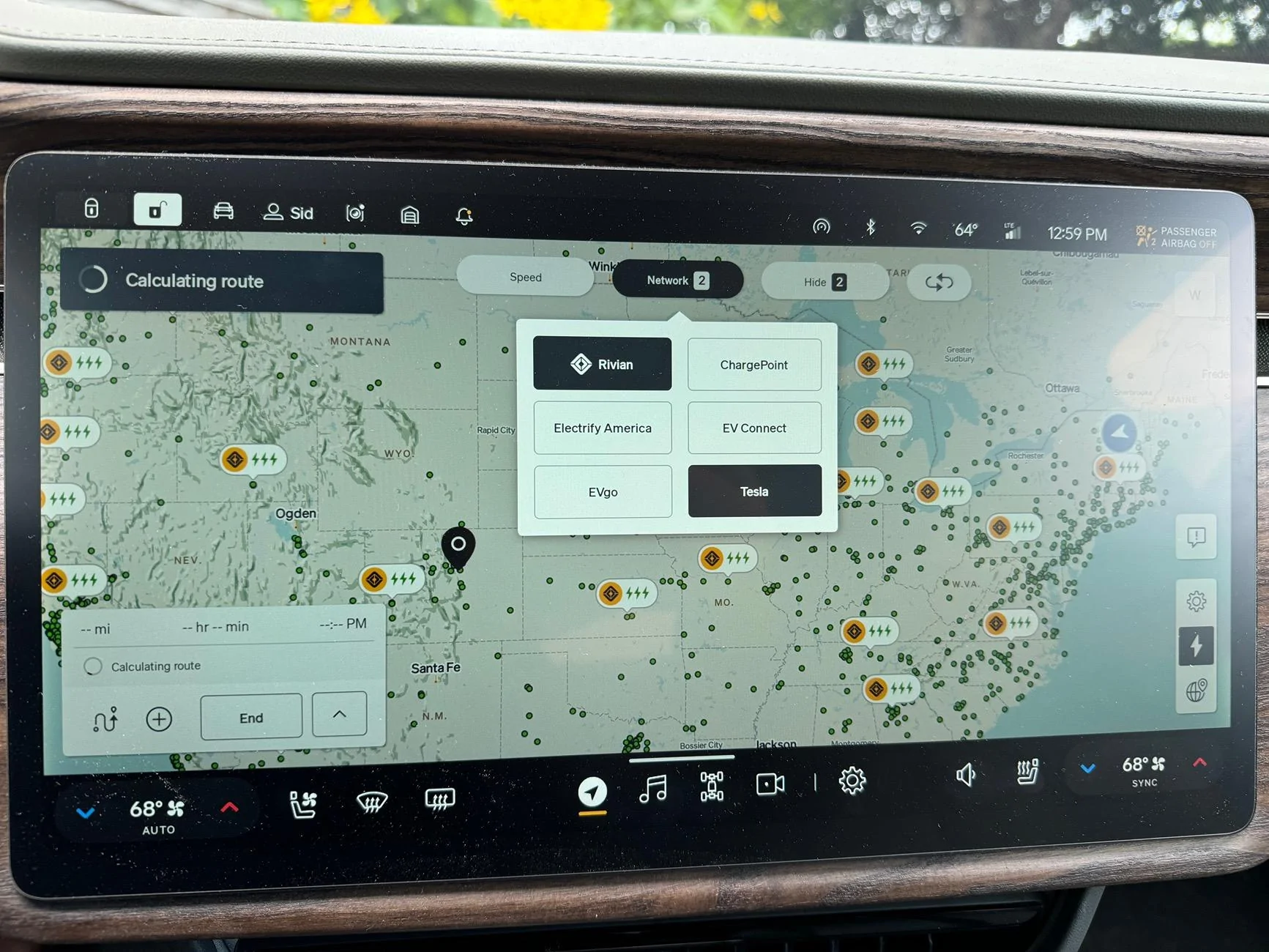
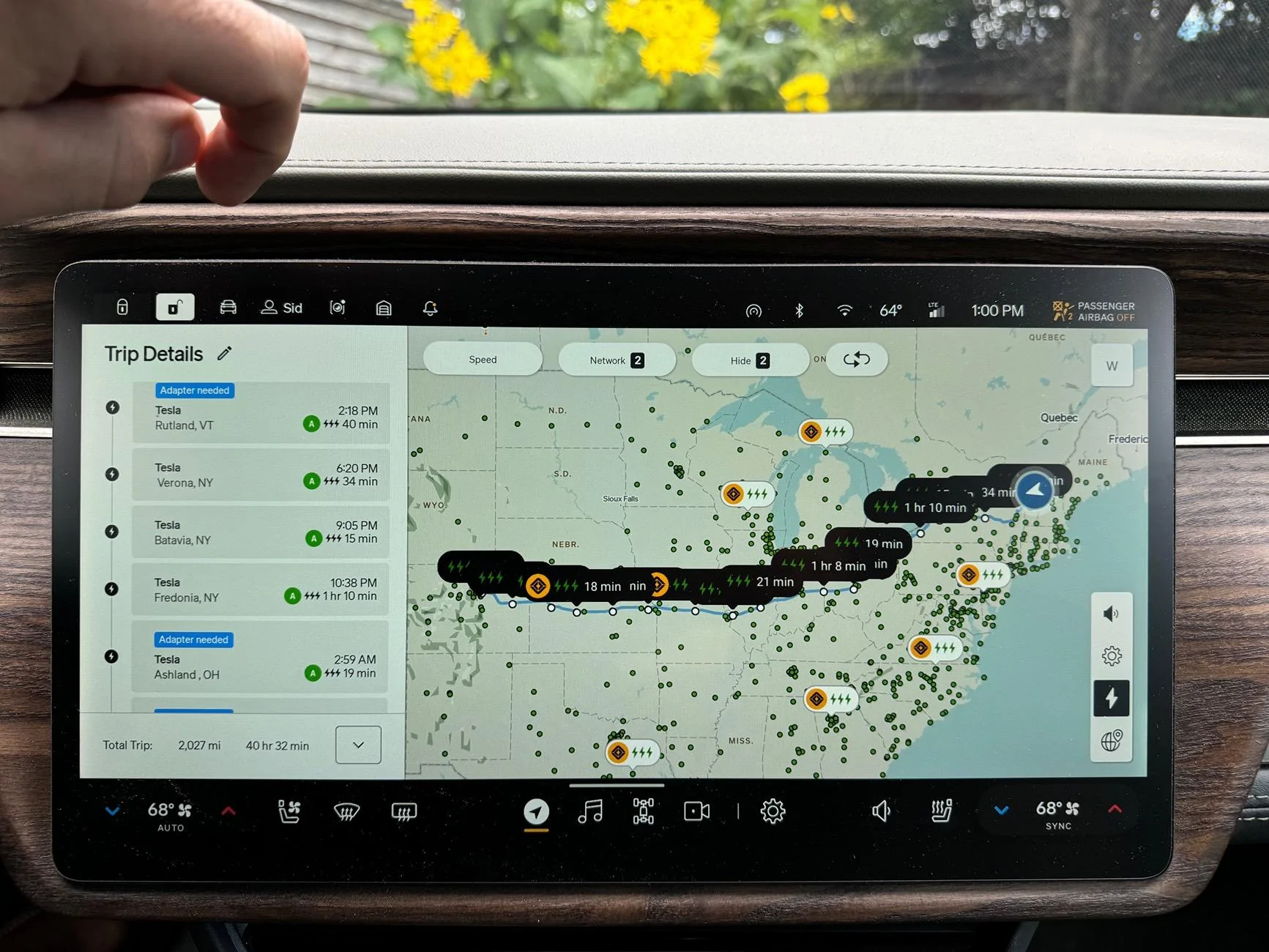
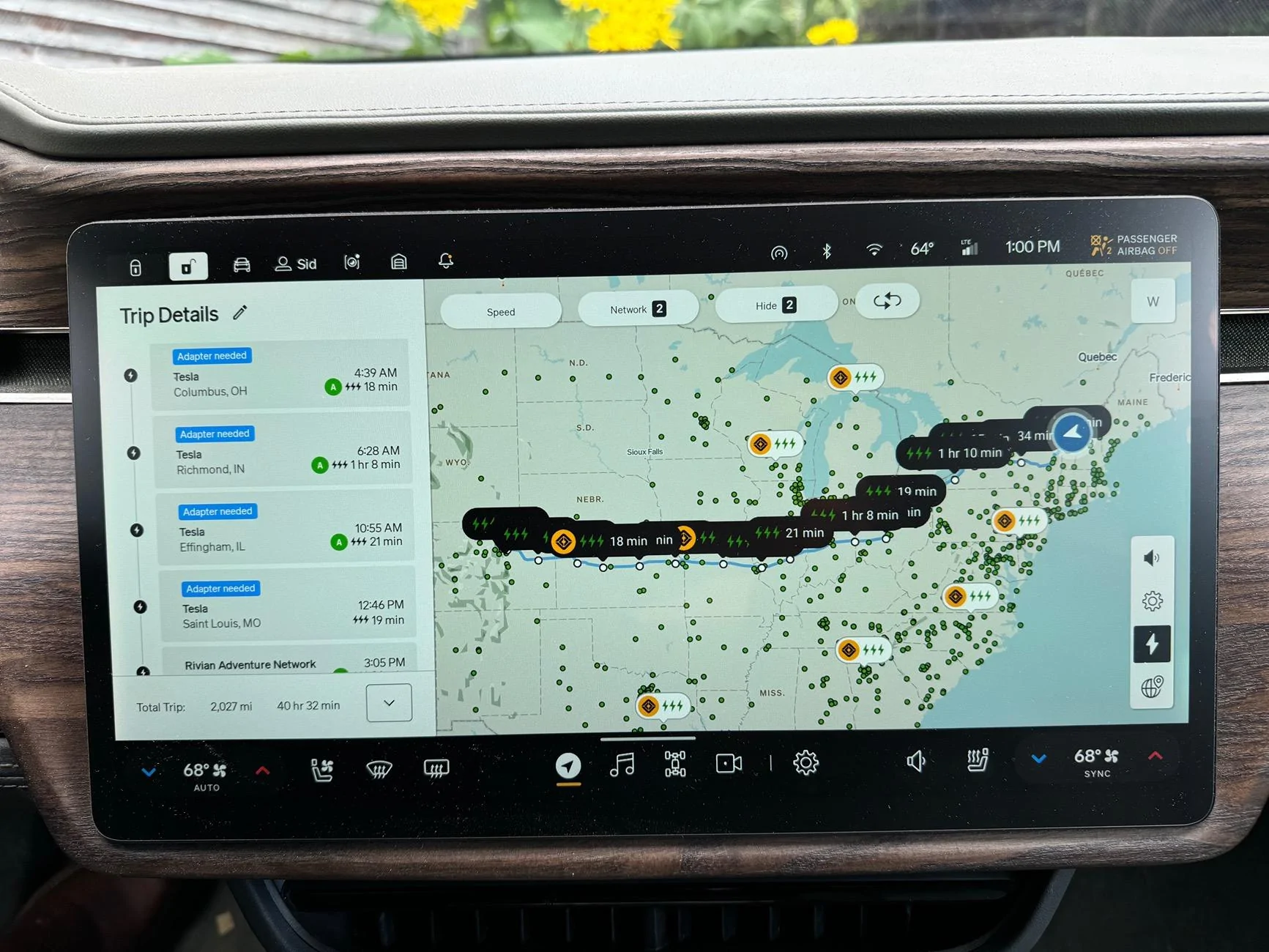
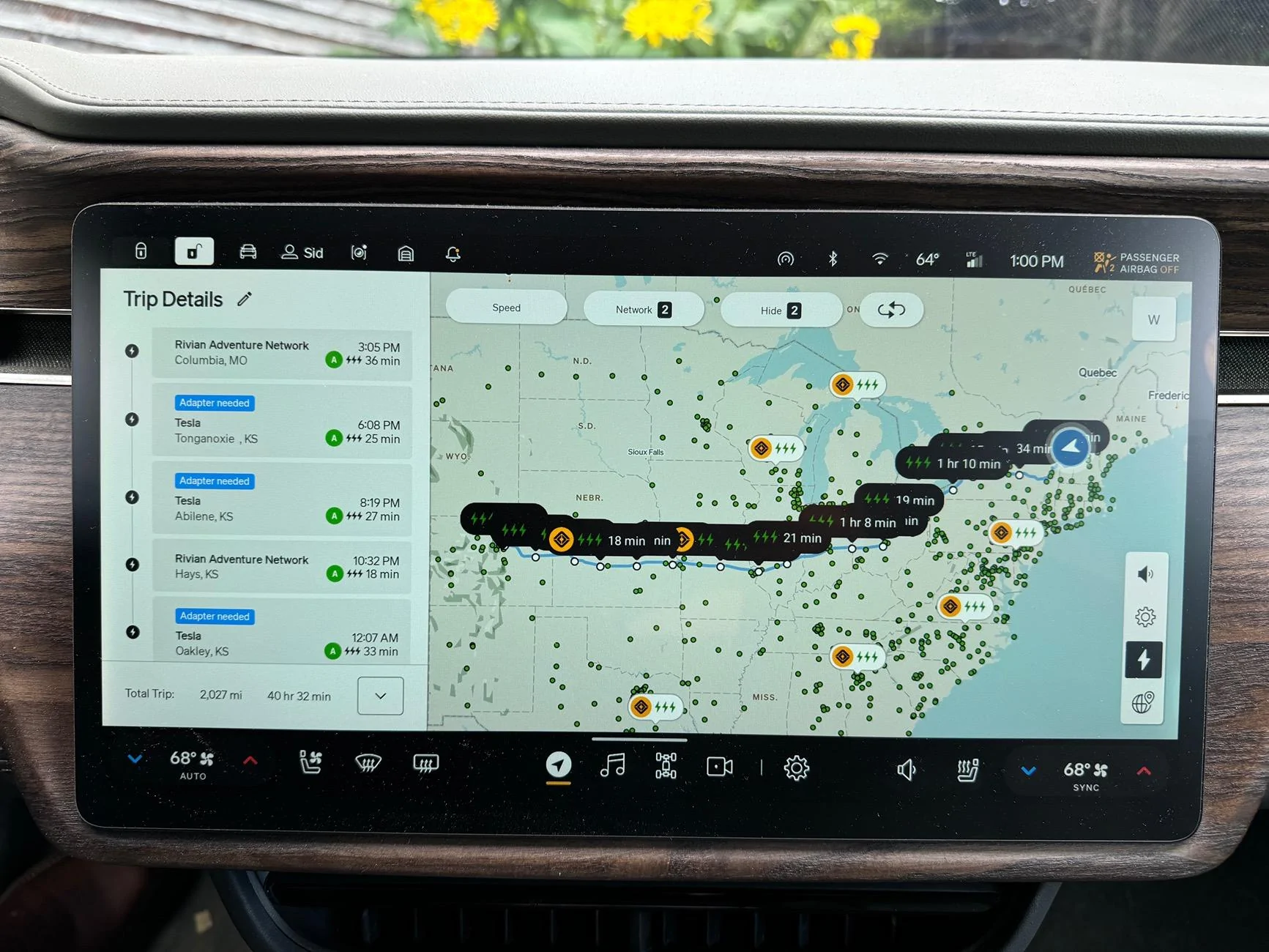
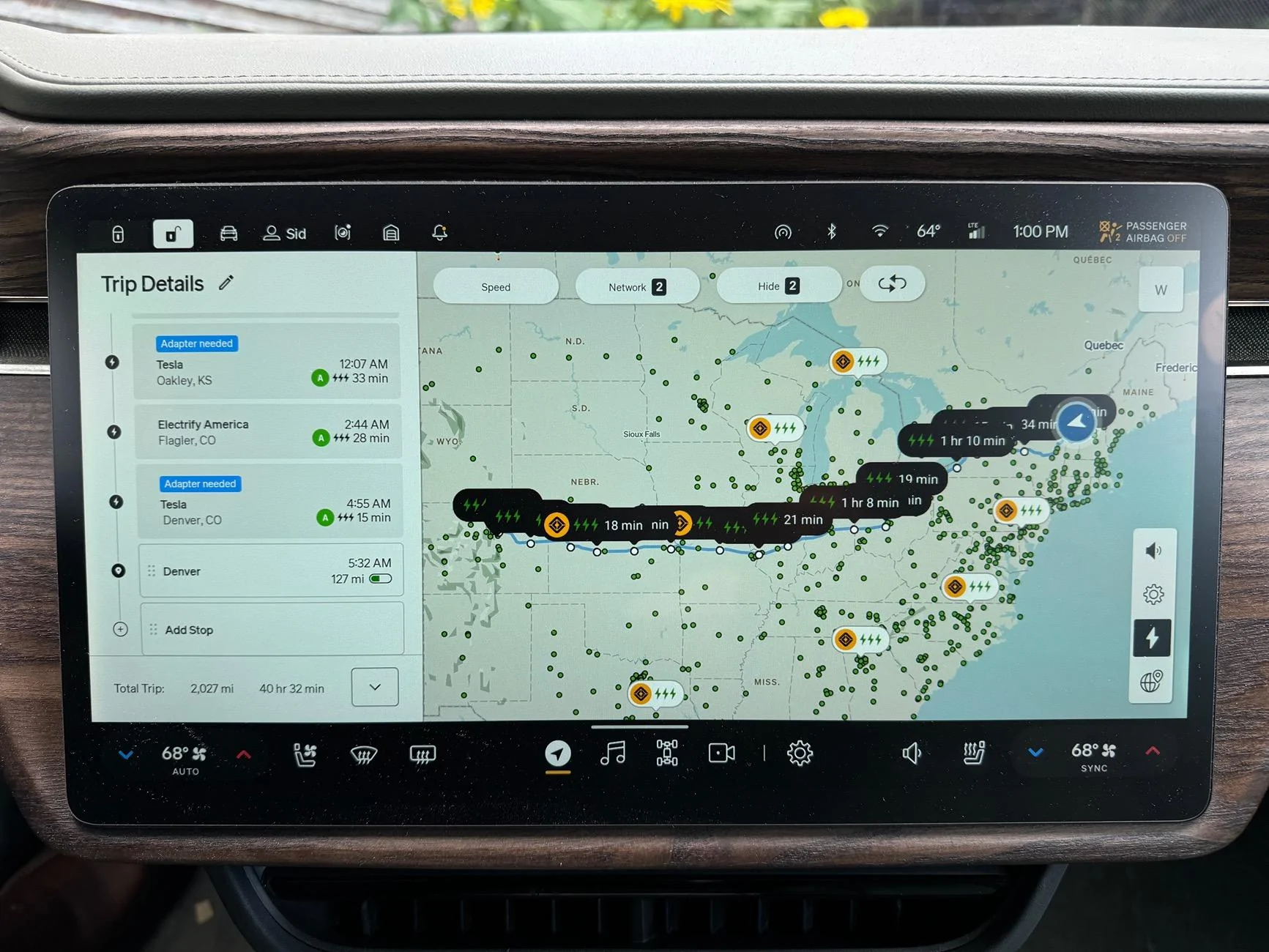
Have you tried a hard reset (Holding the left steering wheel button and emergency flashers at the same time)? I have set my filters to strictly use RAN/Tesla (with an A2Z adapter), and when I route to CO (from VT), it suggests mostly Tesla chargers along the way:

Rivian R1T R1S Solved (post #14): Superchargers not Included in Trip Navigation IMG_2323


Rivian R1T R1S Solved (post #14): Superchargers not Included in Trip Navigation IMG_2324


Rivian R1T R1S Solved (post #14): Superchargers not Included in Trip Navigation IMG_2328


Rivian R1T R1S Solved (post #14): Superchargers not Included in Trip Navigation IMG_2329


Rivian R1T R1S Solved (post #14): Superchargers not Included in Trip Navigation IMG_2330


Rivian R1T R1S Solved (post #14): Superchargers not Included in Trip Navigation IMG_2331


I’m not sure how/why that Flagler, CO EA is on my hypothetical route given my filters, but I’m guessing it’s required and there isn’t a RAN/Tesla in that stretch of road?
 
OP
OP
Aardvark

Aardvark

Well-Known Member
Joined
Dec 29, 2021
Threads
6
Messages
654
Reaction score
1,339
Location
Colorado
Vehicles
R1S, Model 3
Have you tried a hard reset (
No, I have not yet tried a hard reset. I will do that before departing. This isn't too big of a deal. I can just manually select each Tesla stop.
 

Sponsored

TampaR1T

Well-Known Member
First Name
Paul
Joined
May 21, 2024
Threads
1
Messages
58
Reaction score
40
Location
Land O'Lakes, FL
Vehicles
2023 Rivian R1T Quad Motor
Hey, not sure if this helps, but look at this video:


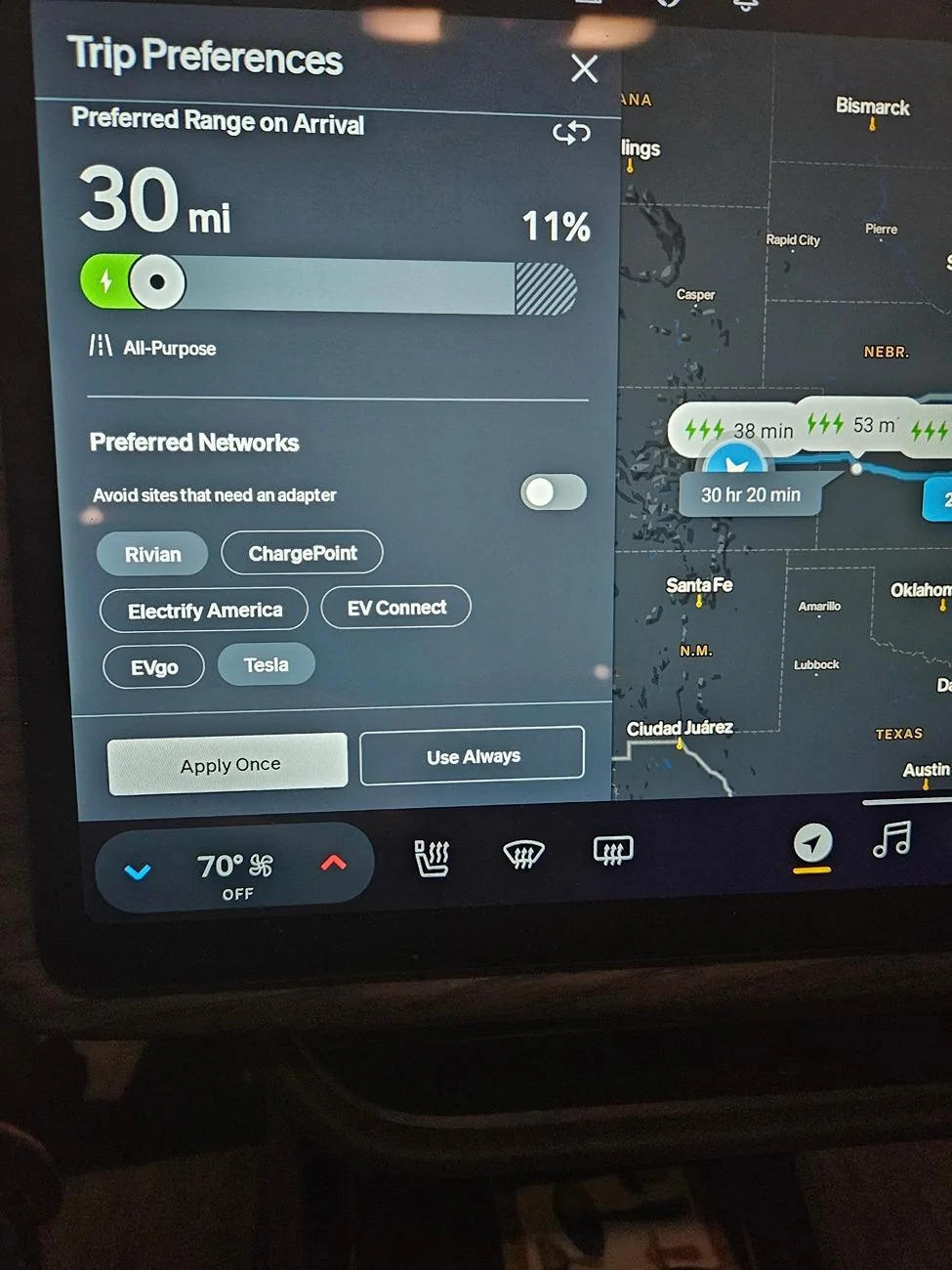
At the 9:27 mark, he shows how to set preferences for NAVIGATION, NOT what shows on the map. The buttons at the top of the map just seem to change which chargers shown when viewing the map, NOT preferences for navigating.

In the preferences for navigation in the video --which is separate from the navigation tab in the main settings menu--if you click preferred networks, there you can change which networks the system uses for navigation. When you're done, select 'use always' if you want the settings to be permanent. I personally use this to choose Tesla only due to availability in my region. (Changing on the map did nothing when getting directions to a far away destination requiring a charge in between.)

Hope that helps...
 
Last edited:

onesoil

Well-Known Member
First Name
Sid
Joined
Jun 16, 2022
Threads
3
Messages
391
Reaction score
560
Location
Montpelier VT
Vehicles
2022 Rivian R1T
Occupation
Director of Operations at Vermont Compost Company
Clubs
 
No, I have not yet tried a hard reset. I will do that before departing. This isn't too big of a deal. I can just manually select each Tesla stop.
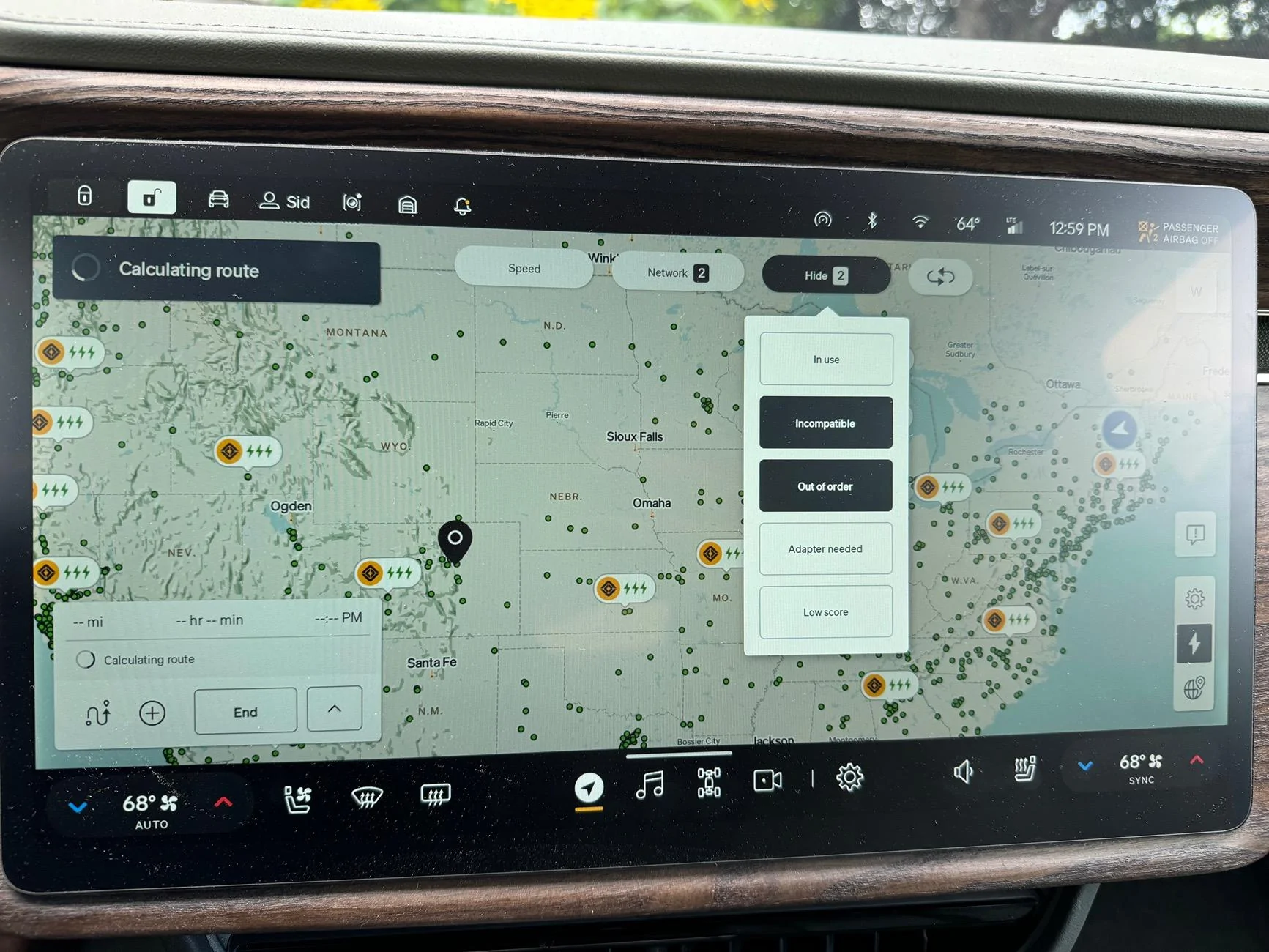
Worth a shot... Also, compare the filters you have set to the first two photos I posted. The "Hide" "Adapter Needed" one tripped me up the first few times I went on a trip with an adapter (for some reason, even though it's straightforward enough for me now). Also, does anyone know what "Incompatible" stations are? I'm assuming these are Tesla stations that don't work with the adapter? If so, why even give the option to show incompatible stations? I also wish my truck would just remember my preferred stations and station "hide" settings, but at least they seem to function well enough for me...

Another tip for your trip: you can use your adapter at Magic Dock stations, and in my experience, you get full charge speed whereas I've seen some reports of using the Magic Dock itself limiting charge speeds to 150kw. Also, for a trip like this, it's well worth subscribing to the Tesla charging membership and triggering your charges from within the app. You have to reserve the specific charger before you plug the adapter into the truck, otherwise the Rivian plug-and-charge will be triggered which charges you a higher rate (to use the Tesla app: park, open app, select location and specific pedestal you are parked at, then plug in when prompted). This saved us a decent bit of money on my last road trip to West Virginia.
 

onesoil

Well-Known Member
First Name
Sid
Joined
Jun 16, 2022
Threads
3
Messages
391
Reaction score
560
Location
Montpelier VT
Vehicles
2022 Rivian R1T
Occupation
Director of Operations at Vermont Compost Company
Clubs
 
Hey, not sure if this helps, but look at this video:


At the 9:27 mark, he shows how to set preferences for NAVIGATION, NOT what shows on the map. The buttons at the top of the map just seem to change which chargers shown when viewing the map, NOT preferences for navigating.

In the preferences for navigation in the video --which is separate from the navigation tab in the main settings menu--if you click preferred networks, there you can change which networks the system uses for navigation. I personally use this to choose Tesla only due to availability in my region. (Changing on the map did nothing when getting directions to a far away destination requiring a charge in between.)

Hope that helps...
This might be it right here: I think when I got my adapter, I set my trip calculation settings to only use Tesla and RAN when planning routes (with "Avoid sites that an adapter" deselected), and I'm sure I would have selected "Use Always" when I did that since I avoid EA, EVGo, Chargepoint, etc. if at all possible given past bad experiences with all of the above (and nearly flawless Tesla/RAN charging).
 
OP
OP
Aardvark

Aardvark

Well-Known Member
Joined
Dec 29, 2021
Threads
6
Messages
654
Reaction score
1,339
Location
Colorado
Vehicles
R1S, Model 3
Hey, not sure if this helps, but look at this video:


At the 9:27 mark, he shows how to set preferences for NAVIGATION, NOT what shows on the map. The buttons at the top of the map just seem to change which chargers shown when viewing the map, NOT preferences for navigating.

In the preferences for navigation in the video --which is separate from the navigation tab in the main settings menu--if you click preferred networks, there you can change which networks the system uses for navigation. I personally use this to choose Tesla only due to availability in my region. (Changing on the map did nothing when getting directions to a far away destination requiring a charge in between.)

Hope that helps...
That was the answer, @TampaR1T ! Thank you. I had to go to the navigation menu screen to deselect "Avoid sites that need an adapter" even though on the map screen, I had deselected "Hide adapter needed"
I really appreciate the tip!
Rivian R1T R1S Solved (post #14): Superchargers not Included in Trip Navigation 1000004326
Sponsored


Top