Sponsored

Whale Blubber

Well-Known Member
Joined
May 2, 2023
Threads
4
Messages
396
Reaction score
553
Location
Austin
Vehicles
2019 BMW X3 3.0si, 2021 Toyota RAV4 XLE
Made this chart in case you need help tracking the work yet to be done once Rivian starts paying you for your time... :p

GenChasisHardwareSoftwareSuperfluid Analysis
1R1SMeridianPre 2024.27.01
1R1SMeridianPost 2024.27.01
1R1SElevationPre 2024.27.01Feb 08 2024 Rivian Forums Post
1R1SElevationPost 2024.27.01Aug 27 2024 Rivian Forums Post
1R1TMeridianPre 2024.27.01Mar 23 2024 Rivian Forums Post
1R1TMeridianPost 2024.27.01
1R1TElevationPre 2024.27.01
1R1TElevationPost 2024.27.01
2R1SPremiumPre 2024.27.01
2R1SPremiumPost 2024.27.01
2R1SStandardPre 2024.27.01
2R1SStandardPost 2024.27.01
2R1TPremiumPre 2024.27.01
2R1TPremiumPost 2024.27.01
2R1TStandardPre 2024.27.01
2R1TStandardPost 2024.27.01
Sponsored

 
OP
OP
superfluid

superfluid

Well-Known Member
Joined
Mar 29, 2021
Threads
20
Messages
290
Reaction score
923
Location
Austin, TX
Vehicles
Rivian R1S, Kia Telluride
Occupation
Tech and data
Clubs
 
Thanks a ton for this. You should set up a Buy Me A Coffee—I’d gladly throw you some cash for your time and effort here. Highly appreciate your methodology.
I've been thoroughly enjoying these posts as I've spent many hours with REW in the past and appreciate the effort that goes into getting the audio system to sound good... As an owner with a Gen1 R1T Meridian, I second GaryGR here and would really appreciate a test and adjustments relevant to the Meridian system. Would gladly throw in some financial appreciation to the "buy me a coffee" idea too!
Following your advice, I set up a Buy Me a Coffee link. Since I'm a sake guy, I made it cups of sake. Big thanks to @Whale Blubber for being the first to buy me several cups!

Thanks and cheers!

https://buymeacoffee.com/tedmanasa
 

akod112

Member
Joined
Sep 12, 2023
Threads
1
Messages
11
Reaction score
11
Location
Dallas, TX
Vehicles
Rivian R1S
Clubs
 
Thank you - I blindly followed the instructions last time and was blown away by how much better my system sounded. Post update I noticed besides it being louder, that it was "off" somehow. I look forward to playing around with these new settings!
 

R1Tom

Well-Known Member
First Name
Tom
Joined
May 19, 2022
Threads
37
Messages
3,621
Reaction score
4,862
Location
Wisc
Vehicles
Riv R1T
Occupation
Sales
I’ve posted in other threads on this, but I didn’t mention that besides lost of one whole stereo channel, loss of the updated ‘volume kick’, and generally awful Apple Music experience after the latest update… even after multiple infotainment resets… another issue was zero (apparent) output from the ceiling ‘heights’ speakers. The only solution for me for all these issues was a full vehicle hard reset/reboot (via hazard switch, etc.). I don’t have the Meridian system, but I’d try the reboot and listen for those ceiling speakers to cut back in.
This update definitely has a issue with dropping channels. I just did a reset again....and this time finally...it really corrected everything. Now my Meridian sounds AMAZING!
 
OP
OP
superfluid

superfluid

Well-Known Member
Joined
Mar 29, 2021
Threads
20
Messages
290
Reaction score
923
Location
Austin, TX
Vehicles
Rivian R1S, Kia Telluride
Occupation
Tech and data
Clubs
 
Thank you - I blindly followed the instructions last time and was blown away by how much better my system sounded. Post update I noticed besides it being louder, that it was "off" somehow. I look forward to playing around with these new settings!
Let us know how it sounds!
 

Sponsored

pmd5700

Member
First Name
Peter
Joined
Jul 16, 2024
Threads
1
Messages
11
Reaction score
7
Location
Tampa, FL
Vehicles
2024 R1T
Clubs
 
FWIW, these new settings on my 2024 R1T (Elevation) sound great! I was playing with the settings after the update and couldn't quite put my finger on which channels to adjust to get the sound I wanted, but these settings are very close to perfect for me. Thank you!
 

Cascadian

Well-Known Member
First Name
Steve
Joined
Apr 19, 2023
Threads
12
Messages
327
Reaction score
321
Location
Seattle
Vehicles
Volt, Outback
Clubs
 
Thanks

I’ m new to this

How do I adjust Apple Music to highest rate?
 
OP
OP
superfluid

superfluid

Well-Known Member
Joined
Mar 29, 2021
Threads
20
Messages
290
Reaction score
923
Location
Austin, TX
Vehicles
Rivian R1S, Kia Telluride
Occupation
Tech and data
Clubs
 
FWIW, these new settings on my 2024 R1T (Elevation) sound great! I was playing with the settings after the update and couldn't quite put my finger on which channels to adjust to get the sound I wanted, but these settings are very close to perfect for me. Thank you!
Glad to hear that!
 

Whale Blubber

Well-Known Member
Joined
May 2, 2023
Threads
4
Messages
396
Reaction score
553
Location
Austin
Vehicles
2019 BMW X3 3.0si, 2021 Toyota RAV4 XLE
Thanks

I’ m new to this

How do I adjust Apple Music to highest rate?
Not an expert on Apple Music at all, and no idea if this has an effect on Rivian reception, but I went into my Apple iphone: Settings > Music > Audio Quality (under Audio) > Lossless Audio

I will say it is just as crisp and punchy to my ear as Tidal max (except when Atmos is involved).
 

Sponsored

Kaiju

Well-Known Member
Joined
Aug 18, 2024
Threads
2
Messages
136
Reaction score
254
Location
Texas
Vehicles
R1T
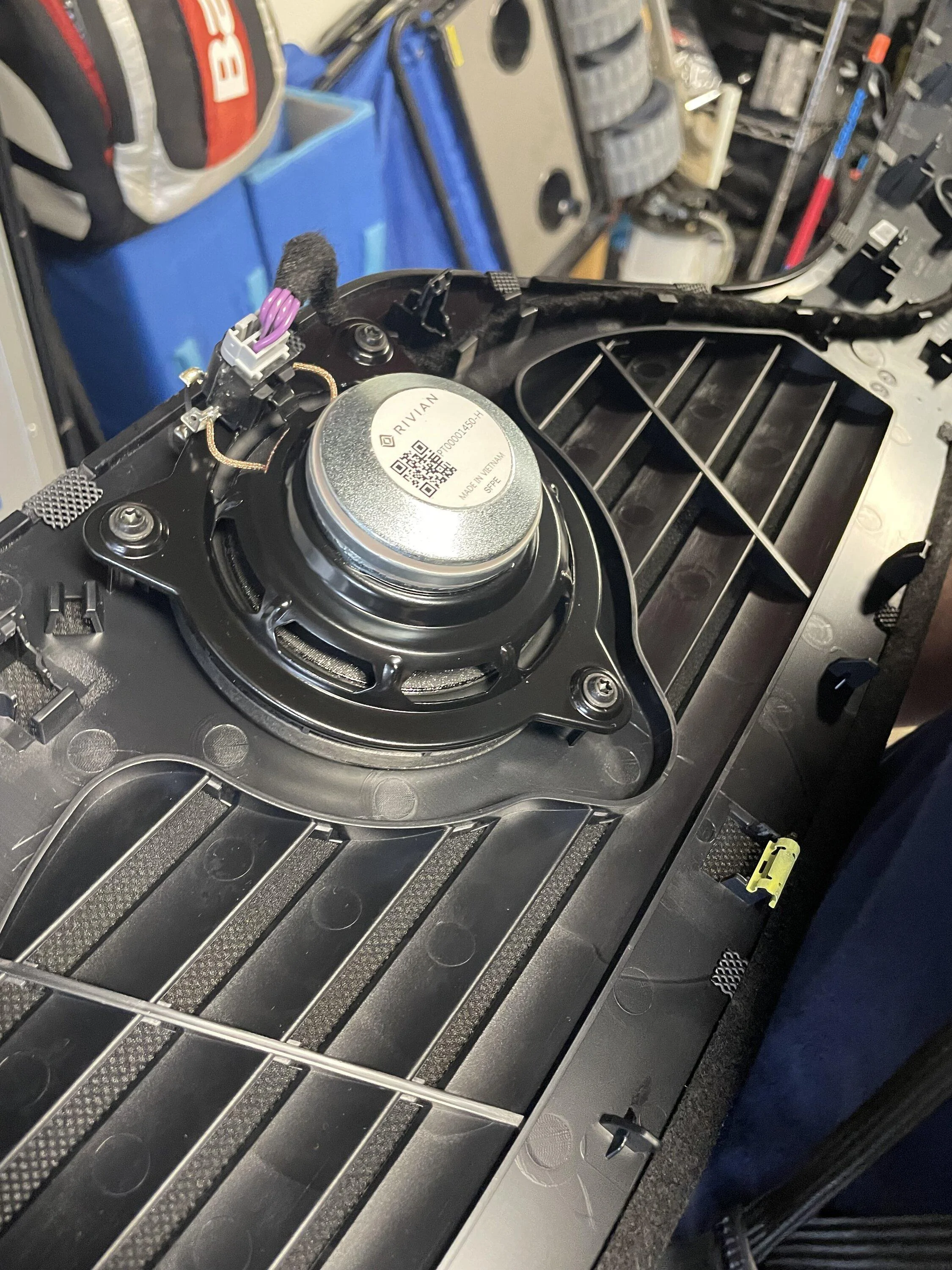
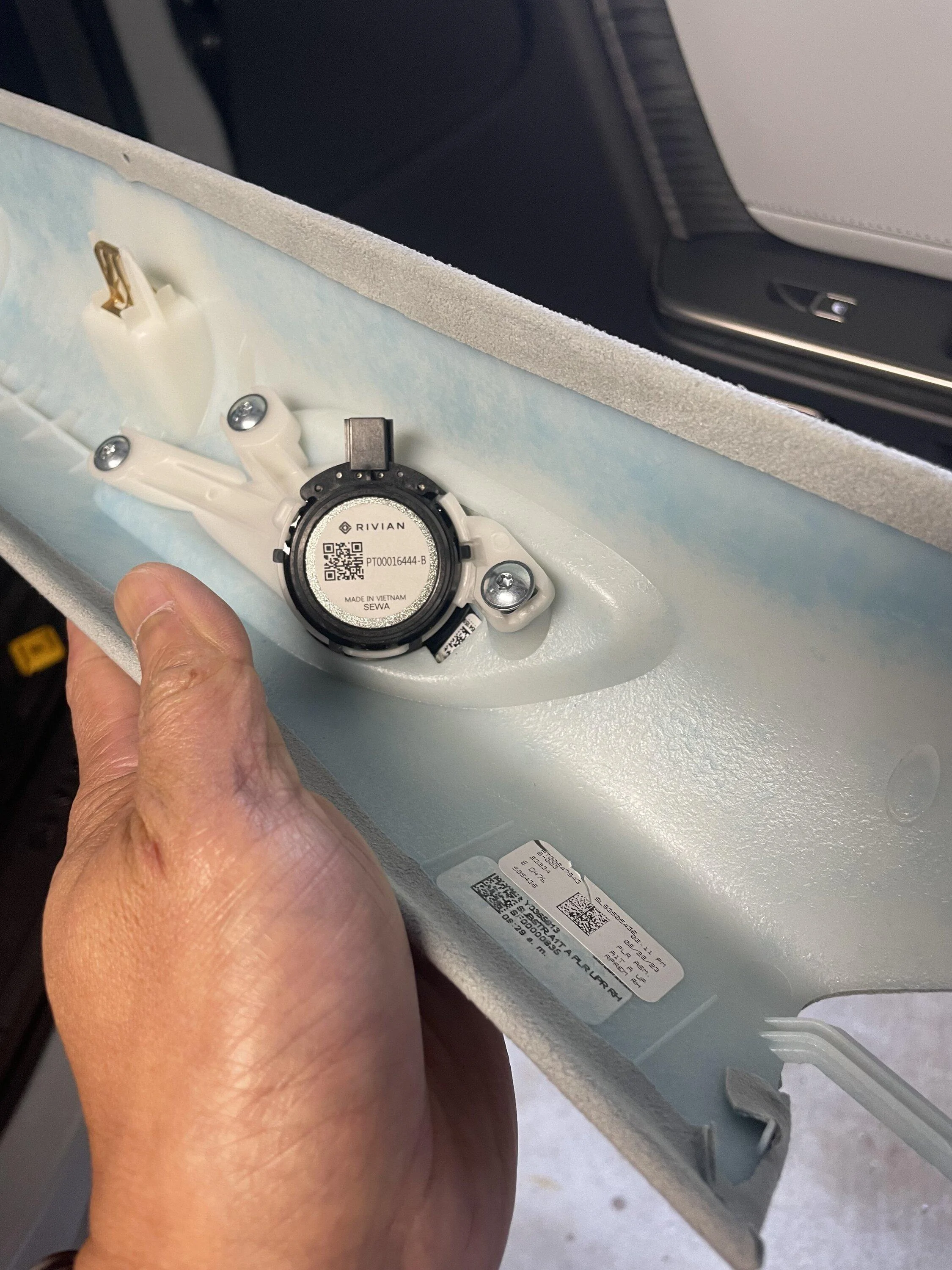
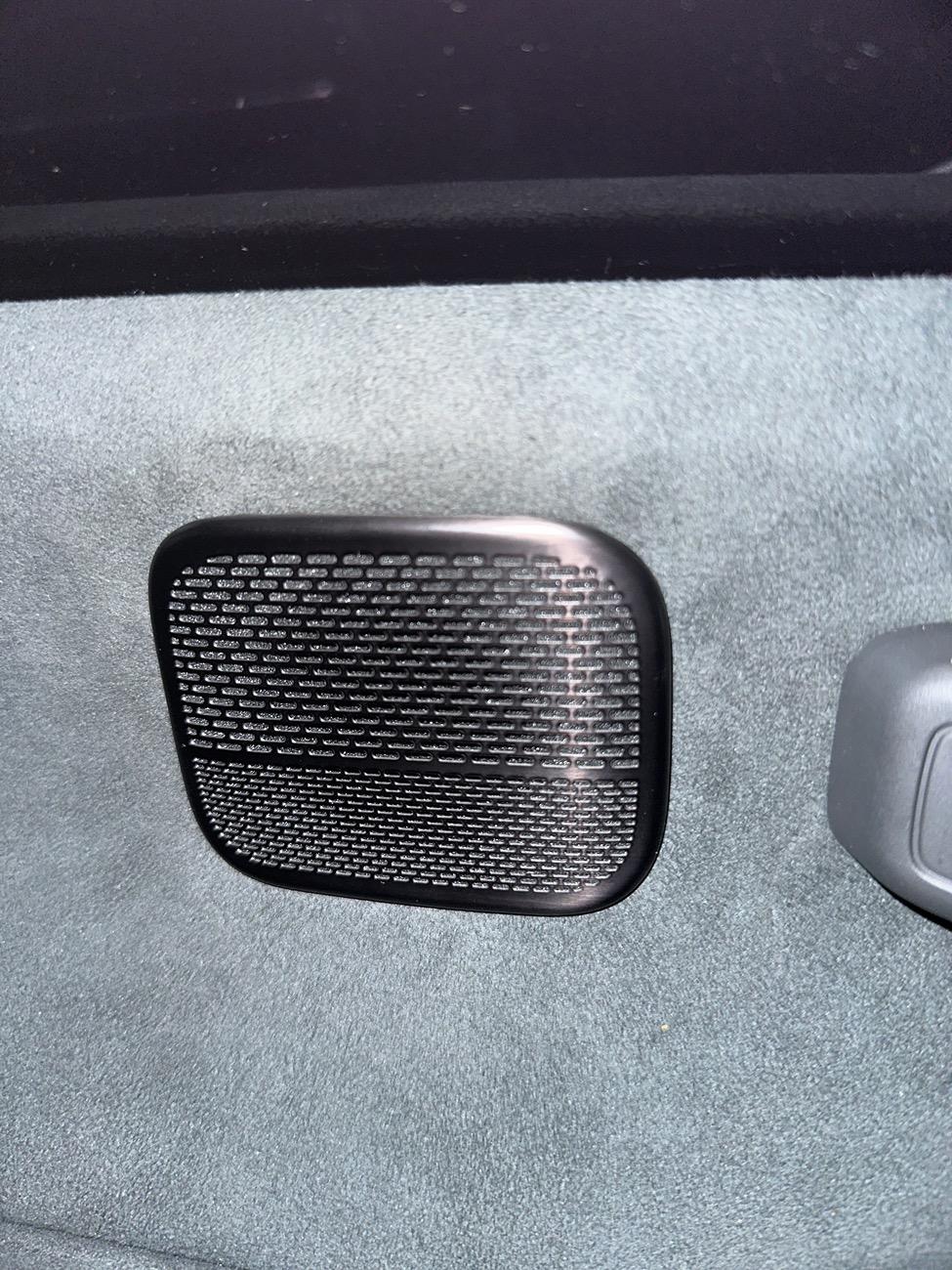
I don't suppose anyone has technical specs on any of the Elevation speakers? The only thing I've seen so far is a forum post where someone fixing their dash rattle took some helpful pictures. I believe this is a Rivian in-house set because some of the Ebay speakers look identical save they actually say Meridian just below the Rivian logo. Same part number by the look of it. We have Made in Vietnam, SFPE and SEWA. Gets a few hits on search but not much actual info. Here be the moist pertinent pictures:

Rivian R1T R1S How to Improve a Gen 1 Rivian R1S’s Elevation Sound System After Update 2024.27.01 With Simple EQ Changes img_2210-jpg


Rivian R1T R1S How to Improve a Gen 1 Rivian R1S’s Elevation Sound System After Update 2024.27.01 With Simple EQ Changes img_2202-jpg


The reason I ask is because it would be a public service to pinpoint where the weakest point in the system is. While people have been bashing the speakers, a good speaker can't make up for problems with the signal.

Speaking of which if you really want, you can get your hands on the Meridian speakers and swap them. People sell them. The question is if that alone would be enough, or if the key difference is somewhere else in the amp or the DAC. Given that superfluid's first round of research suggested they swapped parts without changing the crossover to adapt to the in-house speakers, I might guess that part of the system housing the digital crossover is the same. It wouldn't surprise me if it's integrated with some other part of the infotainment there.

If it wasn't and you could find it, you could change it. It's making me wonder if you did identify and get your hands on the Meridian parts if you could straight up swap them and bam, Meridian system. In theory Rivian has to have some way of fixing these things even though the Meridian system is discontinued.
 

iforbes

Well-Known Member
First Name
Ian
Joined
Oct 24, 2022
Threads
9
Messages
515
Reaction score
883
Location
Connecticut
Vehicles
R1T
Occupation
APRN
Clubs
 
Thanks for this post!

Does anyone know how to remove the speaker cover on the speaker up near the drivers ear? No matter my settings, it is too loud!

thanks!

Rivian R1T R1S How to Improve a Gen 1 Rivian R1S’s Elevation Sound System After Update 2024.27.01 With Simple EQ Changes image
 
OP
OP
superfluid

superfluid

Well-Known Member
Joined
Mar 29, 2021
Threads
20
Messages
290
Reaction score
923
Location
Austin, TX
Vehicles
Rivian R1S, Kia Telluride
Occupation
Tech and data
Clubs
 
Any chance of doing a similar post for R1T Elevation? Thank you!!!
Definitely possible. I'd need to find someone in Austin willing to allow me to measure their R1T Elevation.

Anyone?
 

Bullwinkle

Well-Known Member
First Name
Jim
Joined
Aug 12, 2022
Threads
3
Messages
264
Reaction score
245
Location
Minnesota
Vehicles
Rivian RS1, Jeep Grand Cherokee 4Xe
Occupation
Retired
This is the third in a series of posts about how to improve how your Rivian’s audio system sounds. Find the other two here and here, both of which pertain to software versions older than 2024.27.01.

TLDR;
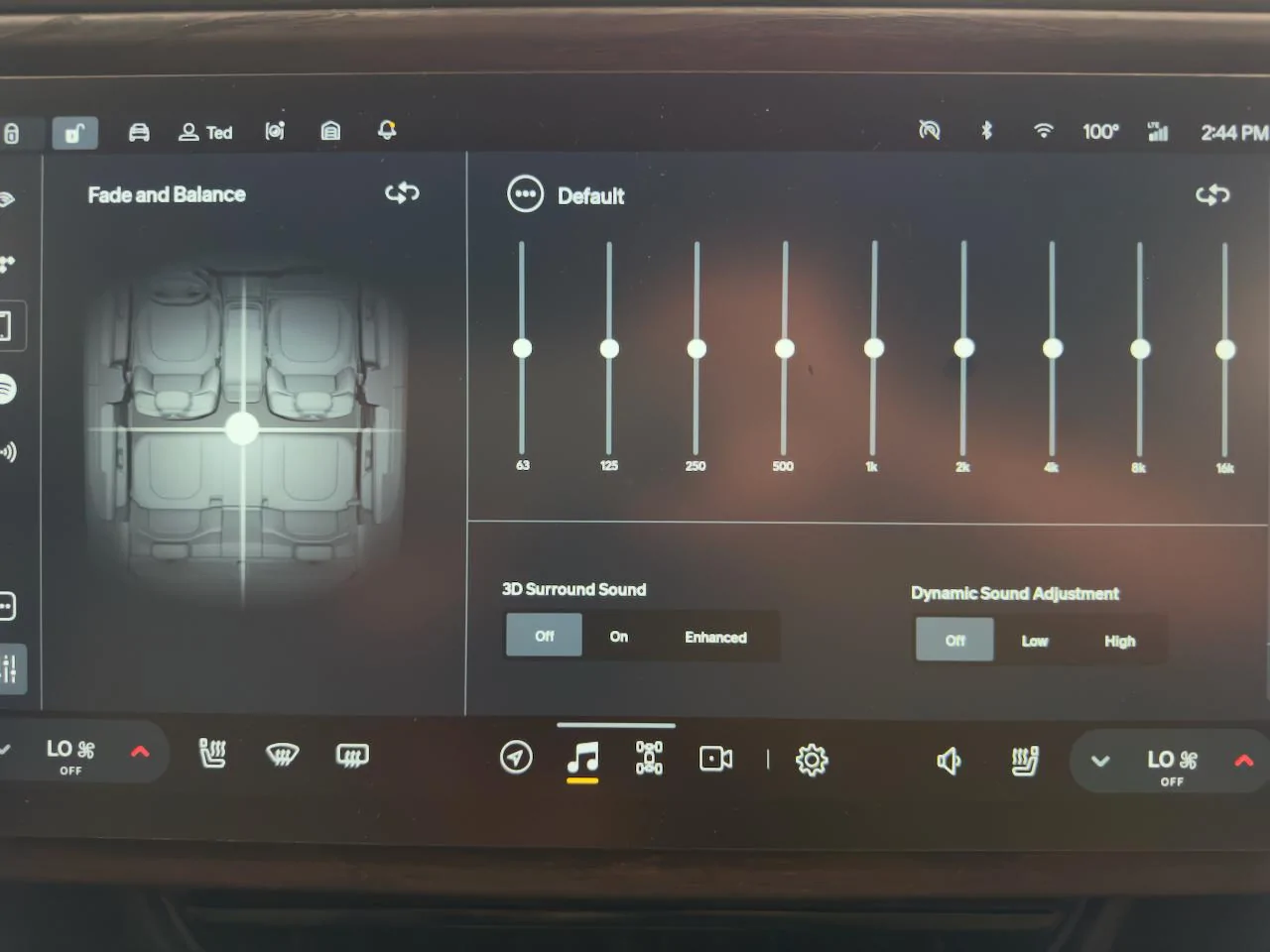
  1. Flatten your EQ by using the “Default” setting or the reset icon.
  2. Set 3D Surround Sound to Off.
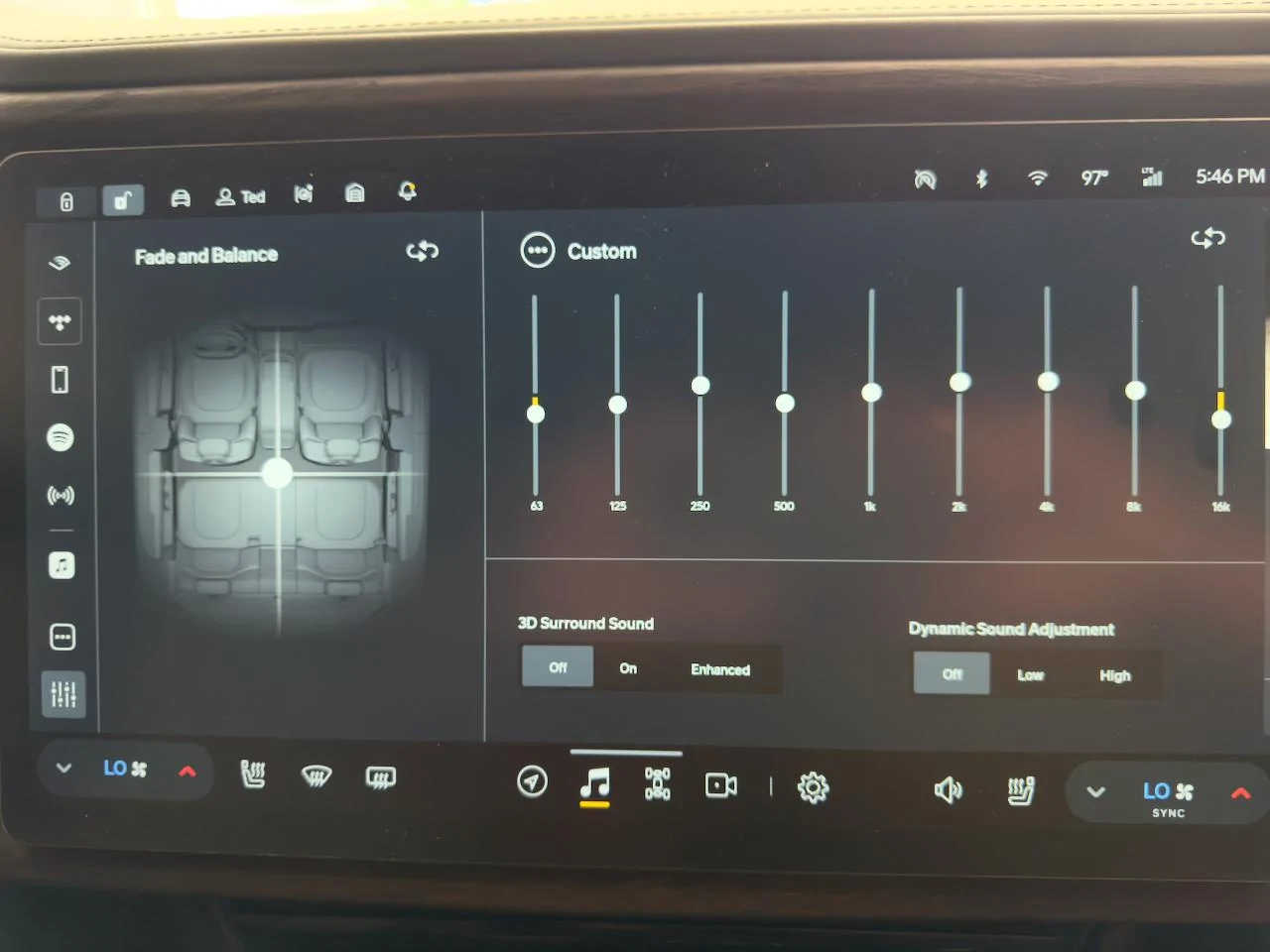
  3. For stereo tracks, use these EQ settings: 63 Hz -2, 125 Hz -1, 250 Hz +1, 500 hZ -1, 1 kHz +/-0, 2 kHz +1, 4 kHz +1, 8 kHz +/-0, 16 kHz -3.
  4. For Dolby Atmos tracks, use these EQ settings: 63 Hz -1, 125 Hz 0, 250 Hz +1, 500 hZ -1, 1 kHz 0, 2 kHz 0, 4 kHz -1, 8 kHz 0, 16 kHz -3
  5. Use Tidal, Apple Music, or Spotify set to the highest streaming bitrate. Avoid Bluetooth for music playback.
  6. Start with your volume set to 9.
  7. Listen to a song you know well.
  8. Adjust EQ to taste.
If you make this change, let me know how you think it sounds.

Tip: Listen to the new setting for a while using familiar songs at low volume and higher-than-average volume. Your ears/brain may take a bit to get accustomed to the new balance. What should happen is that you hear instruments/sounds more clearly because overtly emphasized frequency ranges aren't drawing attention away from others. Then tweak to taste.

IMG_3169.jpeg


The latest software update at the time of writing—2024.27.01—significantly changed the audio system. It added Apple Music and Audible apps, as well as Dolby Atmos immersive decoding for Gen 1 Meridian/Elevation and Gen 2 Premium systems. It also changed things about the audio system under the hood. This post pertains to the Gen 1 R1S with Elevation system, my vehicle.

Like many owners, I noticed output levels increased dramatically and my EQ settings were no longer appropriate after the update. I set about doing the same thing I did in this post’s sister posts: measure the system’s behavior, understand its implementation, and recommend improvements where applicable.

Objectives, Methodology, and Tests

Objectives


I ran tests to answer these questions:
  1. Did the update resolve the significant 20 dB imbalance between 450 Hz - 2 kHz that the previous version suffered from?
  2. Is the system louder after the 2024.27.01 update and is it a good thing?
  3. What EQ settings improve sound quality after the update?
  4. How did Rivian implement Atmos?
  5. How does the Gen 1 R1S Elevation 2024.27.01 sound compare with the Gen 1 R1S Meridian pre 2024.27.01?

Methodology
  • Flattened the EQ using the Default setting.
  • Turned off 3D Surround Sound and Dynamic Sound Adjustment.
  • Set Fade and Balance to default.
  • Turned off climate control to reduce in-cabin noise as much as possible.
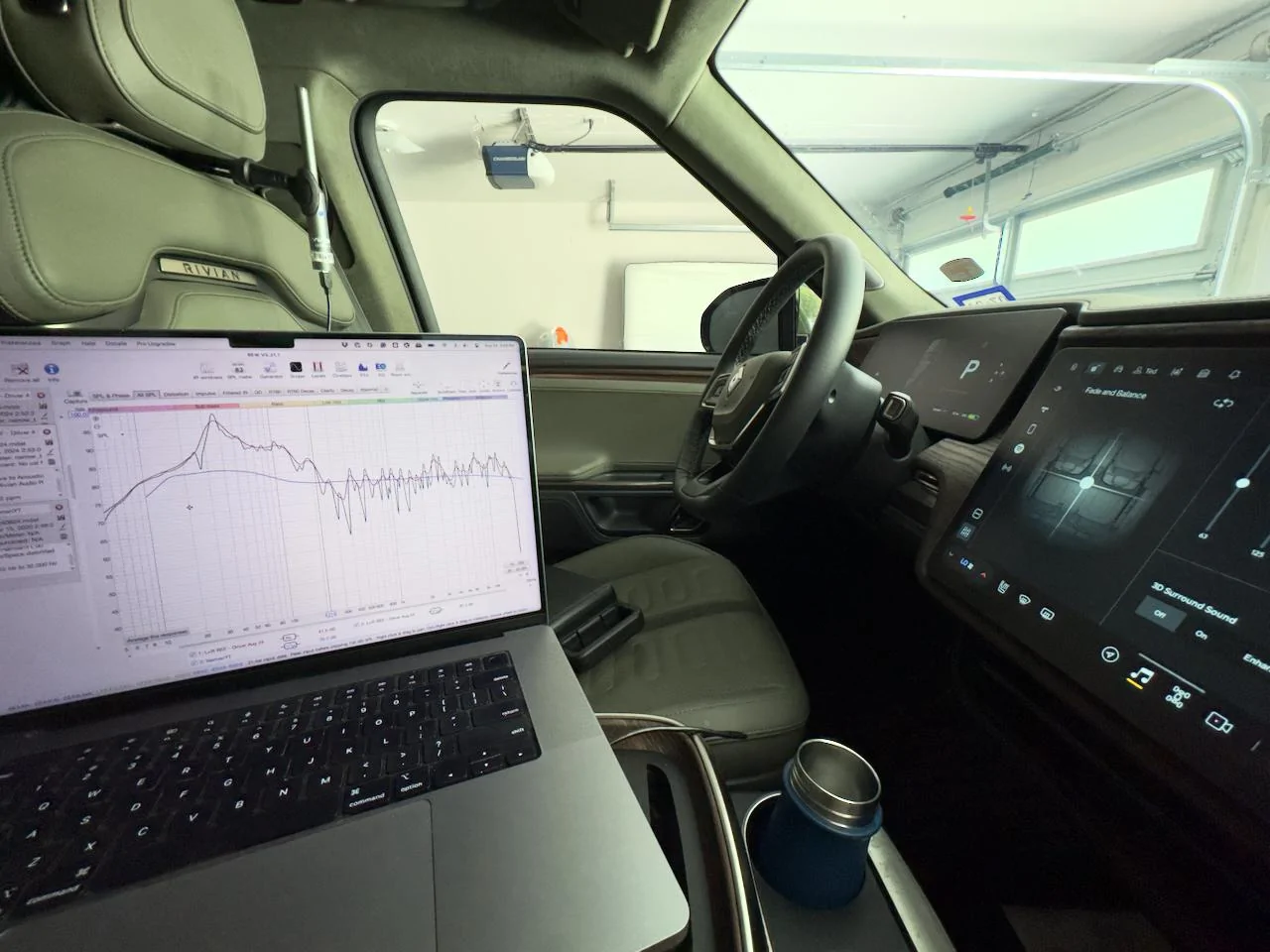
  • Put a calibrated UMIK-1 microphone roughly where my ears would be in the driver’s seat.
  • Connected my MacBook Pro to the Rivian Audio system via Bluetooth. This connection method had meaningful downsides—namely data and resolution loss—but Rivian Support said they didn’t know another way to make the vehicle a target audio device. USB doesn’t work.
  • Set the Rivian’s volume to 9 to give me 75 dB of pink noise, C-weighted, generated by Room EQ Wizard (the industry standard acoustic measurement app). 75 dB is a standard level for taking measurements.
IMG_3164.jpeg


Tests

I ran 5 sweeps from 0-20,000 Hz through the Bluetooth input to understand the system’s performance and set a baseline for improvements. A sweep is an audio signal sent to the sound system that sweeps across a given frequency range at a uniform volume. The recording microphone records the sound the speakers make and what the room—the cabin, in this case—does to change/distort the sound before it enters your ears. The closer the recording is to uniform, the more accurately the system will reproduce what is in the recording. But systems are never perfectly accurate because perfect accuracy requires a ridiculous set of physical conditions (anechoic chamber) that confuse the hell out of the brain and sounds terrible.

Speakers, amplifiers, and the cabin have physical characteristics and limitations that dramatically alter what we hear. Think of speaker and amplifier distortion as what your throat and lungs do when you try to sing Whitney Houston’s Higher Love. The average throat and lungs physically limit how accurately you can produce Whitney’s notes at her power levels; the louder we try to sing, the less control we have over our vocal cords, particularly at higher and lower octaves. Speakers have analogous limitations. That’s why good sound systems cost so much. A lot of engineering goes into making them hit higher output levels with low distortion.

Think of room/cabin distortion as what happens to the sound of your voice when you cup your hands around your mouth. It changes dramatically, generally not for the better.

Speakers, amplifiers, and the cabin effectively act as filters to the sound before it hits your ears. Any song you put through a system goes through the same filters. An audio engineer’s and acoustician’s job is to reduce the deleterious impact of those filters on your sound system while retaining their positive effects. Why some are positive is a much more complicated topic involving psychoacoustics, but suffice it to say that our brains rely on certain acoustic cues to understand the physical space we’re in and to ground our equilibriums. Take those away, and people can become dizzy and sick—not good while driving.

The adjustments we will make compensate for those distortions to help the sound we hear be as close to how it was recorded as we can manage. Since EQ is the only tool we have, and EQ only affects the relative loudness of certain frequency ranges, that’s what we’ll focus on improving: the relative loudness of certain frequency ranges.

IMG_3165.jpeg


Results, Analysis, and Recommendations

We’ll answer each question one by one.

Q: Did the update resolve the significant 20 dB imbalance between 450 Hz - 2 kHz that the previous version suffered from?

A: Yes. The system no longer suffers from a severe imbalance between 450 Hz - 2 kHz where most vocal and acoustic instrument information lives.

This is the biggest takeaway of this update because it means two things:
  1. Rivian removed the Elevation system’s biggest performance shackle. Vocal and instrument clarity is hugely improved and we can use EQ to make improvements instead of compromised repairs. If you’re an Elevation owner, you’ll be thrilled.
  2. The 450 Hz - 2 kHz imbalance was created by software, not by a physical crossover like I previously thought. A physical crossover can’t be changed by a software update. The sound system is more adjustable than I believed, which means more improvements are possible in the future. How about implementing a parametric EQ or offering Dirac Live room correction as a paid upgrade, Rivian?
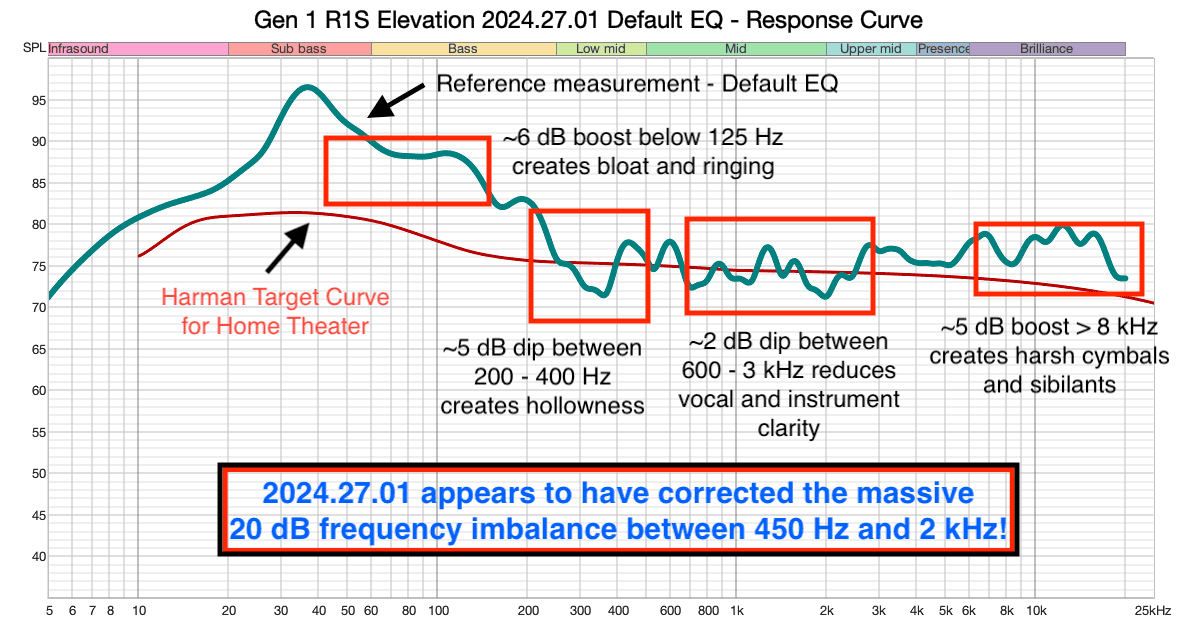
Here is the reference measurement with Default (flat) EQ showing that the 450 Hz - 2 kHz issue is gone. I also highlighted new problem areas, none of which are severe.

Gen 1 R1S Elevation 2024.27.01 Default EQ - Response Curve.png


Compare that to the reference sweep of the Gen 1 R1S Elevation system prior to 2024.27.01.


Gen 1 R1S Elevation Pre-2024.27.01 Default EQ - Response Curve.png


If you recall from my pre-2024.27.01 analysis, the 20 dB imbalance of the Elevation system between 450 Hz and 2 kHz was a major problem because the Rivian’s graphic EQ limited us to changing level at 1 kHz, smack in the middle of the problem area. It only allowed us to reduce the 600 Hz peak at the cost of dropping 1 - 2 kHz lower than it already was, the critical frequency range for the human voice and many acoustic instruments. The best we could do was strike a balance between cutting the 600 Hz hump enough to reduce the mud around voices and instruments and reducing the detail of voices and instruments within 1 - 2 kHz. It was a major compromise.

But with 2024.27.01, that problem is gone. Now, we can use EQ to make meaningful improvements to vocal and instrument clarity.

Q: Is the system louder after the 2024.27.01 update and is it a good thing?

A: The 2024.27.01 increased the overall output level of the system by a lot. I think it’s a good thing.

The previous software required a volume setting of 16 to reach 75 dB of C-weighted pink noise. 2024.27.01 needed a volume setting of 9 to reach the same volume. Because I can’t A/B the new and previous software, I can’t measure how many dB louder the new software is at the same volume setting. But if we assume the volume scale is linear (it probably isn’t based on other owners’ reports that volume 2 is a lot louder than volume 1), then the new software is 44% louder than the old one.

If you want an idea of why this change is good, read on. If not, skip this section; it’s long.

Many owners complained that their Rivian systems were weak, lacking “punch” and “tightness,” and needing a volume setting between 16-22 to reach acceptable listening levels. Some owners noted that the system used to sound punchy but a subsequent update castrated it. I believe Rivian tried to address those complaints with the volume change. I don’t know why they didn’t mention it in their release notes except that they might have considered it a bug to be swept under the rug. It’s a shame because it’s an important change.

As we established by measurement, the updated system requires a lower volume level (9 vs. 16) to hit the same sound pressure level (75 dB) without a hardware change. That means the change was digital. It’s hard to know exactly how they made the change because integrated car systems are complex and abstracted, but here’s how I think they did it and why it matters to sound quality.

The most likely thing they did was increase the output level of the DAC (digital-to-analog converter). A DAC converts the digital output (bits and bytes) of the streaming player into a low-level, voltage-modulated analog signal that is then further amplified by power amplifiers that power the speakers. Power amplifiers multiply the incoming signal to levels that can move speaker cones at listening volumes. The volume setting we control on the dash changes how much the amplifiers raise that signal. Boosting the DAC’s output means the amplifier amplifies a higher-level input signal, resulting in higher output for the same volume setting, all else equal.

Cool, but why does boosting the DAC’s output matter for sound quality?

High and low output signals differ in more ways than simply their number of volts. The main difference—for the question of loudness and punchiness—is their signal-to-noise ratios (SNR). High SNR is better than low SNR.

Every electrical component introduces noise into a signal. No electrical circuit is free from electromagnetic interference (EMI) or inductance, capacitance, or thermal problems. Electricity’s behavior in circuits is maddeningly non-linear, making noise difficult to prevent and eliminate. The more electrical power we put through a circuit, the bigger the noise problems become. I’m not an electrical engineer, but any EE would confirm that. To any EE out there, please add any details/clarifications/corrections to what I’m about to explain.

Each time an electrical component touches an incoming signal (i.e., the music), the component adds noise. To help you auralize noise, think of it as a hiss and/or hum. You might have put your ear up to your parents’ old Cerwin Vega system and heard a quiet hiss when nothing was playing. That’s noise. In fact, we call that the “noise floor” because it’s there whether we’re playing something or not. We just don’t usually perceive it when playing something loudly enough to mask it.

The problem is that amplifiers and speakers perceive it. They don’t differentiate between signal and noise. It’s all signal to them; volts are volts. Since every analog signal contains noise, amplifying that signal amplifies its noise right along with it. This brings us back to the DAC’s output level and the system update.

If the DAC outputs a low-level signal compared to its noise floor (i.e., low SNR), then the amplification stage will pick all of that up and boost both the signal and the noise by the same amount. If, for the sake of illustration, the DAC outputs 50% signal and 50% noise (an SNR of 1:1), and the amplifier multiplies the power by 100x to drive the speakers, 50% of the sound the speakers produce will be noise.

Remember cassette tape? Ever recorded someone whispering on a cassette? When you played it back, the hiss was almost as loud as the voice, maybe louder. Imagine playing that through your 1,200-watt car system.

Noise destroys sound quality in three main ways:
  1. Noise masks the music. It’s like trying to talk to someone while using a blow dryer; you can’t understand anything they’re saying. They can keep yelling louder but if the blow dryer keeps getting louder with them, more energy is wasted and nothing improves.
  2. The amplifier spends power reproducing noise. An amplifier can only produce so much power before it starts to distort audibly. If it spends more energy amplifying noise, it spends less energy reproducing music, especially parts that require high power like deep bass notes and snare hits.
  3. The speaker reproduces the noise, which increases how much the speaker distorts the music. A speaker is basically a magnet that moves a cone using electricity. That magnet has to accelerate, stop, and return the cone rapidly. A pure 10 kHz signal makes the cone oscillate 10,000 times per second. Noise, which comprises many frequencies, makes the magnet and cone work even harder. The more noise the speaker has to reproduce, the harder it has to work and the more mistakes it will make as it tries to reproduce the music.
All these reasons add up to sound that is weak and empty, just like a homemade cassette recording.

We want a high SNR. If the DAC outputs 95% signal and 5% noise, then the noise is inaudible, the amplifier spends more energy on reproducing the bass and treble of the music, and the speakers distort less. The system sounds punchier and more dynamic because it is. Because the Rivian system sounds a lot punchier and more dynamic, and they fixed the 450 Hz - 2 kHz frequency issue digitally, I think Rivian increased the DAC’s output and lowered its SNR with the update. I don’t have a way to verify this without taking panels off and performing tests along the signal chain, but that’s the best theory I have for those interested enough to have read this far =)


Q: What EQ settings improve sound quality after the update?

A: For stereo tracks: 63 Hz -2, 125 Hz -1, 250 Hz +1, 500 hZ -1, 1 kHz 0, 2 kHz +1, 4 kHz +1, 8 kHz 0, 16 kHz -3

Listening Tests

TIDAL on Master quality, 3D Surround Sound set to Off, Dynamic Sound Adjustment set to Off, and volume 14.

Flat EQ

Two things were immediately apparent:
  1. The system was a lot louder, punchier, and less distorted than before. See the above explanation of why.
  2. The sound was much more neutral than before, absent issues that made me grimace. See the above explanation of why.
I wasn’t surprised by the loudness. I was surprised by the neutrality.

Whatever Rivian did, it improved the system significantly.

Listening to Send My Love by Adele, vocal clarity was listenable out of the box—especially consonant articulation—which was not true of the previous update. Reverb tails were more detailed, but also overly bright. Bass was tighter and less bloated, though still boosted more than I’d consider necessary. Mids were certainly recessed, reducing vocal prominence and the acoustic guitar’s body. Sound staging remained narrow, imaging weak. But staging and imaging weren’t new issues, just ones I didn’t pay much attention to prior to the update because I had bigger issues to worry about.

Listening to Lost Cause by Billie Eilish, vocal clarity remained reasonably good. Bass was solid and deep. The overall system has a ton more headroom than before: I could crank the volume to uncomfortable levels without bothersome distortion. Nice. Imaging was an even bigger mess than with Send My Love because Lost Cause’s phasing/chorus effects highlighted timing disparities between L and R speakers at the driver’s listening position—but it wasn’t noticeably different from pre-update. It was probably just more noticeable now that other issues were absent.

To my ears, this is the best the Gen 1 R1S Elevation system at default has sounded to date. The measurements back that up.

Let’s see how we can improve it with EQ. Here's the same graph you saw earlier.

Gen 1 R1S Elevation 2024.27.01 Default EQ - Response Curve.png


EQ Adjustment #1

2 kHz +2, 4 kHz -1, 8 kHz -2, 16 kHz -6


The first thing I noticed was a general lack of vocal clarity and too much sibilance and harshness in crash cymbals and high hats. As I turned the volume up to better hear vocals, the harshness bit hard. I toned down the harshness and leveled out the vocals with the following adjustments.

Lost Cause - Measures closer to “flat” but sounds muffled and lacking in detail, particularly guitar strick plucks and vocal sibilants. Midrange vocals were more balanced, but they lost detail and air. Low-mids were a bit muddy, bloated, masking some vocal information.

Most of the songs I listened to sounded like that. I did a second round of adjustments to see if I could do better.

EQ Adjustment #2

63 Hz -2, 125 Hz -1, 250 Hz +1, 500 hZ -1, 1 kHz 0, 2 kHz +1, 4 kHz +1, 8 kHz 0, 16 kHz -3


Cutting 16 kHz -3 was better than -6. -6 eliminated too much detail. 16 kHz could be adjusted to taste between -3 and -5 depending on how loud one likes to listen. Returning 8 kHz to 0 brought back some cymbal and string definition.

Cutting 500 Hz by -2 helped with the mud but felt a little hollow. -1 was better, though not great.

Change on the Rise by Avi Kaplan - Vocals were less weighty and chesty than they should be. Adding 250 Hz +2 helped return weight to his voice.

Cutting 63 hz -2 and 125 Hz -1 helped clean up ringing bass notes and sharpened bass note definition, particularly acoustic bass.

To my ears, these settings created the best balance of bass depth, bass definition, and vocal and instrumental clarity and detail. YMMV.

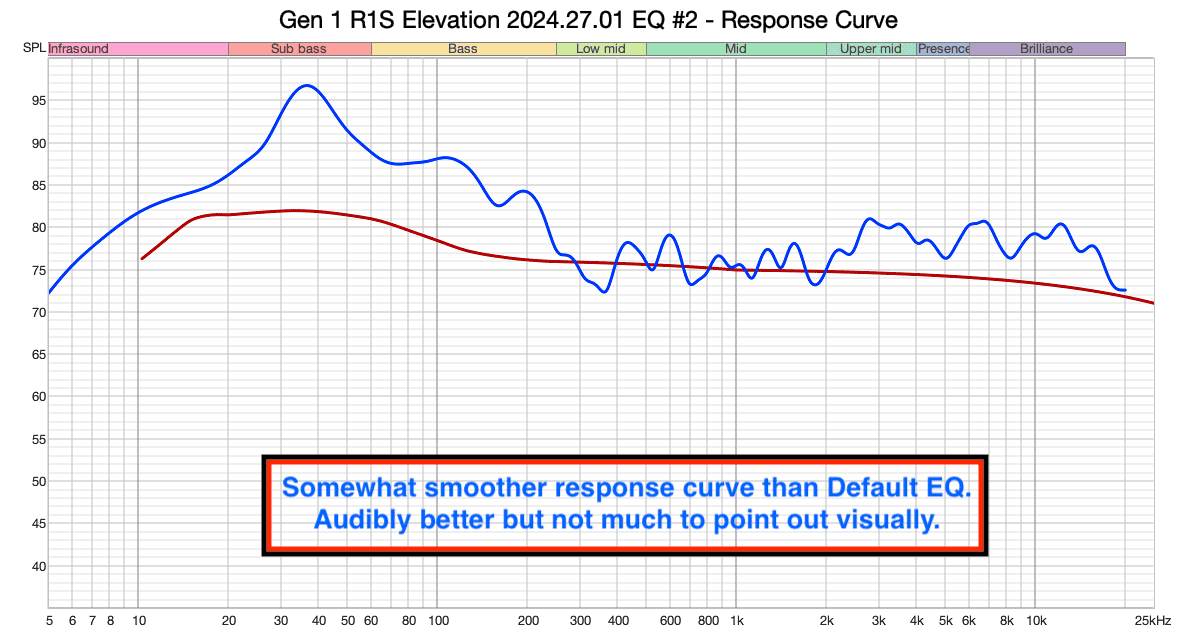
Here’s what the response curve looks like after these adjustments. Because each adjustment was small, there wasn’t much to highlight other than to say it’s more balanced overall. Your ears should hear that.

Gen 1 R1S Elevation 2024.27.01 EQ 2 - Response Curve.png


A Note About Stereo Imaging

You can’t get “stereo imaging” in a car unless you sit in the middle, equidistant between the left and right speakers. Stereo imaging is an illusion created by the same signal emerging from the left and right speakers and reaching your ears at the same time with the same volume. Sound from the left and right speakers in a car do not reach the driver’s ears at the same time or with the same volume because the driver is sitting much closer to the left speaker than the right one.

You can test this for yourself by playing a song and moving your head over the center console. The stereo image appears quite clearly in that position.

You can’t use Fade or Balance to fix the stereo image because they simply reduce the volume of certain speakers. They do nothing about timing. Without having done thorough testing, I believe Fade/Balance mixes channels together as you move it around. If you fade hard left, it mixes 100% of the left and right channels and puts them into the left speaker. This makes Fade/Balance even less useful for fixing stereo imaging problems because the sound that should be lowered in one channel now comes out of another.

IMG_3170.jpeg


Q: How well did Rivian implement Atmos?

A: Pretty well--with caveats.

Even though I love what Atmos can do for music, I don’t listen to Atmos music much; most of my favorite music isn’t available in Atmos. I did cursory tests of the Atmos implementation to fact-find and gather first impressions.

I was surprised by how good Atmos tracks sounded in my Rivian. Bad Guy and Lost Cause by Billie Eilish in Atmos sounded much more open and enveloping than their stereo counterparts. That said, with the Default EQ, songs were definitely juiced and not neutral. Highs, particularly sibilants and cymbals, were overly emphasized. Bass was controlled, if slightly anemic compared to all of the mid and high information. But the implementation was pretty good. Overheads weren’t distracting except the occassional buzzing in the overhead left speaker. I suspect that was a residual bug from a previously known issue. The separate center channel definitely anchored vocals and snares to the center, clarifying the soundstage considerably.

I made some quick adjustments to balance the frequency response by restoring some bass and toning down the critical vocal range but didn’t do any objective measurements.

63 Hz -1, 125 Hz 0, 250 Hz +1, 500 hZ -1, 1 kHz 0, 2 kHz 0, 4 kHz -1, 8 kHz 0, 16 kHz -3

I suspect Atmos required a bit less bass cutting because Atmos is mastered at a lower level (-18 DBFS) than stereo mixes. I suspect the 2 - 4 kHz bands were hotter in Atmos mixes because they engage the center channel where most vocal information is mixed, adding energy to that range.

I listened to a few more tracks to better understand how Rivian’s implementation positions sound objects around the cabin.

Yeah! by User - It was interesting to hear backup vocals coming from behind my listening positioning and Usher’s main vocals coming from in front. The chorus also comes from behind with the sharp synth lead line mixed way too high, standing out and breaking immersion. Some vocal elements nearly disappeared as they got mixed into the back channels. Either the mix was incoherent and disjointed or the way Rivian rendered Atmos was screwy. I’m not sure who mixed this to Atmos but they made strange decisions.

BOOM by Tiesto - This is a standard track for testing immersive sound mixes. The Rivian renders it strangely. The main synth and vocal verse were sent to the back of the vehicle. I’ll have to do some more comparisons to how it was mixed for a home theater, but it doesn’t sound good.

Note: While the update touted Apple Music + Spatial Audio, TIDAL also decodes Atmos. When you playback an Atmos track with TIDAL, it doesn’t display a badge that it’s decoding Dolby Atmos, but it is. You can test this by searching TIDAL for “billie eillish atmos” and playing any of the songs on that playlist.

The 3D Surround Sound On setting appears to have no effect on stereo or Atmos sources. That seems like a bug or a vestige of Atmos implementation. The Enhanced setting seems to send some information to second-row height speakers to act as side surround speakers. The effect is overemphasized and reduces your ability to localize sound that should be coming from directly ahead (i.e. vocals). I don’t care for it.

Q: How does the Gen 1 R1S Elevation 2024.27.01 sound compare with the Gen 1 R1S Meridian pre 2024.27.01?

A: Quite well.

Like many folks, I ordered my Rivian with the upgraded package to get the Meridian system. When Rivian swapped it for the Elevation system before delivery, I was quite upset. When they said people preferred the Elevation over the Meridian, I became distrustful. When I measured my R1S Elevation and compared it to @RivianBowerbird 's R1T Meridian, my suspicions were confirmed: the Elevation was inferior to the Meridian objectively and perceptually. I believed the disparity was hardware-based and unchangeable. I gave up hope of having a sound system in my R1S that I enjoyed.

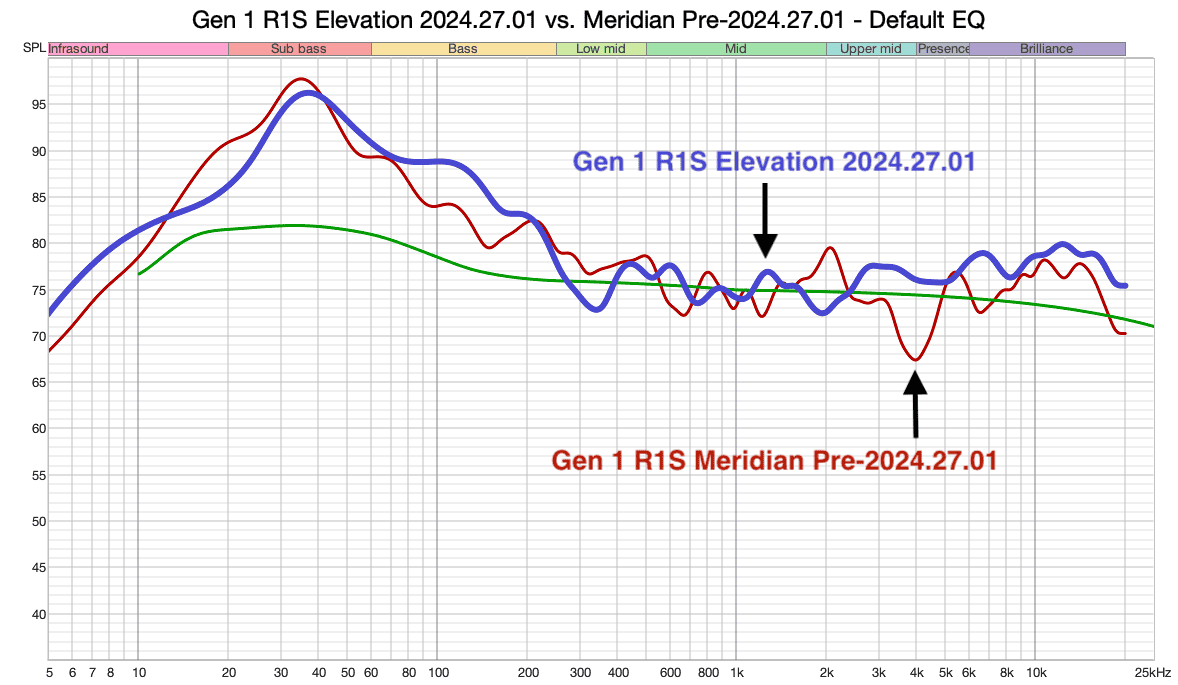
2024.27.01 changed that. It brought my R1S’s frequency response back in line with what I’d expect from a properly tuned system and got it close to the Meridian’s response. Here it is compared to @skyote ’s Gen 1 R1S Meridian before he updated to 2024.27.01. It’s far more similar than it was.

I’m enjoying my sound system for the first time and don’t mind that it’s not a Meridian.

Thanks, Rivian.

Gen 1 R1S Elevation 2024.27.01 vs. Meridian Pre-2024.27.01 Default EQ - Response Curve.png


If you found this post beneficial, please consider buying me a cup of sake. I'd appreciate it. Kanpai!


Xnip2024-08-28_12-22-22.png
Useful and clear as ever--just bought you sake--drink mine hot.

On imaging, you are right (not sure about the balance slowly moving to mono), you can't change the distance from your head to the speakers and so the phase is what it is. But there is clearly dsp built into this system, and phase correction may be optimized for the driver.

I just went and listened to confirm my thoughts, and less is usually more with good audio, but it does center the soundstage for me by making a small adjustment to the right speakers. I keep the vertical line a bit to the left of the right edge of the armrest. I also move the sound to the back a tiny bit. I put the horizontal line at the front edge of the back seat. The movement to the rear may naturally let the driver hear the right channel a bit more, because the rear/right speakers have a more direct path to the driver.

My home set-up is an Audio Research amp driving Monitor Audio towers. It kills my wife that I have them on either side of the fireplace in the formal living room. Insult to injury, they are also a 18 inches off the back wall (putting the front of the speaker 2.5 feet into the room) and both are about 8 feet from side walls, so they image nicely. Things muddy up a bit when cranking rock, but my preferred genre is Dylan, Prine, Emmy-Lou, Tyler Childers etc.--the soundstage is pretty darn good. That said, a car system can't give the same soundstage as a home system, but it can create a different soundstage that can be really involving and fun. I probably even prefer Billie Eilish or The Stones in my car. That is probably part of the reason that I prefer a tiny bit more involvement from the rear speakers in my Rivian.

To my ear, in my Gen 1 Elevation system, the update was a noticeable improvement. I wonder if you had something to do with that Mr. Superfluid.
 

aethervisor

Member
First Name
Chris
Joined
Aug 28, 2024
Threads
0
Messages
11
Reaction score
3
Location
Portland, OR
Vehicles
Gen2 R1S Standard
@superfluid I have a Gen2 R1S that sounds severely "off". Would you like to measure it? I tried to use REW and I'm not sure exactly how to use it lol. I also have a UMIK-1.
Sponsored


Top