Sponsored

Apple Music: Matched, Uploaded and "Apple Music" differences

johnmcgrann

Well-Known Member
First Name
John
Joined
Apr 23, 2022
Threads
25
Messages
125
Reaction score
229
Location
Lancaster, PA
Vehicles
Rivian R1T
Hi all, after a few days of Apple Music I'm coming around to some questions (but 100% thrilled to have it!).

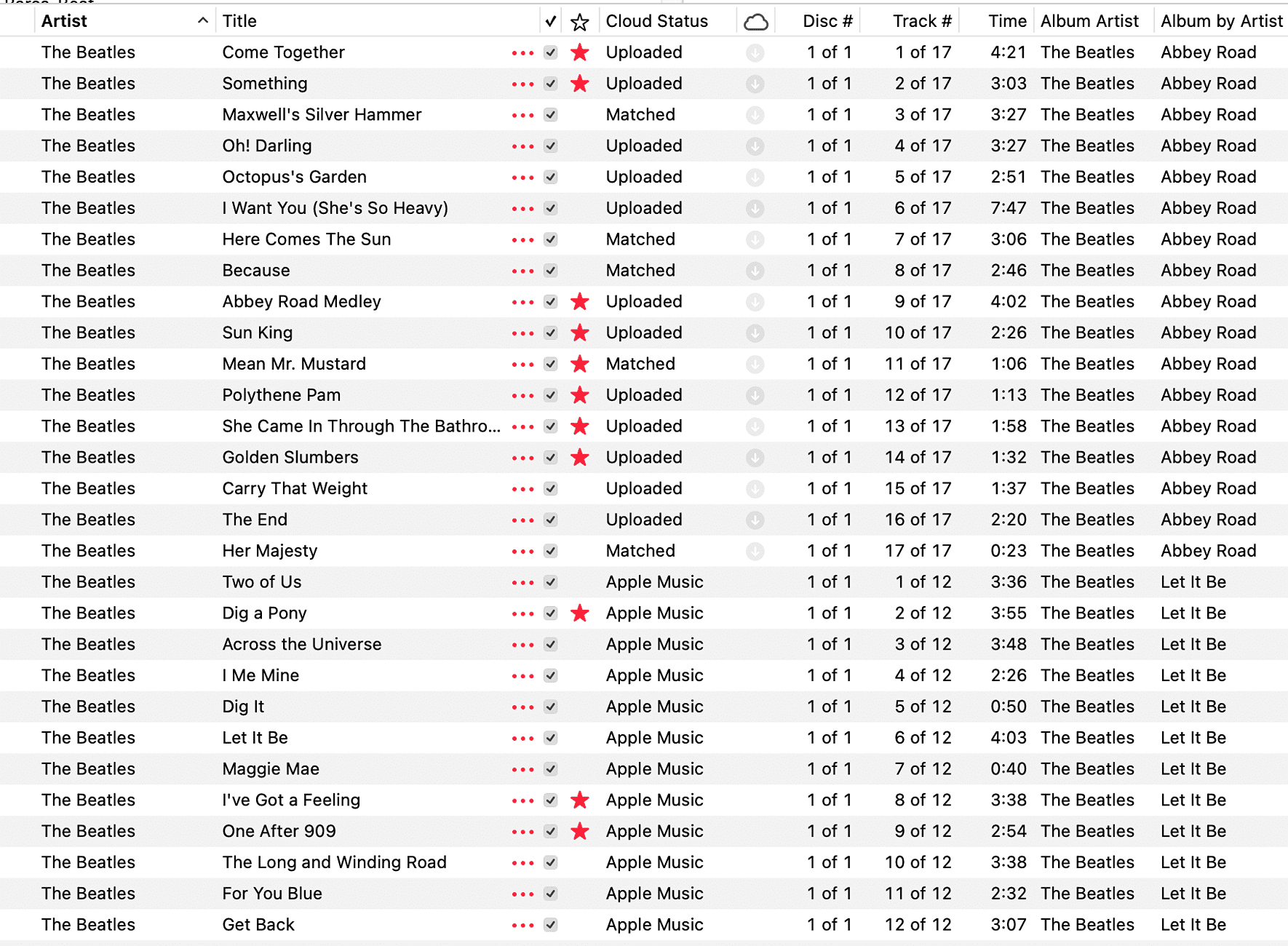
I have an extensive library, over 10,000 songs, and my library goes back to 2006 when it was all local files, and also includes the iTunes Match era. Because of this, my songs are in a mix of Cloud Statuses, over half are "matched" and the rest are evenly split between "uploaded" and streaming via Apple Music.

I'm hearing and seeing some differences, and starting this thread to ask if anyone is further down this path than me? The biggest differences seem to be in the sound quality and volume, and the ability to see and toggle the favorite "star".

What it seems like to me is that with streaming songs and matched songs, the quality is better than with uploaded songs, and the volume also goes down when an uploaded song plays. And it seems like we only have access to the favorite "star" with streaming songs.

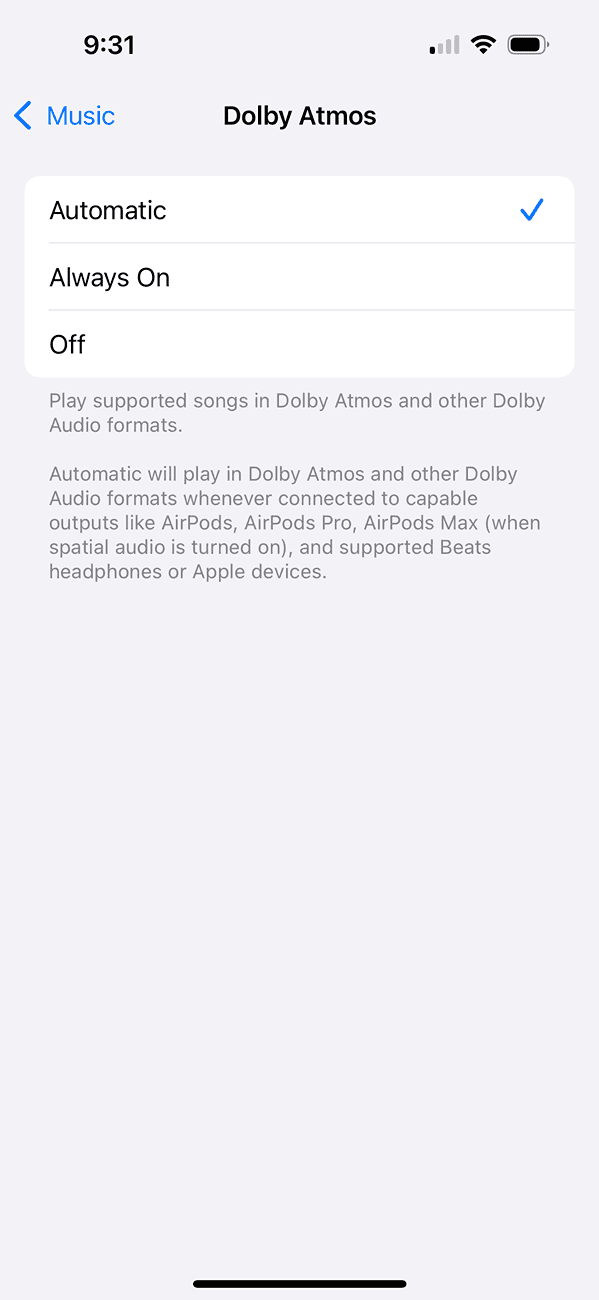
And I'm assuming that Atmos will only be available with streamed songs?

Does that match up with others' experience?

I guess I'm trying to figure out if I'm going to do anything about all that. With the difference in sound quality, I feel like I'll want to get as many songs as possible via streaming, but Apple doesn't make it very easy to convert songs from one Cloud Status to the other.

So I don't think I have a specific question, more curious if others are noticing these same things and wondering if you're doing anything about it?
Sponsored


 

BigSkies

Well-Known Member
First Name
Brian
Joined
Sep 4, 2021
Threads
17
Messages
1,238
Reaction score
2,657
Location
Denver
Vehicles
R1T, Model Y
Clubs
 
I have a similar setup, but haven’t experimented yet. I’ll try some different variations over the next few days.

I’ll admit I’ve entered my grumpy old man yelling at clouds phase of life. I find it kind of asinine that I can’t log into Apple Music to listen to my iTunes purchases without paying for a monthly subscription. Why the f—- should I have to pay a monthly fee to listen to music I already purchased? I despise this new streaming music business model and would rather have nothing to do with it. I don’t care if other people love it, but I do wish both Apple and Rivian would give better options for those that don’t like it.
 

WhidbeyIsland

Well-Known Member
First Name
Jon
Joined
Mar 16, 2022
Threads
2
Messages
198
Reaction score
171
Location
Langley, WA
Vehicles
2023 R1T & 2026 Lexus NX350
Occupation
Retired!
I’ll admit I’ve entered my grumpy old man yelling at clouds phase of life. I find it kind of asinine that I can’t log into Apple Music to listen to my iTunes purchases without paying for a monthly subscription. Why the f—- should I have to pay a monthly fee to listen to music I already purchased? I despise this new streaming music business model and would rather have nothing to do with it. I don’t care if other people love it, but I do wish both Apple and Rivian would give better options for those that don’t like it.
Yep, I am right there with you. :mad:
 

SwampNut

Well-Known Member
First Name
Carlos
Joined
Apr 22, 2024
Threads
51
Messages
3,451
Reaction score
3,660
Location
Peoria AZ
Vehicles
2022 R1T Launch Edition
Occupation
Geek
Clubs
 
And I'm assuming that Atmos will only be available with streamed songs?
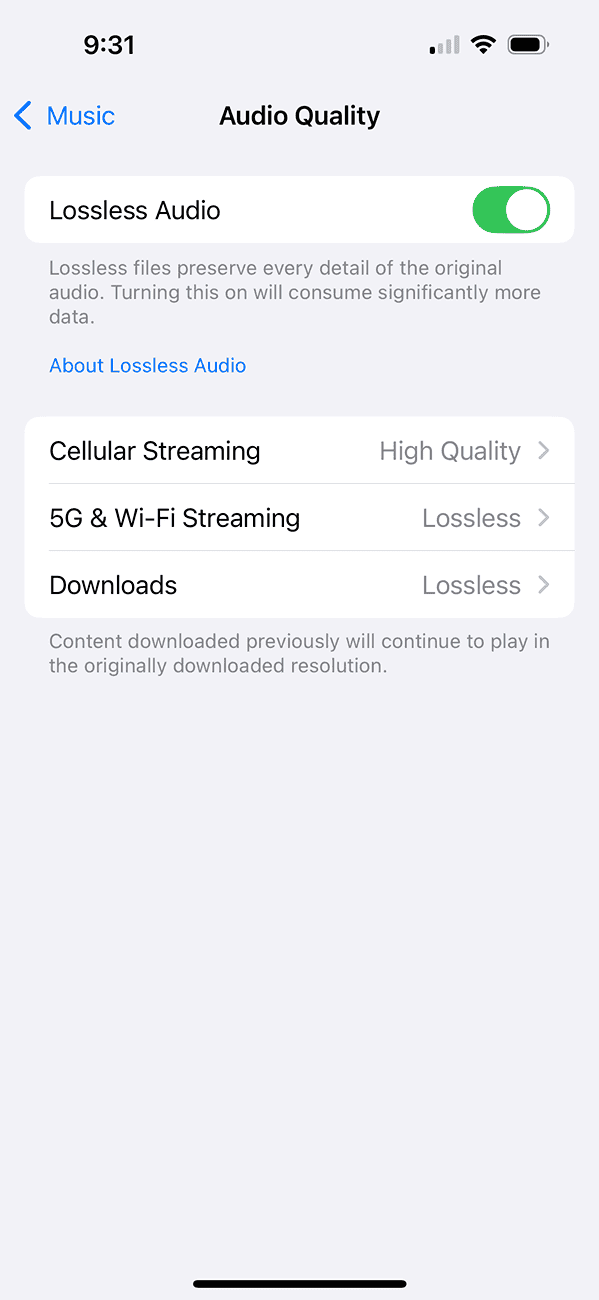
There are two kinds of local storage; things you uploaded, and things that were downloaded and saved. I have my phone set to download everything in my library since I regularly go off-grid and away from cellular service. The downloads SHOULD be in Atmos too, if you have it set to lossless, I think.


Rivian R1T R1S Apple Music: Matched, Uploaded and "Apple Music" differences 1724259865753-h8


Rivian R1T R1S Apple Music: Matched, Uploaded and "Apple Music" differences 1724259801943-8w


I find it kind of asinine that I can’t log into Apple Music to listen to my iTunes purchases without paying for a monthly subscription.
You can.

but I do wish both Apple and Rivian would give better options for those that don’t like it.
"I want it all done MY way, and free!"

Rivian R1T R1S Apple Music: Matched, Uploaded and "Apple Music" differences 1724259822839-xl
 

RivAW

Well-Known Member
First Name
Alex
Joined
Mar 9, 2023
Threads
1
Messages
871
Reaction score
852
Location
MA
Vehicles
R1T, Glacier White, Black Mountain, Black AT 20s,
Clubs
 
Yep, I am right there with you. :mad:
Maybe take a breath and learn how to use what you have.
You absolutely can log in to listen to your purchased music without a subscription.
Also....it's not all about you.
 

Sponsored

Kacey3

Well-Known Member
First Name
Kacey
Joined
Feb 2, 2023
Threads
10
Messages
353
Reaction score
475
Location
North Texas
Vehicles
2022 R1T Launch Edition; MotoGuzzi V7II
Occupation
IT Support Manager
Clubs
 
On a related note, I have noticed that the Rivian doesn't cloud sync on a very regular basis. Admittedly, we've only been using it for a week now, but I have playlists that update (rotate music and reshuffle) every night. All of my Apple devices show the new content in the playlists every day as expected, but the Rivian has shown the same content in every playlist from day one.

I am hoping that the cloud sync will catch up eventually, but for now the only way I have found to update my playlists is to fully sign out of Apple Music on the Rivian and then sign back in.
 
OP
OP

johnmcgrann

Well-Known Member
First Name
John
Joined
Apr 23, 2022
Threads
25
Messages
125
Reaction score
229
Location
Lancaster, PA
Vehicles
Rivian R1T
There are two kinds of local storage; things you uploaded, and things that were downloaded and saved. I have my phone set to download everything in my library since I regularly go off-grid and away from cellular service. The downloads SHOULD be in Atmos too, if you have it set to lossless, I think.
My post was meant to be about the integrated Apple Music in the Rivian infotainment system. I am very familiar with the way Apple Music works on my phone as shown in your screenshots, and how to select what to download vs. what's streamed.

When I refer to "uploaded" and "matched", those are the iCloud statuses of each song as designated in Apple Music, this is easiest to see on Apple's desktop app, see the screenshot below.

In my Rivian, there is a noticeable difference in audio quality and other functions that seems to depend on this status.

I'm not sure that your pointers on downloading music to my phone will be relevant to how songs are stored/streamed in Rivian's infotainment.

Rivian R1T R1S Apple Music: Matched, Uploaded and "Apple Music" differences Screenshot 2024-08-22 at 7.22.45 AM
 

Daspes

Member
First Name
Michael
Joined
Jun 13, 2024
Threads
1
Messages
14
Reaction score
8
Location
Jacksonville, FL
Vehicles
2022 EV6 First Edition
Occupation
MSP
Want to share how? When I try to setup Apple Music through the QR code, log in to my Apple account, I’m receiving an error that a subscription is required.

I’m from the Napster/Limewire/iTunes era and also have over 10k titles. All have been added to my Apple Music account on my Mac. I’ve never used the service, if I didn’t want to listen to FM or XM my favorite songs have always been on a thumb drive and I’ve been able to play from that.

W/Rivian’s infotainment, I’ve settled for Tune In and streaming CM from my phone. I was “excited” about being able to access my Library again just to have it seemingly blocked by a pay wall with a required subscription.
 

Alanparkcity

Well-Known Member
First Name
Alan
Joined
May 26, 2024
Threads
6
Messages
123
Reaction score
162
Location
Park City, Ut
Vehicles
Rivian T1T
Occupation
Retired
Clubs
 
There are two kinds of local storage; things you uploaded, and things that were downloaded and saved. I have my phone set to download everything in my library since I regularly go off-grid and away from cellular service. The downloads SHOULD be in Atmos too, if you have it set to lossless, I think.


1724259865753-h8.png


1724259801943-8w.png


You can.


"I want it all done MY way, and free!"

1724259822839-xl.png
There is a $3.99 app called Music Tracker that will convert and separate all Dolby Atmos songs from non-Atmos. When it went thru my 60,000 songs it found and converted about 1400 to Atmos. This is ongoing and it finds a few more each day.

Most songs are not remixed to Atmos and may never be remixed if they don’t have the right master.

I definitely prefer the Atmos mix, and Music Tracker makes a separate Atmos playlist within Apple Music.
Sponsored


Top