Sponsored

Dustyshades

Well-Known Member
Joined
Jul 26, 2023
Threads
0
Messages
101
Reaction score
145
Location
Seattle, WA
Vehicles
R1S
Look, I am not trashing ABRP, it has a value, no doubt. But you can not rely on it, you always need to recheck the routes as many times it will route you to bad chargers, longer routes, etc.

As for APIs - plug share provides API access: https://company.plugshare.com/api.html
This alone can help to see at least the status of the last charge sessions, which can help to predict the availability of the charger.

EA also has API: https://dev.developer.electrifyamerica.com/getting-started

Anyway, as I am not paying an ABRP subscription, so I can not really complain about
Plug share data sucks though. The de rated charging session at 37 kW is going to reflect as a success. I don’t think PlugShare in its current state is useful in a way that ABRP could rely on it. Same goes for EA to a degree since they don’t relay information about current charging speed limits. Although at least incorporating down status would be nice.
Sponsored


AYAYRON

Well-Known Member
First Name
Aaron
Joined
Nov 17, 2022
Threads
6
Messages
466
Reaction score
434
Location
Dallas Tx
Vehicles
r1t
This is some really useful information! We can't improve without knowing what we're doing wrong, so I really appreciate all the feedback in this thread.


I'm really curious on this one. When I try the Dallas -> Bentonville route myself I get a route very close to what Google proposes, with a ~20 min detour to a 200kW charger most of the way to Bentonville. That results in a ~7hr drive, not 10 hours. Could you send me an example of what you're seeing so we can try to replicate it and fix it?

Hey there! OK so from the Rivian phone app I just ran it, it's totally the normal route, this may be a revision from the first time's I've tried it.

Just tried it from the ABRP app, it does a different route (adds about 30 miles using different chargers)

But the last time I used it my guess is it did not know about Francis energy charging stations as it had me to through Oklahoma city using EA chargers (which did not work) and that turned the trip into 10 hours

@Jason_ABRP not sure how integrated ABRP is in the navigation software, but if there's a way to auto recenter that would be a nice option, I think some folks may not want it so a toggled option by the user, but, I at least am used to the Waze where it recenters after a few seconds and Rivians nav doesn't do that. Also it would be helpful to be able to select OR deselect the destination as a charger, sometimes the "preparing for fast charge" is not applicable because the Nav doesn't know you're going to a charger, and I've found in some conditions I don't want it to prepare the battery, in warmer conditions the "preparing for fast charge" seems to allow the charger to hit peak kwh delivery but after 10 ish minutes it starts to slow down dramatically (I'm sure this is Rivian's inability to manage the heat propertly) but when I don't pre-condition, the ramp curve is slower (like 3 minutes instead of 30 seconds) and then I find I can get 20-25 min before it slows down (which I always see it slow down around 60% then again at 70% then drastically slower at 80%
 
Last edited:

Jason_ABRP

Member
First Name
Jason
Joined
Aug 10, 2023
Threads
0
Messages
9
Reaction score
27
Location
Houston, TX
Website
abetterrouteplanner.com
Vehicles
R1S
Occupation
EV Route Planning
Hey there! OK so from the Rivian phone app I just ran it, it's totally the normal route, this may be a revision from the first time's I've tried it.

Just tried it from the ABRP app, it does a different route (adds about 30 miles using different chargers)

But the last time I used it my guess is it did not know about Francis energy charging stations as it had me to through Oklahoma city using EA chargers (which did not work) and that turned the trip into 10 hours
Ah, yeah, I had that problem too when I drove my R1S home to Houston from the factory. Francis Energy is a relatively recent addition to the Rivian database.

Edit:
not sure how integrated ABRP is in the navigation software, but if there's a way to auto recenter that would be a nice option, I think some folks may not want it so a toggled option by the user, but, I at least am used to the Waze where it recenters after a few seconds and Rivians nav doesn't do that. Also it would be helpful to be able to select OR deselect the destination as a charger, sometimes the "preparing for fast charge" is not applicable because the Nav doesn't know you're going to a charger, and I've found in some conditions I don't want it to prepare the battery, in warmer conditions the "preparing for fast charge" seems to allow the charger to hit peak kwh delivery but after 10 ish minutes it starts to slow down dramatically (I'm sure this is Rivian's inability to manage the heat propertly) but when I don't pre-condition, the ramp curve is slower (like 3 minutes instead of 30 seconds) and then I find I can get 20-25 min before it slows down (which I always see it slow down around 60% then again at 70% then drastically slower at 80%
We're pretty well integrated, and those are all pieces of feedback that I've given to the Rivian team from my own R1S ownership. I have also seen that 'step-down' on charging, it's super annoying.
 
Last edited:

shap

Well-Known Member
Joined
Nov 18, 2021
Threads
16
Messages
870
Reaction score
765
Location
Austin,TX
Vehicles
BMW 45e, R1T
Clubs
 
This is some really useful information! We can't improve without knowing what we're doing wrong, so I really appreciate all the feedback in this thread.

I love Lost Maples! I'll be heading there this fall. Pretty exciting that we have two eclipses coming up, both going right over Lost Maples.

For that route, I would chalk that up to differences in traffic data between ABRP, Mapbox, and Google. Google's is certainly more extensive and up-to-date, especially for back roads. So if Google has better knowledge of speeds on back roads, it can pick out those routes which on paper should be worse, but in reality are better.

As far as the range prediction from Austin -> Rockport, when the Rivian deal was announced, we updated the R1T/S models quite a lot, so maybe you're still using the old alpha model? It might be worth re-selecting your car model from the list to make sure you're using the new model.

Can you point me to the non-working charger? I'll check what data source we're using for that and see if there's something we can do about it.

On charger APIs, I'll say that we've (ABRP) looked into most publicly advertised APIs, and the ones we don't use are generally because they have either very restrictive terms of use or are crazy expensive.

All in all, we really do appreciate feedback, and are always looking for ways to improve. Rest assured we're not sitting still, and we are really working on making improvements to the way ABRP and Rivian nav works. It's a complicated problem to solve, but it's one we're invested in. We all drive EVs at ABRP (including an R1S I own), and use our own tools so we can see the weak spots and identify the areas to improve on.
First of all - I really appreciate your response - this gives hope that somebody listening.

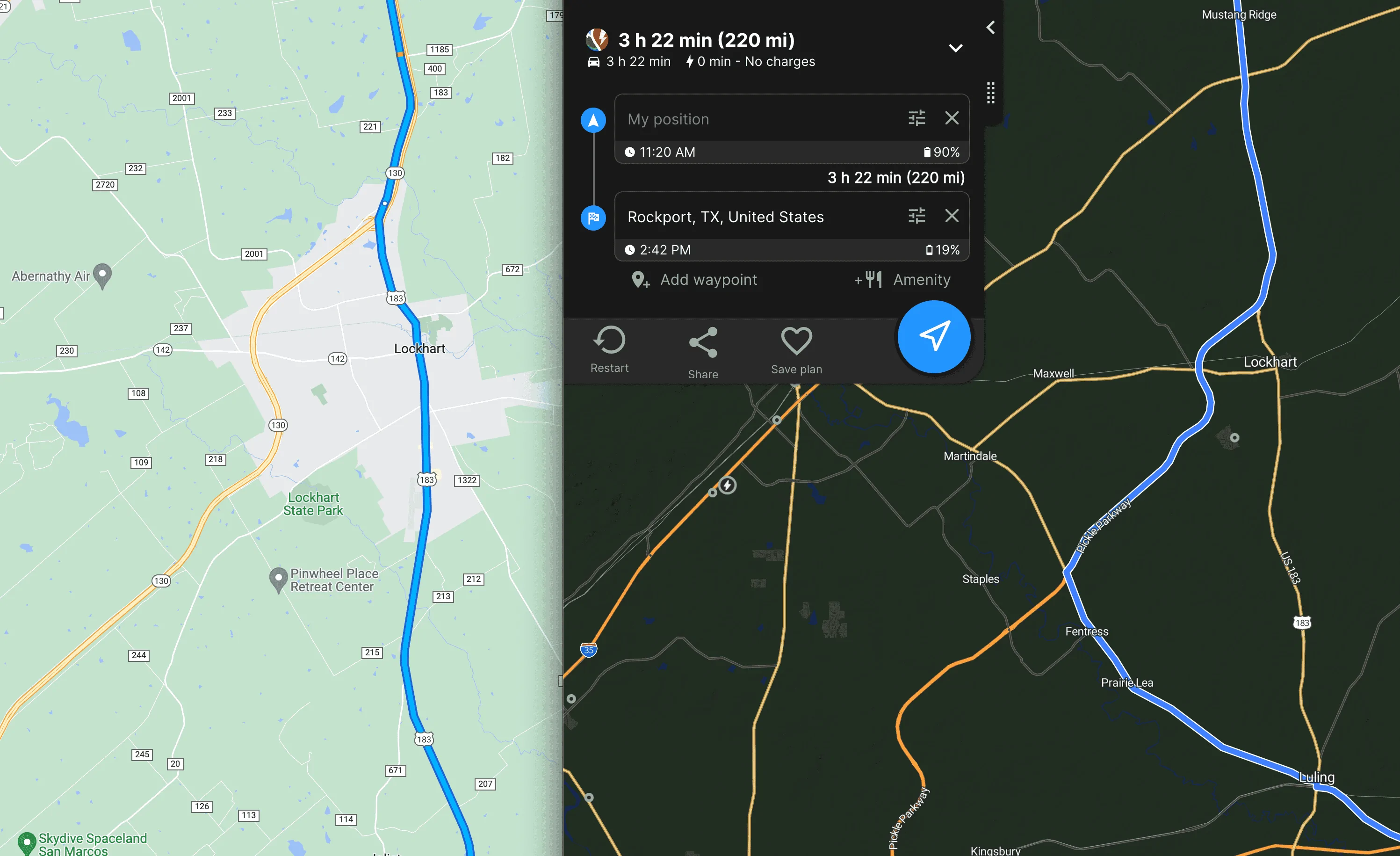
1. Range prediction - yes, I am using the latest version, and even manually changed power consumption for 65mph to 2.9 from the default (that is 2.49) which is totally off IMHO.
BTW, I am using R1T , 21" wheels, all-purpose mode only

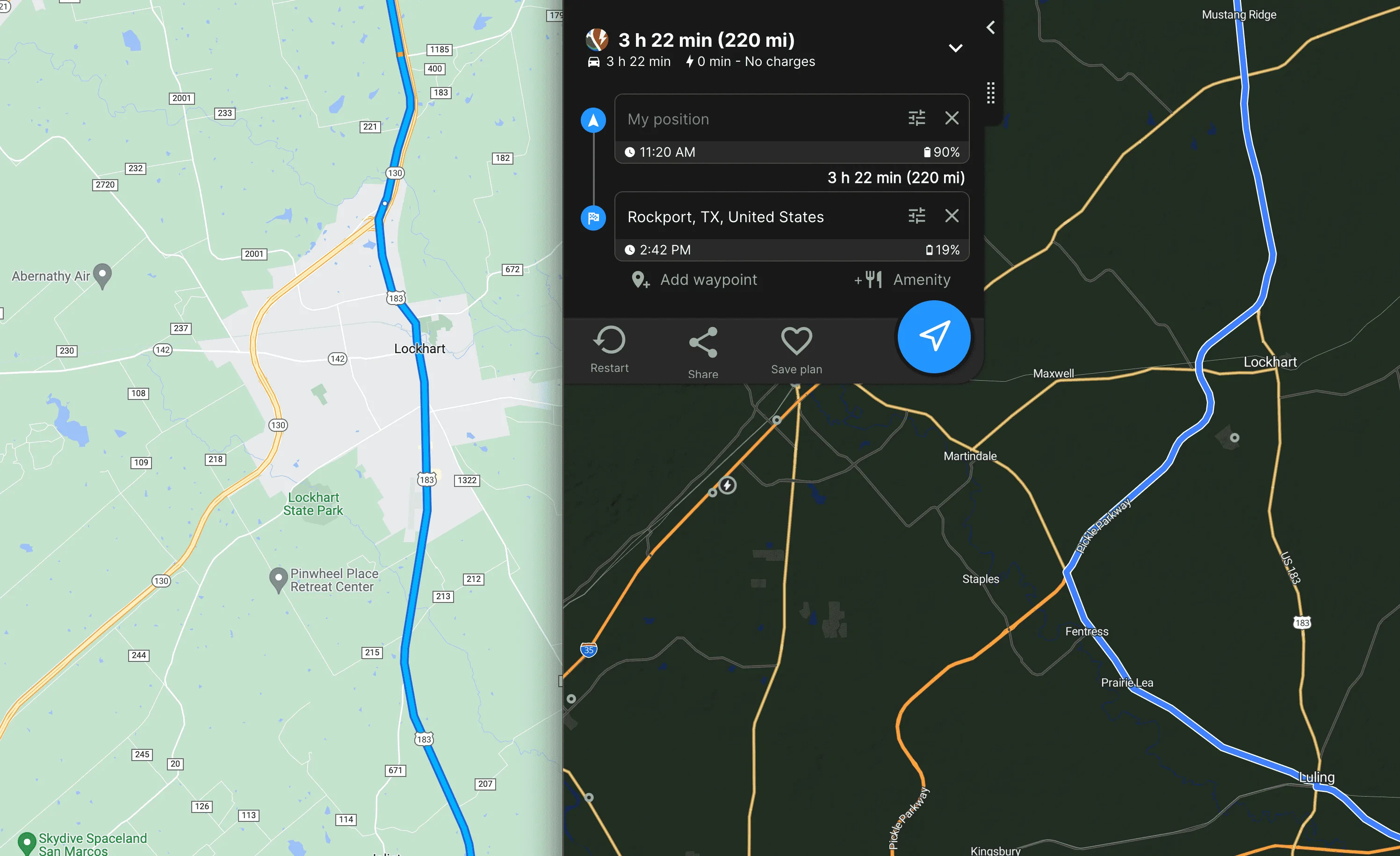
1.1 Also, if you look for a route that ABRP calculates, you will see that it uses inefficient detour :
with or without tolls (compared to gmaps (no tolls) that adds additional 11 miles w/o any benefit
Rivian R1T R1S ABRP 4.5.0. gets a major upgrade 1691684489295


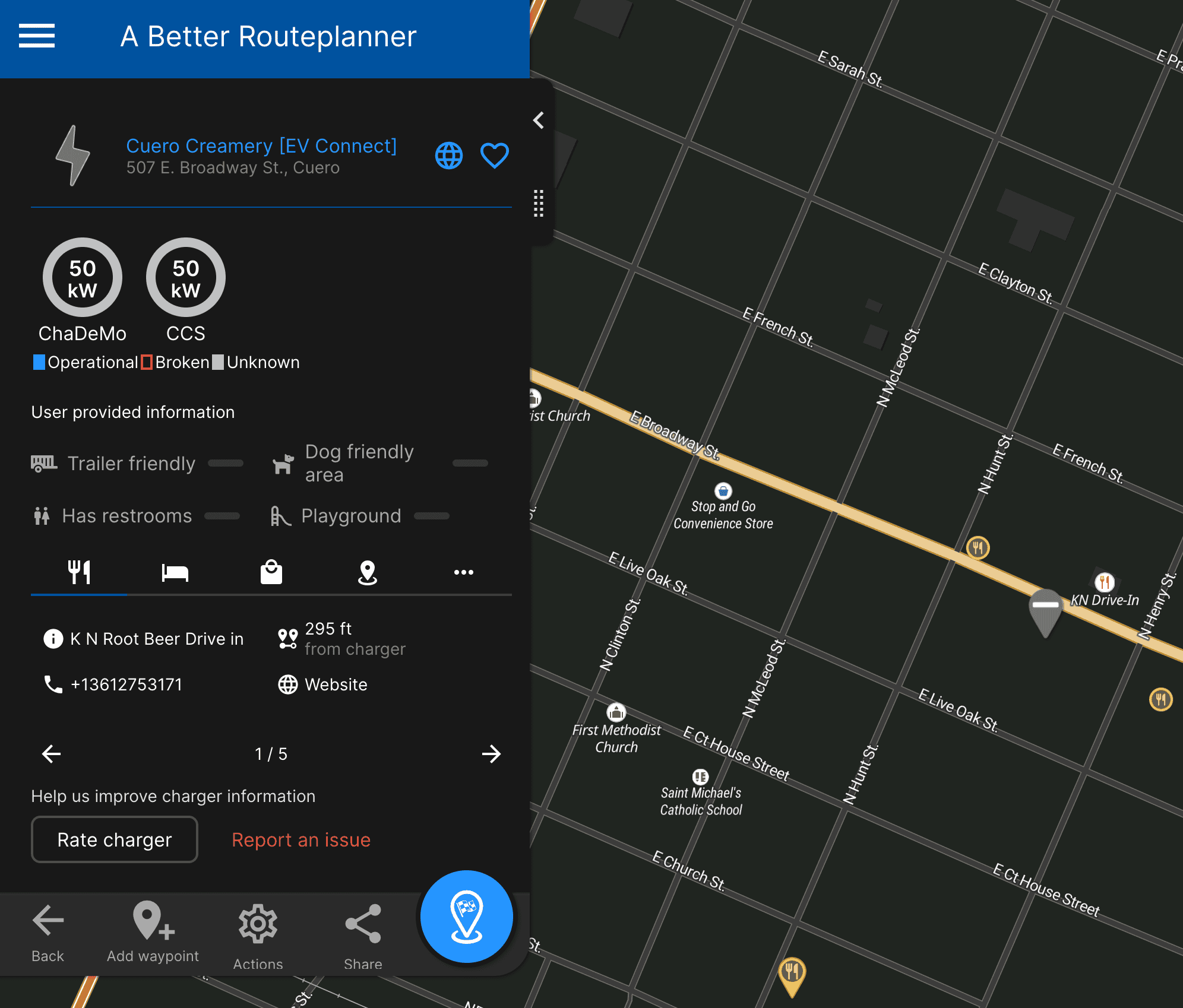
2. Nonworking charger:
Rivian R1T R1S ABRP 4.5.0. gets a major upgrade 1691683628555


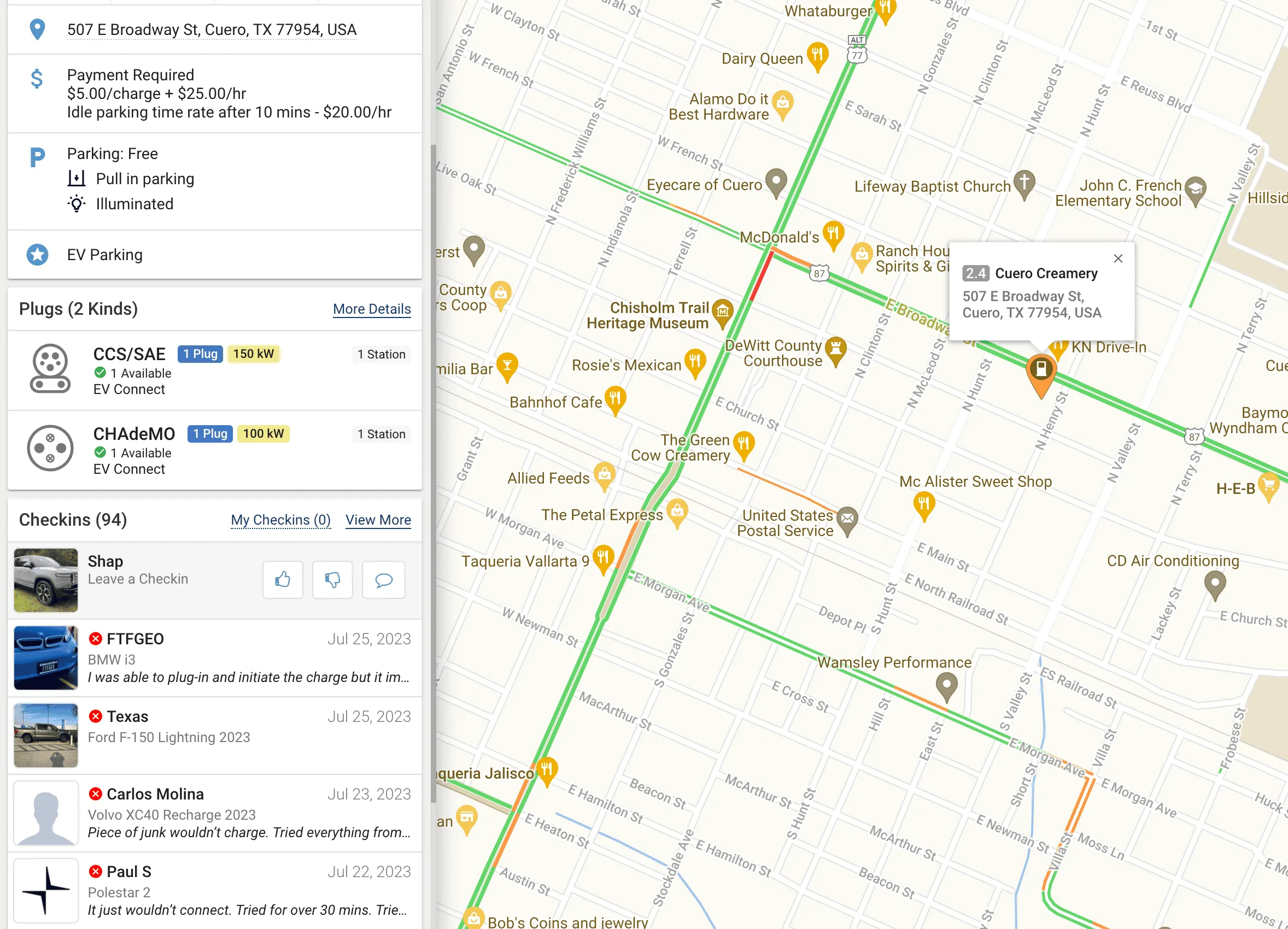
BTW, here is from plug share on this charger: (BTW, yesterday EV Connect change their status to available - they were marked as unavailable till yesterday).
Rivian R1T R1S ABRP 4.5.0. gets a major upgrade 1691684819490


As for API, I fully understand you - some vendors charge a robbery price for the access. I am not sure about plug share, but for the start even if I could click on the charger in ABRP and get redirected to plug share to see the EV user checkins - would be a great help (instead of manually searching each time now)

Rivian R1T R1S ABRP 4.5.0. gets a major upgrade 1691684493013
 
Last edited:

shap

Well-Known Member
Joined
Nov 18, 2021
Threads
16
Messages
870
Reaction score
765
Location
Austin,TX
Vehicles
BMW 45e, R1T
Clubs
 
Plug share data sucks though. The de rated charging session at 37 kW is going to reflect as a success. I don’t think PlugShare in its current state is useful in a way that ABRP could rely on it. Same goes for EA to a degree since they don’t relay information about current charging speed limits. Although at least incorporating down status would be nice.
Well, this is the reality we live in - except for Tesla superchargers, any other charger is a casino - EA does not even mark chargers as derated in the mobile app (as far as I know). So there is no way to know it, and it changes every minute, so even if you could pull the information. without good predictive AI, it would be useless.
 
Last edited:

Sponsored

Jason_ABRP

Member
First Name
Jason
Joined
Aug 10, 2023
Threads
0
Messages
9
Reaction score
27
Location
Houston, TX
Website
abetterrouteplanner.com
Vehicles
R1S
Occupation
EV Route Planning
First of all - I really appreciate your response - this gives hope that somebody listening.

1. Range prediction - yes, I am using the latest version, and even manually changed power consumption for 65mph to 2.9 from the default (that is 2.49) which is totally off IMHO.
BTW, I am using R1T , 21" wheels, all-purpose mode only
Personalized learning will help a lot with this. On the ABRP side, we are still working with them to find a happy way to authenticate ABRP account -> Rivian account so we can get Live Data, and then you'll get a calibrated model and not have to worry about the exact number. You'll get that by default on the in-vehicle nav once we finish hooking up Rivian nav to the Live Data calibration methods we've built for ABRP.

1.1 Also, if you look for a route that ABRP calculates, you will see that it uses inefficient detour :
with or without tolls (compared to gmaps (no tolls) that adds additional 11 miles w/o any benefit
That is something I can definitely work with. Weirdly, when I trim the route down to just that section, it takes the appropriate road. Nice that it's reproducible, should be able to solve that one.

2. Nonworking charger:
I passed that along to our provider for that charger data, it's not one we have dynamic data on, so it's hard to know for sure. We do prioritize chargers we have dynamic data from, and chargers with more stalls, but south of I-10 in TX is a pretty rough charging desert still. And I say that as someone who's been road tripping in non-Tesla EVs in Texas since even before Electrify America had any stations at all. Driving Houston -> Lost Maples back then was a little nerve-wracking.

As for API, I fully understand you - some vendors charge a robbery price for the access. I am not sure about plug share, but for the start even if I could click on the charger in ABRP and get redirected to plug share to see the EV user checkins - would be a great help (instead of manually searching each time now)
That would be pretty useful, but I'm not sure it'd be super easy to map our charger IDs to theirs without a lot of manual matching. In general, something we need to work on is making it easier to cross-reference our waypoints with external services.
 

SeaGeo

Well-Known Member
First Name
Brice
Joined
Jan 12, 2021
Threads
50
Messages
5,673
Reaction score
10,212
Location
Seattle
Vehicles
Xc60 T8
Occupation
Engineer
I have also seen that 'step-down' on charging, it's super annoying.
Speaking for both of us to Rivian.... *TURN THE DAMN COOLING ON EARLIER* lol.

Also, hopefully this is addressed in this next update with that "up to 2.5 minute" time savings.
 

R1Thor

Well-Known Member
First Name
Joe
Joined
Aug 9, 2023
Threads
8
Messages
1,536
Reaction score
2,423
Location
Lancaster, PA
Vehicles
23QM R1T, Limestone + Ocean Coast, 21" & UBS
Occupation
Mechanical Engineering Lead
Clubs
 
Personalized learning will help a lot with this.
Jason, is there a place we can submit bugs? This predates ABRP, but Rivian's Nav is allergic to a roundabout that's along my route to work. It works HARD to avoid it, up to, and including, telling me to make a uturn in the middle of the road as I approach it. It's like it can't identify it as a road.

I tried submitting the issue to Rivian, but after I talked to a tech, the ticket was closed and it seems to me like no one ever took it seriously. I have video of the problem in question:

The issue
The interesting reverse route (no issue)

It's things like this that make me really question why a growing company wouldn't defer to companies who have dedicated their resources to navigation and opting to provide in-house solutions. Further, I have another bug I haven't fully captured, but there's a covered bridge that no navigation wants to acknowledge as of about 2.5 months ago (it was fine, then suddenly one day, NONE of them, including Waze) seem to identify it as a valid route up until I pull right up in front of it... craziness.
 

azbill

Well-Known Member
First Name
Bill
Joined
Jun 8, 2020
Threads
17
Messages
1,696
Reaction score
1,978
Location
Arizona
Vehicles
Escalade IQ, Mach E, Hummer EV SUT
Occupation
Retired
Plug share data sucks though. The de rated charging session at 37 kW is going to reflect as a success. I don’t think PlugShare in its current state is useful in a way that ABRP could rely on it. Same goes for EA to a degree since they don’t relay information about current charging speed limits. Although at least incorporating down status would be nice.
Personally, I use Plugshare in a way that works for me, which is never just looking at the ratings. Most trips I take have 2-3 charging stops, so I simply look at the comments at those stops to see what is going on, including throttled chargers. If they are throttled, I find a different site to use.

Unfortunately, the Rivian nav rerouted me to a throttled station on my last trip, ignoring the one I wanted. I had not checked out that station on Plugshare, because I did not intended to stop at it.

On an upcoming trip, my first stop will be a an EA site I have used several times, and although it is busy sometimes, I never have issues getting a good charge. Two of my other stops will be at RAN locations, but there are also EA backups nearby. I will check Plugshare comments the day before leaving.
 

RWerksman

Well-Known Member
Site Sponsor
First Name
Rob @ OSEV
Joined
Nov 13, 2020
Threads
81
Messages
1,774
Reaction score
3,737
Location
Pittsburgh
Website
opensourceev.com
Vehicles
Jeep & R1T & Silverado EV
Clubs
 
Constant rerouting is definitely not what we want. I'd love to get some more details from you so we can investigate and solve it.
Thanks, Jason - I've seen this multiple times and I don't think it's an ABRP issue specifically, it's more the nav system and what it's requesting and then displaying.

It's almost like it encounters something (maybe an accident / road closure?) when it periodically recalculates and then doesn't know what to do, so it delivers this really screwed up route. I then have to stop the nav, restart it, and everything is replotted, but now with different variables and somehow worse.

I know that it asks you to do so, but it also doesn't really provide any detail about *why* it's asking to save you 60 minutes suddenly. Other products say, "XXXXX ahead" and then provide you options.

I'm thinking that i need to let the system just not do that as the traffic information is typically completely outdated or unrealistically low, so the value (and the trust) just isn't there.


Additional items that I've observed at times on both the nav and with ABRP related to stopping / charging:

Station Choosing

The onboard nav directed me multiple times to a 62kw station when both a EA and EVgo high powered station was available a bit down my route and were easily reachable and available, and I ended up charging at one of them. I suspect this is likely down to some logic or data regarding availability, but this basically forces me to not trust the entire process.

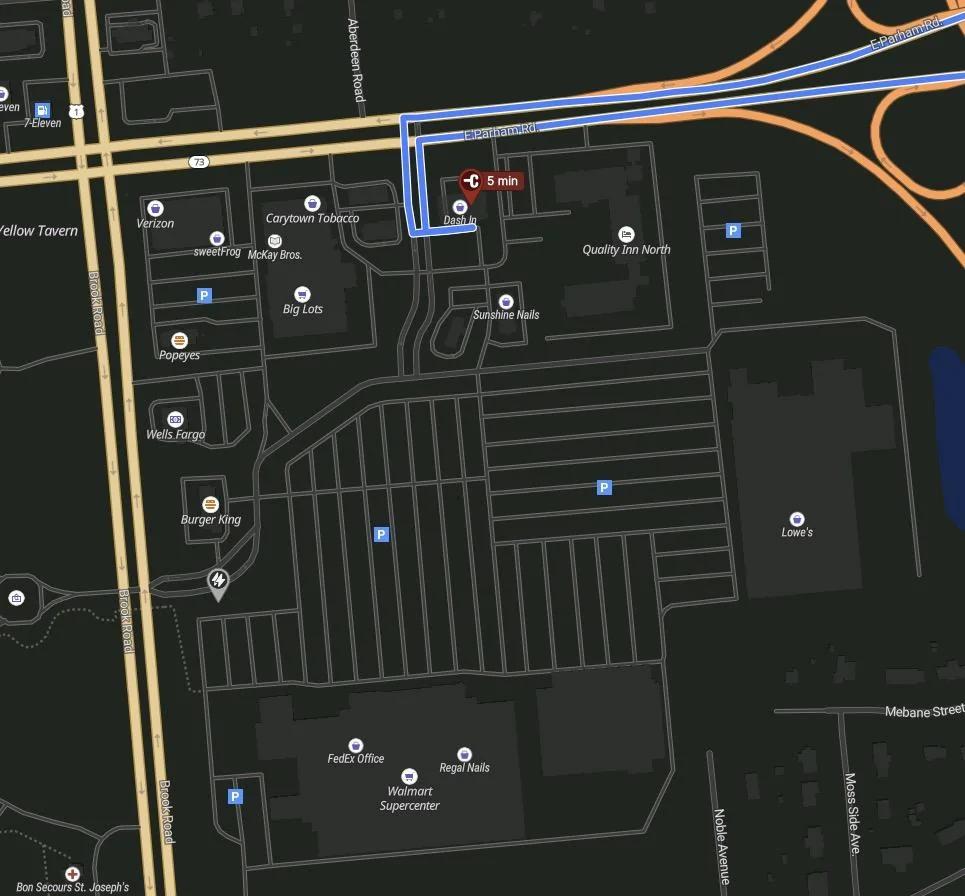
A good example is a route I just plotted where it literally has me stopping at a 4.2kw charger for 5 minutes IN THE SAME PARKING LOT as a 350kw EA charger, and about a mile away from an EVgo DCFC:

Rivian R1T R1S ABRP 4.5.0. gets a major upgrade Screenshot 2023-08-10 at 4.07.49 PM


I mean, why to any of this? I have the slider one tick toward 'more, faster stops' but I expect it to at least somewhat rational. If it's a problem with the settings in the slider, that is a whole other discussion regarding the efficacy of those settings to begin with.


Routing Variable Adherence

On the site I plotted a trip last night home from OBX that had me stopping at a random EVgo station for a 9 minute charge for extra range when I could have clearly made it with what I had in the criteria that was input. Why did I need to stop when I could have clearly made it based on the extra % charged vs % remaining at my arrival? Why not just wait at my previous stop for 5 minutes instead of making the trip instead of stopping?

I unfortunately don't have a screenshot of this and can't seem to reproduce the behavior.


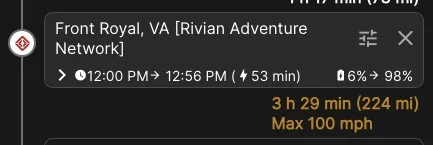
Finally, I do appreciate good tips like this though. I however find myself wondering why I'm getting them:

Rivian R1T R1S ABRP 4.5.0. gets a major upgrade Screenshot 2023-08-10 at 4.17.46 PM
 

Sponsored

Jason_ABRP

Member
First Name
Jason
Joined
Aug 10, 2023
Threads
0
Messages
9
Reaction score
27
Location
Houston, TX
Website
abetterrouteplanner.com
Vehicles
R1S
Occupation
EV Route Planning
Jason, is there a place we can submit bugs? This predates ABRP, but Rivian's Nav is allergic to a roundabout that's along my route to work. It works HARD to avoid it, up to, and including, telling me to make a uturn in the middle of the road as I approach it. It's like it can't identify it as a road.

I tried submitting the issue to Rivian, but after I talked to a tech, the ticket was closed and it seems to me like no one ever took it seriously. I have video of the problem in question.
I wish there was a more public way to submit bugs, etc, but I also understand why they don't. On ABRP we have https://abrp.upvoty.com/ - which we try our best to keep up with the flood of feedback.

It's things like this that make me really question why a growing company wouldn't defer to companies who have dedicated their resources to navigation and opting to provide in-house solutions. Further, I have another bug I haven't fully captured, but there's a covered bridge that no navigation wants to acknowledge as of about 2.5 months ago (it was fine, then suddenly one day, NONE of them, including Waze) seem to identify it as a valid route up until I pull right up in front of it... craziness.
The thing is, they/we are kind of doing that. They're using Mapbox for the actual turn-by-turn routing, ABRP for overall route selection, charger selection, etc. Google for location lookups, etc.

The problem with just adding Android Auto (And I say this as someone who desperately wants Android Auto in my Rivian) is you lose the tightly integrated experience for really good EV navigation. Stuff like accurate range prediction, DCFC preconditioning signals, routing accounting for chargers, etc.

There just isn't a perfect drop-in EV nav tool that does everything perfectly yet. ABRP + some A-B Routing Engine with good traffic data that's better than OSRM would be pretty close (and that's what we're working towards).
 

R1Thor

Well-Known Member
First Name
Joe
Joined
Aug 9, 2023
Threads
8
Messages
1,536
Reaction score
2,423
Location
Lancaster, PA
Vehicles
23QM R1T, Limestone + Ocean Coast, 21" & UBS
Occupation
Mechanical Engineering Lead
Clubs
 
I wish there was a more public way to submit bugs, etc, but I also understand why they don't. On ABRP we have https://abrp.upvoty.com/ - which we try our best to keep up with the flood of feedback.


The thing is, they/we are kind of doing that. They're using Mapbox for the actual turn-by-turn routing, ABRP for overall route selection, charger selection, etc. Google for location lookups, etc.

The problem with just adding Android Auto (And I say this as someone who desperately wants Android Auto in my Rivian) is you lose the tightly integrated experience for really good EV navigation. Stuff like accurate range prediction, DCFC preconditioning signals, routing accounting for chargers, etc.

There just isn't a perfect drop-in EV nav tool that does everything perfectly yet. ABRP + some A-B Routing Engine with good traffic data that's better than OSRM would be pretty close (and that's what we're working towards).
Gotcha.

So, regarding my unique issues where these roads aren't accurately being ... referenced and navigated, is there anything that can be done? Is this a problem that Mapbox needs to address, or is it something else altogether? Is my best bet just to wait and hope that someday things will get better?
 

Jason_ABRP

Member
First Name
Jason
Joined
Aug 10, 2023
Threads
0
Messages
9
Reaction score
27
Location
Houston, TX
Website
abetterrouteplanner.com
Vehicles
R1S
Occupation
EV Route Planning
...I'm thinking that i need to let the system just not do that as the traffic information is typically completely outdated or unrealistically low, so the value (and the trust) just isn't there.
Yeah, up-to-date traffic data is a major pinch point. I can't give a lot of details, but we are aware and working on it.


Station Choosing

The onboard nav directed me multiple times to a 62kw station when both a EA and EVgo high powered station was available a bit down my route and were easily reachable and available, and I ended up charging at one of them. I suspect this is likely down to some logic or data regarding availability, but this basically forces me to not trust the entire process.

A good example is a route I just plotted where it literally has me stopping at a 4.2kw charger for 5 minutes IN THE SAME PARKING LOT as a 350kw EA charger, and about a mile away from an EVgo DCFC:

I mean, why to any of this? I have the slider one tick toward 'more, faster stops' but I expect it to at least somewhat rational. If it's a problem with the settings in the slider, that is a whole other discussion regarding the efficacy of those settings to begin with.
If you could send me the ABRP link (Share > Share ABRP Link) in a private message we can take a look at the actual plan and see what went wrong. We really shouldn't be adding short stops like that, and picking a slow charger is extra weird.

Routing Variable Adherence

On the site I plotted a trip last night home from OBX that had me stopping at a random EVgo station for a 9 minute charge for extra range when I could have clearly made it with what I had in the criteria that was input. Why did I need to stop when I could have clearly made it based on the extra % charged vs % remaining at my arrival? Why not just wait at my previous stop for 5 minutes instead of making the trip instead of stopping?

I unfortunately don't have a screenshot of this and can't seem to reproduce the behavior.
This is something we should figure out a way to communicate better on the UI. When there's traffic or good weather on the route that improves your range, we don't credit the whole effect when it comes to meeting arrival goals. Because that traffic could clear, or the weather could shift, and we don't want to end up getting you stuck because the weather was too optimistic.

So basically, the stop is probably there because on the no-traffic route you would use too much energy and would need a stop.

Finally, I do appreciate good tips like this though. I however find myself wondering why I'm getting them:

Screenshot 2023-08-10 at 4.17.46 PM.jpg
That's because if you drive faster you use more energy, and we found that for that particular leg it might be faster to drive slower (or only possible if you drive slower) than stopping to charge one more time. You can turn that off in the settings if you want (Speed > Adjust speed).
 

Jason_ABRP

Member
First Name
Jason
Joined
Aug 10, 2023
Threads
0
Messages
9
Reaction score
27
Location
Houston, TX
Website
abetterrouteplanner.com
Vehicles
R1S
Occupation
EV Route Planning
Gotcha.

So, regarding my unique issues where these roads aren't accurately being ... referenced and navigated, is there anything that can be done? Is this a problem that Mapbox needs to address, or is it something else altogether? Is my best bet just to wait and hope that someday things will get better?
Shoot me a PM with some details (which road, maybe even a link to a route going through this intersection) and I can follow up on it.
 

Joel

Well-Known Member
First Name
Joel
Joined
Jul 29, 2019
Threads
1
Messages
425
Reaction score
324
Location
Florida
Vehicles
Volvo
You are 100% correct - that is exactly my experience. For almost any trip I plan, if I use ABRP it uses the longest route, inefficient chargers, or defunct (for more than a few months) charges. I agree with you - they are useless, and I am not sure why Rivian bought them. Maybe for some algorithm or so. I hope google maps will come soon with EV route planning and we will be in perfect situation. All this proprietary attempts to make "better" user experience is a really pitty stories... IMHO
Google maps and Apple Maps both do. But I think it is limited to just in car maps. Porsche and Apple Car play use Apple Maps for electric vehicles, https://appleinsider.com/articles/2...ets-apple-maps-ev-routing-with-carplay-update. Google maps is what is used in Polestar for all charging, preconditioning, and navigation.
Sponsored


Top