stynes
Well-Known Member
- Joined
- Oct 6, 2021
- Threads
- 9
- Messages
- 419
- Reaction score
- 773
- Location
- Atlanta, GA
- Vehicles
- 2022 R1S LE
- Thread starter
- #1
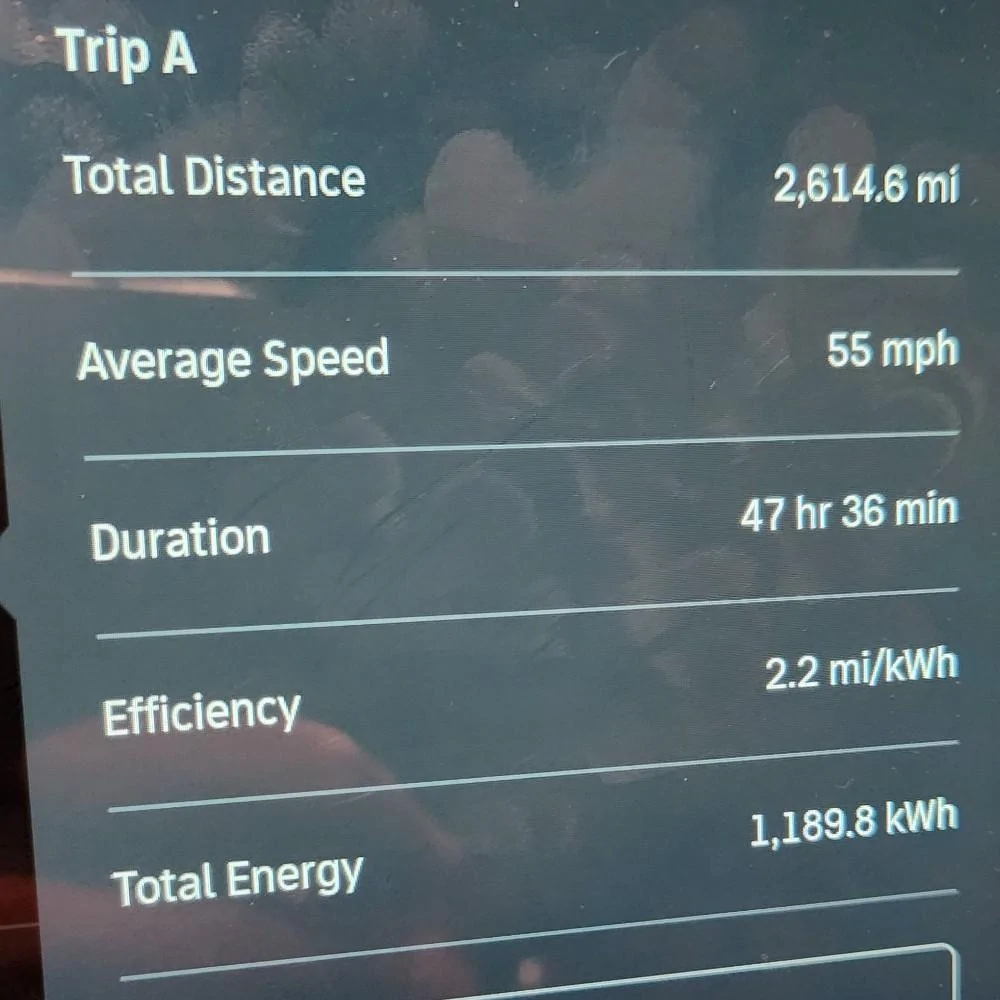
A couple of weeks ago I got back from my 3rd multi-day road trip in my R1S. I'm not going to call my planning methods perfect but I've yet to run into any serious charging issues so I thought I'd share the process and planning that's worked well for me. I've done multiple stretches of 250+ miles between charges. I usually drive in All Purpose around town and Conserve on the highway. I set the cruise 6-8 mph above the speed limit, 78 in a 70. I typically see 2.2mi/kwh on longer trips (see image below for my most recent trip). Also, I have 22" sport bright wheels.
Here's the process I normally follow. I go to ABRP and plot my route. I set it for quickest arrival. I have my reference consumption at 2.25 (and could probably go higher). I have it set to prefer EA chargers (I've yet to road trip through an area where RAN chargers are available) and have charging overhead set to 2 minutes. Arrival SoC is defaulted to 10% and I normally plan to leave for a long road trip at 100% so I set that, too. Then I click route and let ABRP do its thing.
Routing from Atlanta to Orlando, just as a recent example, ABRP recommends that I stop at EA in Cordele 42%->89% (32 mins) and then in Gainesville and go from 10%->57% (34 mins). I use that info and jump over to PlugShare and lookup those specific stations Cordele (https://www.plugshare.com/location/186713) and Gainesville (https://www.plugshare.com/location/192956). If you filter by network (I generally look first at EA and Rivian) and speed (I typically have it set to 120+) you can find them really quickly on the map. I look not at the listed speeds but the speeds in the checkins to see what people are actually getting.
In Cordele, I see 122, 158, and 124 along with a 210 from an R1S back on 6/22. I only see 1 note on 6/23 about stations being full and only 1 no charge which was for maintenance on 6/26 with several successful charges since. So I wouldn't expect to get 200kw here but 120-150 seems likely. Then I do the same in Gainesville. It's similar. I see 160, 238, 183, and 150 all in the past week. I only see one note about stations being full and a 15min wait on 6/24. So it seems likely to provide higher speeds than Cordele.
I then go back to ABRP, click on the planned charging stop, and then click add waypoint at the bottom. That essentially "locks in" my charging station choice so it doesn't change it later. I'm hopeful with Rivian's acquisition of ABRP that at some point I can send to the Rivian nav. Right now I have to plan this in the Rivian app which isn't as robust and send to car only sends the destination, not the individual planned stops. So hopefully that will get better. Has anyone seen different behavior here? I've only had a chance to use it once and actually ran into a guy from Rivian at a charger in IL and chatted with him about it. He was like, "that's not the way it's *supposed* to work." But that's what I saw - the planned charging stops changed when the route went from the app to the car.
Anyway, once I'm on my trip, I set my destination as my first charging stop so it'll precondition the battery. I also want to keep an eye on miles on arrival (I wish Rivian would show SoC on arrival). ABRP and Rivian are ALWAYS conservative for my driving so if it says 39 miles on arrival when I leave, it might say 63 by the time I actually get there. I note the SoC on arrival vs. what ABRP said and charge up to what I need to make it to the next charging stop.
Hopefully this makes sense and helps people! ABRP and PlugShare are your friends! Overcome range anxiety and get out there!

Here's the process I normally follow. I go to ABRP and plot my route. I set it for quickest arrival. I have my reference consumption at 2.25 (and could probably go higher). I have it set to prefer EA chargers (I've yet to road trip through an area where RAN chargers are available) and have charging overhead set to 2 minutes. Arrival SoC is defaulted to 10% and I normally plan to leave for a long road trip at 100% so I set that, too. Then I click route and let ABRP do its thing.
Routing from Atlanta to Orlando, just as a recent example, ABRP recommends that I stop at EA in Cordele 42%->89% (32 mins) and then in Gainesville and go from 10%->57% (34 mins). I use that info and jump over to PlugShare and lookup those specific stations Cordele (https://www.plugshare.com/location/186713) and Gainesville (https://www.plugshare.com/location/192956). If you filter by network (I generally look first at EA and Rivian) and speed (I typically have it set to 120+) you can find them really quickly on the map. I look not at the listed speeds but the speeds in the checkins to see what people are actually getting.
In Cordele, I see 122, 158, and 124 along with a 210 from an R1S back on 6/22. I only see 1 note on 6/23 about stations being full and only 1 no charge which was for maintenance on 6/26 with several successful charges since. So I wouldn't expect to get 200kw here but 120-150 seems likely. Then I do the same in Gainesville. It's similar. I see 160, 238, 183, and 150 all in the past week. I only see one note about stations being full and a 15min wait on 6/24. So it seems likely to provide higher speeds than Cordele.
I then go back to ABRP, click on the planned charging stop, and then click add waypoint at the bottom. That essentially "locks in" my charging station choice so it doesn't change it later. I'm hopeful with Rivian's acquisition of ABRP that at some point I can send to the Rivian nav. Right now I have to plan this in the Rivian app which isn't as robust and send to car only sends the destination, not the individual planned stops. So hopefully that will get better. Has anyone seen different behavior here? I've only had a chance to use it once and actually ran into a guy from Rivian at a charger in IL and chatted with him about it. He was like, "that's not the way it's *supposed* to work." But that's what I saw - the planned charging stops changed when the route went from the app to the car.
Anyway, once I'm on my trip, I set my destination as my first charging stop so it'll precondition the battery. I also want to keep an eye on miles on arrival (I wish Rivian would show SoC on arrival). ABRP and Rivian are ALWAYS conservative for my driving so if it says 39 miles on arrival when I leave, it might say 63 by the time I actually get there. I note the SoC on arrival vs. what ABRP said and charge up to what I need to make it to the next charging stop.
Hopefully this makes sense and helps people! ABRP and PlugShare are your friends! Overcome range anxiety and get out there!
Sponsored