Sponsored

Supratachophobia

Well-Known Member
Joined
Apr 8, 2023
Threads
9
Messages
1,780
Reaction score
2,122
Location
Ohio
Vehicles
S
Clubs
 
i found myself this morning with my Riv app open on my phone - but car would not shift out of park due to "no phone or card detected" and the icon display to place a key card on the center console...

so i located my new Rivian "card" in my apple wallet - and the car shpowed "unlocked" beheth the icon....but still wouldnt allow me to shift.
i finally figured out i needed to do a face id to "open or unlock" the card and THEN place it on the center console

is this how it is supposed to work or am i doing something wrong?

i hope there is an easier way because this will be annoying if i need to do a face id an place my phone on the center console every time...
I had to do that once. but then the rest of the day, not required
Sponsored


coder

New Member
First Name
Randy
Joined
Aug 13, 2025
Threads
0
Messages
3
Reaction score
2
Location
Utah
Vehicles
R1S Gen2
Got stuck setting up the digital key with "Enter vehicle to continue". Had to delete the original phone key and forget the various Rivian bluetooth entries on the phone.
 

rutiger

Well-Known Member
Joined
Jul 4, 2023
Threads
8
Messages
181
Reaction score
245
Location
WA
Vehicles
2 x '25 Tri S's, '25 750S
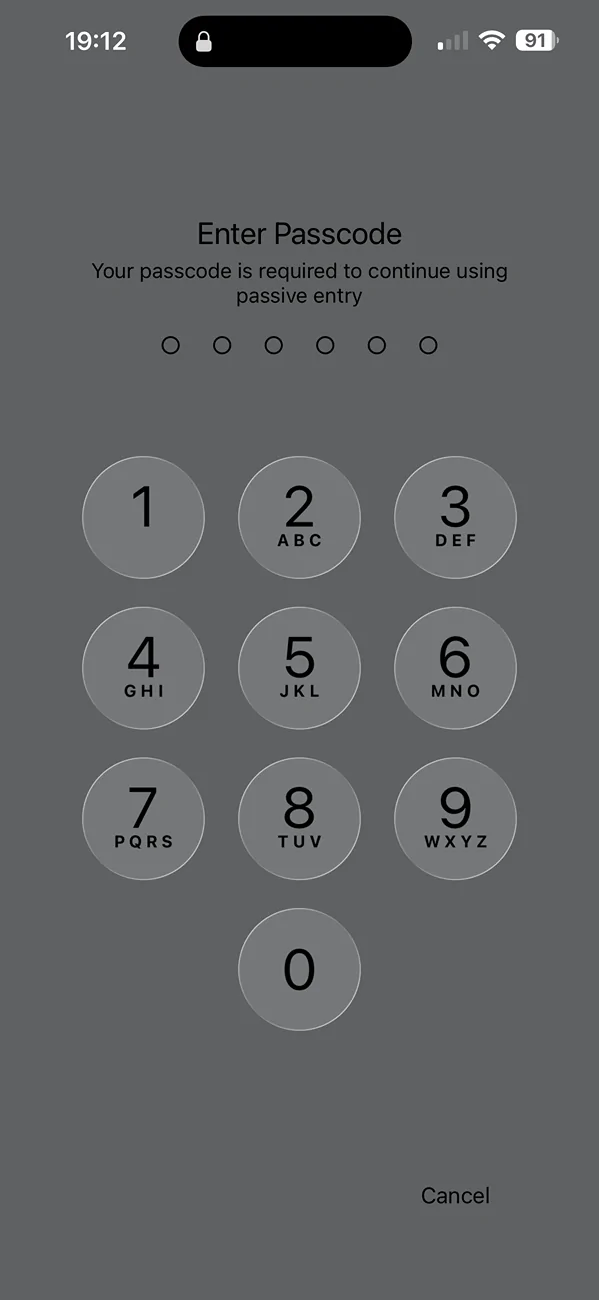
Anyone else getting this every so often? I've noticed my phone randomly buzzing and when I look at it this is the screen.

Rivian R1T R1S Rivian Digital Key Tutorial (How to Install, Use, Share) rivian digital key prompt
 

Sponsored

rutiger

Well-Known Member
Joined
Jul 4, 2023
Threads
8
Messages
181
Reaction score
245
Location
WA
Vehicles
2 x '25 Tri S's, '25 750S
Is there an option to go back to the old style app key? I'm not brave enough to delete the digital key and see what options it presents me.
 

R1S-DMPerformance

Well-Known Member
Joined
Sep 17, 2024
Threads
4
Messages
65
Reaction score
64
Location
San Diego
Vehicles
Rivian R1S, Cyberbeast, BMW i3, Stark Varg EX
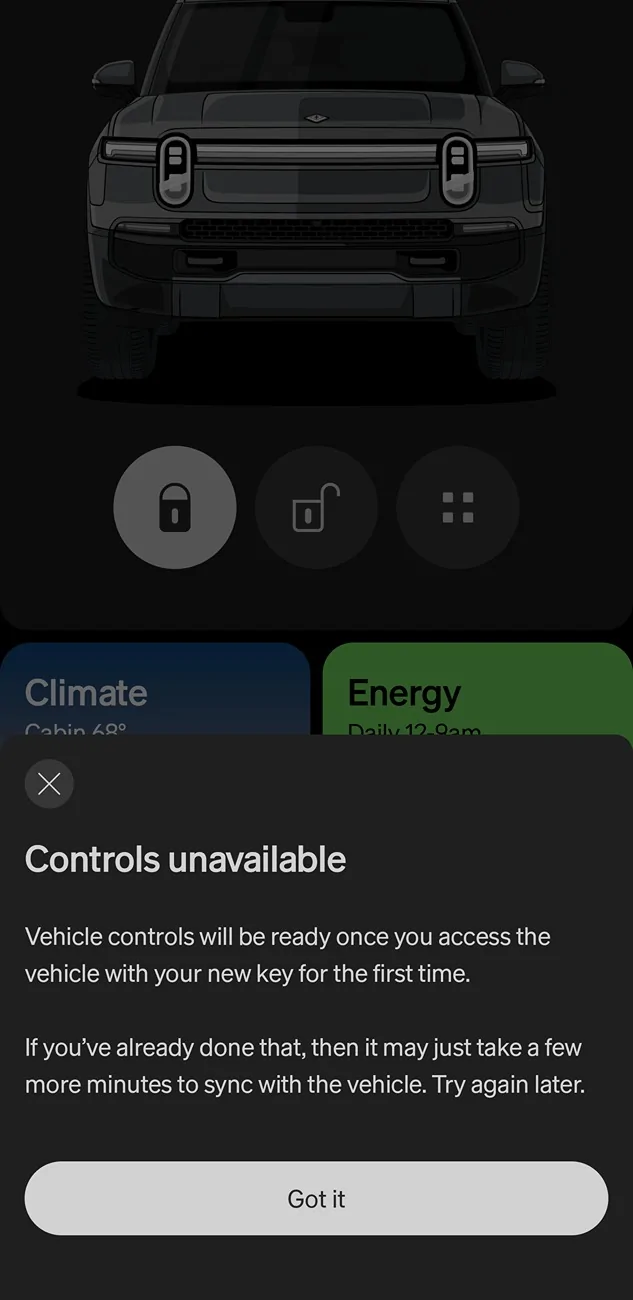
I dont know whats wrong with mine, the r1s opens drives and closes with the digital key just fine. But i can't control the vehicle from the app. Keeps showing this error message which is obviously wrong since I've been using the digital key since yesterday to drive the Vehicle
Any ideas?

Rivian R1T R1S Rivian Digital Key Tutorial (How to Install, Use, Share) Screenshot_20251222_112325_Rivian
 

Supratachophobia

Well-Known Member
Joined
Apr 8, 2023
Threads
9
Messages
1,780
Reaction score
2,122
Location
Ohio
Vehicles
S
Clubs
 
I dont know whats wrong with mine, the r1s opens drives and closes with the digital key just fine. But i can't control the vehicle from the app. Keeps showing this error message which is obviously wrong since I've been using the digital key since yesterday to drive the Vehicle
Any ideas?

Screenshot_20251222_112325_Rivian.webp
did you set it on the center console after pairing?
 

bgg1

Well-Known Member
First Name
Ben
Joined
Nov 14, 2021
Threads
12
Messages
143
Reaction score
122
Location
USA
Vehicles
Honda Odyssey
I am thoroughly confused by this digital key. Running Android 16 on a Pixel. Setup stalled a bit then had me put the phone on the center console, but seemed to work eventually. However, now I basically have a persistent notification from Google Wallet saying that the vehicle is locked or unlocked. Opening the Wallet app doesn't show the Rivian card, but the shortcut that it created on my home screen does.
Everything I keep reading talks about starting the vehicle from the key, but all I see is lock/unlock. And what exactly is "starting" the vehicle supposed to mean for an EV? Climate control? I can do that from the Rivian app, but not from the wallet. Something else? It remains to be seen if entry will work more consistently with this key vs the old method, but other than that I seem to be missing the point of this.
 

Dasoss

Well-Known Member
First Name
David
Joined
Jul 10, 2025
Threads
2
Messages
137
Reaction score
65
Location
Utah
Vehicles
RIVIAN R1S Quad Max Launch
Occupation
Retired engineer
Just a public service announcement. My digital key install eventually bombed in the middle of deleting the original keys and then would never let me restart the process from the mobile app.

You do restart that process by clicking on the digital key in the top right corner of the app.

I ended up having to manually delete my old phone PAAK / Bluetooth key.

Then I could go through the normal flow again
DO NOT attempt to set up the digital key unless you are absolutly sute your phone is compatible. The app kept nagging ne to ser up my digital key, so I went ahead even though I thought my phone wasn't compatible. The setup failed, leaving all Bluetooth functions e.g. proximity unlock/lock unavailable. I tried to recover by uninstalling then reinstalling the app. That resulted in all the quick buttons vanishing, other functions greyed out, and no functions working. In other words,, the phone app is now worthless. garbage. Zit just says that i must set up my digitsl key. There is no fallback provision. Rivian service says my phone, a Samsung Z-flip 3 5G is compatible with the digital key. I have confirmed that no Z-flip phones have UWB chips or antennas--arequirement for the digital key--except a Z-flip 7, that is available only in Korea.. Rivian service had me delete my phone key and try a lot of other things. They were on the phone with me for hours. They are stumped. The have an app development team working on it. I have mobile service appointment next year. Meanwhile, the key fob and key card still work. I was satisfied with the Bluetooth key. I hope to get the function back.
 

Sponsored

bgg1

Well-Known Member
First Name
Ben
Joined
Nov 14, 2021
Threads
12
Messages
143
Reaction score
122
Location
USA
Vehicles
Honda Odyssey
However, now I basically have a persistent notification from Google Wallet saying that the vehicle is locked or unlocked. Opening the Wallet app doesn't show the Rivian card, but the shortcut that it created on my home screen does.
After playing around a bit more I want to clarify. There is no key card visible in the Google Wallet app whatsoever. The shortcut in the homescreen is actually to Google Play Services. Clicking it opens the image of the key card, with the lock/unlock options below. Clicking on the card opens up the options to use passive entry, change the name, delete the key, or click on another button which opens the Rivian app.
No option for a widget either. I'm generally very tech savvy and I must admit I am at a loss to explain what the point of this update is.
 

R1S-DMPerformance

Well-Known Member
Joined
Sep 17, 2024
Threads
4
Messages
65
Reaction score
64
Location
San Diego
Vehicles
Rivian R1S, Cyberbeast, BMW i3, Stark Varg EX
Yeah, so far I can't say this "digital key" is anywhere near of how well the Tesla Bluetooth access is with their app and Tesla vehicles. I dont see Tesla going out of their way to invent this "digital key" either.

As I have said before, Rivian needs to copy the good things Tesla does, theres an entire road map for them to follow.

This digital key initiative, while cute, just doesnt seem to be that good.

The only good thing I have to say about it is that proximity lock and unlock is more exact than when using the Bluetooth. I can be sitting in my living room and my car won't unlock in the driveway like it did with Bluetooth.

But as I mentioned on my post above. All control functionally isn't working still. And yep I did put the phone on the charging pad when I transitioned to the digital key.
 

Supratachophobia

Well-Known Member
Joined
Apr 8, 2023
Threads
9
Messages
1,780
Reaction score
2,122
Location
Ohio
Vehicles
S
Clubs
 
I am thoroughly confused by this digital key. Running Android 16 on a Pixel. Setup stalled a bit then had me put the phone on the center console, but seemed to work eventually. However, now I basically have a persistent notification from Google Wallet saying that the vehicle is locked or unlocked. Opening the Wallet app doesn't show the Rivian card, but the shortcut that it created on my home screen does.
Everything I keep reading talks about starting the vehicle from the key, but all I see is lock/unlock. And what exactly is "starting" the vehicle supposed to mean for an EV? Climate control? I can do that from the Rivian app, but not from the wallet. Something else? It remains to be seen if entry will work more consistently with this key vs the old method, but other than that I seem to be missing the point of this.
Same, pixel and constant lock unlock notifications
 

iamnid

Well-Known Member
Joined
Aug 10, 2023
Threads
7
Messages
614
Reaction score
756
Location
California
Vehicles
Mercedes EQE, Rivian R1S
Anyone know how to get rid of the constant notifications on my phone since upgrading to digital key? Every time it locks I get a "R1S locked" notification on my phone.

I've
I am thoroughly confused by this digital key. Running Android 16 on a Pixel. Setup stalled a bit then had me put the phone on the center console, but seemed to work eventually. However, now I basically have a persistent notification from Google Wallet saying that the vehicle is locked or unlocked.
Here's how you fix that (because I too was annoyed by the constant "lock/unlock" notifications.)

Go to:

Settings (phone settings, not rivian app or wallet settings), Notifications, App Notifications. Then select "Google Play Services" from the list of apps. Select "Digital Car Key" from there and turn the slider to "off."
 
Last edited:

RivianTrackr

Well-Known Member
First Name
Jose
Joined
May 2, 2022
Threads
3
Messages
203
Reaction score
618
Location
Winter Garden, FL
Website
RivianTrackr.com
Vehicles
2025 Rivian R1T Tri Max, 2025 Rivian R1S Dual Large Performance
I also worked with Rivian on a video tutorial:
Sponsored

 
  • Like
Reactions: Cal


Top