Sponsored

How to Improve Your Sound System Without Measurement Equipment

superfluid

Well-Known Member
Joined
Mar 29, 2021
Threads
20
Messages
290
Reaction score
923
Location
Austin, TX
Vehicles
Rivian R1S, Kia Telluride
Occupation
Tech and data
Clubs
 
Hey all,

Been seeing a lot of frustration with the Gen 2 sound system, particularly after the last update, 2025.34.30.

Since I haven't been able to coordinate with a Gen 2 owner to measure system performance and make recommendations, I thought I'd offer a way to improve your sound yourself. This method works for any sound system with an EQ you can adjust.

Rivian R1T R1S How to Improve Your Sound System Without Measurement Equipment pexels-tima-miroshnichenko-4988131

Donated $3 to photographer Tima Miroshnichenko for using this photo.

Procedure
  1. Select a Custom EQ profile slot. The latest update lets us save two custom profiles, an oft-requested feature. You'll save your new EQ profile to it for future recall. Thanks, Rivian!
  2. Reset your EQ to flat.
  3. Turn off Dynamic Sound Adjustment and 3D Surround Sound.
  4. Reset Fade and Balance to center.
  5. Determine whether you listen to more Dolby Atmos or stereo tracks. In my experience, Dolby Atmos and stereo tracks tend to benefit from slightly different EQ settings, primarily in the bass region. We'll optimize for the format you listen to the most. If you're 50/50 or don't know/care, I suggest going with stereo because more tracks were/are mixed in stereo.
  6. Reference a favorite song with vocals. Sitting in a quiet place with windows up and A/C on Low or Off, play your favorite vocal-based song on repeat. Choose the Dolby Atmos or stereo version depending on which format you listen to more. Play it at a level where you can pay attention to the quieter parts of the song, like reverb tails and finger picks, without hurting your ears. We use a song with vocals because our ears and brains are the most sensitive to the vocal range, 1-4 kHz, the range that carries the most information we care about—vocal communication with other people. If you don't have a track handy, I recommend Adele's Send My Love (stereo) through a streaming app at the highest quality (e.g., Spotify, TIDAL, Apple Music) instead of Bluetooth, which reduces a ton of resolution. I like this song because Adele's vocals are excellent and the mix is simple, which helps you hear the effect of the changes you make.
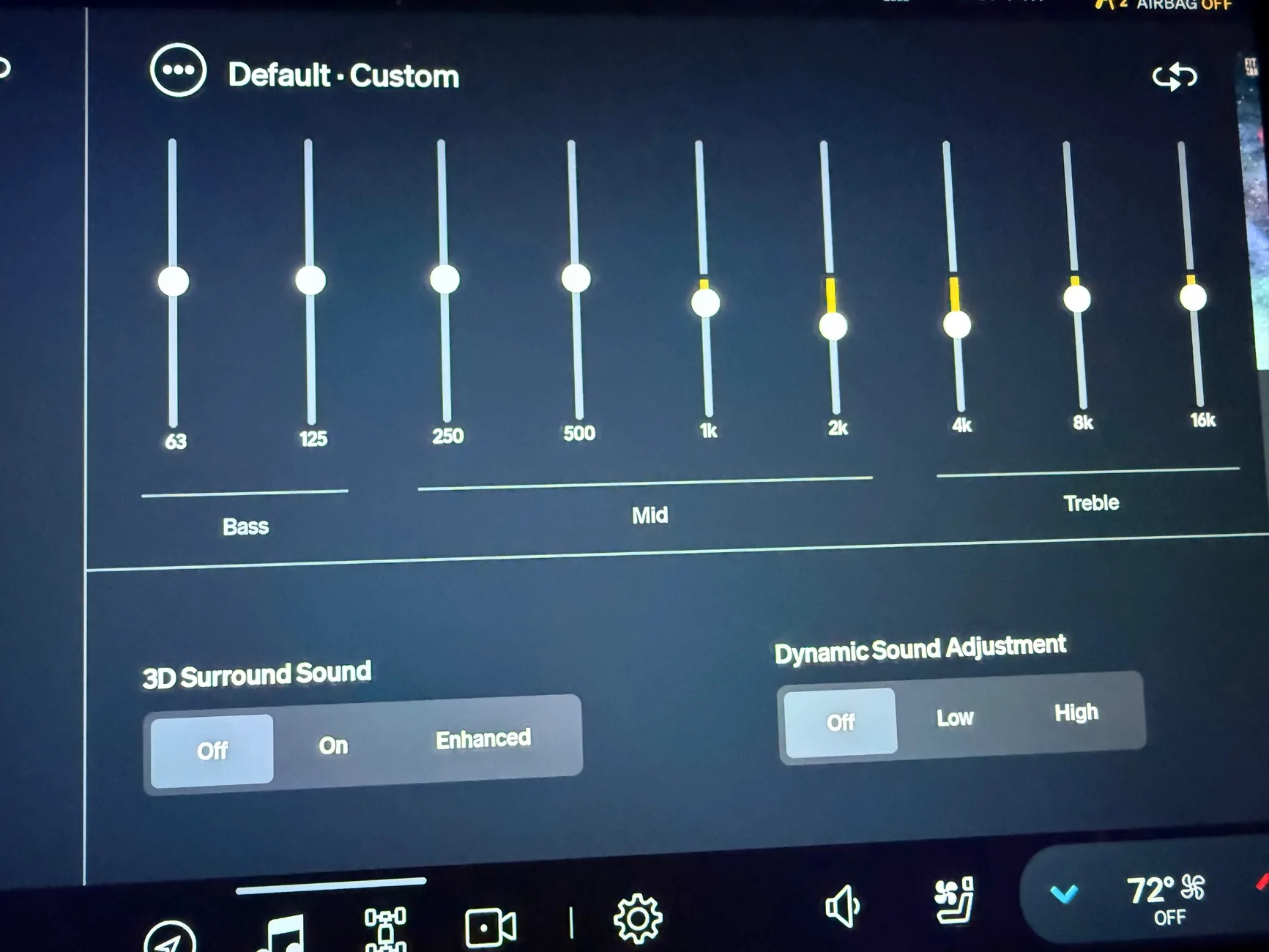
  7. Center on vocals. EQ the 1 kHz, 2 kHz, and 4 kHz bands up and/or down until the vocals sound "natural". Try to ignore surrounding instruments like kick drums, rhythm guitar, and hi-hats as much as you can. Closing your eyes helps. "Natural" means the vocals sound as clear and as pleasant as you can get them without them "leaving" the mix. Boost 2 kHz to the max to hear what "leaving the mix" means. (An analog would be brighting someone's face in a photo to the point you can see it clearly but it doesn't look copy/pasted onto the photo. We brighten faces because the face usually carries the most information we care about in a photo.) The vocal band is now your reference for all your other EQ adjustments. Note that cutting is better than boosting in most cases because boosting bands too high can cause digital distortion. Moreover, we have a tendency to boost one thing, feel like it sounds good but makes something else sounds too quiet. Then we boost that thing and then another until we end up boosting everything, which defeats the purpose of adjustments. If you want to boost something a lot (more than +4 notches) because you can't hear it well, try cutting the bands to the left and right of it instead. Once you get the vocals sounding decent, leave it alone and balance the bass.
  8. Balance the bass. Adjust the 63 Hz, 125 Hz, and 250 Hz bass bands to get the kick and low-end instruments in place relative to the vocals: Listen for the balance between the vocals and the bass and try to ignore everything else (synths, rhythm guitars, piano, etc). You're aiming to get the drums and bass instruments sounding clear and punchy without ringing or rattling. Once you get 63, 125, and 250 Hz dialed in, adjust the 500 Hz band up or down to cement the bass and vocal ranges together.
  9. Listen to more songs and tweak to taste. Now that the bass and vocals sound natural and enjoyable relative to each other, play a few other favorite songs and listen for how the vocals and bass sit together. If they sound good, dial in the 8 kHz+ bands to taste, being judicious about boosting in this region—a little goes a long way. For whatever reason, I typically have to cut 16 kHz in my Gen1 R1S Elevation by 4-6 notches. If they don't sound great, balance vocals and bass using your other favorite songs until they all sound reasonably good.
  10. Repeat for the other format. If you want a different EQ profile for Dolby Atmos and stereo, choose the second custom EQ slot and repeat the above using a reference track in that format. If you're looking for a reference Dolby Atmos track with vocals, try Billie Eilish's Bad Guy.
  11. Optional: Reenable Dynamic Sound Adjustment and/or 3D Surround Sound. If you like what those enhancements do, turn them back on. (I personally don't like what they do.)
If you followed this procedure, you did a basic version of what a mastering engineer does (albeit with far more tools than EQ) to make a song sound clear, coherent, and enjoyable after it has been mixed, which is what we're also doing.

Please share screenshots of your EQ profiles for others to try.

If you enjoyed this post or it helped you get a better result, I'd appreciate a cool cup of sake 🍶 to weather this Texas heat.

Kampai!
Sponsored


pointless

Well-Known Member
Joined
Jan 21, 2023
Threads
13
Messages
259
Reaction score
187
Location
US
Vehicles
Awaiting R1T
Nice primer.

Stereo: I dialed this up a while ago and it is holding up fairly well.

Apple says my hearing is fine ;)

Rivian R1T R1S How to Improve Your Sound System Without Measurement Equipment IMG_3140
 

Supratachophobia

Well-Known Member
Joined
Apr 8, 2023
Threads
9
Messages
1,781
Reaction score
2,122
Location
Ohio
Vehicles
S
Clubs
 
Hey all,

Been seeing a lot of frustration with the Gen 2 sound system, particularly after the last update, 2025.34.30.

Since I haven't been able to coordinate with a Gen 2 owner to measure system performance and make recommendations, I thought I'd offer a way to improve your sound yourself. This method works for any sound system with an EQ you can adjust.
Mixing engineering

Donated $3 to photographer Tima Miroshnichenko for using this photo.

Procedure
  1. Select a Custom EQ profile slot. The latest update lets us save two custom profiles, an oft-requested feature. You'll save your new EQ profile to it for future recall. Thanks, Rivian!
  2. Reset your EQ to flat.
  3. Turn off Dynamic Sound Adjustment and 3D Surround Sound.
  4. Reset Fade and Balance to center.
  5. Determine whether you listen to more Dolby Atmos or stereo tracks. In my experience, Dolby Atmos and stereo tracks tend to benefit from slightly different EQ settings, primarily in the bass region. We'll optimize for the format you listen to the most. If you're 50/50 or don't know/care, I suggest going with stereo because more tracks were/are mixed in stereo.
  6. Reference a favorite song with vocals. Sitting in a quiet place with windows up and A/C on Low or Off, play your favorite vocal-based song on repeat. Choose the Dolby Atmos or stereo version depending on which format you listen to more. Play it at a level where you can pay attention to the quieter parts of the song, like reverb tails and finger picks, without hurting your ears. We use a song with vocals because our ears and brains are the most sensitive to the vocal range, 1-4 kHz, the range that carries the most information we care about—vocal communication with other people. If you don't have a track handy, I recommend Adele's Send My Love (stereo) through a streaming app at the highest quality (e.g., Spotify, TIDAL, Apple Music) instead of Bluetooth, which reduces a ton of resolution. I like this song because Adele's vocals are excellent and the mix is simple, which helps you hear the effect of the changes you make.
  7. Center on vocals. EQ the 1 kHz, 2 kHz, and 4 kHz bands up and/or down until the vocals sound "natural". Try to ignore surrounding instruments like kick drums, rhythm guitar, and hi-hats as much as you can. Closing your eyes helps. "Natural" means the vocals sound as clear and as pleasant as you can get them without them "leaving" the mix. Boost 2 kHz to the max to hear what "leaving the mix" means. (An analog would be brighting someone's face in a photo to the point you can see it clearly but it doesn't look copy/pasted onto the photo. We brighten faces because the face usually carries the most information we care about in a photo.) The vocal band is now your reference for all your other EQ adjustments. Note that cutting is better than boosting in most cases because boosting bands too high can cause digital distortion. Moreover, we have a tendency to boost one thing, feel like it sounds good but makes something else sounds too quiet. Then we boost that thing and then another until we end up boosting everything, which defeats the purpose of adjustments. If you want to boost something a lot (more than +4 notches) because you can't hear it well, try cutting the bands to the left and right of it instead. Once you get the vocals sounding decent, leave it alone and balance the bass.
  8. Balance the bass. Adjust the 63 Hz, 125 Hz, and 250 Hz bass bands to get the kick and low-end instruments in place relative to the vocals: Listen for the balance between the vocals and the bass and try to ignore everything else (synths, rhythm guitars, piano, etc). You're aiming to get the drums and bass instruments sounding clear and punchy without ringing or rattling. Once you get 63, 125, and 250 Hz dialed in, adjust the 500 Hz band up or down to cement the bass and vocal ranges together.
  9. Listen to more songs and tweak to taste. Now that the bass and vocals sound natural and enjoyable relative to each other, play a few other favorite songs and listen for how the vocals and bass sit together. If they sound good, dial in the 8 kHz+ bands to taste, being judicious about boosting in this region—a little goes a long way. For whatever reason, I typically have to cut 16 kHz in my Gen1 R1S Elevation by 4-6 notches. If they don't sound great, balance vocals and bass using your other favorite songs until they all sound reasonably good.
  10. Repeat for the other format. If you want a different EQ profile for Dolby Atmos and stereo, choose the second custom EQ slot and repeat the above using a reference track in that format. If you're looking for a reference Dolby Atmos track with vocals, try Billie Eilish's Bad Guy.
  11. Optional: Reenable Dynamic Sound Adjustment and/or 3D Surround Sound. If you like what those enhancements do, turn them back on. (I personally don't like what they do.)
If you followed this procedure, you did a basic version of what a mastering engineer does (albeit with far more tools than EQ) to make a song sound clear, coherent, and enjoyable after it has been mixed, which is what we're also doing.

Please share screenshots of your EQ profiles for others to try.

If you enjoyed this post or it helped you get a better result, I'd appreciate a cool cup of sake 🍶 to weather this Texas heat.

Kampai!
Do you mind sharing where you landed with your eq?
 
OP
OP
superfluid

superfluid

Well-Known Member
Joined
Mar 29, 2021
Threads
20
Messages
290
Reaction score
923
Location
Austin, TX
Vehicles
Rivian R1S, Kia Telluride
Occupation
Tech and data
Clubs
 

Bullwinkle

Well-Known Member
First Name
Jim
Joined
Aug 12, 2022
Threads
3
Messages
276
Reaction score
254
Location
Minnesota
Vehicles
2023 Rivian RS1, 2026 BMW X5 50e
Occupation
Retired
Hey all,

Been seeing a lot of frustration with the Gen 2 sound system, particularly after the last update, 2025.34.30.

Since I haven't been able to coordinate with a Gen 2 owner to measure system performance and make recommendations, I thought I'd offer a way to improve your sound yourself. This method works for any sound system with an EQ you can adjust.

Mixing engineering

Donated $3 to photographer Tima Miroshnichenko for using this photo.

Procedure
  1. Select a Custom EQ profile slot. The latest update lets us save two custom profiles, an oft-requested feature. You'll save your new EQ profile to it for future recall. Thanks, Rivian!
  2. Reset your EQ to flat.
  3. Turn off Dynamic Sound Adjustment and 3D Surround Sound.
  4. Reset Fade and Balance to center.
  5. Determine whether you listen to more Dolby Atmos or stereo tracks. In my experience, Dolby Atmos and stereo tracks tend to benefit from slightly different EQ settings, primarily in the bass region. We'll optimize for the format you listen to the most. If you're 50/50 or don't know/care, I suggest going with stereo because more tracks were/are mixed in stereo.
  6. Reference a favorite song with vocals. Sitting in a quiet place with windows up and A/C on Low or Off, play your favorite vocal-based song on repeat. Choose the Dolby Atmos or stereo version depending on which format you listen to more. Play it at a level where you can pay attention to the quieter parts of the song, like reverb tails and finger picks, without hurting your ears. We use a song with vocals because our ears and brains are the most sensitive to the vocal range, 1-4 kHz, the range that carries the most information we care about—vocal communication with other people. If you don't have a track handy, I recommend Adele's Send My Love (stereo) through a streaming app at the highest quality (e.g., Spotify, TIDAL, Apple Music) instead of Bluetooth, which reduces a ton of resolution. I like this song because Adele's vocals are excellent and the mix is simple, which helps you hear the effect of the changes you make.
  7. Center on vocals. EQ the 1 kHz, 2 kHz, and 4 kHz bands up and/or down until the vocals sound "natural". Try to ignore surrounding instruments like kick drums, rhythm guitar, and hi-hats as much as you can. Closing your eyes helps. "Natural" means the vocals sound as clear and as pleasant as you can get them without them "leaving" the mix. Boost 2 kHz to the max to hear what "leaving the mix" means. (An analog would be brighting someone's face in a photo to the point you can see it clearly but it doesn't look copy/pasted onto the photo. We brighten faces because the face usually carries the most information we care about in a photo.) The vocal band is now your reference for all your other EQ adjustments. Note that cutting is better than boosting in most cases because boosting bands too high can cause digital distortion. Moreover, we have a tendency to boost one thing, feel like it sounds good but makes something else sounds too quiet. Then we boost that thing and then another until we end up boosting everything, which defeats the purpose of adjustments. If you want to boost something a lot (more than +4 notches) because you can't hear it well, try cutting the bands to the left and right of it instead. Once you get the vocals sounding decent, leave it alone and balance the bass.
  8. Balance the bass. Adjust the 63 Hz, 125 Hz, and 250 Hz bass bands to get the kick and low-end instruments in place relative to the vocals: Listen for the balance between the vocals and the bass and try to ignore everything else (synths, rhythm guitars, piano, etc). You're aiming to get the drums and bass instruments sounding clear and punchy without ringing or rattling. Once you get 63, 125, and 250 Hz dialed in, adjust the 500 Hz band up or down to cement the bass and vocal ranges together.
  9. Listen to more songs and tweak to taste. Now that the bass and vocals sound natural and enjoyable relative to each other, play a few other favorite songs and listen for how the vocals and bass sit together. If they sound good, dial in the 8 kHz+ bands to taste, being judicious about boosting in this region—a little goes a long way. For whatever reason, I typically have to cut 16 kHz in my Gen1 R1S Elevation by 4-6 notches. If they don't sound great, balance vocals and bass using your other favorite songs until they all sound reasonably good.
  10. Repeat for the other format. If you want a different EQ profile for Dolby Atmos and stereo, choose the second custom EQ slot and repeat the above using a reference track in that format. If you're looking for a reference Dolby Atmos track with vocals, try Billie Eilish's Bad Guy.
  11. Optional: Reenable Dynamic Sound Adjustment and/or 3D Surround Sound. If you like what those enhancements do, turn them back on. (I personally don't like what they do.)
If you followed this procedure, you did a basic version of what a mastering engineer does (albeit with far more tools than EQ) to make a song sound clear, coherent, and enjoyable after it has been mixed, which is what we're also doing.

Please share screenshots of your EQ profiles for others to try.

If you enjoyed this post or it helped you get a better result, I'd appreciate a cool cup of sake 🍶 to weather this Texas heat.

Kampai!
Great write up. I do think there is significant vocal content at 500hz also—the weight of the voice.
 

Sponsored

OP
OP
superfluid

superfluid

Well-Known Member
Joined
Mar 29, 2021
Threads
20
Messages
290
Reaction score
923
Location
Austin, TX
Vehicles
Rivian R1S, Kia Telluride
Occupation
Tech and data
Clubs
 
Great write up. I do think there is significant vocal content at 500hz also—the weight of the voice.
Thanks!

100%. Most chest, particularly from male vocals, and the body of acoustic guitars/cellos also live in the 500 Hz range. This is a really important range to get right, but also a hard one to get right by ear.

I find EQ'ing the 400-600 Hz range (mid-bass) easier after locking in bass and mids first. I think the resonances typical of acoustic bodies in the 400-600 Hz range tend to confuse our perception of relative loudness because resonances ring for a long time and we perceive loudness as a integration of SPL over a 200-500ms window, albeit at different levels by frequency. I find that pinning mid-bass down by ear without bookends on either side is like trying to pick a piece of black pepper out of a drink—I just chase it around the cup. Oh, the joys of non-linear psychoacoustics =)
 

Bullwinkle

Well-Known Member
First Name
Jim
Joined
Aug 12, 2022
Threads
3
Messages
276
Reaction score
254
Location
Minnesota
Vehicles
2023 Rivian RS1, 2026 BMW X5 50e
Occupation
Retired
Thanks!

100%. Most chest, particularly from male vocals, and the body of acoustic guitars/cellos also live in the 500 Hz range. This is a really important range to get right, but also a hard one to get right by ear.

I find EQ'ing the 400-600 Hz range (mid-bass) easier after locking in bass and mids first. I think the resonances typical of acoustic bodies in the 400-600 Hz range tend to confuse our perception of relative loudness because resonances ring for a long time and we perceive loudness as a integration of SPL over a 200-500ms window, albeit at different levels by frequency. I find that pinning mid-bass down by ear without bookends on either side is like trying to pick a piece of black pepper out of a drink—I just chase it around the cup. Oh, the joys of non-linear psychoacoustics =)
I agree, this is a good area of a sound system to keep flat and tailor other frequencies around. There are often resonance peaks just below this in the mid-bass area (100hz to 200hz) that usually need to be depressed. I am not sure I have ever not depressed the 125 or 150 band a bit.

Back in the day, I designed a lot of very high-end car systems, utilizing electronic crossovers and raw home speaker drivers. This allowed us to listen to individual drivers and frequency ranges and become familiar with what a given frequency sounds like. A fun ear training tip that takes only 10 minutes is to play a balanced track and fully turn down all but one frequency--leaving that frequency flat. Do this for every frequency, and it helps you get to know what part of the music each adjustment band controls.
 
OP
OP
superfluid

superfluid

Well-Known Member
Joined
Mar 29, 2021
Threads
20
Messages
290
Reaction score
923
Location
Austin, TX
Vehicles
Rivian R1S, Kia Telluride
Occupation
Tech and data
Clubs
 
I agree, this is a good area of a sound system to keep flat and tailor other frequencies around. There are often resonance peaks just below this in the mid-bass area (100hz to 200hz) that usually need to be depressed. I am not sure I have ever not depressed the 125 or 150 band a bit.

Back in the day, I designed a lot of very high-end car systems, utilizing electronic crossovers and raw home speaker drivers. This allowed us to listen to individual drivers and frequency ranges and become familiar with what a given frequency sounds like. A fun ear training tip that takes only 10 minutes is to play a balanced track and fully turn down all but one frequency--leaving that frequency flat. Do this for every frequency, and it helps you get to know what part of the music each adjustment band controls.
Heck yeah, a man after my own heart! So you were using digital crossovers? Were you installing fully active systems? I always wondered about the benefits of a fully active systems in a car and how one would manage the sheer number of amplifiers you'd need. I looked at going fully active in my media room and realized the cost and complexity would be ridiculous.

Love the technique of reverse-notch filtering bands to familiarize your brain with what lives there. It's ear opening because many instruments don't live in the band(s) you expect them to.
 

Bullwinkle

Well-Known Member
First Name
Jim
Joined
Aug 12, 2022
Threads
3
Messages
276
Reaction score
254
Location
Minnesota
Vehicles
2023 Rivian RS1, 2026 BMW X5 50e
Occupation
Retired
This is a long time ago, 1985ish. We used all active crossovers only on very large/expensive systems. Most systems under $3k or so used passive crossovers between the mid-bass woofers and tweeters. Generally, sub-woofers handled frequencies below 125ish Hz with their own large amp. The hidden benefit is that most cars and yachts have a bad resonance point near this frequency--so you can dovetail the high pass and low pass points to control it and smooth it out. Also, a smaller amp can be used for mid-bass and treble drivers.
 
Last edited:

AZanella

Member
First Name
Andre
Joined
Jun 11, 2025
Threads
1
Messages
13
Reaction score
8
Location
Brentwood CA
Vehicles
R1T, X7, M4, Tesla
Occupation
Engineer
For me, it’s a waste of time. The G2 “Premium sound” is terrible, and no matter what you do, it won’t work well. Of course, if you don’t have a car with a real sound system, most people will think it’s fine. The system in the Gen2 is terrible, and whoever is responsible for this at Rivian needs to do an internship at another company first.
 

Sponsored

R1TCntrlMaIzzy

Well-Known Member
Joined
May 10, 2023
Threads
50
Messages
556
Reaction score
628
Location
Massachusetts
Vehicles
R1T
Occupation
Computer Sci Stuff
Clubs
 
Another great post, gracias OP!

If anything it might help improve the experience in a Riv, even if it is a little, and or give someone some ideas for other sound system adjustments.
 
OP
OP
superfluid

superfluid

Well-Known Member
Joined
Mar 29, 2021
Threads
20
Messages
290
Reaction score
923
Location
Austin, TX
Vehicles
Rivian R1S, Kia Telluride
Occupation
Tech and data
Clubs
 
Another great post, gracias OP!

If anything it might help improve the experience in a Riv, even if it is a little, and or give someone some ideas for other sound system adjustments.
Thanks!

I agree. I think it's worth a shot. It can turn a horrible experience into a tolerable one. That' happened to me when the Elevation system had a significant 1 kHz issue caused by bad DSP. Adjustments made it tolerable until Rivian fixed it with an OTA.
 

zendavian

Member
First Name
S
Joined
Sep 8, 2025
Threads
0
Messages
14
Reaction score
9
Location
California
Vehicles
R1S 2026
Hey all,

Been seeing a lot of frustration with the Gen 2 sound system, particularly after the last update, 2025.34.30.

Since I haven't been able to coordinate with a Gen 2 owner to measure system performance and make recommendations, I thought I'd offer a way to improve your sound yourself. This method works for any sound system with an EQ you can adjust.

pexels-tima-miroshnichenko-4988131.webp

Donated $3 to photographer Tima Miroshnichenko for using this photo.

Procedure
  1. Select a Custom EQ profile slot. The latest update lets us save two custom profiles, an oft-requested feature. You'll save your new EQ profile to it for future recall. Thanks, Rivian!
  2. Reset your EQ to flat.
  3. Turn off Dynamic Sound Adjustment and 3D Surround Sound.
  4. Reset Fade and Balance to center.
  5. Determine whether you listen to more Dolby Atmos or stereo tracks. In my experience, Dolby Atmos and stereo tracks tend to benefit from slightly different EQ settings, primarily in the bass region. We'll optimize for the format you listen to the most. If you're 50/50 or don't know/care, I suggest going with stereo because more tracks were/are mixed in stereo.
  6. Reference a favorite song with vocals. Sitting in a quiet place with windows up and A/C on Low or Off, play your favorite vocal-based song on repeat. Choose the Dolby Atmos or stereo version depending on which format you listen to more. Play it at a level where you can pay attention to the quieter parts of the song, like reverb tails and finger picks, without hurting your ears. We use a song with vocals because our ears and brains are the most sensitive to the vocal range, 1-4 kHz, the range that carries the most information we care about—vocal communication with other people. If you don't have a track handy, I recommend Adele's Send My Love (stereo) through a streaming app at the highest quality (e.g., Spotify, TIDAL, Apple Music) instead of Bluetooth, which reduces a ton of resolution. I like this song because Adele's vocals are excellent and the mix is simple, which helps you hear the effect of the changes you make.
  7. Center on vocals. EQ the 1 kHz, 2 kHz, and 4 kHz bands up and/or down until the vocals sound "natural". Try to ignore surrounding instruments like kick drums, rhythm guitar, and hi-hats as much as you can. Closing your eyes helps. "Natural" means the vocals sound as clear and as pleasant as you can get them without them "leaving" the mix. Boost 2 kHz to the max to hear what "leaving the mix" means. (An analog would be brighting someone's face in a photo to the point you can see it clearly but it doesn't look copy/pasted onto the photo. We brighten faces because the face usually carries the most information we care about in a photo.) The vocal band is now your reference for all your other EQ adjustments. Note that cutting is better than boosting in most cases because boosting bands too high can cause digital distortion. Moreover, we have a tendency to boost one thing, feel like it sounds good but makes something else sounds too quiet. Then we boost that thing and then another until we end up boosting everything, which defeats the purpose of adjustments. If you want to boost something a lot (more than +4 notches) because you can't hear it well, try cutting the bands to the left and right of it instead. Once you get the vocals sounding decent, leave it alone and balance the bass.
  8. Balance the bass. Adjust the 63 Hz, 125 Hz, and 250 Hz bass bands to get the kick and low-end instruments in place relative to the vocals: Listen for the balance between the vocals and the bass and try to ignore everything else (synths, rhythm guitars, piano, etc). You're aiming to get the drums and bass instruments sounding clear and punchy without ringing or rattling. Once you get 63, 125, and 250 Hz dialed in, adjust the 500 Hz band up or down to cement the bass and vocal ranges together.
  9. Listen to more songs and tweak to taste. Now that the bass and vocals sound natural and enjoyable relative to each other, play a few other favorite songs and listen for how the vocals and bass sit together. If they sound good, dial in the 8 kHz+ bands to taste, being judicious about boosting in this region—a little goes a long way. For whatever reason, I typically have to cut 16 kHz in my Gen1 R1S Elevation by 4-6 notches. If they don't sound great, balance vocals and bass using your other favorite songs until they all sound reasonably good.
  10. Repeat for the other format. If you want a different EQ profile for Dolby Atmos and stereo, choose the second custom EQ slot and repeat the above using a reference track in that format. If you're looking for a reference Dolby Atmos track with vocals, try Billie Eilish's Bad Guy.
  11. Optional: Reenable Dynamic Sound Adjustment and/or 3D Surround Sound. If you like what those enhancements do, turn them back on. (I personally don't like what they do.)
If you followed this procedure, you did a basic version of what a mastering engineer does (albeit with far more tools than EQ) to make a song sound clear, coherent, and enjoyable after it has been mixed, which is what we're also doing.

Please share screenshots of your EQ profiles for others to try.

If you enjoyed this post or it helped you get a better result, I'd appreciate a cool cup of sake 🍶 to weather this Texas heat.

Kampai!
Hey all,

Been seeing a lot of frustration with the Gen 2 sound system, particularly after the last update, 2025.34.30.

Since I haven't been able to coordinate with a Gen 2 owner to measure system performance and make recommendations, I thought I'd offer a way to improve your sound yourself. This method works for any sound system with an EQ you can adjust.

Mixing engineering

Donated $3 to photographer Tima Miroshnichenko for using this photo.

Procedure
  1. Select a Custom EQ profile slot. The latest update lets us save two custom profiles, an oft-requested feature. You'll save your new EQ profile to it for future recall. Thanks, Rivian!
  2. Reset your EQ to flat.
  3. Turn off Dynamic Sound Adjustment and 3D Surround Sound.
  4. Reset Fade and Balance to center.
  5. Determine whether you listen to more Dolby Atmos or stereo tracks. In my experience, Dolby Atmos and stereo tracks tend to benefit from slightly different EQ settings, primarily in the bass region. We'll optimize for the format you listen to the most. If you're 50/50 or don't know/care, I suggest going with stereo because more tracks were/are mixed in stereo.
  6. Reference a favorite song with vocals. Sitting in a quiet place with windows up and A/C on Low or Off, play your favorite vocal-based song on repeat. Choose the Dolby Atmos or stereo version depending on which format you listen to more. Play it at a level where you can pay attention to the quieter parts of the song, like reverb tails and finger picks, without hurting your ears. We use a song with vocals because our ears and brains are the most sensitive to the vocal range, 1-4 kHz, the range that carries the most information we care about—vocal communication with other people. If you don't have a track handy, I recommend Adele's Send My Love (stereo) through a streaming app at the highest quality (e.g., Spotify, TIDAL, Apple Music) instead of Bluetooth, which reduces a ton of resolution. I like this song because Adele's vocals are excellent and the mix is simple, which helps you hear the effect of the changes you make.
  7. Center on vocals. EQ the 1 kHz, 2 kHz, and 4 kHz bands up and/or down until the vocals sound "natural". Try to ignore surrounding instruments like kick drums, rhythm guitar, and hi-hats as much as you can. Closing your eyes helps. "Natural" means the vocals sound as clear and as pleasant as you can get them without them "leaving" the mix. Boost 2 kHz to the max to hear what "leaving the mix" means. (An analog would be brighting someone's face in a photo to the point you can see it clearly but it doesn't look copy/pasted onto the photo. We brighten faces because the face usually carries the most information we care about in a photo.) The vocal band is now your reference for all your other EQ adjustments. Note that cutting is better than boosting in most cases because boosting bands too high can cause digital distortion. Moreover, we have a tendency to boost one thing, feel like it sounds good but makes something else sounds too quiet. Then we boost that thing and then another until we end up boosting everything, which defeats the purpose of adjustments. If you want to boost something a lot (more than +4 notches) because you can't hear it well, try cutting the bands to the left and right of it instead. Once you get the vocals sounding decent, leave it alone and balance the bass.
  8. Balance the bass. Adjust the 63 Hz, 125 Hz, and 250 Hz bass bands to get the kick and low-end instruments in place relative to the vocals: Listen for the balance between the vocals and the bass and try to ignore everything else (synths, rhythm guitars, piano, etc). You're aiming to get the drums and bass instruments sounding clear and punchy without ringing or rattling. Once you get 63, 125, and 250 Hz dialed in, adjust the 500 Hz band up or down to cement the bass and vocal ranges together.
  9. Listen to more songs and tweak to taste. Now that the bass and vocals sound natural and enjoyable relative to each other, play a few other favorite songs and listen for how the vocals and bass sit together. If they sound good, dial in the 8 kHz+ bands to taste, being judicious about boosting in this region—a little goes a long way. For whatever reason, I typically have to cut 16 kHz in my Gen1 R1S Elevation by 4-6 notches. If they don't sound great, balance vocals and bass using your other favorite songs until they all sound reasonably good.
  10. Repeat for the other format. If you want a different EQ profile for Dolby Atmos and stereo, choose the second custom EQ slot and repeat the above using a reference track in that format. If you're looking for a reference Dolby Atmos track with vocals, try Billie Eilish's Bad Guy.
  11. Optional: Reenable Dynamic Sound Adjustment and/or 3D Surround Sound. If you like what those enhancements do, turn them back on. (I personally don't like what they do.)
If you followed this procedure, you did a basic version of what a mastering engineer does (albeit with far more tools than EQ) to make a song sound clear, coherent, and enjoyable after it has been mixed, which is what we're also doing.

Please share screenshots of your EQ profiles for others to try.

If you enjoyed this post or it helped you get a better result, I'd appreciate a cool cup of sake 🍶 to weather this Texas heat.

Kampai!
WOW this is awesome, thanks for posting!
 

hudesigns

Well-Known Member
First Name
Jim
Joined
May 27, 2024
Threads
5
Messages
130
Reaction score
110
Location
New York
Vehicles
2026 R1S dual max performance
My 2026 R1S premium sound sounds terrible. Since couple day after delivery software was upgraded to 34.30 I have no experience of sound quality previously. The provided equalization sliders do not improve but just give you different versions of ugly sounds.

I ended up folding down 2nd and 3rd row seats and lay down two pieces of acoustic foams 2 ft x6 ft x6 inches thick each which made a positive difference. This means Rivian sound guys didn’t spent time to tune system to R1S cabin acoustic, OR cabin and upholstery guys didn’t design space with sound system in mind. It could just be sound hardware was not selected by seasoned audio persons. Such a unique vehicle with such terrible sound is unconscionable and inexcusable.
 

DrBluey

Active Member
First Name
Ali
Joined
Jun 2, 2024
Threads
3
Messages
42
Reaction score
83
Location
Ann Arbor, MI
Vehicles
2023 R1S, 2023 Tesla MYP, 2019 Targa 4S
Clubs
 
Since the latest update, our Gen2 R1S sounds terrible compared to our Gen1 R1S with Elevation. The Gen2 sounds muddy with no base at all. I’m sure they will fix the Gen2 again with the next update.
Sponsored


Top