
Sponsored
KBabione
Well-Known Member
- First Name
- Kevin
- Joined
- Sep 11, 2023
- Threads
- 48
- Messages
- 1,488
- Reaction score
- 2,024
- Location
- Lititz, PA
- Vehicles
- 2023 R1S Quad (8/23)
- Occupation
- Consultant
I keep a keycard in my wallet when I'm out, but having the Apple Watch act as a key comes in handy every now and then. This morning I went out to our garage and was going to turn the R1S around so I could load the rear more easily and realized that I didn't bring my phone. I just opened the Rivian app on my watch and turned the car around.

tate16t
Well-Known Member
You just reminded me that I wanted to remove one of the two cards so I can use my Apple Watch as a driver key if needed. I have a GEN2 which is limited to 4 keysI keep a keycard in my wallet when I'm out, but having the Apple Watch act as a key comes in handy every now and then. This morning I went out to our garage and was going to turn the R1S around so I could load the rear more easily and realized that I didn't bring my phone. I just opened the Rivian app on my watch and turned the car around.
KBabione
Well-Known Member
- First Name
- Kevin
- Joined
- Sep 11, 2023
- Threads
- 48
- Messages
- 1,488
- Reaction score
- 2,024
- Location
- Lititz, PA
- Vehicles
- 2023 R1S Quad (8/23)
- Occupation
- Consultant
Are you sure you have to remove a card? Here's a screenshot from our Gen1 (and I thought we had more limits than a Gen2):You just reminded me that I wanted to remove one of the two cards so I can use my Apple Watch as a driver key if needed. I have a GEN2 which is limited to 4 keys
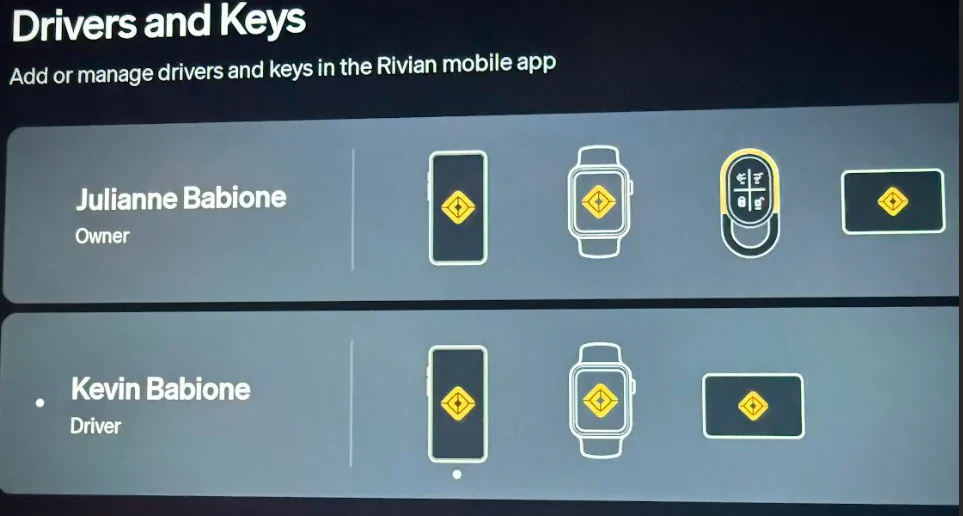
We each have a phone, a watch, and a keycard and the fob is assigned to my wife (it's definitely HER car).
tate16t
Well-Known Member
I thought the limit was 4. Perhaps per driver? I cannot use my watch as a key, but everything else works. I removed one of the key cards so it should work now. I will try it later.Are you sure you have to remove a card? Here's a screenshot from our Gen1 (and I thought we had more limits than a Gen2):

We each have a phone, a watch, and a keycard and the fob is assigned to my wife (it's definitely HER car).
Sponsored
KBabione
Well-Known Member
- First Name
- Kevin
- Joined
- Sep 11, 2023
- Threads
- 48
- Messages
- 1,488
- Reaction score
- 2,024
- Location
- Lititz, PA
- Vehicles
- 2023 R1S Quad (8/23)
- Occupation
- Consultant
Gen1 could be different, but to use my watch as a key I have to open the Rivian app on my Apple Watch.I thought the limit was 4. Perhaps per driver? I cannot use my watch as a key, but everything else works. I removed one of the key cards so it should work now. I will try it later.
tate16t
Well-Known Member
It works the same way on Gen1. I believe Gen2’s limit is 8.Gen1 could be different, but to use my watch as a key I have to open the Rivian app on my Apple Watch.
tate16t
Well-Known Member
I removed one of my key cards but using my watch as a key did not work. Everything else works via my watch, opening doors, venting windows etc.Gen1 could be different, but to use my watch as a key I have to open the Rivian app on my Apple Watch.
Regarding opening the Rivian App once in the vehicle, can it be opened in advance since I’m using the app/watch to open the door?
KBabione
Well-Known Member
- First Name
- Kevin
- Joined
- Sep 11, 2023
- Threads
- 48
- Messages
- 1,488
- Reaction score
- 2,024
- Location
- Lititz, PA
- Vehicles
- 2023 R1S Quad (8/23)
- Occupation
- Consultant
Did you do the setup in the Rivian (not just the app) to use your watch as a key? I can't remember exactly what I did, but there was something in the car that I had to do...Regarding opening the Rivian App once in the vehicle, can it be opened in advance since I’m using the app/watch to open the door?
And yes - you should be able to open the app on your watch before you open the car.
tate16t
Well-Known Member
Yes, the watch was always setup in the Rivian as a key. It just did not work as a key. I assumed this was due to it being the fifth key, and the limitation is four. Everything else worked, but it just didn’t act as a key. Maybe I need to re-add it now that I removed one of the five keys.Did you do the setup in the Rivian (not just the app) to use your watch as a key? I can't remember exactly what I did, but there was something in the car that I had to do...
And yes - you should be able to open the app on your watch before you open the car.
Sponsored
KBabione
Well-Known Member
- First Name
- Kevin
- Joined
- Sep 11, 2023
- Threads
- 48
- Messages
- 1,488
- Reaction score
- 2,024
- Location
- Lititz, PA
- Vehicles
- 2023 R1S Quad (8/23)
- Occupation
- Consultant
Give it a try...I'm not sure what else to do.Yes, the watch was always setup in the Rivian as a key. It just did not work as a key. I assumed this was due to it being the fifth key, and the limitation is four. Everything else worked, but it just didn’t act as a key. Maybe I need to re-add it now that I removed one of the five keys.
KBabione
Well-Known Member
- First Name
- Kevin
- Joined
- Sep 11, 2023
- Threads
- 48
- Messages
- 1,488
- Reaction score
- 2,024
- Location
- Lititz, PA
- Vehicles
- 2023 R1S Quad (8/23)
- Occupation
- Consultant
That's great - I'm glad that worked! I think I've used my watch as my key just twice since I set it up, but it is nice knowing I have that third option.I deleted and re-added my watch. It works now. Thanks
Similar threads

- Replies
- 111
- Views
- 10,777

- Replies
- 36
- Views
- 3,108
- Replies
- 5
- Views
- 972

- Replies
- 6
- Views
- 1,011

- Replies
- 67
- Views
- 13,554
